Searching for the best Monday.com alternatives in 2026? You are not alone. Monday.com’s 3-seat minimum, feature gating across tiers, and steep pricing for time tracking push thousands of teams to evaluate alternatives every year. According to a 2024 G2 software switching report, 28% of Monday.com users actively considered alternatives within their first year, primarily citing pricing surprises and missing features locked behind higher tiers. The 8 alternatives below were tested with real teams to identify which platforms actually solve the problems that drive teams away from Monday.
Each alternative below wins for specific use cases. ClickUp delivers cheaper pricing with more built-in features. Trello provides radical simplicity. Smartsheet appeals to spreadsheet-comfortable teams. Pick based on which Monday.com pain point matters most to your team.
Why Teams Look for Monday.com Alternatives in 2026
Monday.com is a capable PM platform with strong visual design, but consistent weaknesses push teams to look elsewhere. Understanding these pain points helps you pick a replacement that fixes your specific problem rather than introducing a new set of issues.
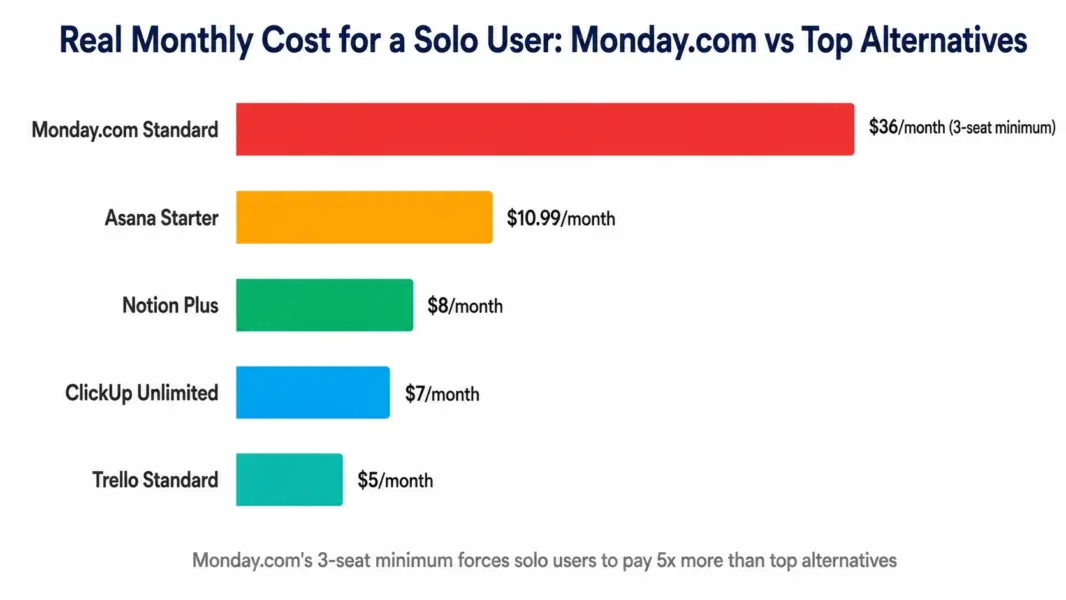
The 3-seat minimum is the biggest complaint. Monday.com forces a 3-seat minimum on all paid plans, meaning a solo consultant pays for 3 seats whether or not those seats are used. A solo user on Monday.com Standard pays $36 per month for one person, while the same person on ClickUp Unlimited pays $7 per month. According to a 2024 Capterra small business survey, 42% of solo users and 2-person teams who tried Monday.com switched to alternatives within 90 days specifically due to this seat minimum.
Feature gating across tiers frustrates buyers. Time tracking requires the Pro plan at $16 per seat. Dependencies require Pro. Workload management requires Pro. Private boards require Pro. Teams that signed up for Standard at $12 per seat often discover they need Pro to access basic features, doubling their actual cost.
Email-only customer support without live chat. Monday.com has no live chat support at any tier. Response times average 8-12 hours on Standard, faster on Pro and Enterprise. Compared to ClickUp’s 5-15 minute live chat or Asana’s 1-3 hour chat, Monday’s support feels slow when teams hit blockers.
Pricing complexity beyond the published numbers. Annual versus monthly billing creates 18% premium for monthly. Volume discounts kick in only at higher seat counts. Add-on Monday products (CRM, Dev, Service) cost additional seats. Total enterprise spend often runs 40-60% higher than the published Pro plan would suggest.
What Are the Best Monday.com Alternatives in 2026?
| Rank | Alternative | Best Reason to Switch from Monday.com | Starting Price | Our Rating |
|---|---|---|---|---|
| 1 | ClickUp | Cheaper with more built-in features, no seat minimum | Free / $7 per user | 8.4/10 |
| 2 | Asana | Better for workflow-driven teams with clean automation | Free / $10.99 per user | 8.2/10 |
| 3 | Trello | Simpler kanban boards at $5 per user, no seat minimum | Free / $5 per user | 7.5/10 |
| 4 | Notion | Better for documentation-heavy and knowledge work | Free / $8 per user | 8.1/10 |
| 5 | Smartsheet | Better for spreadsheet-comfortable enterprises | Free / $9 per user | 7.6/10 |
| 6 | Wrike | Deeper Gantt scheduling and built-in proofing | Free / $9.80 per user | 7.8/10 |
| 7 | Airtable | Best database-style flexibility with relational data | Free / $10 per user | 7.7/10 |
| 8 | Basecamp | Flat-rate pricing for teams 20+ people | $15 per user or $299 flat | 7.2/10 |
1. ClickUp: The Best Overall Monday.com Alternative
ClickUp is the most-cited Monday.com alternative because it solves Monday’s three biggest weaknesses directly: no seat minimum, lower per-user pricing, and more built-in features without tier gating. ClickUp Unlimited at $7 per user delivers what Monday Standard provides at $12 per seat, with built-in time tracking and docs that Monday locks behind the Pro plan at $16 per seat.
The tradeoff is interface complexity. Monday.com’s colorful boards are visually engaging in a way ClickUp’s denser interface is not. Teams that value design polish over feature depth may prefer Monday despite the price premium. Teams that prioritize features and budget consistently choose ClickUp. According to a 2024 G2 buyer comparison, ClickUp delivers 36% lower total cost of ownership than Monday.com for typical mid-market teams when factoring in tier upgrades for missing features.
Switch from Monday.com to ClickUp if: You are paying for a 3-seat minimum on a smaller team, you need time tracking without upgrading to Pro tier, or you want built-in docs and whiteboards instead of paying for Monday WorkDocs separately. See our ClickUp vs Monday.com comparison for the detailed feature breakdown.
Stay on Monday.com if: Your team is large enough that the 3-seat minimum is irrelevant, you specifically value Monday’s visual board design, or you plan to expand into the Work OS ecosystem (Monday CRM, Dev, Service).
2. Asana: The Best Monday.com Alternative for Workflow-Driven Teams
Asana beats Monday.com on workflow automation refinement and ease of use. The Workflow Builder enforces process stages with stronger logic than Monday’s automation templates, and the clean interface drives faster team adoption. Asana has no seat minimum, making it cheaper than Monday for solos and pairs despite the higher per-user list price.
Asana lacks Monday’s visual flair and Work OS multi-product breadth. There is no Asana CRM or Asana Dev product. Teams wanting platform consolidation across PM, sales, and engineering data find Monday’s ecosystem more appealing. Teams focused purely on workflow execution find Asana’s design discipline more productive.
Switch from Monday.com to Asana if: Your team prioritizes workflow automation refinement over visual design, you have fewer than 3 people (avoid Monday’s seat minimum), or you find Monday’s color-heavy interface distracting for focused work. See our Monday.com vs Asana comparison for detailed analysis.
Stay on Monday.com if: Visual design quality drives team adoption in your culture, or you plan to expand into Monday CRM or Monday Dev for sales and engineering workflows.
3. Trello: The Simplest Monday.com Alternative
Trello is the right alternative when Monday.com feels like too much tool for your needs. The kanban-only interface at $5 per user is the cheapest paid PM option, has no seat minimum, and the free plan supports unlimited users with 10 boards. Small teams that found Monday’s 30+ column types and 200+ automation templates overwhelming often find Trello’s focused simplicity delivers more daily value.
Trello lacks Monday’s automation depth, multiple view types, and ecosystem breadth. There are no Timeline, Calendar, or Workload views on the free plan, no formulas, and no CRM expansion. Teams choosing Trello over Monday accept a significant feature reduction in exchange for radical simplicity and lower cost.
Switch from Monday.com to Trello if: Your workflows are simple kanban patterns, your team is small (2-10 people), or you consistently underused Monday’s advanced features. See our Trello review for detailed analysis.
Stay on Monday.com if: You need multiple view types beyond kanban, you use automation extensively, or your team has grown past Trello’s effective scaling point (around 15 people for active project management).
4. Notion: The Best Monday.com Alternative for Knowledge-Heavy Teams
Notion beats Monday.com when your team’s work is more documentation and knowledge management than structured project execution. Product teams writing specs, content teams managing editorial calendars, and consulting firms with internal knowledge bases find Notion’s block-based workspace dramatically more capable than Monday’s task-focused boards.
Notion at $8 per user is cheaper than Monday Standard at $12 per seat with no seat minimum. The platform consolidates documentation, wikis, databases, and lightweight project tracking into one tool. Teams using Monday plus Notion separately often consolidate to Notion alone, accepting reduced PM features for unified documentation and project tracking.
Switch from Monday.com to Notion if: Your team’s primary work is creating and organizing information rather than executing structured projects, or you are currently paying for both Monday and a separate documentation tool. See our Notion review for detailed analysis.
Stay on Monday.com if: Structured project execution with strong automation matters more than flexible documentation, or your team needs visual board interfaces that Notion does not provide.
5. Smartsheet: The Best Monday.com Alternative for Spreadsheet-Comfortable Teams
Smartsheet is the right Monday.com alternative for enterprise teams that think in spreadsheets rather than boards. The familiar grid interface adds Gantt charts, automated workflows, dashboards, and reporting on top of spreadsheet logic that Excel users already understand. Migration from Excel-based project tracking to Smartsheet feels natural in ways that Monday.com’s board paradigm does not.
Smartsheet’s Gantt capabilities (4 dependency types, critical path, baselines) exceed Monday.com’s at every tier. The reporting depth with cross-sheet formulas is more powerful than Monday’s Chart view. Pricing at $9 per user (Pro plan) is comparable to Monday Standard at $12 per seat. Business at $19 per user adds proofing and resource management that Monday charges more for.
Switch from Monday.com to Smartsheet if: Your team prefers spreadsheet interfaces, you need advanced Gantt scheduling with critical path, or you require cross-sheet formulas for complex reporting. See our Smartsheet review for detailed analysis.
Stay on Monday.com if: Visual board design matters more than spreadsheet familiarity, or your team responds better to colorful interfaces than to data-dense grids.
6. Wrike: The Best Monday.com Alternative for Complex Project Scheduling
Wrike beats Monday.com on advanced project scheduling and creative proofing. Its Gantt charts support 4 dependency types, critical path calculation, and baseline tracking that Monday’s Timeline view cannot match. Wrike also includes built-in creative proofing for image, PDF, and video markup, which Monday has no equivalent for.
Wrike Business at $24.80 per user is more expensive than Monday Pro at $16 per seat but unlocks proofing and deeper resource management. Teams managing complex client projects with creative review cycles find Wrike’s specialized features worth the premium. Teams without these specific needs find Monday’s lower pricing more attractive.
Switch from Monday.com to Wrike if: You manage complex projects with dependencies and critical path requirements, your team needs creative proofing workflows, or you require resource management depth beyond Monday’s Workload view. See our Wrike review for detailed analysis.
Stay on Monday.com if: Your projects do not require advanced Gantt features, you find Wrike’s interface too dense, or you prioritize visual polish over enterprise PM depth.
7. Airtable: The Best Database-Style Monday.com Alternative
Airtable is the right Monday.com alternative for teams that need relational database functionality alongside project management. While Monday.com offers Mirror columns for cross-board references, Airtable’s relational data model is more flexible and powerful, supporting genuine database operations like complex linked records, rollup formulas, and lookup fields.
Airtable at $10 per user is comparable to Monday Standard but offers more database flexibility. The Interface Designer lets you build custom views and dashboards. Airtable serves teams that need to track structured data (inventory, CRM, content catalogs, applications) alongside or instead of traditional project tracking. The tradeoff is fewer dedicated PM features like automation and time tracking compared to Monday Pro.
Switch from Monday.com to Airtable if: Your work involves managing structured data more than executing time-bound projects, you need relational database capabilities Monday cannot provide, or you currently use Monday plus a separate database tool you could consolidate.
Stay on Monday.com if: Traditional project management with automation and timelines matters more than database flexibility, or your team finds spreadsheet-style data tools less intuitive than visual boards.
8. Basecamp: The Best Monday.com Alternative for Flat-Rate Pricing
Basecamp’s Pro Unlimited plan at $299 per month flat for unlimited users becomes the cheapest PM tool when teams cross 20-25 people. A 50-person team pays Basecamp $5.98 per user versus Monday Standard at $12 per seat ($600 per month). The pricing predictability and zero per-seat math make Basecamp attractive for organizations approaching this size.
Basecamp is intentionally simpler than Monday.com. No Gantt charts, no automation, no multiple view types, no Work OS ecosystem. Teams that found Monday’s feature breadth unnecessary appreciate Basecamp’s minimalism. Teams that depend on Monday’s specific features find Basecamp limiting within weeks.
Switch from Monday.com to Basecamp if: Your team is 20+ people and predictable pricing matters more than feature depth, or your team consistently underused Monday’s advanced capabilities. See our Basecamp review for detailed analysis.
Stay on Monday.com if: Your team is under 15 people (Basecamp’s pricing math does not work yet), or you need any Monday features that Basecamp deliberately omits.
How to Pick the Right Monday.com Alternative
The right Monday.com alternative depends on which specific weakness drove you to look elsewhere. Match your primary frustration to the alternative that directly addresses it rather than choosing based on general popularity.
| Your Reason to Leave Monday.com | Best Alternative | Why |
|---|---|---|
| 3-seat minimum is wasteful for our team size | ClickUp or Trello | No seat minimum, lower per-user pricing |
| Feature gating across tiers feels expensive | ClickUp | More features included at base tier, no surprise upgrades |
| Need built-in time tracking without Pro upgrade | ClickUp or Wrike | Both include native time tracking on all paid plans |
| Need stronger automation than Monday’s templates | Asana | Workflow Builder enforces process stages with better logic |
| Team prefers spreadsheet over visual boards | Smartsheet | Familiar grid interface with PM features added |
| Need complex Gantt with dependencies | Wrike or Smartsheet | Both deliver enterprise-grade Gantt depth |
| Need creative proofing workflows | Wrike | Built-in proofing with annotation and approval routing |
| Need database flexibility beyond boards | Airtable | Relational database functionality with PM capabilities |
| Want flat-rate pricing at 20+ users | Basecamp | $299 flat for unlimited users at scale |
| Team is mostly documentation work | Notion | Best-in-class docs with lightweight PM |
Can You Migrate Data from Monday.com to These Alternatives?
Yes. Most major PM tools support Monday.com migration through CSV import or built-in importers. The migration quality varies by destination tool and complexity of your Monday.com workspace.
ClickUp offers a Monday.com importer that transfers boards, items, columns, and basic automation. Asana supports CSV import from Monday exports. Notion, Trello, Smartsheet, and Airtable all accept CSV-based migration. Wrike provides a more comprehensive migration through professional services for complex workspaces. Basecamp requires manual data entry due to its simpler data model.
Migration typically takes 1-3 weeks for typical mid-market workspaces including data transfer, team retraining, and parallel running. Custom automation, formulas, and Monday’s Mirror column relationships rarely transfer cleanly and require manual recreation. According to a 2024 industry analysis by enterprise software migration consultancy Trujay, organizations switching from Monday.com to alternatives report planning an average of 4 weeks of total effort including hidden work beyond the data import itself.
Compare exact costs
Use our free PM tool cost calculator to see what each Monday.com alternative actually costs for your team size.
Frequently Asked Questions
What is the best alternative to Monday.com in 2026?
ClickUp is the best overall Monday.com alternative because it offers no seat minimum, lower per-user pricing at $7 versus Monday’s $9-12 per seat, and includes built-in time tracking, docs, and whiteboards that Monday locks behind higher tiers. ClickUp directly solves Monday’s three biggest weaknesses: the 3-seat minimum, feature gating across tiers, and higher real-world costs from tier upgrades.
Is ClickUp really cheaper than Monday.com?
Yes, in most scenarios. ClickUp Unlimited at $7 per user with no seat minimum is significantly cheaper than Monday.com Standard at $12 per seat with a 3-seat minimum. A solo user pays $7 monthly on ClickUp versus $36 on Monday. A 10-person team pays $70 on ClickUp versus $120 on Monday. The gap widens further when factoring in Monday’s tier upgrades for features ClickUp includes at base.
Why does Monday.com require a 3-seat minimum?
Monday.com’s 3-seat minimum is a pricing decision that ensures minimum revenue per customer on paid plans. The minimum applies to all paid plans regardless of actual team size. Critics view it as anti-competitive for small teams. Monday.com positions it as standard SaaS pricing for collaborative tools. The minimum is the most frequently cited reason small teams and solo users switch to alternatives like ClickUp or Trello.
Which Monday.com alternative is best for small teams?
ClickUp at $7 per user is best for small teams of 5-25 who want feature depth at reasonable prices. Trello at $5 per user is best for tiny teams of 2-5 who want maximum simplicity. Both alternatives have no seat minimum, making them significantly cheaper than Monday.com for small teams that get penalized by the 3-seat requirement.
Can I export my Monday.com data to another tool?
Yes. Monday.com supports CSV export of board data including items, columns, statuses, and updates. ClickUp offers a Monday.com importer for streamlined migration. Asana, Notion, Trello, Smartsheet, and Airtable accept CSV import. Complex Monday features like Mirror columns, formulas, and custom automation rules typically require manual recreation in the destination tool.
Is Asana better than Monday.com?
Asana is better for teams prioritizing workflow automation refinement and clean design over visual board variety. Monday.com is better for teams that value colorful interfaces, multi-product platform expansion (CRM, Dev, Service), and 30+ column types for board customization. Asana has no seat minimum, making it cheaper than Monday for small teams. Both are strong PM tools serving different aesthetic preferences.
What is the cheapest Monday.com alternative?
Trello at $5 per user with no seat minimum is the cheapest paid PM alternative. ClickUp’s Free Forever plan supports unlimited users with most core features, making it the cheapest viable option for small teams. For teams over 20 people, Basecamp Pro Unlimited at $299 per month flat works out to less than $15 per user with unlimited scaling, making it cheapest at scale.
Should I migrate from Monday.com if I am already established on it?
Migrate only if Monday.com is failing your team in specific, measurable ways. If you are paying for unused seat minimums, hitting feature gates that require expensive tier upgrades, or your team consistently complains about specific Monday limitations, switching makes sense. If Monday is working well and your team has built workflows on it, the migration cost (typically 1-3 weeks of effort) may not justify the change.
Related Articles
- Monday.com Review 2026
- ClickUp Review 2026
- ClickUp vs Monday.com 2026
- Monday.com vs Asana 2026
- Monday.com vs Trello 2026
- Asana Alternatives 2026
- Jira Alternatives 2026
- Best PM Tools for Small Teams
- Best Free PM Tools
- Free PM Tool Cost Calculator
- PM Tool Picker Quiz
- Complete Guide to PM Software