ClickUp vs Monday.com is a comparison between the PM tool that tries to do everything (ClickUp) and the PM platform that’s expanding into everything (Monday.com). Both serve hundreds of thousands of teams, both rank as G2 Leaders, and both target the mid-market. But they solve different problems for different buyers. ClickUp gives you maximum features at minimum price. Monday.com gives you maximum visual appeal with a growing multi-product ecosystem. This comparison helps you pick the right one.
After testing both across a 20-person team for 60 days each, our verdict: ClickUp is the better value for most teams. Monday.com is the better platform play for organizations wanting PM, CRM, and dev tools under one roof. Your priority determines your winner.
What Is the Key Difference Between ClickUp and Monday.com?
ClickUp is a feature-maximalist PM tool. It bundles tasks, docs, whiteboards, time tracking, goals, and 15+ views into one platform at $7/month per user. The philosophy: consolidate every productivity tool into one app so teams stop paying for and switching between five different products.
Monday.com is a visual-first work operating system. It uses colorful, customizable boards as the foundation for multiple products: Work Management (PM), CRM, Dev, and Service. The philosophy: give teams one beautiful interface and one data layer, then expand the platform to cover more operational needs over time.
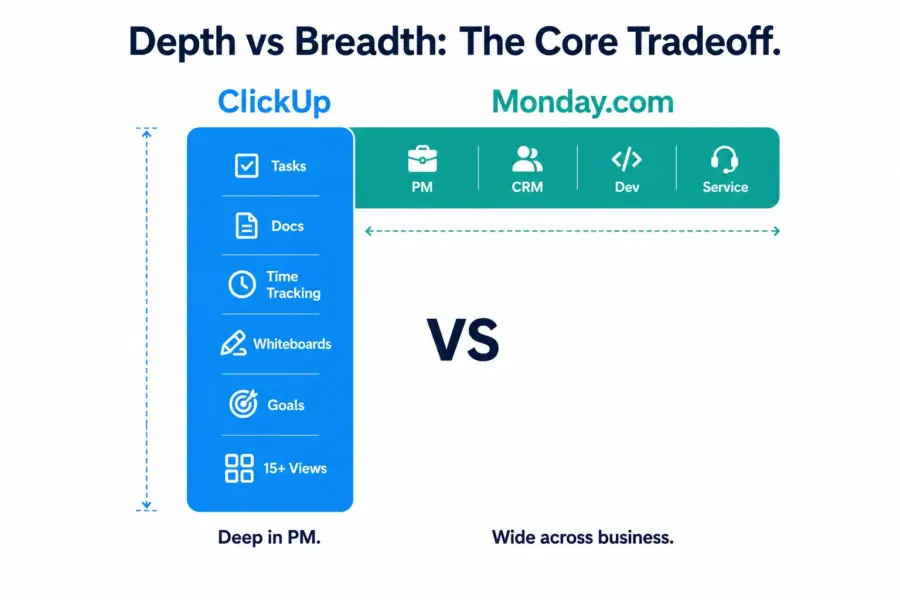
The practical consequence: ClickUp is deeper within PM. Monday.com is broader across business functions. A team choosing ClickUp gets the most capable PM tool at the lowest price. A team choosing Monday.com gets a growing ecosystem where their PM boards share data with their sales pipeline and IT tickets. For full individual assessments, see our ClickUp review and Monday.com review.
How Does ClickUp vs Monday.com Pricing Compare in 2026?
ClickUp is cheaper than Monday.com at every tier, and the gap compounds with team size because Monday.com enforces a 3-seat minimum on all paid plans that ClickUp doesn’t.
| Dimension | ClickUp | Monday.com | Impact |
|---|---|---|---|
| Free plan | Unlimited users, unlimited tasks | 2 seats, 3 boards only | ClickUp free plan is usable; Monday’s is a demo |
| Entry paid (per user/month) | $7 (Unlimited) | $9 (Basic) — but missing key features | ClickUp $7 includes Gantt; Monday $9 doesn’t |
| Mid tier | $12 (Business) | $12 (Standard) | Same price but ClickUp includes time tracking; Monday doesn’t |
| Time tracking tier | $7 (included from Unlimited) | $16 (Pro plan required) | Monday charges 2.3x more for time tracking |
| Minimum seats | 1 seat | 3 seats on all paid plans | Solo user: ClickUp $7/mo vs Monday $27/mo |
| 20-person team (mid tier) | $240/month | $240/month | Equal at mid tier — but ClickUp includes more |
| 50-person team (mid tier) | $600/month | $600/month | Equal — but Monday needs Pro ($800) for time tracking |
At the same per-seat price point ($12/user mid tier), ClickUp includes Gantt charts, time tracking, advanced automations (10,000/mo), and unlimited storage. Monday.com at $12/user gives you Gantt and Calendar views but caps automations at 250/month and locks time tracking behind the $16 Pro plan.
The 3-seat minimum is Monday.com’s hidden cost multiplier. A solo consultant on Monday Standard pays $36/month. The same person on ClickUp Unlimited pays $7/month. For teams of 1-2, ClickUp’s pricing advantage is overwhelming.
Winner on pricing: ClickUp, at every team size.
Which Tool Offers Stronger Features?
ClickUp wins on feature depth within project management. Monday.com wins on platform breadth across business functions. Here’s the feature-by-feature comparison:
| Feature | ClickUp | Monday.com | Winner |
|---|---|---|---|
| View types | 15+ (List, Board, Gantt, Mind Map, Whiteboard, etc.) | 8+ (Table, Kanban, Gantt, Calendar, Chart, etc.) | ClickUp |
| Built-in docs/wiki | Yes (ClickUp Docs) | WorkDocs (basic) | ClickUp |
| Time tracking | Native, all paid plans ($7+) | Pro plan only ($16/user) | ClickUp |
| Whiteboards | Yes, built-in | No | ClickUp |
| Subtask depth | 7 levels of nesting | 1 level (subitems) | ClickUp |
| Column/field types | 15+ | 30+ | Monday.com |
| Automation templates | 100+ | 200+ | Monday.com |
| CRM product | No (CRM templates only) | Yes (Monday CRM) | Monday.com |
| Dev product | No (Sprint features built-in) | Yes (Monday Dev) | Monday.com |
| Service/ticketing | No | Yes (Monday Service) | Monday.com |
| Cross-board data (Mirror) | No native equivalent | Yes (Mirror columns) | Monday.com |
| Integrations | 1,000+ native | 200+ native | ClickUp |
ClickUp wins 6 feature categories. Monday.com wins 5. But the categories they each win tell you who each tool is for. ClickUp’s wins (docs, time tracking, whiteboards, views, subtask depth, integrations) benefit teams that want one PM tool to rule them all. Monday.com’s wins (column types, automations, CRM, Dev, Service, Mirror columns) benefit organizations that want one platform across multiple business functions.
Winner on features: ClickUp for PM depth. Monday.com for multi-product ecosystem.
Which Is Easier to Learn and Use Daily?
Monday.com is easier to learn and more visually engaging to use daily than ClickUp. The gap isn’t as large as Asana vs ClickUp, but it’s meaningful, especially for non-technical teams.
Monday.com’s board metaphor is immediately understandable: rows are items, columns are data, colors tell you status. New users create their first board in 10 minutes. The 200+ templates cover industry-specific starting points. The drag-and-drop is the smoothest in the category. Color-coded status columns give instant visual feedback that makes scanning a 50-item board effortless.
ClickUp requires learning the Workspace > Spaces > Folders > Lists > Tasks hierarchy, choosing among 15+ views, and configuring custom fields before the platform feels like yours. Setup takes 2-4 hours. Full comfort takes 1-2 weeks.
G2 2024 Ease of Use scores: Monday.com 8.8/10. ClickUp 7.8/10. That 1.0-point gap translates into real adoption differences, particularly with non-technical teams in marketing, HR, and sales who won’t tolerate a steep learning curve.
Winner on ease of use: Monday.com.
How Does Customer Support Compare?
Neither tool leads the PM category in support (Asana does), but both provide adequate help for most teams.
ClickUp offers live chat (5-15 min during business hours, 4+ hours off-peak) and email support. The knowledge base is comprehensive. Complex questions occasionally receive generic responses requiring escalation.
Monday.com offers email only with no live chat, averaging 8-12 hours for Standard-plan responses. Priority support on higher tiers is faster (2-4 hours). The help center and YouTube tutorials are well-organized. No real-time support channel is a gap.
Winner on support: ClickUp (marginally, due to live chat availability).
Which Tool Is Better for Your Specific Team?
Clear recommendations based on team type and primary need:
| Team Profile | Recommended | Why |
|---|---|---|
| Startup needing a free PM tool | ClickUp | Free plan includes unlimited users and tasks. Monday free = 2 seats, 3 boards. |
| Agency tracking billable hours | ClickUp | Time tracking at $7/user. Monday requires $16/user Pro plan. |
| Sales + marketing team wanting shared data | Monday.com | Monday CRM shares board data with PM. ClickUp has no CRM product. |
| Non-technical team (HR, admin, events) | Monday.com | More visual, faster adoption, template-driven setup. |
| Engineering team needing sprint + docs | ClickUp | Built-in Docs + Sprint features. Monday Dev is less mature. |
| Solo consultant or freelancer | ClickUp | $7/mo vs Monday’s $27/mo minimum (3-seat rule). |
| SMB wanting PM + CRM + Service on one platform | Monday.com | Work OS covers all three. ClickUp is PM-only. |
| Team migrating from complex tools (Jira, Wrike) | ClickUp | More feature depth to replace enterprise tools without capability loss. |
ClickUp vs Monday.com: Our 2026 Final Verdict
ClickUp is the better project management tool for most teams. It offers more features at a lower price, includes time tracking and docs that Monday.com charges extra for or doesn’t offer, and has a free plan that’s actually usable for real teams. If your primary need is managing projects, tasks, and team workload, ClickUp delivers more value per dollar.
Monday.com is the better platform for organizations thinking beyond PM. If you want your project boards, sales pipeline, dev sprints, and IT tickets sharing one data layer and one colorful interface, Monday’s Work OS ecosystem is unique in the mid-market. No other tool offers this kind of multi-product unity at this price point.
Our recommendation: choose ClickUp if project management is the problem you’re solving. Choose Monday.com if platform consolidation across business functions is the problem you’re solving. For most teams reading this comparison, the answer is ClickUp. For organizations buying their “one platform for everything,” the answer is Monday.com.
For more PM options, see our complete PM software guide, Monday.com vs Asana comparison, or best free PM tools.
Try ClickUp Free Try Monday.com Free Last updated: April 25, 2026Frequently Asked Questions
Is ClickUp better than Monday.com in 2026?
For pure project management, yes. ClickUp offers more views, built-in time tracking, docs, and whiteboards at a lower price. Monday.com is better for teams wanting a multi-product platform covering PM, CRM, dev, and service on one interface. Most teams focused on project management get more value from ClickUp.
Is ClickUp cheaper than Monday.com?
Yes at most comparisons. ClickUp’s comparable plans cost $7-12/user versus Monday’s $9-16/user. ClickUp has no seat minimum; Monday requires 3 seats on all paid plans. A solo user pays $7/month on ClickUp versus $27/month minimum on Monday. The gap is largest for small teams and users needing time tracking.
Does Monday.com have time tracking?
Yes, but only on the Pro plan at $16/month per seat. ClickUp includes native time tracking on all paid plans starting at $7/month per user. For a 20-person team needing time tracking, ClickUp costs $140/month versus Monday’s $320/month, a $180 monthly difference.
Which has better automations, ClickUp or Monday.com?
Monday.com offers more automation templates (200+ versus ClickUp’s 100+) and a slightly more intuitive visual builder. However, Monday caps automations at 250/month on Standard versus ClickUp’s 1,000/month on Unlimited. Teams running heavy automations get more monthly actions from ClickUp at a lower price tier.
Can Monday.com replace a CRM tool?
Monday CRM handles basic-to-moderate sales pipeline management including deal tracking, email integration, activity logging, and forecasting. It’s viable for teams wanting a lightweight CRM without Salesforce or HubSpot complexity. It doesn’t match dedicated CRM tools for advanced features like marketing automation, lead scoring, or territory management.
Which is better for remote teams?
ClickUp is better for remote teams wanting one tool for tasks, docs, and communication. Monday.com is better for remote teams that want a visual, low-friction platform with broad business coverage. ClickUp’s built-in Docs and Chat views reduce tool-switching. Monday’s visual boards require less training for distributed team onboarding.
Do ClickUp and Monday.com integrate with Slack?
Yes, both offer native Slack integrations. ClickUp’s integration allows creating tasks, receiving notifications, and unfurling task links in Slack. Monday.com’s integration enables similar functionality plus status updates and board notifications. Both integrations are well-maintained and cover the most common Slack-to-PM workflows.
Which tool has a better mobile app?
Neither excels on mobile. Monday.com’s mobile app is slightly more polished with its visual board interface translating better to smaller screens. ClickUp’s mobile app is functional but cramped, with advanced features like Gantt and Whiteboard unavailable. Teams working primarily from mobile devices should test both apps during free trials.
Related Comparisons
- ClickUp vs Asana 2026
- Monday.com vs Asana 2026
- Notion vs ClickUp 2026
- ClickUp Review 2026
- Monday.com Review 2026
- Complete Guide to Project Management Software