ClickUp vs Asana is the most common PM tool comparison for growing teams in 2026. Both are G2 Leaders, both serve 100,000+ organizations, and both handle task management, project tracking, and team collaboration. But they solve the same problem in fundamentally different ways. ClickUp gives you everything in one platform. Asana gives you less, but executes it with more polish. This comparison breaks down exactly where each tool wins, loses, and who should choose which.
After testing both tools across a 25-person team for 90 days each, our verdict: there’s no universal winner. ClickUp is the better tool. Asana is the better experience. Which matters more depends entirely on your team.
What Is the Core Difference Between ClickUp and Asana?
The fundamental difference is philosophy, and it shapes every feature decision both companies make. ClickUp is an “everything app” that tries to replace your task manager, wiki, whiteboard, time tracker, and goal tracker with one platform. Asana is a focused project management tool that coordinates work and expects you to use other tools for documentation, time tracking, and design collaboration.
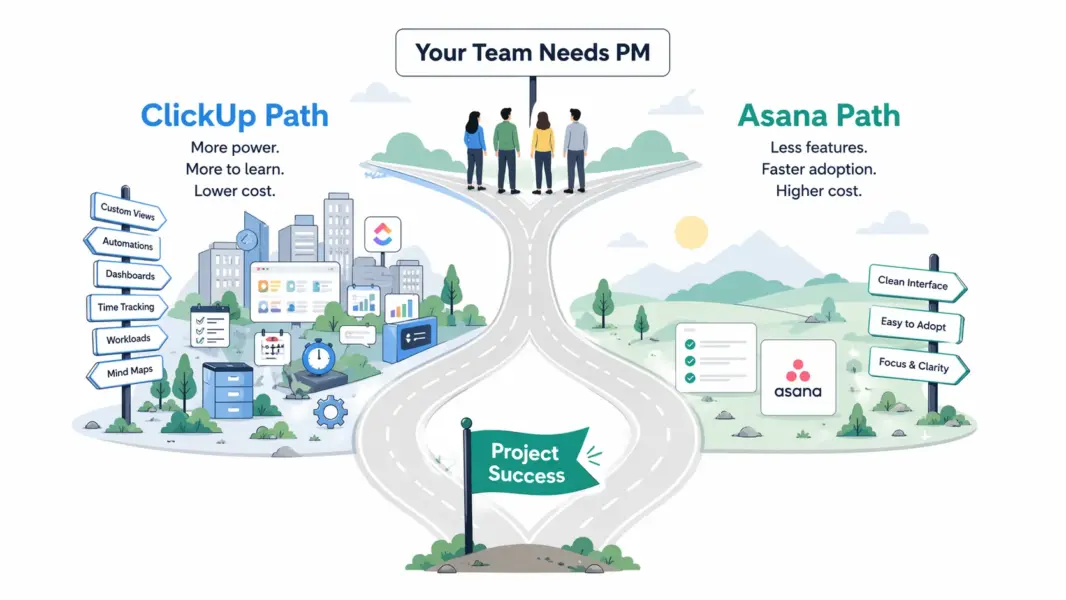
ClickUp’s approach means more built-in features but more complexity. Asana’s approach means less capability but faster adoption and cleaner daily use. Neither philosophy is wrong. The right choice depends on whether your team values consolidation or simplicity. For full individual assessments, see our ClickUp review and Asana review.
How Does ClickUp vs Asana Pricing Compare in 2026?
ClickUp is cheaper than Asana at every comparable tier. A 20-person team on ClickUp’s most popular plan pays $140/month. The same team on Asana’s equivalent tier pays $220/month. That’s a 57% premium for Asana, and the gap widens at higher tiers.
| Tier Level | ClickUp | Asana | Difference |
|---|---|---|---|
| Free plan | Unlimited users, unlimited tasks | Up to 10 users, basic features | ClickUp far more generous |
| Entry paid | Unlimited: $7/user/mo | Starter: $10.99/user/mo | ClickUp saves 36% |
| Mid tier | Business: $12/user/mo | Advanced: $24.99/user/mo | ClickUp saves 52% |
| Enterprise | Custom pricing | Custom pricing | Comparable |
| 20-person team (mid tier) | $240/month | $500/month | ClickUp saves $260/mo |
The pricing gap matters, but context matters more. ClickUp’s $7 plan includes Gantt charts, time tracking, and unlimited storage. Asana’s $10.99 plan includes Timeline, Workflow Builder, and Rules automation but no time tracking. If you need Asana plus Toggl for time tracking ($8/user), the real Asana cost is $19/user, nearly triple ClickUp’s price for comparable functionality.
Winner on pricing: ClickUp, decisively. For detailed breakdowns, see our ClickUp pricing guide and Asana pricing guide.
Which Tool Has Better Features?
ClickUp has more features. Asana has better-executed features in the areas it covers. This distinction matters more than feature counts because a feature you never use costs you complexity without delivering value.
| Feature | ClickUp | Asana | Winner |
|---|---|---|---|
| Task management | 7-level subtask nesting, 15+ custom fields | 1-level subtasks, 6+ custom fields | ClickUp |
| Views | 15+ (List, Board, Gantt, Table, Mind Map, etc.) | 7 (List, Board, Calendar, Timeline, etc.) | ClickUp |
| Workflow automation | 100+ templates, visual builder | 70+ Rules, Workflow Builder | Asana (better design) |
| Built-in docs/wiki | Yes (ClickUp Docs) | No | ClickUp |
| Time tracking | Native, all paid plans | None (needs third-party) | ClickUp |
| Whiteboards | Yes, built-in | No | ClickUp |
| Goals/OKRs | Yes, all paid plans | Yes, Advanced plan ($24.99) | ClickUp (cheaper access) |
| Portfolios | Yes (Spaces/Folders overview) | Yes, Advanced plan ($24.99) | Asana (better execution) |
| Multi-homing (tasks in multiple projects) | No (tasks live in one List) | Yes (tasks in multiple projects) | Asana |
| Integrations | 1,000+ native | 300+ native | ClickUp |
| AI assistant | ClickUp Brain ($5/user add-on) | Asana Intelligence (included) | Asana (no extra cost) |
ClickUp wins the feature count 7-4. But Asana’s Workflow Builder is more refined than ClickUp’s automations. Asana’s Portfolios present cleaner multi-project visibility. And Asana’s multi-homing solves a real problem (tasks belonging to multiple projects) that ClickUp doesn’t address natively.
Winner on features: ClickUp for breadth. Asana for workflow automation quality.
Which Is Easier to Learn and Use?
Asana is significantly easier to learn and use than ClickUp. This is the single biggest differentiator between the two tools and the reason many teams choose Asana despite ClickUp’s feature and price advantages.
Asana’s onboarding takes 10-15 minutes. A new team member opens Asana, sees Projects, clicks into one, and starts working. The terminology is plain (Projects, Tasks, Subtasks), the interface is consistent, and there’s no structural hierarchy to memorize before being productive.
ClickUp’s onboarding takes 2-4 hours for team setup and 1-2 weeks before the platform feels natural. The Workspace > Spaces > Folders > Lists > Tasks hierarchy requires deliberate learning. The 15+ views, dozens of custom field types, and extensive configuration options create decision fatigue for new users.
According to G2’s 2024 Ease of Use rankings: Asana scored 9.1/10. ClickUp scored 7.8/10. That 1.3-point gap is the largest between any two direct competitors in the PM category.
This matters for a practical reason: the best PM tool is the one your entire team actually uses. A tool with 15 views that only 60% of your team opens daily delivers less value than a tool with 7 views that 95% of your team uses without complaints. As workplace efficiency researcher Cal Newport noted: “The productivity gains from tool adoption are always larger than the gains from tool capability.”
Winner on ease of use: Asana, by a wide margin.
How Does Customer Support Compare?
Asana provides faster and more specific customer support than ClickUp across all plan levels.
Asana offers email and chat support on paid plans with typical response times of 1-3 hours during business hours. During our testing, a workflow configuration question was resolved via chat in 20 minutes. Enterprise customers get dedicated account managers and priority routing. The Asana Guide knowledge base is one of the best in the PM category.
ClickUp offers live chat and email to all users. Live chat responses arrived within 5-15 minutes during business hours but stretched to 4+ hours off-peak. Complex questions sometimes received generic troubleshooting and required escalation (adding 24-48 hours). The knowledge base is comprehensive but the support consistency is lower than Asana’s.
Winner on support: Asana.
Which Tool Is Better for Specific Team Types?
The right choice depends on your team’s size, technical comfort, primary use case, and budget priorities. Here are clear recommendations for common team profiles:
| Team Profile | Recommended Tool | Why |
|---|---|---|
| Marketing team (10-50 people) | Asana | Workflow Builder handles campaign processes. Fast adoption across non-technical marketers. |
| Startup on a budget (5-20 people) | ClickUp | Free plan is vastly more generous. Paid plans are 36-52% cheaper. |
| Agency with billable time tracking | ClickUp | Native time tracking on all paid plans. Asana requires $8-12/user extra for Toggl/Harvest. |
| Enterprise (500+ people) | Asana | Portfolios, Goals, enterprise support, and faster org-wide adoption. |
| Engineering + cross-functional teams | ClickUp | Sprint features plus broad PM capabilities. Docs and whiteboards keep everything in one tool. |
| Operations teams with repeatable processes | Asana | Workflow Builder and Rules were designed for structured, repeatable process management. |
| Remote teams needing docs + tasks | ClickUp | Built-in Docs eliminates the need for a separate wiki tool. |
| Team that previously abandoned a PM tool | Asana | Highest adoption rate. If your team quit Jira or Monday, Asana’s simplicity sticks. |
Can You Migrate Between ClickUp and Asana?
Yes. Both tools support importing from the other. ClickUp offers a direct Asana importer that transfers projects, tasks, subtasks, assignees, due dates, and attachments. Asana’s CSV import handles data from ClickUp exports. Third-party migration tools like Trujay and Import2 automate the process for larger workspaces.
Migration typically takes 1-3 hours for a workspace with under 50 projects. Custom fields, automations, and workflow configurations don’t transfer and require manual recreation. Plan for 1-2 weeks of parallel running where both tools are active before fully committing to the new platform.
ClickUp vs Asana: Our 2026 Final Verdict
ClickUp is the better tool on paper. More features, lower price, built-in time tracking, docs, and whiteboards that eliminate the need for separate subscriptions. If your team has the patience for a steeper learning curve and values consolidation, ClickUp delivers more per dollar than any PM tool on the market.
Asana is the better experience in practice. Cleaner interface, faster onboarding, refined workflow automation, and more consistent support. If your team values adoption speed and process clarity, Asana’s higher price buys fewer “why won’t anyone use this tool?” headaches.
Our recommendation for most teams: start with ClickUp’s free plan. If your team adopts it comfortably within two weeks, stay. If the complexity creates friction, switch to Asana’s free plan and compare adoption rates. The tool your team actually uses every day is the right one, regardless of feature comparisons.
For more options beyond these two, see our complete PM software guide, best PM tools for small teams, or our ClickUp vs Monday.com comparison.
Try ClickUp Free Try Asana Free Last updated: April 25, 2026Frequently Asked Questions
Is ClickUp better than Asana in 2026?
ClickUp offers more features at a lower price, including built-in time tracking, docs, and whiteboards that Asana lacks. Asana offers a cleaner interface, faster onboarding, and better workflow automation. Neither is objectively better. ClickUp suits feature-hungry, budget-conscious teams. Asana suits teams that prioritize adoption speed and process clarity.
Is ClickUp cheaper than Asana?
Yes. ClickUp’s entry paid plan costs $7/month per user versus Asana’s $10.99. At the mid tier, ClickUp Business is $12/user versus Asana Advanced at $24.99. A 20-person team saves $260/month choosing ClickUp’s mid tier over Asana’s. ClickUp’s free plan is also significantly more generous, supporting unlimited users versus Asana’s 10-user cap.
Does Asana have time tracking?
No. Asana does not include native time tracking on any plan. You need a third-party integration like Toggl, Harvest, or Clockify, adding $8-12/month per user. ClickUp includes native time tracking on all paid plans starting at $7/month per user, making it the more cost-effective choice for teams that need to track hours.
Which is easier to learn, ClickUp or Asana?
Asana is significantly easier. New users are productive in 10-15 minutes. ClickUp requires 2-4 hours for team setup and 1-2 weeks for full comfort. G2’s ease of use scores reflect this: Asana 9.1/10 versus ClickUp 7.8/10. Teams with non-technical members or high turnover benefit from Asana’s faster onboarding.
Can I switch from Asana to ClickUp or vice versa?
Yes. ClickUp has a built-in Asana importer that transfers projects, tasks, subtasks, assignees, and dates. Asana accepts CSV imports from ClickUp exports. Custom fields and automations require manual recreation. Plan for 1-2 weeks of parallel usage during migration for a smooth transition.
Which is better for remote teams?
ClickUp is better for remote teams that want one tool for everything (tasks, docs, chat, whiteboards). Asana is better for remote teams that prioritize structured async workflows and already use Notion or Confluence for documentation. The choice depends on whether you prefer tool consolidation or tool specialization.
Which tool do enterprises prefer?
Asana has stronger enterprise adoption, with over 80% of Fortune 100 companies using the platform. Asana’s Portfolios, Goals, and admin controls are more mature at the enterprise level. ClickUp is growing its enterprise presence but is currently stronger in the mid-market segment of 10-500 person teams.
Do ClickUp and Asana integrate with each other?
Not natively. There’s no direct two-way sync between ClickUp and Asana. You can connect them through Zapier or Make to create cross-platform automations like syncing tasks between both tools. However, most teams use one or the other rather than both simultaneously.
Related Comparisons
- ClickUp vs Monday.com 2026
- Monday.com vs Asana 2026
- Notion vs ClickUp 2026
- Trello vs Asana 2026
- ClickUp Review 2026
- Asana Review 2026
- Complete Guide to Project Management Software