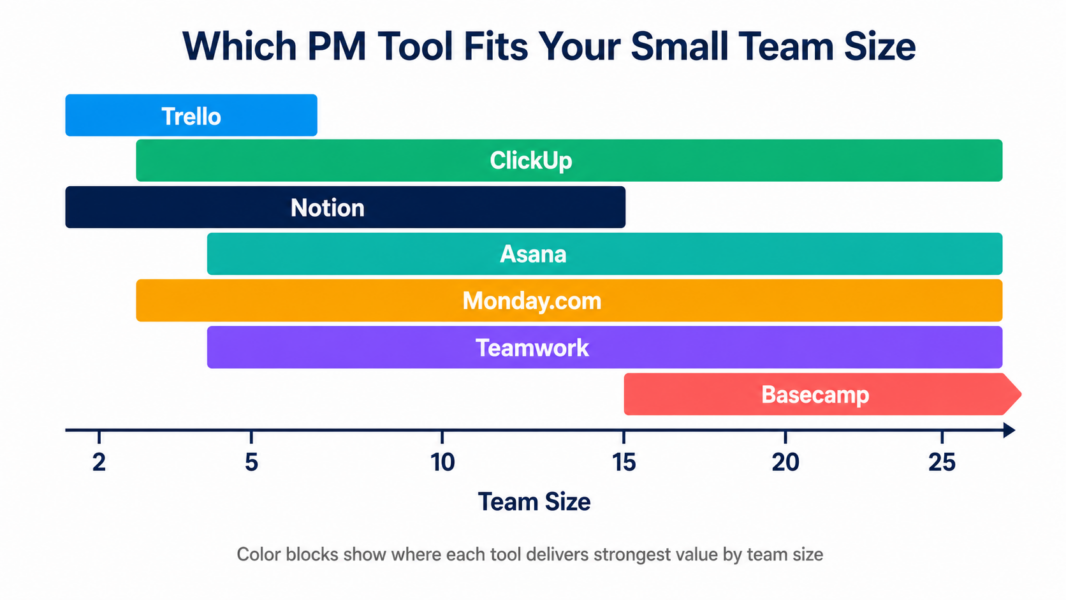
Picking the right project management tool for small teams means avoiding two opposite mistakes. The first mistake is choosing enterprise software (Jira, Wrike, Smartsheet) that overwhelms small teams with features they will never use. The second mistake is choosing a tool so simple it stops working when your team grows past 10 people. The seven tools below all hit the sweet spot for small teams of 2-25 people: capable enough to scale, simple enough to adopt in a week, priced for small budgets.
We tested every major PM platform with real small teams over 90 days. Our rankings reflect real-world fit, not feature counts. According to a 2024 Capterra small business survey, 67% of small teams abandon their first PM tool within 6 months due to either feature overwhelm or capability limitations. The recommendations below address both failure modes.
What Are the Best Project Management Tools for Small Teams in 2026?
| Rank | Tool | Best For | Starting Price | Our Rating |
|---|---|---|---|---|
| 1 | ClickUp | Best overall for small teams | Free / $7 per user | 8.4/10 |
| 2 | Trello | Best for simplicity-first teams | Free / $5 per user | 7.5/10 |
| 3 | Asana | Best for workflow structure | Free / $10.99 per user | 8.2/10 |
| 4 | Monday.com | Best for visual non-technical teams | Free / $9 per seat (3-min) | 8.0/10 |
| 5 | Notion | Best for knowledge-heavy small teams | Free / $8 per user | 8.1/10 |
| 6 | Basecamp | Best for flat-rate pricing at 20+ team size | $15 per user or $299 flat | 7.2/10 |
| 7 | Teamwork | Best for small agencies and consultancies | $13.99 per user (3-min) | 7.7/10 |
1. ClickUp: Best Overall Project Management Tool for Small Teams
ClickUp earns the top spot for small teams because of its unmatched value proposition: the most generous free plan in PM, the lowest paid pricing among feature-complete tools, and built-in capabilities (time tracking, docs, whiteboards) that competitors charge extra for. A small team can run ClickUp’s free plan with unlimited users indefinitely, then upgrade only when specific features unlock real value.
The tradeoff is a steeper learning curve than Asana or Monday.com. ClickUp’s Workspace > Spaces > Folders > Lists > Tasks hierarchy takes 1-2 hours of initial orientation. Once configured, daily use is smooth and the feature depth pays off as teams grow. For a 10-person startup that expects to scale, ClickUp’s runway is the longest in this list.
Pricing for small teams: Free plan supports unlimited users with most core features. Paid plans start at $7 per user per month (Unlimited), making a 10-person team’s monthly cost just $70. Business plan at $12 per user adds time tracking with billable rates and workload management.
Best for: Small teams (5-25 people) that want feature depth without enterprise pricing, startups planning to grow, agencies needing built-in time tracking on a budget. Read our full ClickUp review for detailed analysis.
2. Trello: Best for Small Teams That Want Maximum Simplicity
Trello wins for small teams whose project management needs are simple and visual. The kanban board interface is the most intuitive in PM, requiring zero training. A 5-person team can be productive within minutes of signing up. The free plan supports unlimited users with 10 boards, which is enough for most small teams managing 5-10 active projects.
The limitation is depth. Trello lacks Gantt charts, dependencies, time tracking, and reporting. When small teams grow past 10 people or projects gain complexity, Trello hits walls that force migration to more capable tools. For some small teams, Trello is a permanent solution. For others, it is the right first tool before graduating to Asana or ClickUp.
Pricing for small teams: Free plan supports unlimited users with 10 boards. Standard plan at $5 per user adds unlimited boards and Power-Ups. Premium at $10 per user unlocks Timeline view and Dashboard.
Best for: Solo freelancers, tiny teams (2-5 people), non-technical teams, mobile-first teams that work primarily from phones. Read our full Trello review for detailed analysis.
3. Asana: Best for Small Teams That Want Workflow Structure
Asana ranks third for small teams because its onboarding is the fastest in PM (10-15 minutes to productive) and its Workflow Builder enforces process consistency that benefits growing teams. Small teams that have been burned by tools nobody used find Asana’s adoption rate genuinely better than competitors. The clean interface and intuitive structure stick.
The pricing makes Asana more expensive than ClickUp at every comparable tier. A 10-person team on Asana Starter costs $110 per month versus $70 on ClickUp Unlimited. The premium buys polish and faster adoption, which is worth it for some teams and overkill for others.
Pricing for small teams: Free plan supports up to 10 users with unlimited tasks. Starter at $10.99 per user adds Timeline, Rules automation, and Workflow Builder. Advanced at $24.99 per user unlocks Goals, Portfolios, and Workload.
Best for: Small marketing teams, operations teams with repeatable processes, teams that prioritize tool adoption rate over feature count. Read our full Asana review for detailed analysis.
4. Monday.com: Best for Visual Small Teams
Monday.com ranks fourth specifically because of its 3-seat minimum on paid plans, which inflates costs for very small teams. A solo user or pair pays for 3 seats regardless of actual team size. For teams of 3+, Monday.com becomes more competitive and offers the most visually engaging interface in PM.
Small teams that prioritize visual appeal and the option to expand into CRM, dev, or service management later (Work OS ecosystem) get strong value from Monday.com. The 200+ automation templates and colorful status columns make daily use enjoyable in a way that drives adoption.
Pricing for small teams: Free plan supports 2 seats (essentially a demo). Basic at $9 per seat. Standard at $12 per seat (most popular). Pro at $16 per seat adds time tracking. All paid plans require 3-seat minimum.
Best for: Visual non-technical teams (3-25 people), small agencies, marketing teams that value design over feature depth, teams planning to expand into CRM. Read our full Monday.com review for detailed analysis.
5. Notion: Best for Knowledge-Heavy Small Teams
Notion ranks fifth as a PM tool because it is not really a PM tool. Notion is a workspace that includes lightweight project tracking. For small teams whose work is mostly documentation, knowledge management, and content organization with some task tracking layered on top, Notion delivers exceptional value. Product teams, content teams, and consulting firms often choose Notion specifically for this reason.
For small teams whose primary need is structured project management with dependencies, automation, and reporting, Notion falls short. The database-based project tracking is flexible but lacks the workflow enforcement and project structure that dedicated PM tools provide.
Pricing for small teams: Free plan supports unlimited pages but only one user (no team collaboration). Plus at $8 per user adds unlimited team members. Business at $15 per user adds SSO and advanced features.
Best for: Product teams writing specs, content teams managing editorial calendars, consulting firms with knowledge bases, async-first remote teams. Read our full Notion review for detailed analysis.
6. Basecamp: Best for Small Teams Wanting Predictable Flat-Rate Pricing
Basecamp’s flat-rate Pro Unlimited plan ($299 per month for unlimited users) becomes the cheapest PM tool in the market at around 20-25 team members. For small teams approaching this size, Basecamp delivers predictable pricing that does not increase as you hire. The simplicity is also exceptional: 6 tools per project, zero configuration overhead, near-instant adoption.
Basecamp deliberately omits features that competitors include: no Gantt charts, no time tracking, no automation, no reporting beyond basic activity. For small teams whose needs fit Basecamp’s intentionally narrow feature set, this minimalism is a feature. For teams that need more, Basecamp creates friction.
Pricing for small teams: No free plan, only a 30-day trial. Per-user plan at $15 per user (best for under 20 people). Pro Unlimited at $299 per month flat rate (best for over 20 people).
Best for: Small teams of 15-25 people approaching the flat-rate breakeven, remote teams using Shape Up methodology, agencies wanting predictable subscription costs. Read our full Basecamp review for detailed analysis.
7. Teamwork: Best for Small Agencies and Consultancies
Teamwork ranks seventh because it is purpose-built for one specific small team type: agencies and client-services businesses. For that audience, Teamwork delivers more value than any generalist PM tool. Native time tracking with billable rates, client portals, project budgets with profitability tracking, and integrated invoicing eliminate the multi-tool sprawl typical of agency operations.
For non-agency small teams, Teamwork is overkill and over-priced. The agency-specific features (proofing, budgets, invoicing) become unused weight, and the $13.99 per user price tag is hard to justify when ClickUp offers comparable general PM features at $7.
Pricing for small teams: Free Forever plan supports up to 5 users with 2 active projects. Deliver at $13.99 per user (3-user minimum). Grow at $25.99 per user adds workload management and advanced budgets.
Best for: Small digital agencies, design studios, consulting firms, professional services billing hourly with 5-25 team members. Read our full Teamwork review for detailed analysis.
How to Pick the Right PM Tool for Your Small Team
The right project management tool for your small team depends on three factors: team size, primary work type, and budget priority. Use the decision matrix below to narrow your options before testing free plans.
| Your Situation | Top Pick | Backup Pick |
|---|---|---|
| Solo freelancer or 2-person team | Trello (free) | ClickUp (free) |
| Tiny startup (3-5 people, budget-conscious) | ClickUp ($7/user) | Trello ($5/user) |
| Small team (5-15 people) with simple needs | ClickUp | Asana |
| Small team (5-15 people) wanting fastest adoption | Asana | Monday.com |
| Visual-first marketing team (5-25 people) | Monday.com | Asana |
| Knowledge-heavy team (writers, product, consulting) | Notion | ClickUp + ClickUp Docs |
| Small agency tracking billable hours | Teamwork | ClickUp Business |
| Team approaching 20 people wanting flat-rate pricing | Basecamp Pro Unlimited | ClickUp |
| Mobile-first field team | Trello | Asana |
| Cross-functional team with some engineering | ClickUp | Asana |
What Features Do Small Teams Actually Need?
Small teams overbuy PM software more often than they underbuy. The features that drive value for small teams (2-25 people) differ from what enterprise marketing pages emphasize.
Must-have for most small teams: task assignment with due dates, basic kanban or list view, file attachments, comments and @mentions, mobile apps, integrations with Slack or Google Workspace, free plan for evaluation or permanent use.
Nice-to-have for growing small teams (10-25 people): Gantt or timeline view, simple workflow automation (status changes, notifications), time tracking if billing is involved, custom fields for tracking project-specific data, dashboards showing team workload.
Usually overkill for small teams: portfolio management, OKR tracking, resource management with capacity planning, advanced reporting with cross-board formulas, SSO and enterprise security, proofing workflows (unless you are a creative agency).
According to a 2024 Forrester analysis of PM tool adoption, small teams use an average of 23% of available features in their chosen tool. Buying a tool with more features than you will use creates onboarding friction without delivering additional value.
Free vs Paid PM Tools for Small Teams
Many small teams can run free PM plans indefinitely without ever needing to pay. The free tiers from ClickUp, Trello, Notion, and Asana cover most small team needs without compromise. Upgrading to paid only makes sense when you hit specific limits.
Common triggers that push small teams from free to paid: exceeding user limits (Asana’s 10-user cap, Monday’s 2-seat cap), needing Gantt views or automation (free plans typically exclude these), file storage limits (ClickUp’s 100MB free becomes restrictive fast), or needing integrations (free plans cap integrations on some tools).
If you are starting fresh, our recommended approach is: try ClickUp’s free plan first because it supports unlimited users with the broadest feature set, then evaluate Asana free if you need workflow structure, then Trello free if you want maximum simplicity. For more on free options, see our complete best free PM tools guide.
Need more PM tool guidance?
Read our complete guide covering every major PM platform with detailed comparisons.
Frequently Asked Questions
What is the best free project management tool for small teams in 2026?
ClickUp’s Free Forever plan is the best for small teams because it supports unlimited users with unlimited tasks, Docs, Whiteboards, and Sprint management. Unlike Asana (10-user cap), Monday.com (2-seat cap), or Wrike (5-user cap), ClickUp does not restrict team size on its free tier, making it the only major PM tool that scales free for teams of any size.
How much should a small team budget for PM software?
Small teams should budget $7-15 per user per month for adequate PM software. A 10-person team spends $70-150 monthly. Free plans cover many small team needs indefinitely, so paid spending is often optional. Avoid enterprise tools priced at $25-50 per user, which are typically overkill for teams under 25 people.
Is Trello good for small teams?
Trello is excellent for small teams with simple kanban-style workflows. The free plan supports unlimited users with up to 10 boards, and the interface requires zero training. Trello falls short for small teams needing Gantt views, time tracking, or workflow automation. Many small teams use Trello as their first PM tool, then migrate to Asana or ClickUp as needs grow.
Should a small team use Jira or ClickUp?
Small engineering-only teams may prefer Jira for its agile depth. Cross-functional small teams that include designers, marketers, or product managers should choose ClickUp because Jira’s developer-centric interface alienates non-technical team members. ClickUp also offers a more generous free plan and lower paid pricing than Jira when accounting for marketplace app costs.
When should a small team upgrade from a free PM plan?
Upgrade when you hit specific limits that force workarounds: exceeding user caps, needing Gantt views or workflow automation, file storage running out, or needing integrations not available on the free tier. If you find yourself building workarounds for missing features more than twice a week, upgrading saves time worth more than the subscription cost.
Is ClickUp or Asana better for small teams?
ClickUp offers more features at lower prices and supports unlimited users on the free plan. Asana offers cleaner design and faster onboarding (10-15 minutes versus ClickUp’s 1-2 hours). Choose ClickUp for value and feature depth on a budget. Choose Asana when fast team adoption matters more than maximum capability. Both work well for small teams.
What is the easiest PM tool for non-technical small teams?
Trello is the easiest tool to learn with a 5-minute onboarding. Asana is the easiest tool to use daily once learned, with a 10-15 minute initial setup. Monday.com is the most visually engaging, which drives adoption among teams that respond to design quality. Non-technical small teams typically rank these three above ClickUp, Jira, and Wrike for ease of use.
Do small teams really need project management software?
Small teams under 5 people can often coordinate effectively using email, Slack, and shared documents. PM software becomes valuable around 5-7 people when project visibility, task ownership, and deadline tracking start breaking down with informal coordination. By 10+ people, dedicated PM software typically pays for itself in saved coordination time and reduced missed deadlines.
Related Articles
- Best Free Project Management Tools 2026
- ClickUp Review 2026
- Asana Review 2026
- Trello Review 2026
- ClickUp vs Asana 2026
- Trello vs Asana 2026
- Free PM Tool Cost Calculator
- Complete Guide to Project Management Software