Pros
- Easiest PM tool to learn with the most intuitive kanban interface
- Generous free plan with unlimited users and cards
- Best mobile app in the PM category for on-the-go task management
- Power-Ups extend functionality with calendar, voting, and custom fields
- Butler automation handles basic workflow automation without coding
- Clean visual design that makes daily task tracking enjoyable
Cons
- No Timeline or Gantt view on free plan
- Limited to board view as the primary interface paradigm
- No native time tracking on any plan
- Reporting and analytics are nearly nonexistent
- Subtasks are checklists only with no assignees or due dates per item
- Free plan limited to 10 boards per workspace
- Weak for complex projects with dependencies and resource planning
This Trello review is based on 5 years of personal use and 60 days of structured team testing across a 10-person content team. Trello is a kanban-based project management tool owned by Atlassian that does one thing exceptionally well: cards on a board. Founded in 2011 by Fog Creek Software (now Glitch) and acquired by Atlassian in 2017 for $425 million, Trello serves over 50 million registered users. Our verdict: Trello is the easiest PM tool on the market and the one most likely to be outgrown.
Trello holds a 4.4/5 on G2 across 13,500+ reviews, making it one of the most-reviewed PM tools on the platform. Capterra rates it 4.5/5 across 23,000+ reviews. Users consistently praise the simplicity and mobile experience while flagging the lack of advanced PM features. The review pattern tells Trello’s story perfectly: beloved for what it is, abandoned for what it isn’t.
What Is Trello and How Does It Work?
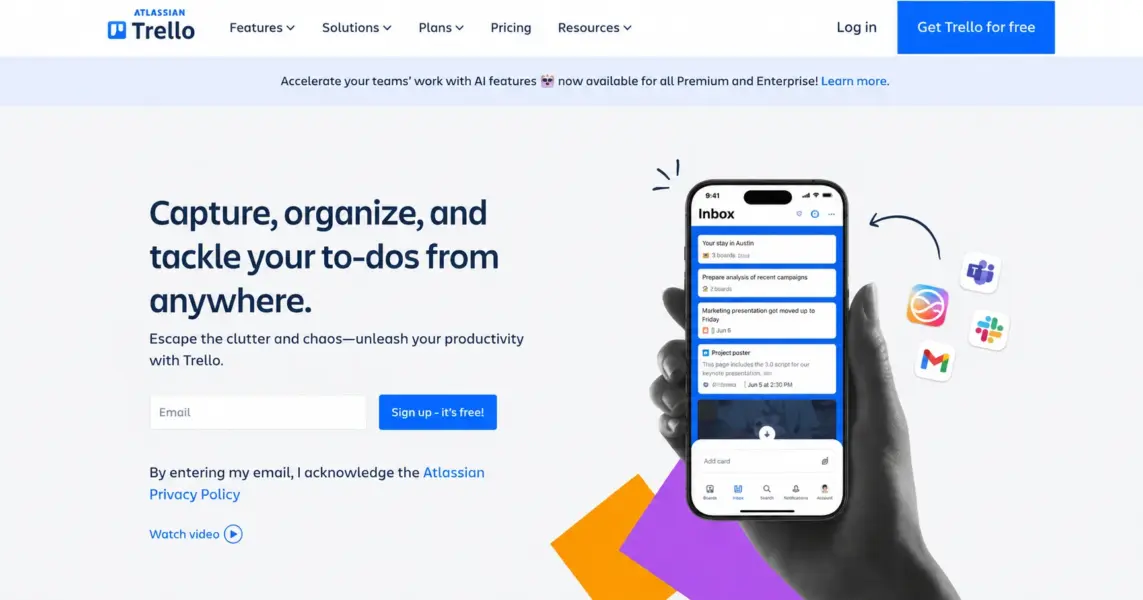
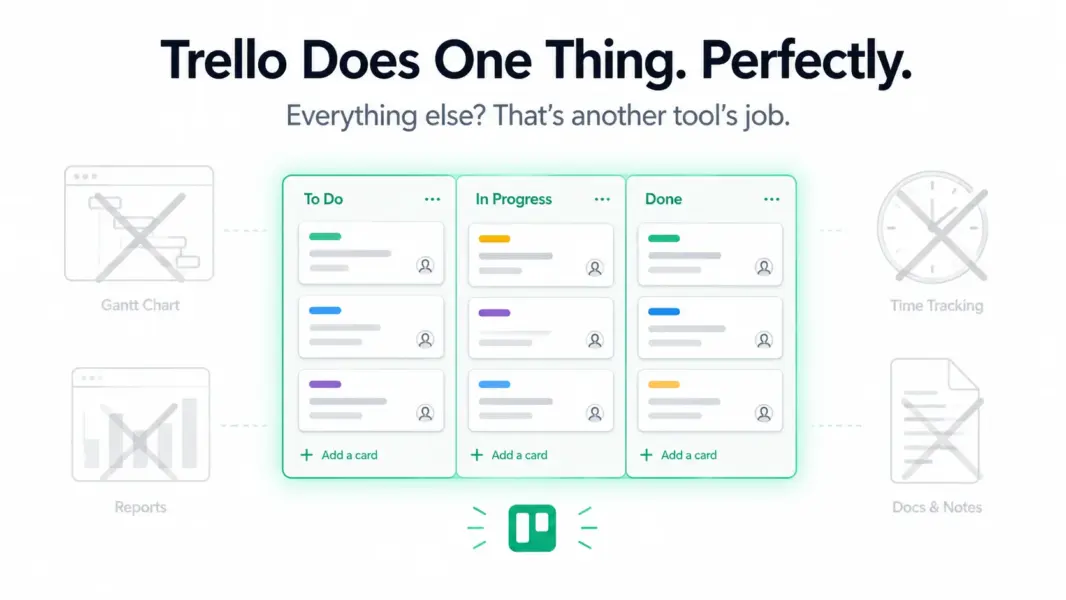
Trello is a cloud-based kanban board tool that organizes work into boards, lists, and cards. A board represents a project. Lists represent stages (To Do, In Progress, Done). Cards represent tasks. You drag cards between lists to update their status. That’s the entire core product.
The simplicity is deliberate. Trello was inspired by the Toyota kanban system and designed to be the digital equivalent of sticky notes on a whiteboard. Joel Spolsky (Fog Creek’s co-founder) built it as a visual task tracker that anyone could understand in 30 seconds without reading documentation.
Trello extends its core through Power-Ups: add-on modules that introduce calendar views, custom fields, voting, card aging, time tracking (via third-party), and integrations with tools like Slack, Google Drive, and Jira. The free plan allows 1 Power-Up per board. Paid plans unlock unlimited Power-Ups.
After Atlassian’s acquisition, Trello gained deeper integration with the Atlassian ecosystem (Jira, Confluence, Bitbucket) but maintained its identity as the simple option in Atlassian’s portfolio. For broader PM context, see our complete guide to project management software.
How Much Does Trello Cost in 2026?
Trello is the cheapest mainstream PM tool with paid plans starting at $5/month per user. The free plan is generous enough that many individuals and small teams never need to upgrade.
Trello Pricing in 2026
Free
Unlimited users & cards, 10 boards, 1 Power-Up per board, 250 automations, 10MB file limit
Standard
Unlimited boards, Unlimited Power-Ups, 1000 automations, 250MB files, Custom fields, Advanced checklists
Premium
Timeline & Calendar views, Dashboard view, Workspace-level views, Admin controls, Priority support
Enterprise
Unlimited workspaces, Organization-wide permissions, Attachment restrictions, Free SSO
The free plan works for real use: unlimited users, unlimited cards, up to 10 boards, 1 Power-Up per board, and 250 workspace automation commands. For a freelancer managing 5-8 client boards, it’s permanently sufficient.
Standard at $5/user unlocks unlimited boards, unlimited Power-Ups, 1,000 automations, and custom fields. This is where most small teams land — it removes the free plan’s restrictions without a heavy price tag.
Premium at $10/user adds Timeline (Gantt-like) and Calendar views, Dashboard view, and workspace-level oversight. This tier is for teams that need more than kanban but want to stay in Trello rather than migrate to Asana or ClickUp.
Price context: Trello Standard ($5) is the cheapest paid PM plan among major tools. ClickUp Unlimited ($7) offers significantly more features for $2 more. Asana Starter ($10.99) costs double but includes workflow automation. The question isn’t whether Trello is cheap — it is — but whether the savings justify the feature gaps. For detailed pricing across tools, see our PM pricing comparison.
What Are Trello’s Key Features?
Trello’s feature set is intentionally narrow. It does a few things well and doesn’t try to compete with full-featured PM platforms. Here’s what you get and where the edges are.
Kanban Boards: The Best in the Category
Trello invented the digital kanban board that every PM tool now copies. The board interface is the most polished, responsive, and intuitive version of kanban available. Cards support descriptions, checklists, labels (color-coded tags), due dates, attachments, cover images, comments, and member assignments.
Card aging visually fades cards that haven’t been updated, surfacing stale tasks. Card covers add visual richness with images or colors on the front of each card, making boards scannable at a glance. Drag-and-drop is instantaneous with smooth animations that make the physical metaphor feel real.
For teams whose entire workflow is “move tasks through stages,” Trello’s board is functionally perfect. The problem emerges when you need to see work in any other format.
Butler Automation
Butler is Trello’s built-in automation engine. It uses rule-based triggers (when a card is moved to Done, then archive it), scheduled commands (every Monday, create a standup card), and card/board buttons (one-click actions). The free plan includes 250 automation runs per workspace. Standard gets 1,000. Premium and Enterprise get unlimited.
Butler handles basic workflows well: auto-assign when moved to a list, set due dates on card creation, post comments on status changes. It’s more limited than Asana’s Rules or Monday.com’s 200+ automation templates, but for Trello’s scope, it covers the most common needs.
Power-Ups: Extending Trello’s Capabilities
Power-Ups are add-on modules that extend what boards can do. Popular Power-Ups include Calendar view, Custom Fields, Card Repeater, Voting, and integrations with Slack, Google Drive, Jira, GitHub, and Salesforce. The free plan limits you to 1 Power-Up per board. Paid plans unlock unlimited.
The 1-per-board limit on free is the most impactful restriction. You choose between Calendar view OR Custom Fields OR a Slack integration on each board. Most teams hit this wall within weeks and upgrade to Standard ($5) to remove it.
What Trello Doesn’t Have
This list is as important as the feature list: no native Gantt chart with dependencies (Timeline on Premium is basic), no resource management, no workload view, no time tracking, no goals/OKRs, no portfolios, no dashboards with meaningful reporting, no built-in docs/wiki, no whiteboards, no custom workflows beyond Butler, and no subtask assignments (checklists have no assignees or dates per item on free).
Is Trello Easy to Use?
Trello is the easiest project management tool to learn. We rate it 9.5/10 for ease of use, the highest score in our entire PM review series. A new user creates an account, makes a board, adds lists, adds cards, and starts working within 5 minutes. There is no onboarding flow because none is needed.
The card-on-a-board metaphor requires zero explanation. Everyone who has used a sticky note understands Trello instantly. There are no hierarchies to learn (no Spaces > Folders > Lists), no view configurations to set up, and no custom fields to define before you start.
Trello’s mobile app is the best in the PM category. The card-based interface translates naturally to phone screens. Dragging cards between lists on a touchscreen feels intuitive in a way that table views and Gantt charts never do on mobile. Teams that manage work primarily from phones should seriously consider Trello for this reason alone.
According to G2’s 2024 Ease of Use rankings, Trello scored 9.0/10, tied with Asana at the top of the mid-market PM category. Our higher rating (9.5) reflects that Trello’s simplicity is more absolute — there’s genuinely nothing to configure, while Asana still requires understanding Projects and Task structures.
How Is Trello’s Customer Support?
Trello provides email support through the Atlassian support system. Free users get community forum access and documentation. Premium and Enterprise users get priority support. There is no live chat on any plan.
Response times during testing averaged 12-24 hours for Standard-plan queries. The answers were adequate but felt routed through Atlassian’s general support infrastructure rather than a dedicated Trello team. The Trello Help documentation is clear and covers common questions well.
Community support is Trello’s strength. The Trello Community forum has active discussion threads, and the broader Atlassian Community provides cross-product support. Reddit’s r/trello is modestly active. YouTube tutorials are abundant.
Our support rating: 7.0/10. Functional but unremarkable. The lack of chat support and slower email responses place it below Asana (8.5) and ClickUp (7.5).
How Does Trello Compare to ClickUp, Asana, and Monday.com?
Trello is the simplest and cheapest option in every comparison. It wins on ease of use and loses on feature depth. The comparison shows the tradeoff clearly:
| Dimension | Trello | ClickUp | Asana | Monday.com |
|---|---|---|---|---|
| Starting price | $5/user | $7/user | $10.99/user | $9/seat (3 min) |
| Free plan generosity | High (unlimited users, 10 boards) | Highest (unlimited everything) | Moderate (10 users) | Low (2 seats) |
| Views | Board + Timeline/Calendar (Premium) | 15+ | 7 | 8+ |
| Time tracking | No | Yes, all paid | No | Pro only ($16) |
| Workflow automation | Butler (basic) | 100+ templates | 70+ Rules + Workflow Builder | 200+ templates |
| Gantt with dependencies | No (Timeline is basic) | Yes | Yes | Yes (Pro) |
| Ease of use (our rating) | 9.5/10 | 7.2/10 | 9.0/10 | 8.5/10 |
| Best for | Simplicity seekers | Feature maximalists | Workflow teams | Visual teams |
| Our rating | 7.5/10 | 8.4/10 | 8.2/10 | 8.0/10 |
Trello’s 7.5 overall is the lowest among these four, driven entirely by the feature score (5.5). But like Basecamp, the score doesn’t capture the full story. For teams that only need a board, Trello’s 7.5 delivers more daily value than an 8.4-rated tool nobody uses because it’s too complex.
For comparisons, see Trello vs Asana. For alternatives when you outgrow Trello, see Trello alternatives.
Who Is Trello Best For? (And Who Has Outgrown It)
Trello is the right tool for individuals and teams with simple, visual task tracking needs and zero appetite for PM tool complexity. It’s the wrong tool for any team managing projects with dependencies, deadlines, and reporting requirements.
Trello Excels For
Freelancers and solo workers managing client projects, personal tasks, and content calendars. The free plan covers everything a solo operator needs indefinitely.
Tiny teams (2-5 people) with simple workflows: to-do, doing, done. No configuration, no training, no overhead. Everyone productive on day one.
Personal productivity. Trello boards for meal planning, travel itineraries, reading lists, and life goals are used by millions. The mobile app makes it a pocket-sized life organizer.
Non-technical teams in education, nonprofits, churches, and community organizations that need to coordinate volunteers and activities without enterprise software. See best PM for small teams for more options.
Trello Won’t Work For
Teams managing projects with dependencies. No Gantt dependencies, no critical path, no resource leveling. If tasks must happen in sequence, Trello has no mechanism to enforce or visualize that.
Teams needing time tracking or billing. No native time tracking. Third-party Power-Ups add basic timers but nothing approaching ClickUp’s built-in tracking with billable rates.
Managers needing reporting and analytics. Trello provides no dashboards, no velocity tracking, no burndown charts. If accountability depends on data, Trello provides none.
Growing teams (15+ people). Board-only visualization breaks down at scale. When you’re managing 20 boards with 50+ cards each, finding specific tasks becomes a search exercise rather than a visual scan. Explore best free PM tools for alternatives that scale better.
Is Trello Worth It? Our 2026 Verdict
Trello is the PM tool equivalent of a notebook: simple, portable, universally understood, and limited by design. It does one thing — kanban boards — better than any tool that tries to do twenty things. The free plan is genuinely useful. The $5/month Standard plan removes the few restrictions that matter. The mobile app is the best in PM.
The limitations are structural, not fixable with updates. Trello will never have deep Gantt scheduling, workflow enforcement, or enterprise reporting because those features would destroy the simplicity that makes Trello worth choosing. As Atlassian’s Trello product lead Michael Pryor stated: “Trello’s job is to be the simplest way to organize anything. Complexity is what our other products are for.”
We rate Trello 7.5 out of 10. The feature score (5.5) is the second-lowest in our PM review series. The ease of use score (9.5) is the highest. For the right user, Trello is a permanent solution. For the wrong user, it’s a stepping stone to Asana or ClickUp.
Try Trello Free Last updated: May 15, 2026Frequently Asked Questions
Is Trello really free?
Yes. Trello’s free plan includes unlimited users, unlimited cards, up to 10 boards, 1 Power-Up per board, and 250 automation commands per workspace. There is no time limit. Many individuals and small teams use Trello free permanently. Paid plans starting at $5/month remove the board and Power-Up limits.
Is Trello good for teams in 2026?
Trello works well for small teams (2-10 people) with simple kanban-style workflows. It’s excellent for content teams, personal projects, and any group whose work follows a “to-do, doing, done” pattern. It falls short for teams needing timelines, dependencies, reporting, or workflow automation beyond basic card movement rules.
Does Trello have Gantt charts?
Trello’s Premium plan ($10/user/month) includes a Timeline view that provides basic Gantt-like date range visualization. It does not support task dependencies, critical path calculation, or resource leveling. For true Gantt scheduling, ClickUp, Asana, and Wrike offer significantly more capable implementations.
Is Trello better than Asana?
Trello is simpler and cheaper. Asana is more powerful and structured. Trello is better for individuals and tiny teams with basic needs. Asana is better for teams of 5+ needing workflow automation, timeline views, and multi-project tracking. Most teams that outgrow Trello migrate to Asana as their next step.
Does Trello have time tracking?
No. Trello has no native time tracking feature. Third-party Power-Ups like Toggl, Harvest, and Clockify add basic timer functionality, but the integration is shallow compared to ClickUp’s built-in time tracker. Teams needing time tracking should evaluate ClickUp ($7/user with tracking included).
Who owns Trello?
Atlassian acquired Trello in 2017 for $425 million. Trello operates as a standalone product alongside Jira, Confluence, and other Atlassian tools. The acquisition added deeper Jira integration and Atlassian’s enterprise infrastructure while Trello maintained its identity as the simple, visual option in Atlassian’s portfolio.
Can Trello handle agile sprints?
Trello can simulate basic agile with board columns for sprint stages and card labels for story points. Butler automations handle some sprint ceremony tasks. However, it lacks sprint velocity tracking, burndown charts, backlog management tools, and Git integration. Teams running formal agile sprints should use Jira, ClickUp, or Linear.
When should I switch from Trello to something else?
Switch when you need timeline views with dependencies, need to track time or billable hours, are managing more than 10-15 active boards, need reporting beyond card counts, or have a team over 15 people where board-only visualization causes tasks to get lost. The most common migration path is Trello to Asana or Trello to ClickUp.
Related Reviews
- ClickUp Review 2026
- Asana Review 2026
- Monday.com Review 2026
- Basecamp Review 2026
- Trello vs Asana 2026
- Trello Alternatives 2026
- Complete Guide to PM Software
Trello is the PM tool you pick when simplicity is the feature you value most. Its kanban boards are the best in the category, the free plan is genuinely useful, and the learning curve is effectively zero. Trello fails when projects get complex: no Gantt charts, no dependencies, no meaningful reporting, and no native time tracking. It's the perfect starter tool and a permanent solution for teams whose needs never outgrow a board.