Pros
- Highly visual, colorful interface that non-technical teams adopt fast
- 200+ automation templates with a strong no-code builder
- Expanding Work OS suite covering CRM, Dev, and Service alongside PM
- 8+ view types including Gantt, Kanban, Calendar, and Workload
- 200+ marketplace integrations plus custom app development
- Excellent template library with 200+ industry-specific workflows
Cons
- Free plan limited to 2 users with only 3 boards
- 3-seat minimum on paid plans inflates costs for solos and tiny teams
- Time tracking locked behind the Pro plan at $16/mo per seat
- Automation and integration actions capped monthly by plan tier
- Reporting depth trails Asana and ClickUp at comparable pricing
- Dependencies require the Pro plan
This Monday.com review is based on 60 days of hands-on testing across a 20-person team, covering every tier from the free Individual plan through Pro ($16/seat). Monday.com is a visual work management platform that helps teams plan, track, and deliver projects using colorful, customizable boards. Originally launched as dapulse in 2012 and rebranded in 2017, it went public on NASDAQ in 2021 and now serves over 225,000 customers across 200+ countries. Our verdict: Monday.com is the best-looking PM tool on the market, and its expanding Work OS ecosystem makes it genuinely more than a project tracker.
Monday.com holds a 4.7/5 rating on G2 across 12,000+ reviews, the highest raw score among major PM platforms. Capterra rates it 4.6/5, with users highlighting the visual interface and automation engine as primary strengths. Common criticisms center on pricing at scale and limitations of the free and Basic plans. Here’s what those scores look like in daily use.
What Is Monday.com and What Makes It Different?
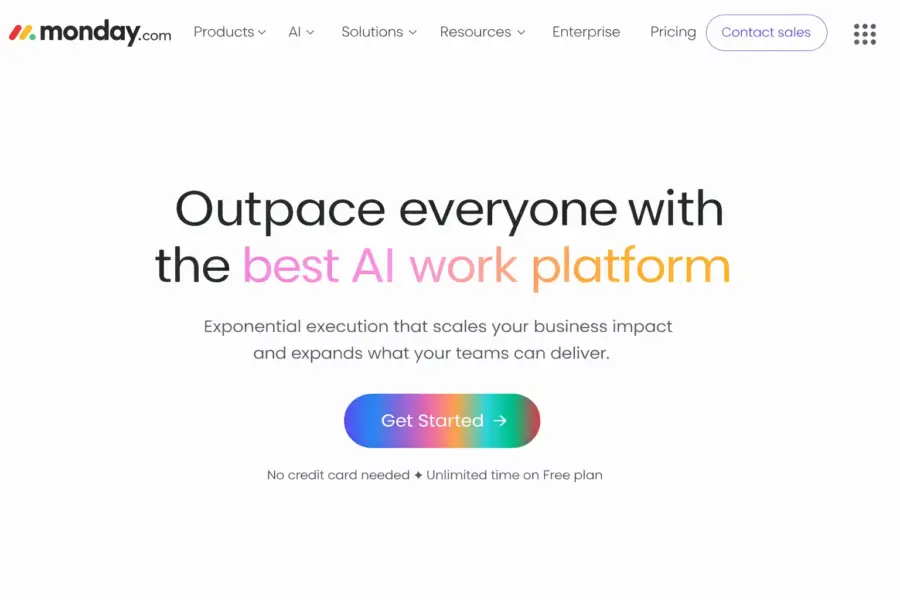
Monday.com is a cloud-based work operating system that organizes work using customizable boards where rows represent items (tasks, leads, tickets, anything) and columns hold structured data (status, person, date, numbers, formulas). Founded in Tel Aviv by Roy Mann and Eran Zinman, the platform’s signature is its visual-first design philosophy: color-coded statuses, smooth drag-and-drop, and an interface that feels more like a design tool than a spreadsheet.
That board structure is more flexible than it first appears. The same underlying system can function as a project tracker, CRM pipeline, content calendar, bug tracker, inventory list, or recruitment pipeline depending on which columns and automations you configure. This flexibility is why Monday.com competes not just with Asana and ClickUp for project management, but increasingly with Salesforce for CRM and Jira for dev workflows.
In 2023, the company launched Monday Work OS, expanding from a single PM product into a suite covering Work Management, CRM, Dev, and Service. That strategic bet matters: you can now run your project boards, sales pipeline, sprint tracking, and IT ticketing on one platform with shared data. Whether that breadth helps or creates jack-of-all-trades limitations depends on your needs. For broader context, see our complete guide to project management software.
How Much Does Monday.com Cost in 2026?
Monday.com offers five pricing tiers: a free Individual plan for 2 users, Basic at $9/month per seat, Standard at $12/seat, Pro at $16/seat, and custom-priced Enterprise. All paid plans require a 3-seat minimum. Prices reflect annual billing; monthly billing runs roughly 18% higher.
Monday.com Pricing in 2026
Individual (Free)
Up to 2 seats, 3 boards, Unlimited docs, 200+ templates
Basic
Unlimited items, 5GB storage, Unlimited boards, iOS & Android apps
Standard
Timeline & Gantt, Calendar view, Guest access, 250 automations/mo, 250 integrations/mo
Pro
Time tracking, Formula column, Chart view, Dependencies, 25K automations/mo
Enterprise
Enterprise security, Advanced reporting, Multi-level permissions, Premium support
The free Individual plan is functionally a demo. Two seats, three boards, no automations, no integrations, limited column types. Compare that to ClickUp’s free plan (unlimited tasks, unlimited members) and the gap is significant.
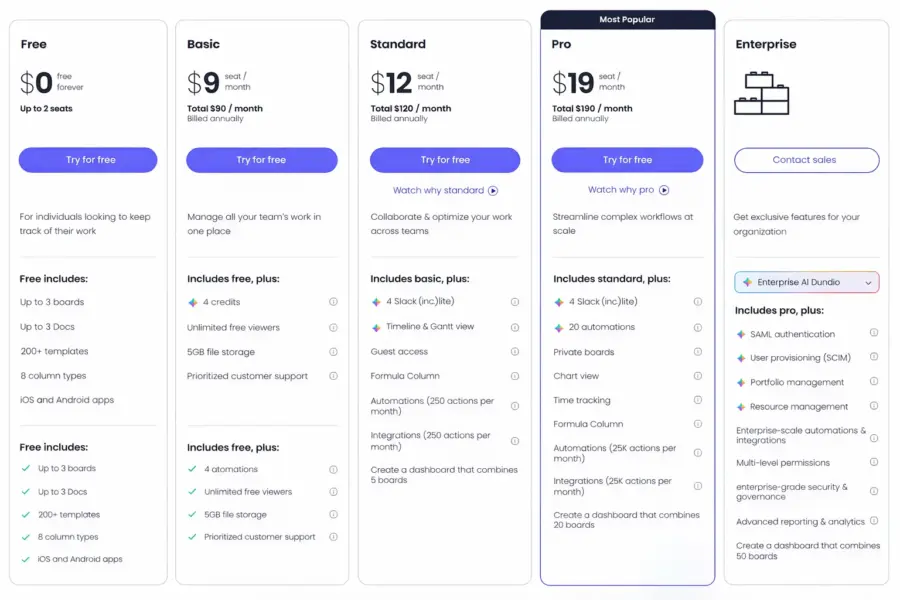
The Basic plan at $9/seat gives you unlimited boards and items but no Timeline, no automations, and no integrations. Most teams skip Basic entirely because it lacks the features that make Monday.com worth choosing.
Standard at $12/seat is the real starting point. Timeline and Gantt views, Calendar, guest access, and 250 monthly automation/integration actions. Those 250 actions sound low, but they cover most small team needs and reset monthly.
Pro at $16/seat unlocks time tracking, formula columns, Chart view, dependency columns, and a massive jump to 25,000 monthly automation actions. Agencies tracking billable hours and teams with complex project dependencies need this tier.
The pricing catch most people miss: the 3-seat minimum. A solo user needing Standard features pays $36/month, not $12. That math matters. According to a 2024 TrustRadius buyer analysis, Monday.com users rated overall value at 7.8/10, with multiple reviewers noting costs scale faster than expected as teams grow.
What Are Monday.com’s Strongest Features?
Monday.com’s competitive advantage sits in three areas: visual board design that non-technical teams actually enjoy using, a powerful no-code automation engine, and an expanding multi-product ecosystem. Here’s how each performs in practice.
The Board System: 30+ Column Types
Every Monday.com board is a structured table with items (rows) and columns (data fields). The platform offers 30+ column types: Status, Person, Date, Timeline, Numbers, Text, Files, Formula, Mirror (cross-board data references), Dependency, Rating, Location, Phone, Email, Tags, Dropdown, Checkbox, and more.
Status columns deserve special attention. They use color-coded labels (green for Done, orange for Working on it, red for Stuck) that make scanning board health instant. These colors aren’t decorative; they’re functional. A project manager can glance at a 50-item board and immediately see which items are blocked, in progress, or complete without reading a single line of text.
The Mirror column is a power feature that most new users overlook. It pulls data from one board into another without duplicating items. If your sales board tracks deal value and your delivery board tracks project status, Mirror connects them so the sales team sees delivery progress without switching boards.
Automations: 200+ No-Code Templates
Monday.com’s automation engine uses a “When [trigger], Then [action]” builder with 200+ pre-built templates. You can auto-assign items when status changes, move items between boards, send notifications, create items from templates, adjust dates, and trigger cross-board actions. The builder is genuinely no-code: non-technical users create multi-step automations in minutes without any training.
The limitation is monthly action caps. Standard gets 250 actions/month, Pro gets 25,000, Enterprise gets 250,000. A single automation that fires on every status change across a 200-item board burns through the Standard cap fast. Teams planning heavy automation usage should budget for Pro from the start.
Monday Work OS: Four Products, One Platform
This is Monday.com’s big strategic play. Instead of competing only in project management, the company now offers four products sharing the same board infrastructure:
Monday Work Management is the core PM tool reviewed here. Projects, tasks, portfolios, resource management, dashboards.
Monday CRM is a sales pipeline tool with deal tracking, email integration, activity logging, and forecasting. For teams wanting a lightweight CRM without Salesforce or HubSpot complexity, it’s a viable option. See our complete guide to CRM software for deeper CRM analysis.
Monday Dev targets engineering teams with sprint management, bug tracking, roadmapping, and GitHub/GitLab integration.
Monday Service handles IT ticketing and customer support workflows.
The advantage: if your sales team uses Monday CRM and your marketing team uses Monday Work Management, data flows between them natively. No third-party integrations for internal handoffs. The disadvantage: each product is less specialized than dedicated tools. Monday CRM doesn’t match HubSpot’s depth. Monday Dev doesn’t match Jira’s developer tooling. You trade depth for platform unity.
Views, Dashboards, and Reporting
Monday.com provides 8+ view types across its plans:
| View | Purpose | Plan Required |
|---|---|---|
| Table | Default spreadsheet-style board with colored columns | All plans |
| Kanban | Visual card-based workflow stages | All plans |
| Timeline (Gantt) | Project scheduling with date ranges | Standard+ |
| Calendar | Deadline and event management | Standard+ |
| Chart | Data visualization and reporting | Pro+ |
| Workload | Team capacity management | Pro+ |
| Map | Location-based item tracking | Standard+ |
| Form | External data collection and work intake | All plans |
Dashboards aggregate data across multiple boards into widgets: numbers, charts, progress batteries, timeline summaries, and workload breakdowns. The builder is drag-and-drop and intuitive. For platform-level visibility across departments, dashboards work well. For deep analytical reporting with calculated metrics and formula-based widgets, most teams still need external BI tools or the Enterprise tier.
Integrations and Marketplace
Monday.com connects to 200+ tools natively including Slack, Microsoft Teams, Google Workspace, Outlook, Zoom, HubSpot, Salesforce, Jira, GitHub, Shopify, Mailchimp, and Zendesk. The Monday Apps Marketplace hosts additional custom apps built by third parties.
Integration actions share the same monthly cap as automations (250 on Standard, 25,000 on Pro). Heavy integration users should factor the Pro tier into cost planning.
Is Monday.com Easy to Use?
Monday.com is one of the easiest PM tools to learn. The board metaphor is immediately understandable: rows are items, columns are data, colors tell you status. New users can set up their first board and start adding tasks within 10 minutes. The template center offers 200+ industry-specific starting points covering marketing, HR, sales, IT, construction, real estate, and more.
One interface detail worth highlighting: Monday.com’s drag-and-drop is the smoothest in the category. Rearranging items, columns, and groups feels responsive and precise. The animation feedback when dropping an item into a new status is both satisfying and functional. These micro-interactions sound trivial, but they affect daily usability more than feature lists suggest.
According to G2’s 2024 Ease of Use rankings, Monday.com scored 8.8/10, placing it second behind Asana (9.1/10) among mid-market PM tools. ClickUp scored 7.8/10. Our testing aligns: non-technical teams adopt Monday.com with minimal training. The learning curve only steepens with advanced features like cross-board automations, Mirror columns, and multi-board dashboards.
Our ease of use rating: 8.5/10.
How Reliable Is Monday.com’s Customer Support?
Monday.com provides email support and a help center to all users. Standard plan and above get priority email routing. Enterprise includes a dedicated customer success manager. There is no live chat support on any plan, which is a notable gap compared to Asana and ClickUp.
During our testing, email support averaged 8-12 hours for Standard-plan queries. Priority support on higher tiers was faster at 2-4 hours. Answers were helpful but sometimes generic; complex automation questions occasionally required follow-up clarification.
The help center is well-organized with searchable articles and video tutorials. Monday.com’s YouTube channel has hundreds of walkthroughs. A certification program and partner consultant network help with larger deployments. But the lack of real-time chat support means urgent troubleshooting relies on email or community forums.
Our customer support rating: 7.8/10.
How Does Monday.com Compare to Asana, ClickUp, and Smartsheet?
Monday.com’s competitive position is visual appeal plus platform breadth. It’s the most colorful tool in the category and the only one offering native CRM, Dev, and Service products alongside PM. Here’s the head-to-head data:
| Dimension | Monday.com | Asana | ClickUp | Smartsheet |
|---|---|---|---|---|
| Starting price (per seat/month) | $9 (3-seat min) | $10.99 | $7 | $9 |
| Free plan usefulness | Low (2 seats, 3 boards) | Moderate (10 users) | High (unlimited users) | Low (1 user) |
| Native time tracking | Pro plan ($16/seat) | No | Yes, all paid plans | No |
| Automation templates | 200+ | 70+ Rules | 100+ | Conditional logic |
| Multi-product ecosystem | Yes (CRM, Dev, Service) | No | No | No |
| Ease of use (G2) | 8.8/10 | 9.1/10 | 7.8/10 | 7.5/10 |
| Best for | Visual non-technical teams | Workflow-focused teams | Feature-hungry teams | Spreadsheet power users |
| Our rating | 8.0/10 | 8.2/10 | 8.4/10 | 7.6/10 |
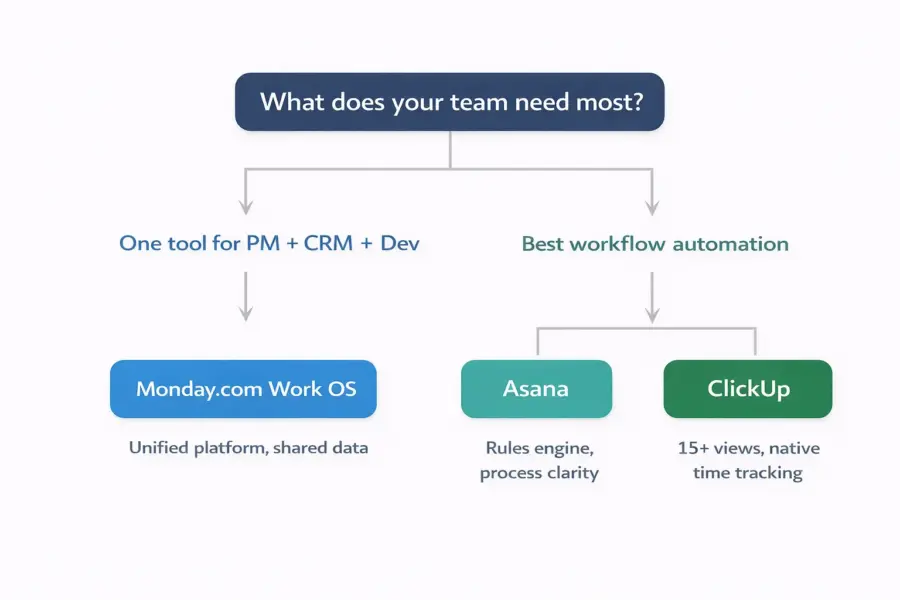
Monday.com’s strongest angle is visual appeal combined with platform breadth. If you want PM, CRM, and dev tools under one roof with a colorful, approachable interface, Monday is the natural choice. If workflow rigor matters most, Asana wins. If raw feature depth at the lowest price matters, ClickUp wins.
For detailed matchups, see our Monday.com vs Asana and ClickUp vs Monday.com comparisons.
Who Is Monday.com Best For? (And Who Should Skip It)
Monday.com is the strongest choice for non-technical teams of 10-200 people who value visual design and want one platform for PM with the option to expand into CRM and dev later. It’s the wrong choice for solo users, budget-constrained small teams, and anyone needing deep project scheduling or advanced analytics.
Monday.com Excels For
Marketing and creative teams managing campaigns, content calendars, and asset production. Monday’s visual boards, color-coded statuses, and file columns make tracking creative work from brief to delivery intuitive and fast. Automation handles approval routing and deadline notifications without manual chasing.
SMBs (10-200 people) wanting a single operational platform. If you’re tired of juggling separate tools for projects, CRM, and support tickets, Monday’s Work OS suite lets you consolidate. Data stays connected, the interface stays consistent, and one vendor manages the whole stack.
Agencies managing multiple client accounts. Monday’s board structure maps cleanly to client-based organization. Pro plan time tracking enables billable hour reporting. Guest access on Standard lets clients view progress without full seat licenses. See best PM tools for small teams for more team-size recommendations.
Teams that care about daily tool enjoyment. This sounds soft, but adoption depends on whether people willingly open the tool each morning. Monday.com’s interface is the most visually appealing in the category, and that drives the daily habit loop that makes PM tools actually work.
Monday.com Is NOT Right For
Solo users and teams of 1-2. The 3-seat minimum means a solo consultant on Standard pays $36/month for features ClickUp offers at $7/month. The math doesn’t work until you have at least 3 team members.
Teams with complex project dependencies. Monday supports basic dependencies on the Pro plan only. Complex multi-path critical chains, resource-leveled scheduling, and advanced Gantt logic aren’t here. Smartsheet or Microsoft Project handle complex scheduling better.
Organizations needing deep analytics without Enterprise pricing. Monday’s dashboards are solid for visual summaries but lack calculated metrics, cross-board formulas, and BI-level analysis. Advanced reporting requires Enterprise or external tools like Power BI.
Engineering teams running complex sprints. Monday Dev is improving but doesn’t match Jira’s depth for issue tracking, CI/CD pipeline integration, or developer-specific analytics. Cross-functional teams with some dev work can make it work; pure engineering teams should look at Jira directly. If you’re considering alternatives, explore the top Monday.com alternatives.
Is Monday.com Worth It? Our 2026 Verdict
Monday.com does something unusual in project management: it makes the daily experience of tracking work visually enjoyable. The colorful boards, smooth interactions, and intuitive layout turn what’s typically a chore into something teams willingly engage with every morning. That’s not a trivial advantage. The best PM tool is the one your team actually uses, and Monday.com has one of the highest daily adoption rates in the industry.
The Work OS expansion into CRM, Dev, and Service is ambitious and still maturing. It’s a genuine advantage for SMBs wanting one vendor and one interface for multiple operational needs. It’s a limitation for teams needing specialist-grade depth in any single product area.
We rate Monday.com 8.0 out of 10. Strong ease of use (8.5) and solid features (8.2) are offset by value concerns (7.0) driven by the 3-seat minimum, feature gating behind higher tiers, and automation caps that push teams to Pro faster than expected. As SaaS analyst Jason Lemkin noted at SaaStr 2024: “Monday.com has executed the platform expansion playbook better than almost any mid-market SaaS company, but per-seat pricing at scale remains their biggest churn driver.”
The 14-day free trial is the best way to evaluate whether Monday’s visual approach fits your team’s working style. Start with Standard ($12/seat) to get the features that actually differentiate Monday from simpler alternatives.
Try Monday.com Free Last updated: April 18, 2026Frequently Asked Questions
Is Monday.com free to use?
Monday.com has a free Individual plan limited to 2 seats and 3 boards with no automations, integrations, or Timeline views. It’s suitable for personal task tracking but too restrictive for any real team use. Most teams need the Standard plan at $12/month per seat to access Gantt views, automations, and integrations.
Is Monday.com good for small teams in 2026?
Monday.com works well for small teams of 5-20 people, especially non-technical teams that value a visual, intuitive interface. The Standard plan at $12/seat provides solid features. The 3-seat minimum on paid plans means very small teams of 1-2 people pay for unused seats. For teams under 3, ClickUp’s free plan is a more cost-effective starting point.
How does Monday.com compare to Asana?
Monday.com offers more visual flexibility, a broader product ecosystem (CRM, Dev, Service), and 200+ automation templates. Asana provides deeper workflow automation with its Rules engine, faster onboarding, and stronger enterprise support. Monday starts at $9/seat versus Asana’s $10.99, but requires a 3-seat minimum. Choose Monday for visual appeal; Asana for workflow discipline.
Does Monday.com have time tracking?
Yes, but only on the Pro plan at $16/month per seat. You can start/stop timers, log time manually, and view time reports by item or person. For teams needing time tracking on a lower budget, ClickUp includes it on all paid plans starting at $7/month per user without any tier restriction.
What is Monday Work OS?
Monday Work OS is the company’s platform strategy extending beyond project management into four products: Work Management (PM), CRM (sales pipeline), Dev (software development), and Service (IT/support ticketing). All products share the same board-based interface and data infrastructure, enabling cross-department workflows without third-party integration.
How many automations does Monday.com allow per month?
Automation limits depend on your plan tier. Standard includes 250 actions per month, Pro includes 25,000, and Enterprise includes 250,000. Each trigger-action pair counts as one action when it fires. Small teams with a few automations find 250 workable. Teams running 10+ active automations across multiple boards typically need Pro’s 25,000 monthly allowance.
Can Monday.com handle agile software development?
Monday Dev supports sprint planning, Kanban boards, bug tracking, retrospectives, and connects to GitHub and GitLab. Sprint velocity tracking and burndown charts are available. For basic agile needs alongside cross-functional PM, it works well. Teams requiring advanced DevOps integrations, detailed commit tracking, and CI/CD pipeline management will find Jira more capable.
Is Monday.com secure enough for enterprise use?
Yes. Monday.com holds SOC 2 Type II and ISO 27001 certifications, supports SAML-based SSO, provides two-factor authentication, and encrypts data at rest and in transit. Enterprise plans add audit logs, session management, HIPAA compliance options, and advanced permission controls meeting most enterprise procurement security requirements.
Related Reviews
- ClickUp Review 2026
- Asana Review 2026
- Notion Review 2026
- Basecamp Review 2026
- Complete Guide to Project Management Software
- Monday.com vs Asana 2026
- Best Free Project Management Tools
Monday.com is the PM tool for visual thinkers. It turns project tracking into something teams actually enjoy using, and the expanding Work OS ecosystem lets you add CRM, dev tracking, and service management without switching platforms. Pricing climbs fast at scale, and power users may hit depth limitations. But for marketing teams, agencies, and SMBs that want a good-looking, flexible work platform, Monday.com delivers.