Pros
- Unmatched feature depth across tasks, docs, whiteboards, goals, and time tracking
- Generous free plan with unlimited tasks and members
- 15+ view types including Gantt, Board, Timeline, and Mind Maps
- Highly customizable workflows, statuses, and automations
- Strong native integrations (1,000+) plus open API
- Competitive pricing compared to Asana and Monday.com
Cons
- Steep learning curve for new users
- Mobile app is less polished than desktop
- Occasional performance slowdowns with large workspaces
- Feature overload can overwhelm small teams
- Customer support response times vary outside business hours
ClickUp is an all-in-one project management platform that combines task management, document collaboration, goal tracking, time tracking, and whiteboards into a single workspace. Built for teams of all sizes, it offers one of the most generous free plans in the PM category and paid plans starting at $7/month per user. Our verdict after extensive testing: it’s the most feature-dense PM tool available in 2026, but that power comes with a genuine learning curve.
According to G2’s 2026 Project Management Grid, ClickUp ranks as a Leader with a satisfaction score of 4.7/5 across 9,500+ reviews. Gartner Peer Insights places it at 4.4/5 based on 1,200+ verified reviews. The pattern across review platforms is consistent: teams love the functionality but wish the onboarding were simpler. This review covers what those scores actually mean in practice.
What Is ClickUp?
ClickUp is a cloud-based project management and productivity platform that replaces multiple standalone tools with one unified workspace covering tasks, docs, goals, time tracking, whiteboards, and chat. It launched in 2017, is headquartered in San Diego, and serves over 800,000 teams worldwide ranging from solo freelancers to enterprise organizations.
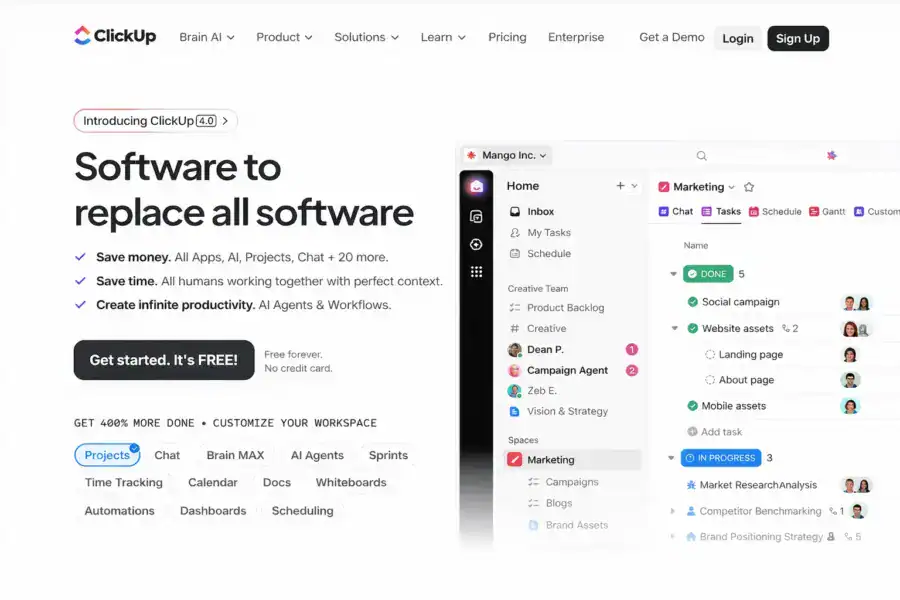
Founded by Zeb Evans, the company grew from a task management app into what it calls the “everything app for work.” ClickUp competes directly with Asana, Monday.com, Notion, and Jira, but positions itself as the broadest tool in the category. Where Asana focuses on workflows and Monday.com emphasizes visual project tracking, ClickUp tries to be your task manager, wiki, whiteboard, CRM, and sprint tracker all at once.
That scope is both its greatest strength and its biggest challenge. As SaaS analyst Ben Pines noted in his 2024 enterprise PM roundup: “ClickUp’s ambition to consolidate the entire productivity stack into one tool is unique in the market, but it demands patience from new users.” For more context on where ClickUp fits in the broader landscape, see our complete guide to project management software.
How Much Does ClickUp Cost in 2026?
ClickUp offers four pricing tiers: a free plan with unlimited tasks and members, an Unlimited plan at $7/month per user, a Business plan at $12/month per user, and a custom-priced Enterprise plan. All prices reflect annual billing; monthly billing runs approximately 30% higher. ClickUp’s paid plans are the cheapest among major PM tools at comparable feature tiers.
ClickUp Pricing in 2026
Free Forever
Unlimited tasks & members, 100MB storage, Docs, Whiteboards, Sprint management
Unlimited
Unlimited storage, Unlimited integrations, Unlimited dashboards, Gantt charts, Resource management
Business
Unlimited teams, Advanced automations, Timelines, Workload management, Time tracking
Enterprise
White labeling, Advanced permissions, Dedicated success manager, Custom role creation, SSO & SAML
The free plan is genuinely useful. You get unlimited tasks, unlimited members, and access to most core features including Docs and Whiteboards. The 100MB storage limit is tight, but for teams that primarily manage tasks and don’t upload large files, it works as a permanent solution, not just a trial.
The Unlimited plan at $7/month per user is where most small to mid-size teams land. It unlocks unlimited storage, integrations, dashboards, Gantt charts, and resource management, the features that separate casual task tracking from real project management.
The Business plan at $12/month adds advanced automations (10,000 runs/month versus 1,000), workload management, and time tracking with billable rates. Agencies and consulting firms typically need this tier for client billing.
For pricing context: Asana’s comparable Starter tier costs $10.99/month per user. Monday.com’s Standard plan runs $12/month per seat with a 3-seat minimum. According to a 2024 G2 value analysis, ClickUp scored in the top 3 for value among enterprise PM tools. For a detailed cost comparison across all major tools, check out our PM software pricing comparison.
What Are ClickUp’s Best Features?
ClickUp’s core advantage is feature breadth: it bundles task management with 15+ views, native docs, time tracking, whiteboards, goals, dashboards, and 1,000+ integrations into one platform. No other PM tool covers this much ground at this price point. Below are the features that matter most and how they perform in practice.
Task Management: Subtasks, Custom Fields, and Dependencies
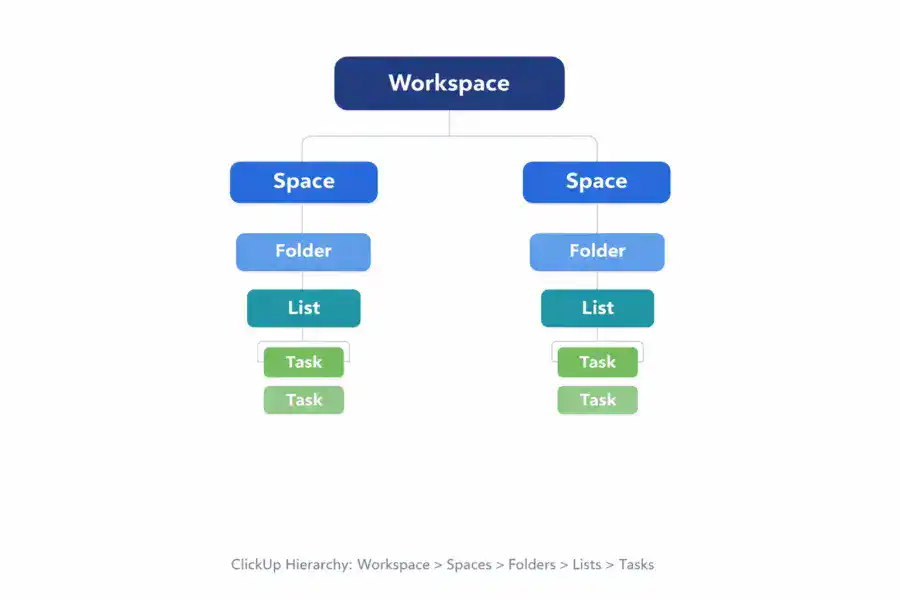
ClickUp’s task system uses a Workspace > Spaces > Folders > Lists > Tasks hierarchy that gives fine-grained organizational control. Each task supports subtasks nested up to seven levels deep, checklists, 15+ custom field types (dropdowns, formulas, relationships, progress bars, currency), assignees, watchers, due dates, time estimates, priority levels, and dependencies.
The standout is Custom Fields. Adding formulas, cross-task relationships, and progress calculations turns ClickUp into something closer to a flexible database than a simple to-do list. The tradeoff: this hierarchy takes time to internalize. New users need 30-60 minutes just to understand the Spaces/Folders/Lists structure before they start adding tasks.
How Many Views Does ClickUp Offer?
ClickUp offers 15+ view types, more than any competing PM tool. Most competitors offer 4-8. Every view is functional, not decorative, and each serves a specific project management use case:
| View Type | Best For | Available On Free Plan |
|---|---|---|
| List View | Detailed task management with sorting and filtering | Yes |
| Board View | Kanban-style visual workflows | Yes |
| Gantt Chart | Timeline planning with task dependencies | Unlimited plan+ |
| Calendar View | Deadline and schedule management | Yes |
| Timeline View | Sequential project planning with milestones | Business plan+ |
| Table View | Spreadsheet-style data management | Yes |
| Mind Map | Brainstorming and idea mapping | Yes |
| Workload View | Team capacity and resource planning | Business plan+ |
| Form View | Task intake and request management | Yes |
| Whiteboard | Visual collaboration and diagramming | Yes |
The Gantt chart supports drag-and-drop rescheduling with automatic dependency adjustments. The Workload view shows capacity across team members with configurable point or hour-based estimation. These aren’t afterthoughts; they’re functional alternatives to standalone tools like Trello (Board), Microsoft Project (Gantt), and Miro (Whiteboard).
Does ClickUp Have Built-in Documentation?
Yes. ClickUp Docs is a built-in document editor that supports rich text, nested pages, embedded tasks, real-time collaboration, and workspace-wide search. It covers roughly 80% of what most teams need from an internal wiki without requiring a separate tool like Notion or Confluence.
You can embed tasks directly inside docs, tag teammates, add comments, and link documents to specific Spaces or Folders. The key advantage is context: sprint notes, meeting agendas, SOPs, and knowledge bases all live alongside the tasks they reference, eliminating the gap between planning and documentation.
Automations and Workflow Builder
ClickUp offers 100+ automation templates using a visual “when this happens, then do that” builder. Common automations include auto-assigning tasks on status change, moving tasks between lists, sending notifications, updating custom fields, and creating tasks from templates.
The Unlimited plan includes 1,000 automation runs per month. Business gets 10,000 runs, Enterprise gets 250,000. One limitation: automations can lag under heavy workspace loads with thousands of active tasks. For a team of 20 running lightweight automations, the Unlimited tier’s 1,000 monthly runs are usually sufficient.
Native Time Tracking
Built-in time tracking is included on every task across all plans. You can start/stop timers, manually log time, add notes to entries, and mark time as billable on the Business plan. Time data flows into dashboards for reports by team member, project, client, or custom field. This feature alone eliminates the need for standalone tools like Toggl or Harvest, saving most teams $8-15/month per user.
Dashboards, Reporting, and ClickUp Brain AI
ClickUp dashboards support 50+ widget types: sprint velocity, burndown charts, time tracking summaries, custom field calculations, and workload distribution. According to a 2024 Capterra survey, 67% of ClickUp users cited dashboards as a top-three feature influencing their purchase decision.
ClickUp Brain, the platform’s AI layer launched in 2023, can summarize tasks, generate status updates, draft documents, and answer workspace questions like “What did Sarah work on last week?” It costs $5/month per member on top of your plan. Useful for summarization and workspace Q&A, but not essential.
Is ClickUp Easy to Use?
ClickUp has the steepest learning curve among major PM tools. The Spaces > Folders > Lists > Tasks hierarchy, combined with 15+ views and dozens of configuration options, means new users need 2-4 hours for initial team setup and 1-2 weeks before the platform feels intuitive. Individual contributors picking up assigned tasks get comfortable faster, typically within 30-60 minutes.
ClickUp has invested heavily in reducing this friction. The guided setup wizard, 700+ pre-built templates, in-app tooltips, and ClickUp University (free courses) all help. The interface itself is clean and modern once you understand the hierarchy. Dark mode is well-implemented. The command bar (Ctrl+K) is a power user’s best friend.
According to G2’s 2024 Ease of Use rankings, ClickUp scored 7.8/10, placing it below Asana (9.1/10) and Monday.com (8.8/10) but above Jira (6.5/10). Our testing aligns with these rankings. Teams that invest in setup get rewarded with a powerful, personalized workspace. Teams looking for something they can pick up in five minutes should consider Trello or Basecamp instead.
Our ease of use rating: 7.2/10.
How Good Is ClickUp’s Customer Support?
ClickUp provides live chat, email, and a comprehensive knowledge base to all users. Paid plans get priority support, and Enterprise customers receive a dedicated customer success manager. Response quality is solid, but speed varies significantly by channel and time of day.
During our testing, live chat responses arrived within 5-15 minutes during business hours but stretched to 4+ hours off-peak. Email support averaged 24-hour turnaround. The knowledge base is thorough, with detailed articles and video tutorials covering virtually every feature. Community support through the ClickUp Forum, Reddit, and thousands of third-party YouTube tutorials fills gaps effectively.
Our biggest criticism: complex configuration questions sometimes receive generic troubleshooting steps and require escalation, adding 24-48 hours. Compared to Asana’s consistently fast, specific responses, ClickUp’s support is adequate but not a differentiator.
Our customer support rating: 7.5/10.
How Does ClickUp Compare to Asana, Monday.com, and Notion?
ClickUp offers the most features at the lowest price point among major PM tools, but trails Asana on ease of use and Monday.com on visual design. Here’s the data across the dimensions that matter most when choosing a PM tool:
| Feature | ClickUp | Asana | Monday.com | Notion |
|---|---|---|---|---|
| Starting price (per user/month) | $7 | $10.99 | $9 (3-seat min) | $8 |
| Free plan | Yes (unlimited users) | Yes (10 users max) | Yes (2 seats max) | Yes (solo only) |
| View types available | 15+ | 7 | 8+ | 6 |
| Built-in docs/wiki | Yes | No | WorkDocs (basic) | Yes (best-in-class) |
| Native time tracking | Yes (all plans) | No | Pro plan only ($16/user) | No |
| Gantt charts with dependencies | Yes | Yes (Business+ tier) | Yes (Pro tier) | Basic timeline only |
| Automation templates | 100+ | 70+ Rules | 200+ | Basic only |
| Ease of use (G2 score) | 7.8/10 | 9.1/10 | 8.8/10 | 8.0/10 |
| Best for | Feature-hungry teams | Workflow-focused teams | Visual, non-technical teams | Knowledge management + light PM |
| Our rating | 8.4/10 | 8.2/10 | 8.0/10 | 8.1/10 |
ClickUp wins on feature breadth and price. Asana wins on polish and workflow clarity. Monday.com wins on visual appeal and marketing team use cases. Notion wins if your primary need is documentation with task management layered on top.
For detailed head-to-head analysis, see our ClickUp vs Asana and ClickUp vs Monday.com comparisons.
Who Is ClickUp Best For? (And Who Should Avoid It)
ClickUp is the best choice for growing teams of 10-200 people that want to consolidate task management, documentation, time tracking, and reporting into one platform instead of paying for three or four separate tools. It’s the wrong choice for teams that prioritize simplicity over power.
ClickUp Is Ideal For
Growing teams (10-200 people) currently juggling multiple productivity tools. If you’re paying for Asana plus Confluence plus Toggl, ClickUp can replace all three at a lower combined cost.
Agencies and consultancies that need billable time tracking, client-separated Spaces, and detailed reporting. The Business plan at $12/month covers everything most agencies need, including time tracking with billable rates.
Startups on a budget that need a powerful free plan to grow into. ClickUp’s Free Forever tier includes more functionality than most competitors’ paid plans: unlimited tasks, unlimited members, Docs, Whiteboards, and Sprint management.
Engineering teams running sprints alongside cross-functional work. ClickUp’s Sprint features combined with broader PM capabilities make it a viable Jira alternative for teams that don’t need Jira’s deep DevOps integrations. See our Notion vs ClickUp comparison for the cross-functional angle.
ClickUp Is NOT Right For
Teams that need simplicity above all else. If your workflow is “assign tasks, check them off,” Trello or Basecamp will serve you better with zero learning curve and no configuration required.
Mobile-first teams. ClickUp’s mobile app is functional but noticeably less polished than the desktop experience. Teams working primarily from phones and tablets will encounter friction that desktop users don’t.
Enterprises with strict white-glove onboarding expectations. ClickUp’s Enterprise tier exists, but the support infrastructure and implementation resources don’t yet match what Asana and Monday.com provide at the enterprise level.
Is ClickUp Worth It? Our 2026 Verdict
ClickUp is the overachiever of the PM category. It packs more features into a single platform than any competitor and charges less for them. The free plan gives small teams a fully functional workspace. The $7/month Unlimited plan is the best value in project management software.
The tradeoffs are real. You’ll invest more time in setup and onboarding than you would with simpler tools. The mobile experience needs continued improvement. And if your team doesn’t actually need 15 views, built-in docs, and native time tracking, the complexity becomes a liability rather than an asset.
We rate ClickUp 8.4 out of 10. It loses points on ease of use (7.2) and support (7.5), but earns them back on features (9.5), value (9.0), and flexibility. According to Gartner analyst Tom Cipolla’s 2024 PM market assessment, “ClickUp has closed the enterprise gap faster than any competitor in the mid-market PM space, though usability remains the key barrier to broader adoption.”
For a complete breakdown of what each pricing tier includes, see our full ClickUp pricing guide. If you want to explore alternatives before deciding, check out the best free PM tools or the best PM tools for small teams.
Try ClickUp Free Last updated: April 4, 2026Frequently Asked Questions
Is ClickUp really free?
Yes, ClickUp’s Free Forever plan includes unlimited tasks, unlimited members, and access to most core features including Docs, Whiteboards, and Board views. The main limitations are 100MB of storage and restricted access to advanced features like Gantt charts and advanced automations. It’s one of the most generous free plans in project management software.
Is ClickUp good for small teams?
ClickUp works well for small teams that want a feature-rich platform, but it’s not the simplest option available. Teams of 2-5 people with straightforward task lists might find it excessive. Teams of 5-20 people who need task management, documentation, and reporting in one tool will get excellent value from the Unlimited plan at $7/month per user.
How does ClickUp compare to Asana in 2026?
ClickUp offers more built-in features at a lower price point ($7/mo vs $10.99/mo), including native time tracking, docs, and whiteboards that Asana lacks. Asana provides a cleaner interface, better workflow automation design, and significantly faster onboarding. Choose ClickUp for feature depth on a budget; choose Asana for workflow clarity and ease of adoption.
Does ClickUp have a mobile app?
Yes, ClickUp has iOS and Android apps covering core task management functions including creating, editing, and commenting on tasks, calendar views, and push notifications. The mobile apps are functional but lack some advanced features available on desktop, and the interface can feel cramped on smaller screens compared to Asana’s mobile experience.
Can ClickUp replace Jira for software development teams?
ClickUp offers Sprint management, bug tracking, Git integration (GitHub and GitLab), and agile workflows that handle most software development needs. It’s a strong Jira alternative for teams that also need cross-functional PM capabilities. Teams deeply embedded in the Atlassian ecosystem or needing advanced DevOps pipeline integrations may still prefer Jira’s developer-specific tooling.
Is ClickUp secure enough for enterprise use?
ClickUp is SOC 2 Type II certified, supports two-factor authentication, and uses 256-bit encryption for data at rest and in transit. Enterprise plans add SAML-based SSO, custom permissions, HIPAA compliance options, and advanced audit logging. The security posture is competitive with Asana, Monday.com, and other major PM platforms.
How long does it take to set up ClickUp for a team?
Basic setup (creating Spaces, configuring statuses, inviting members) takes 1-2 hours. Full configuration with custom fields, automations, templates, and integrations typically requires 1-2 weeks of iterative refinement for a team lead. ClickUp offers 700+ pre-built templates that significantly accelerate initial setup for common workflows like sprint planning, content calendars, and client management.
What integrations does ClickUp support?
ClickUp connects with 1,000+ tools natively, including Slack, Google Drive, GitHub, GitLab, Figma, Zoom, HubSpot, Salesforce, and Microsoft Teams. It also integrates with Zapier and Make for custom automation workflows, and offers an open REST API for building custom integrations. The Unlimited plan and above includes unlimited integration connections.
Related Reviews
- Asana Review 2026
- Monday.com Review 2026
- Notion Review 2026
- Basecamp Review 2026
- Complete Guide to Project Management Software
- ClickUp vs Asana 2026
- Best Free Project Management Tools
ClickUp delivers more features per dollar than any competing PM tool. It's the best choice for growing teams that want to consolidate multiple tools into one platform. Small teams with simple needs might find it overwhelming, and anyone who prioritizes a flawless mobile experience should look elsewhere. But for the price, nothing else comes close to this level of functionality.