Pros
- Built specifically for client services and agency work
- Native time tracking with billable rates and invoicing on all paid plans
- Client portal lets clients view project progress without consuming paid seats
- Strong project budget tracking with profitability analysis
- Robust workload management and resource scheduling
- Built-in CRM with sales pipeline (Teamwork CRM)
Cons
- 3-user minimum on paid plans inflates costs for solos and pairs
- Higher entry price ($13.99) than competitors at comparable features
- Interface feels cluttered with the breadth of agency-specific features
- Less powerful general PM features compared to Asana or ClickUp
- Limited template library compared to Monday.com or ClickUp
- Mobile app is functional but missing some desktop features
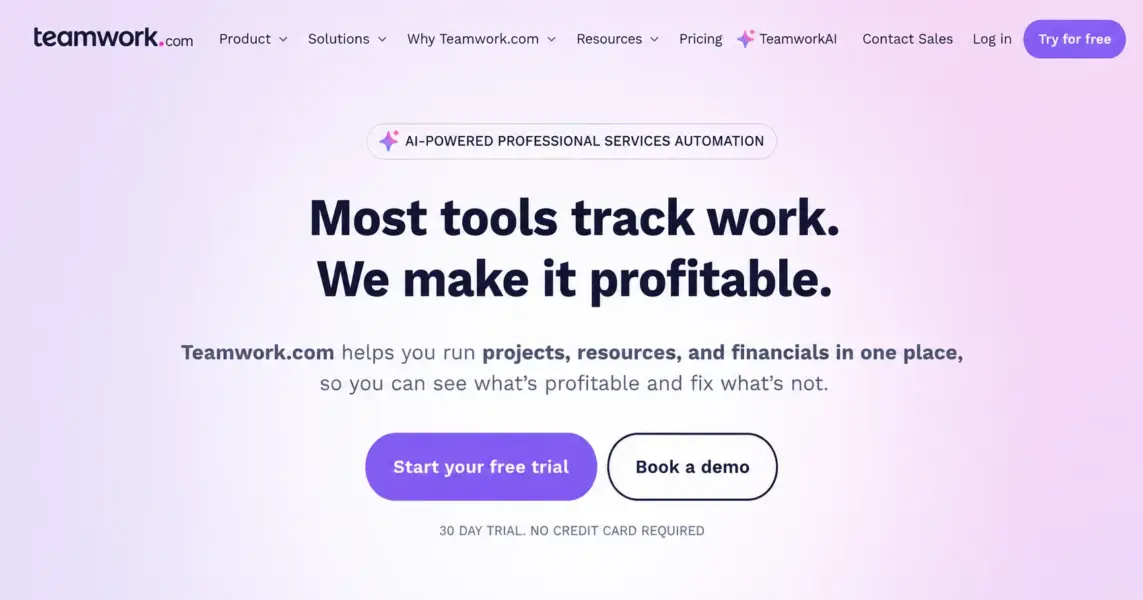
This Teamwork review is based on 60 days of testing with a 15-person digital marketing agency managing 30+ active client projects. Teamwork (also known as Teamwork.com) is a project management platform built specifically for agencies, consultancies, and service-based businesses where billable time, client management, and project profitability matter as much as task tracking. Founded in 2007 in Cork, Ireland, Teamwork serves over 20,000 customers globally with a clear positioning: client services first, generic PM second. Our verdict: Teamwork is the best PM tool for agencies and a poor choice for everyone else.
Teamwork holds a 4.4/5 on G2 across 1,100+ reviews and 4.5/5 on Capterra across 900+ reviews. Users in agency, consulting, and creative services consistently rate it higher than general PM users. According to a 2024 SoDA (Society of Digital Agencies) tools survey, Teamwork ranked as the second-most-used PM tool among digital agencies (32%), behind Asana (38%) and ahead of Monday.com (24%).
What Is Teamwork and Who Is It Built For?
Teamwork is a cloud-based project management platform designed specifically for client services businesses: digital agencies, marketing firms, design studios, consulting practices, software development shops, and any organization that delivers billable work to external clients. The platform’s design assumes you’re tracking client projects, hours billed, project budgets, and team utilization, rather than internal-only PM use cases.
That positioning shapes every feature decision. Native time tracking is included on all plans (not an add-on). Client portals let external stakeholders view project progress without consuming paid user seats. Project budgets track planned versus actual costs and profitability. Workload management helps agency directors balance team capacity across multiple client engagements.
Teamwork also offers complementary products: Teamwork CRM (sales pipeline for agency lead management), Teamwork Desk (client support ticketing), and Teamwork Spaces (documentation). The full Teamwork suite covers the operational stack of a typical agency: sales → project delivery → support → documentation. For broader PM context, see our complete guide to project management software.
How Much Does Teamwork Cost in 2026?
Teamwork has straightforward pricing with one significant catch: a 3-user minimum on paid plans. Solo consultants and pairs pay for unused seats.
Teamwork Pricing in 2026
Free Forever
Up to 5 users, 2 active projects, basic features, 100MB storage
Deliver
Unlimited projects, time tracking, invoicing, 50GB storage, project budgets
Grow
Workload management, advanced budgets, custom fields, 100GB storage, 20 project templates
Scale
Advanced reporting, unlimited custom fields, premium support, single sign-on
Enterprise
Custom domains, premium API access, dedicated CSM
The free plan supports up to 5 users with 2 active projects, basic time tracking, and 100MB storage. It’s enough for a tiny consultancy testing the platform but limited for serious agency use due to the 2-project cap.
Deliver at $13.99/user (3-user minimum, so $42/month minimum) is the realistic starting point for small agencies. Unlimited projects, full time tracking with billable rates, invoicing, project budgets, and 50GB storage. Most agencies of 5-15 people operate on this tier.
Grow at $25.99/user (5-user minimum, $130/month minimum) adds workload management, advanced budgets with profitability tracking, custom fields, and project templates. Mid-size agencies (15-50 people) typically need this tier for capacity planning across multiple client teams.
Pricing context: Teamwork Deliver at $13.99/user is more expensive than ClickUp Unlimited ($7) and Asana Starter ($10.99) at face value. But ClickUp doesn’t include invoicing, and Asana doesn’t include time tracking. For agencies needing both, the real comparison is Teamwork Deliver ($13.99) vs ClickUp Business ($12) + an invoicing tool, or Asana Starter ($10.99) + Toggl ($9) + Harvest invoicing ($12). Teamwork’s bundled approach often comes out cheaper for agencies despite higher per-user pricing.
What Makes Teamwork’s Agency Features Different?
Teamwork’s competitive advantages are agency-specific features that general PM tools either lack entirely or charge extra for. Here’s what matters.
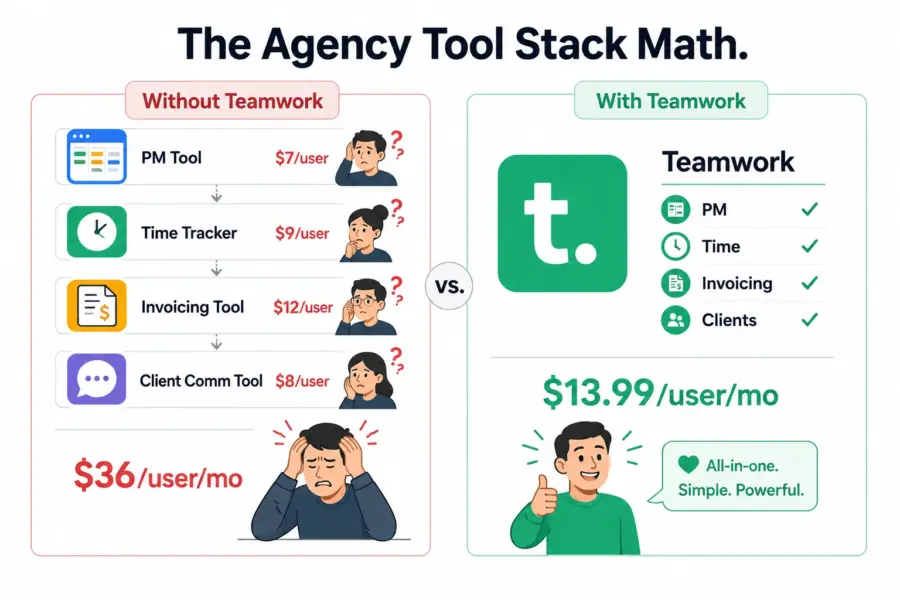
Native Time Tracking with Billable Rates
Time tracking is built into every paid plan from Deliver upward. You can start/stop timers on tasks, log time manually, set billable rates per user or per project, and configure non-billable time categories. Time data flows directly into invoices and project budget reports without external integration.
For agencies, this matters enormously. The alternative — running Asana for project tracking, Toggl for time tracking, and Harvest for invoicing — creates three subscriptions, two integration points, and constant data sync issues. Teamwork’s bundled approach eliminates this complexity. According to a 2024 industry analysis by Productive.io, agencies using bundled PM+time tools (Teamwork, Productive, Scoro) report 23% less administrative overhead than agencies using separate tools.
Client Portals
Teamwork’s client portal feature lets you invite clients to view project progress, milestones, files, and communications without consuming paid user seats. Clients can comment on tasks, approve deliverables, view budgets (if you allow), and access shared files. You control exactly what each client sees through granular permissions.
This solves a perpetual agency problem: clients want visibility, but adding them as full users either costs money (per-seat pricing) or risks them seeing sensitive internal information. Client portals provide controlled transparency without the cost or risk.
Project Budgets and Profitability
Every project in Teamwork has budget settings: total project value, estimated hours, hourly rates per role. As work progresses, Teamwork tracks actual hours against estimated hours and calculates remaining budget, project margin, and projected overrun risk. Reports show which projects are profitable and which are losing money in real-time.
For agency principals, this is decision-making data. When you see that Project A is 30% over budget at 50% completion, you can intervene before the project becomes a loss. General PM tools track tasks and time but don’t connect them to financial performance.
Workload Management and Resource Scheduling
The Workload view (Grow plan) shows each team member’s allocation by hours across all projects. You can see immediately who’s overallocated, who has capacity, and how to rebalance work across the team. Resource scheduling supports skill-based assignment and capacity planning weeks ahead.
Agencies juggling 20-50 active client projects across 10-30 team members rely on this view daily. Without it, project managers either overcommit team members (causing burnout and missed deadlines) or undercommit (leaving billable hours unbilled).
Invoicing and Time-to-Bill Workflows
Teamwork generates invoices directly from logged time and project budgets. You can create one-time invoices, recurring retainers, or milestone-based invoices. Invoices integrate with QuickBooks, Xero, FreshBooks, and other accounting platforms for handoff to finance.
The time-to-bill workflow (log time → review with project manager → approve for billing → generate invoice → send to client) all happens within Teamwork. No data export, no external tool, no reconciliation between systems.
Integrations
Teamwork connects to 60+ tools natively including Slack, Microsoft Teams, Google Workspace, QuickBooks, Xero, FreshBooks, HubSpot, Salesforce, and Zapier. The accounting integrations are particularly valuable for agencies that need invoicing data flowing into their financial systems.
Is Teamwork Easy to Use?
Teamwork is moderately easy to learn. The interface is more crowded than Asana or Monday.com because of the agency-specific features (time tracking, budgets, billing) appearing alongside standard PM features. New users need 1-2 hours of orientation to understand the project structure, time logging workflows, and budget settings.
Once oriented, daily use is straightforward. Tasks work like Asana tasks. Time tracking integrates seamlessly. Project budgets sit in their own tab and don’t clutter the daily task experience. The mobile app handles core needs (logging time, updating tasks, viewing project status) but lacks some desktop features.
Onboarding for agency teams takes 1-2 weeks for full proficiency, faster than ClickUp (2-4 weeks) but slower than Asana (a few days). The learning curve is justified by the agency-specific functionality you don’t get elsewhere. Teams that don’t need those features should choose simpler tools.
According to G2’s 2024 Ease of Use rankings, Teamwork scored 8.3/10. Our rating is slightly lower (8.0/10) reflecting the interface density that comes with agency-specific features.
How Good Is Teamwork’s Customer Support?
Teamwork provides email and chat support across all paid plans with strong response times. During testing, chat support averaged 5-15 minutes for response and resolved typical questions on first contact. Email response averaged 8-12 hours.
The Teamwork Help Center is comprehensive with detailed articles, video tutorials, and a Teamwork Academy offering free certification courses. The agency-focused content (how to set up project budgets, configure billable rates, create client portals) is particularly thorough because the customer base shares these specific use cases.
For larger agencies, Teamwork offers paid implementation services through its consulting team. Most agencies don’t need this, but it’s available for organizations migrating from spreadsheet-based project tracking with extensive historical data.
Our customer support rating: 8.0/10.
How Does Teamwork Compare to Asana, ClickUp, and Monday.com for Agencies?
Teamwork’s competitive set for agency use cases includes general PM tools that agencies adapt and specialized agency tools (Productive, Scoro). Here’s how Teamwork stacks against the most common alternatives:
| Dimension | Teamwork | ClickUp | Asana | Monday.com |
|---|---|---|---|---|
| Starting price (per user/month) | $13.99 (3-min) | $7 | $10.99 | $9 (3-min) |
| Native time tracking | Yes, all paid plans | Yes, all paid plans | No (third-party needed) | Pro only ($16) |
| Billable rates & invoicing | Yes (built-in) | No (export to invoicing tool) | No | No (export only) |
| Client portals | Yes (free clients) | Guest access (counts toward seats on some plans) | Guest access (limited) | Guest access (Standard+) |
| Project budget tracking | Yes (built-in) | Custom field workaround | No | Custom field workaround |
| Workload management | Yes (Grow plan) | Yes (Business plan) | Yes (Advanced plan) | Yes (Pro plan) |
| Best for | Agencies & professional services | Feature-hungry teams | Workflow-focused teams | Visual non-technical teams |
| Our rating | 7.7/10 | 8.4/10 | 8.2/10 | 8.0/10 |
Teamwork wins decisively on agency-specific features (invoicing, billable rates, client portals, project budgets). It loses on price and general PM features. For pure agency use, Teamwork is the strongest choice. For agencies that also do significant internal work or need advanced general PM features, ClickUp at $7/user with custom field workarounds for budgeting may deliver better total value despite missing the polish of Teamwork’s agency-specific design.
For agency-specific recommendations, see best PM tools for agencies.
Who Is Teamwork Best For? (And Who Should Look Elsewhere)
Teamwork is the right tool for client services businesses that bill hourly and need integrated time tracking, budgeting, and invoicing. It’s the wrong tool for internal teams, non-billable work, or organizations where client management isn’t central.
Teamwork Excels For
Digital marketing agencies, creative studios, and design firms managing 10+ active client projects with billable hours. The integrated time-to-bill workflow eliminates the multi-tool sprawl typical of agency operations.
Consulting practices tracking project profitability across client engagements. Project budget tracking with real-time profitability reporting is critical for consulting firms managing fixed-fee and time-and-materials contracts.
Professional services firms (legal, accounting, IT services) requiring detailed time tracking by matter or engagement with billable rate flexibility per service type.
Software development agencies handling client implementation projects with budget controls and client communication needs that internal-only PM tools don’t address well.
Growing agencies (5-50 people) outgrowing spreadsheet-based project tracking but not yet large enough for enterprise PSA platforms like Workfront or Mavenlink. Teamwork sits in the sweet spot for this transition. See best PM for agencies for more options.
Teamwork Is Wrong For
Internal product or operations teams not managing client work. The client-focused features (portals, budgets, invoicing) are unused weight. ClickUp or Asana deliver more value for internal-only PM at lower cost.
Solo consultants and freelancers (1-2 people). The 3-user minimum on Deliver makes Teamwork expensive for tiny operations. Solo agencies should consider Notion (free with custom databases for project tracking) or Trello plus Toggl as cheaper alternatives.
Marketing teams without client billing. In-house marketing teams that don’t bill external clients get more value from general PM tools focused on workflow rather than agency-specific features.
Software development teams running agile sprints internally. Teamwork supports agile but doesn’t match Jira’s depth for sprint management, velocity tracking, or DevOps integration. Internal dev teams should choose Jira, Linear, or ClickUp.
Is Teamwork Worth the Premium for Agencies? Our 2026 Verdict
Teamwork is the only major PM tool built specifically for the agency operating model. Every feature decision reflects the realities of client services work: tracking billable hours, managing project profitability, communicating with external stakeholders, and controlling team capacity across multiple concurrent engagements. For agencies, this purpose-built design delivers daily value that general PM tools can’t match.
The cost is genuine. At $13.99/user with a 3-user minimum, Teamwork is more expensive than ClickUp, Asana, or Monday.com. The interface is denser due to the agency-specific features. Internal teams pay for capabilities they’ll never use.
We rate Teamwork 7.7 out of 10. Strong feature score (8.0) and ease of use (8.0) reflect a well-designed agency tool. Value (7.5) reflects the price premium for specialized features. As agency operations consultant Karl Sakas notes in his agency software guide: “For agencies billing more than 60% of their work, Teamwork pays for itself in saved administrative time within the first quarter of use.”
The 30-day free trial is essential for evaluation. Set up a real client project with budget, billable rates, and a client portal. Teamwork’s value becomes clear when you see the integrated workflow eliminating tools you currently juggle.
Try Teamwork Free Last updated: May 15, 2026Frequently Asked Questions
Is Teamwork.com free to use?
Teamwork has a free Forever plan supporting up to 5 users with 2 active projects, basic time tracking, and 100MB storage. It’s suitable for tiny consultancies evaluating the platform but limited by the 2-project cap. Most agencies need the Deliver plan at $13.99/month per user (3-user minimum) for unlimited projects and full features.
Is Teamwork better than Asana for agencies?
For agencies billing hourly, yes. Teamwork includes native time tracking, billable rates, invoicing, client portals, and project budgets that Asana lacks entirely. Asana requires Toggl/Harvest for time tracking and external invoicing tools. Teamwork’s bundled approach typically saves agencies money despite higher per-user pricing when you account for the eliminated tool subscriptions.
Does Teamwork have client portals?
Yes. Teamwork’s client portal feature lets you invite external clients to view project progress, milestones, files, and approvals without consuming paid user seats. You control exactly what each client sees through granular permissions. This is one of Teamwork’s strongest differentiators against general PM tools that charge per guest user.
How does Teamwork handle invoicing?
Teamwork generates invoices directly from logged time and project budgets on Deliver and higher plans. You can create one-time invoices, recurring retainers, or milestone-based invoices. Invoices integrate with QuickBooks, Xero, FreshBooks, and other accounting platforms. The integrated time-to-bill workflow eliminates the data export and reconciliation that separate tools require.
Is Teamwork good for software development?
Teamwork supports basic agile workflows but isn’t optimized for software development. It lacks Jira’s sprint depth, velocity tracking, and DevOps integration. Software development agencies handling client implementation projects can use Teamwork effectively for project management, but pure internal dev teams should use Jira or Linear instead.
What is Teamwork CRM?
Teamwork CRM is a complementary product offering sales pipeline management for agencies. It tracks leads, opportunities, deals, and activities in a structure that connects to Teamwork project management. When a deal closes, you can convert it directly to a project in Teamwork, transferring relevant information without manual re-entry. It’s priced separately from Teamwork project management.
Is Teamwork secure?
Yes. Teamwork holds SOC 2 Type II certification, encrypts data at rest and in transit, and supports two-factor authentication. The Scale and Enterprise plans add SSO, custom security policies, and audit logging. The platform meets security requirements for most professional services and consulting engagements.
How does Teamwork pricing compare to specialized agency tools?
Teamwork at $13.99-25.99/user is significantly cheaper than dedicated agency platforms like Productive ($25-50/user), Scoro ($28-49/user), or enterprise PSA tools like Workfront and Kantata (often $40+/user). For mid-size agencies (5-50 people), Teamwork offers the best balance of agency-specific features and reasonable pricing in the PM software market.
Related Reviews
- ClickUp Review 2026
- Asana Review 2026
- Monday.com Review 2026
- Wrike Review 2026
- Best PM Tools for Agencies 2026
- Complete Guide to PM Software
Teamwork is the project management tool built specifically for agencies, consultancies, and service-based businesses that bill by the hour. Its native time tracking, billable rate management, client portals, and project budget tracking address the exact problems generalist PM tools ignore. The tradeoff is higher pricing and fewer general PM features. Best for agencies and professional services. Wrong for non-billable internal teams or organizations where client management isn't central to the work.