Pros
- Best-in-class onboarding and ease of use among PM tools
- Excellent Workflow Builder with Rules-based automation
- Clean interface that teams adopt within days not weeks
- Strong enterprise features including Goals, Portfolios, and Workload
- Reliable customer support with fast response times
- 300+ native integrations including Slack, Jira, and Salesforce
Cons
- No native time tracking on any plan
- Free plan limited to 10 users with basic features only
- Higher pricing than ClickUp and Monday.com at comparable tiers
- No built-in document editor or team wiki
- Reporting locked behind the $24.99 Advanced plan
- Subtasks limited to a single nesting level
This Asana review is based on hands-on testing across a 25-person marketing team over 90 days, covering every plan tier from Personal (free) to Advanced ($24.99/user). Asana is a workflow-focused project management platform designed for teams that need structured project execution without feature overload. Founded in 2008 by Facebook co-founder Dustin Moskovitz and engineer Justin Rosenstein, it now serves over 150,000 paying organizations. Our verdict: Asana is the most polished PM tool on the market, but that polish comes at a premium price and a narrower feature set than some competitors.
Asana holds a 4.5/5 rating on G2 across 10,000+ verified reviews, making it one of the highest-rated PM tools on the platform. According to Gartner Peer Insights, Asana scores 4.4/5 based on 1,800+ reviews, with users consistently praising the interface and workflow features while flagging pricing and missing native integrations. Here’s what those scores mean in daily use.
What Is Asana and How Does It Work?
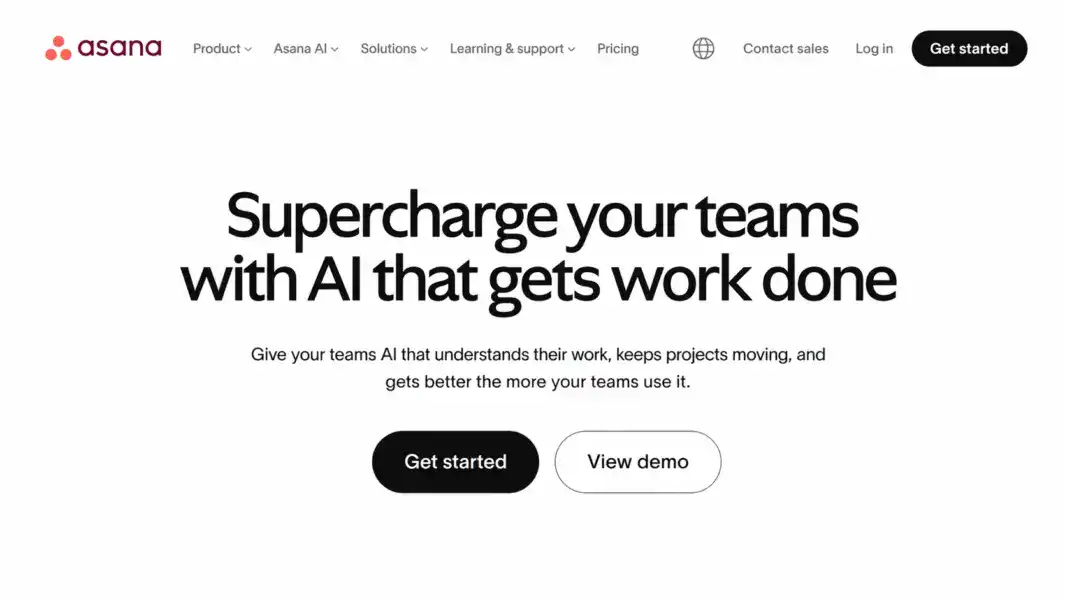
Asana is a cloud-based project management platform that helps teams organize, track, and manage work through structured projects, tasks, timelines, workflows, goals, and portfolios. Unlike ClickUp, which bundles docs, whiteboards, and time tracking into one app, Asana stays focused on one thing: coordinating who does what by when.
That focus is deliberate. Asana’s philosophy is that a PM tool should coordinate work, not try to be the place where all work happens. The result is a tool that’s cleaner, faster to adopt, and more opinionated about how projects should run. The company went public in 2020 and reports that over 80% of Fortune 100 companies use the platform.
Asana started as an internal tool at Facebook, built to solve the coordination problems that emerge when fast-growing teams try to track responsibilities across projects. Moskovitz and Rosenstein spun it out as a standalone company in 2008. For more context on where Asana fits in the PM landscape, see our complete guide to project management software.
How Much Does Asana Cost in 2026?
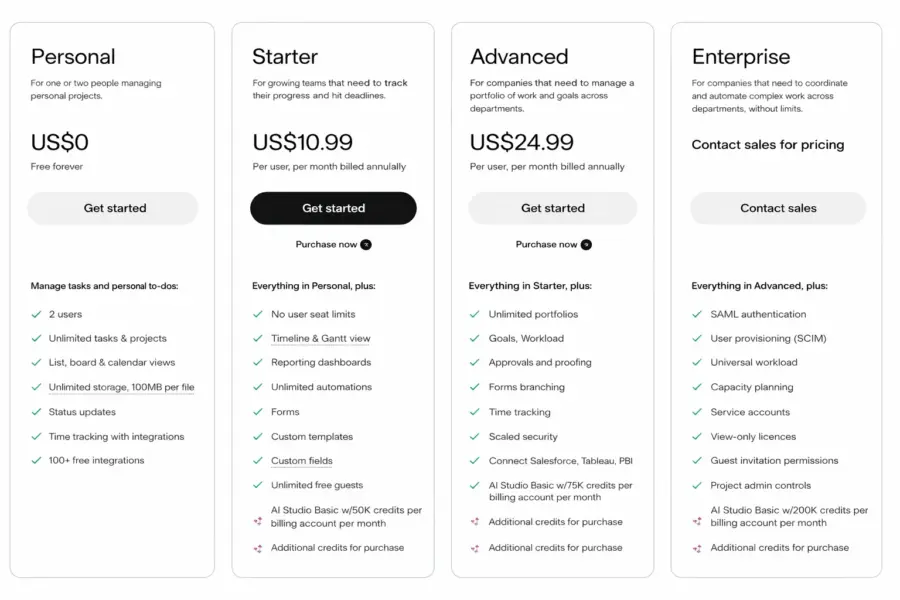
Asana offers four pricing tiers: a free Personal plan for up to 10 users, a Starter plan at $10.99/month per user, an Advanced plan at $24.99/month per user, and a custom-priced Enterprise plan. All prices reflect annual billing; monthly billing is approximately 30% higher.
Asana Pricing in 2026
Personal
Up to 10 users, Unlimited tasks & projects, List/Board/Calendar views, Basic integrations
Starter
Unlimited users, Timeline view, Workflow Builder, Forms, Rules automation, Dashboards
Advanced
Portfolios, Workload, Goals, Custom fields lock, Approvals, Advanced reporting
Enterprise
SAML SSO, Data export, Custom branding, Priority support, Admin controls
The free Personal plan works for tiny teams managing basic task lists, but it’s restrictive. No Timeline view, no Rules automation, no Forms, no dashboards. For anything beyond simple task tracking with a team under 10, you need the Starter tier.
The Starter plan at $10.99/month is where Asana becomes a serious PM tool. You get Timeline (Gantt-style) views, the Workflow Builder, Forms for work intake, and Rules-based automation. Most teams of 10-50 people land here.
The Advanced plan at $24.99/month unlocks Portfolios (multi-project tracking), Workload (capacity management), Goals (OKR tracking), and detailed reporting. Directors and VPs who need visibility across departments typically need this tier.
Pricing reality check: Asana costs more than its closest competitors. ClickUp’s comparable tier starts at $7/month per user. Monday.com’s Standard plan is $12/month per seat. According to a 2024 Gartner Peer Insights buyer survey, 23% of Asana reviewers cited pricing as their primary concern. Whether Asana’s polish justifies the premium depends on how much you value fast adoption and workflow clarity. For full pricing details, see our Asana pricing breakdown.
What Makes Asana’s Workflow Builder Stand Out?
Asana’s Workflow Builder is the single feature that most differentiates it from competitors. It lets you design structured, repeatable processes visually, mapping out every stage of recurring work with assigned owners, due date offsets, automation rules, and templates attached to each stage. Marketing teams, operations departments, and agencies consistently rank it as the primary reason they chose Asana.
You can design workflows for content production (Request > Brief > Draft > Review > Approve > Publish), product launches, employee onboarding, bug triaging, client deliverables, or any repeatable process. Each stage has a default owner, auto-triggers, and form-based intake.
Rules automation triggers actions based on events. When a task moves to “Ready for Review,” it auto-assigns to the reviewer. When a due date approaches, priority bumps automatically. Asana includes 70+ pre-built Rules templates and a custom builder for multi-condition logic.
What makes this better than generic automation in ClickUp or Monday.com is visual clarity. You see the entire workflow at a glance, identify bottleneck stages by task count, and adjust the process without breaking downstream dependencies. According to Asana’s 2024 Anatomy of Work Index, teams using structured workflow automation spend 62% less time on status update meetings compared to teams managing work manually.
What Are Asana’s Core Features?
Beyond the Workflow Builder, Asana covers project management fundamentals well, though its feature set is intentionally narrower than ClickUp’s or Monday.com’s. Here’s what you get and where the boundaries are.
Projects, Tasks, and Multi-Homing
Every piece of work in Asana lives inside a Project. Tasks support one level of subtasks, custom fields (text, number, dropdown, date, people, currency), assignees, due dates, dependencies, followers, comments, and file attachments.
Multi-homing is Asana’s underrated power feature. A single task can appear in multiple projects without duplication. If a design task belongs to both “Q3 Campaign” and “Design Team Sprint,” it exists once but shows in both. Status changes sync everywhere. This solves a real problem that plagues tools requiring tasks to live in a single container.
The one-level subtask limitation is genuine. You can create subtasks within tasks, but you can’t nest subtasks within subtasks. Teams with deeply hierarchical workflows (construction, enterprise IT, manufacturing) hit this wall. ClickUp allows seven levels of nesting; Asana offers one.
Views: Timeline, Board, List, and More
Asana offers seven view types. That’s fewer than ClickUp’s fifteen, but each view is polished and immediately functional:
| View | Purpose | Plan Required |
|---|---|---|
| List | Detailed task management with grouping and sorting | Free |
| Board (Kanban) | Visual workflow stages with drag-and-drop cards | Free |
| Calendar | Deadline visibility across the month | Free |
| Timeline (Gantt) | Project scheduling with dependencies | Starter+ |
| Overview | Project status summary and key resources | Free |
| Dashboard | Charts and metrics for project data | Starter+ |
| Workload | Team capacity across multiple projects | Advanced+ |
The Timeline view handles dependencies with clean drag-and-drop rescheduling. The Workload view on the Advanced plan gives managers a clear capacity picture across team members. Quality over quantity: seven well-built views that teams use daily beats fifteen views that sit untouched.
Portfolios and Goals
Portfolios track the health of multiple projects in one dashboard with color-coded statuses (on track, at risk, off track), progress percentages, owners, and due dates. It’s a director-level feature for anyone managing 10+ concurrent projects.
Goals connects company objectives to team key results and individual tasks, functioning as a lightweight OKR system. Progress rolls up automatically from task completion. Goals live inside Asana alongside your projects, not in a separate spreadsheet, which means alignment stays visible without manual reporting.
Integrations (and What’s Missing Natively)
Asana connects to 300+ tools including Slack, Microsoft Teams, Google Workspace, Jira, Salesforce, Adobe Creative Cloud, Figma, and Zoom. The Slack integration is particularly polished: create tasks, update statuses, and receive notifications without leaving your messaging platform.
What’s missing natively: time tracking and documentation. Most teams pair Asana with Toggl or Harvest for time tracking ($8-12/user extra) and Notion or Confluence for wikis. These integrations work, but they’re additional costs and context switches that tools like ClickUp eliminate by bundling everything.
Is Asana Easy to Use?
Asana is the easiest PM tool to adopt in the mid-to-enterprise category. A new team member can create their first project and start assigning tasks within 10-15 minutes. The terminology is straightforward (Projects, Tasks, Subtasks), the interface is consistent and predictable, and there’s no complex hierarchy to internalize before you start working.
The onboarding flow walks new users through project creation, task assignment, teammate invitations, and first workflow setup. Over 100 pre-built templates cover common use cases: content calendars, sprint planning, event management, product roadmaps, employee onboarding. The My Tasks view gives each user a personal prioritized inbox organized by due date, which reduces the “where do I start?” paralysis that plagues more complex tools.
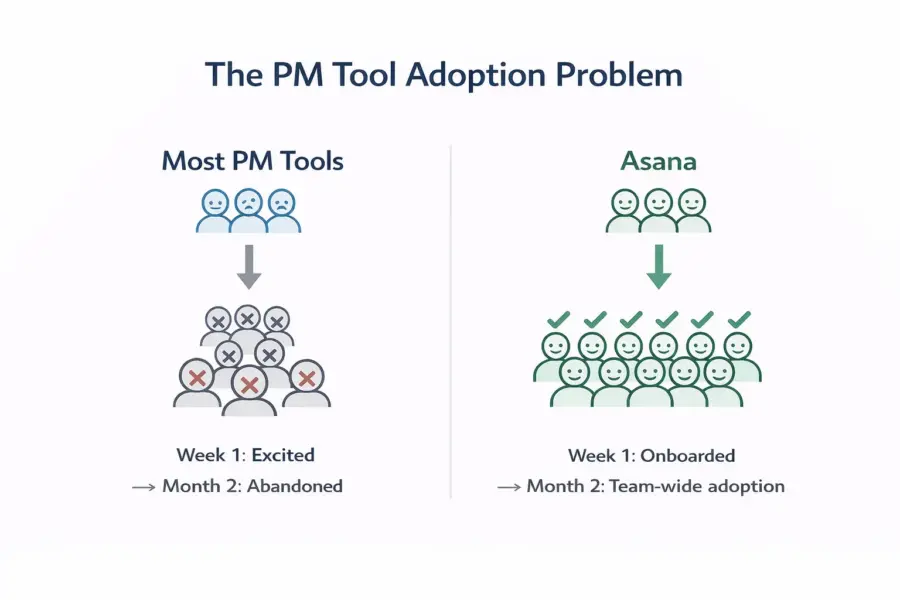
According to G2’s 2024 Ease of Use rankings, Asana scored 9.1/10, the highest among mid-market PM tools. Monday.com scored 8.8, Notion scored 8.0, and ClickUp scored 7.8. Our testing confirms: if adoption speed is your top priority, Asana wins. Every PM tool is useless if your team doesn’t actually open it. Asana solves that problem better than any competitor.
Our ease of use rating: 9.0/10.
How Responsive Is Asana’s Customer Support?
Asana provides email and chat support to Starter and Advanced plan users, with typical response times of 1-3 hours during business hours. Enterprise customers get a dedicated customer success manager, priority routing, and custom onboarding sessions. The support quality is a genuine competitive advantage.
During our testing, chat support resolved a workflow configuration question in under 20 minutes. Email support for a complex reporting query took about 6 hours. Both responses were specific to our setup, not generic troubleshooting scripts. That specificity is what separates Asana’s support from competitors who paste knowledge base links.
The Asana Guide (knowledge base) is one of the best in the PM category: well-written articles with screenshots covering every feature. Asana Academy offers free certification courses. The Asana Forum is actively moderated by staff, and the community of “Asana Champions” provides peer support.
Our customer support rating: 8.5/10.
How Does Asana Compare to ClickUp, Monday.com, and Trello?
Asana trades feature count for execution quality. It doesn’t try to do everything, but what it does, it does exceptionally well. Here’s the direct comparison on the dimensions that matter most when choosing between these four tools:
| Dimension | Asana | ClickUp | Monday.com | Trello |
|---|---|---|---|---|
| Starting price (per user/month) | $10.99 | $7 | $9 (3-seat min) | $5 |
| Free plan user limit | 10 users | Unlimited | 2 seats | Unlimited |
| Native time tracking | No (needs Toggl/Harvest) | Yes, all paid plans | Pro plan only ($16/seat) | No |
| Built-in docs or wiki | No | Yes (ClickUp Docs) | WorkDocs (basic) | No |
| Workflow automation quality | Best-in-class (Rules) | Good (100+ templates) | Very good (200+ templates) | Basic (Butler) |
| Onboarding speed | 10-15 minutes | 2-4 hours | 15-30 minutes | 5 minutes |
| Enterprise readiness | Strong (Portfolios, Goals, SSO) | Growing | Strong | Weak |
| Best for | Workflow-focused teams | Feature-hungry teams | Visual non-technical teams | Simple task boards |
| Our rating | 8.2/10 | 8.4/10 | 8.0/10 | 7.5/10 |
Asana wins on workflow automation, onboarding speed, and support quality. It loses on price, feature breadth, and missing native tools (time tracking, docs). For detailed head-to-head breakdowns, see our ClickUp vs Asana and Monday.com vs Asana comparisons.
Who Is Asana Best For? (And Who Should Look Elsewhere)
Asana is the strongest choice for mid-size teams (20-500 people) in marketing, operations, and cross-functional roles that prioritize workflow clarity and fast team adoption over raw feature count. It’s the wrong choice for budget-conscious teams, solo developers, and organizations that need time tracking without third-party add-ons.
Asana Excels For
Marketing teams managing content calendars, campaign launches, and creative workflows. The Workflow Builder was practically designed for repeatable marketing processes: briefs flow from request to draft to review to publish with clear ownership at every stage.
Operations teams coordinating cross-department processes. Multi-homing means a single task lives in both the IT project and the Facilities project without duplication. Status updates sync everywhere, eliminating the “which spreadsheet is current?” problem.
Organizations (50-5,000 people) that prioritize adoption. If you’ve been burned by PM tools nobody used after the first month, Asana’s onboarding advantage is real. A 2024 Forrester study commissioned by Asana found organizations using the platform saw a 42% reduction in meetings needed for status updates.
Remote and hybrid teams needing async clarity. Project status updates, My Tasks views, and threaded comments reduce constant Slack check-ins. For more team-size-specific picks, see best PM tools for small teams.
Asana Is NOT Right For
Teams that need an all-in-one workspace. No docs, no time tracking, no whiteboards. If consolidating tools matters, ClickUp or Notion are better fits.
Budget-conscious small teams. A 15-person team on Starter pays $165/month. The same team on ClickUp Unlimited pays $105/month with more features included. The gap widens at higher tiers.
Software engineering teams running complex sprints. Asana handles basic agile workflows but lacks Git integration depth, CI/CD hooks, and sprint velocity analytics that Jira provides.
Teams needing deep subtask hierarchies. One level of subtasks. Period. If your workflows require three or four nesting levels, this is a structural limitation. If alternatives interest you, explore the top Asana alternatives.
Is Asana Worth the Premium Price? Our 2026 Verdict
Asana is the PM tool that gets out of your way and lets you work. The interface is clean. The workflows are logical. Onboarding is the fastest in the category. When your team has abandoned PM tools for being confusing and time-consuming, Asana is the antidote.
The tradeoffs are worth stating clearly. You’re paying 57% more per user than ClickUp for a narrower feature set. You need separate tools for time tracking and documentation. The free plan’s 10-user cap pushes growing teams to paid tiers faster than competitors. And advanced reporting doesn’t unlock until the $24.99 Advanced tier.
We rate Asana 8.2 out of 10. It earns its highest marks on ease of use (9.0) and support (8.5), reflecting a tool that’s built for real-world team adoption. It loses ground on value (7.0) and features (7.8), reflecting the premium pricing and narrower scope. As product management consultant Lenny Rachitsky noted in his 2024 PM tools survey: “Asana remains the default choice for non-engineering teams that need structure without complexity.”
The free plan is enough to evaluate whether Asana’s approach fits your team. Start there, and upgrade when you hit the 10-user limit or need Timeline and workflow automation.
Try Asana Free Last updated: April 18, 2026Frequently Asked Questions
Is Asana free to use?
Asana’s Personal plan is free for up to 10 users with unlimited tasks and projects. It includes List, Board, and Calendar views plus basic integrations. You won’t get Timeline views, Workflow Builder, Rules automation, or Forms on the free plan. Most teams outgrow it once they need structured workflows or exceed the 10-member limit.
Is Asana good for small teams in 2026?
Asana works well for small teams that value simplicity and clear workflows. The free plan supports up to 10 users with solid core features. The Starter plan at $10.99/month per user adds Timeline, Rules, and Forms. For teams of 5-20, it’s an excellent choice if you prioritize ease of adoption over having the lowest possible price.
How does Asana compare to Monday.com?
Asana focuses on structured workflows and process enforcement, while Monday.com emphasizes visual flexibility and broader product coverage (CRM, Dev, Service). Asana’s Workflow Builder and Rules are more refined for repeatable processes. Monday.com offers more view types and starts cheaper at $9/seat. Choose Asana for workflow discipline; Monday for visual flexibility.
Does Asana have time tracking?
Asana does not include native time tracking on any plan. You need a third-party tool like Toggl, Harvest, Clockify, or Everhour, all of which integrate directly with Asana tasks. It works but adds $8-12/month per user and introduces a context switch. ClickUp includes time tracking free on all paid plans starting at $7/month.
Can Asana handle agile and scrum workflows?
Asana supports basic agile with Board views for sprints, custom fields for story points, and Rules for automated task transitions. It’s adequate for cross-functional teams with some agile needs. Dedicated engineering teams running complex sprints with CI/CD integration and velocity tracking will find Jira significantly more capable for developer-specific workflows.
Is Asana secure enough for enterprise use?
Yes. Asana holds SOC 2 Type II and ISO 27001 certifications, supports SAML-based SSO, and encrypts data in transit and at rest. Enterprise plans add admin controls, audit logs, data export, and custom security policies. Asana also complies with GDPR requirements. The security posture meets enterprise procurement standards.
What is Asana’s biggest limitation?
Single-level subtasks. You can create subtasks within tasks, but nesting subtasks within subtasks requires workarounds that break the clean UX Asana is known for. For teams with deeply hierarchical project structures, this is a structural constraint that ClickUp (seven nesting levels) and Wrike handle better.
How many integrations does Asana support?
Asana offers 300+ native integrations including Slack, Microsoft Teams, Google Workspace, Salesforce, Jira, Adobe Creative Cloud, Figma, Zoom, and Power BI. It connects to Zapier and Make for custom workflows and has a well-documented API for building custom integrations tailored to your specific tech stack.
Related Reviews
- ClickUp Review 2026
- Monday.com Review 2026
- Notion Review 2026
- Basecamp Review 2026
- Complete Guide to Project Management Software
- ClickUp vs Asana 2026
- Best Free Project Management Tools
Asana is the project management tool for teams that want things to just work. Its workflow automation, clean interface, and fast onboarding make it ideal for marketing, operations, and cross-functional teams. You pay more than ClickUp or Monday.com, and you need third-party tools for time tracking. But for pure workflow execution and team adoption, Asana is the category leader.