Monday.com vs Asana is the PM showdown between visual flexibility and workflow discipline. Both are G2 Leaders serving 150,000+ organizations, both target mid-market teams, and both compete for the same buyer who’s outgrown spreadsheets but doesn’t want Jira-level complexity. The difference is working style: Monday.com is built for teams that think visually. Asana is built for teams that think in processes. This comparison breaks down which approach fits your team.
After testing both across a 25-person marketing team for 90 days, our verdict: Monday.com is the more exciting tool. Asana is the more effective one. Which you need depends on whether your team’s bottleneck is adoption or execution.
What Is the Core Difference Between Monday.com and Asana?
Monday.com is a visual work platform where colorful boards, 30+ column types, and smooth drag-and-drop turn project tracking into something teams enjoy using. Its Work OS strategy extends beyond PM into CRM, dev, and service management. The design philosophy: make work tools look and feel as good as consumer apps.
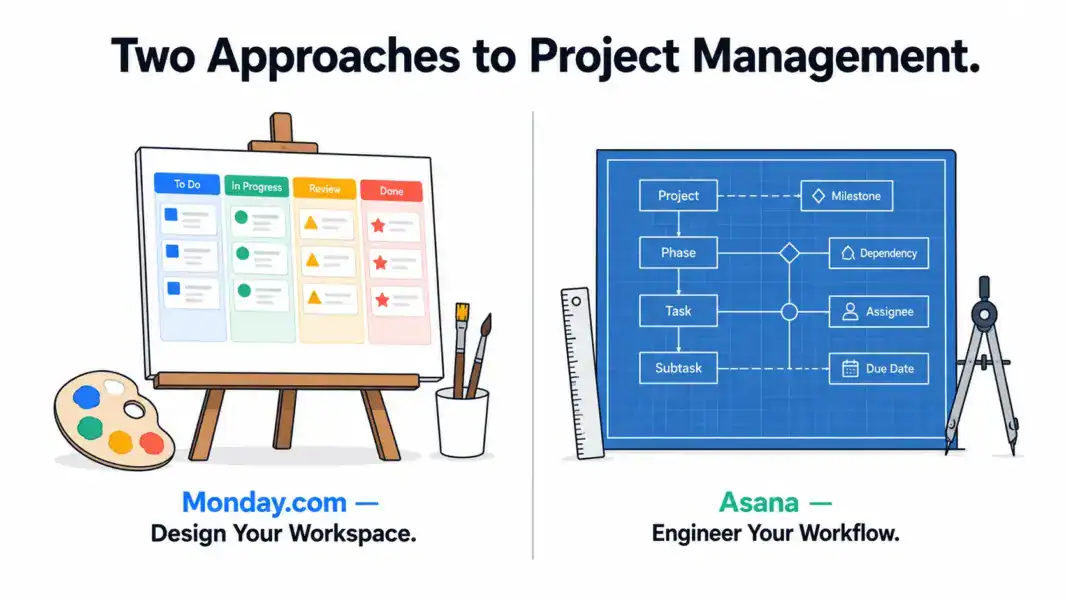
Asana is a workflow-first PM tool where structured processes, Rules automation, and the Workflow Builder enforce consistent execution. The philosophy: a PM tool should coordinate who does what by when, with repeatable processes that run the same way every time regardless of who’s involved.
The practical consequence: Monday.com is more customizable at the board level. Asana is more opinionated at the workflow level. Monday lets you build anything. Asana makes you build it correctly. For full individual assessments, see our Monday.com review and Asana review.
How Does Pricing Compare Between Monday.com and Asana?
Monday.com has a lower entry price per seat but Asana includes more features at each tier. The real cost depends on which features your team actually needs and how many people you’re buying for.
| Dimension | Monday.com | Asana | Key Difference |
|---|---|---|---|
| Free plan | 2 seats, 3 boards | 10 users, unlimited tasks | Asana free plan is far more usable |
| Entry paid | Basic: $9/seat/mo | Starter: $10.99/user/mo | Monday cheaper but missing Gantt and automations |
| Mid tier | Standard: $12/seat/mo | Starter: $10.99/user/mo | Asana Starter beats Monday Standard on workflows |
| Full feature tier | Pro: $16/seat/mo | Advanced: $24.99/user/mo | Monday Pro cheaper; Asana Advanced has Goals and Portfolios |
| Seat minimum | 3 seats on all paid plans | No minimum | Monday forces 3-seat buy; Asana allows 1 |
| Time tracking | Pro only ($16/seat) | None (third-party needed) | Both have cost for time tracking |
| 10-person team (mid tier) | $120/month | $110/month | Nearly equal at this size |
| 50-person team (full features) | $800/month | $1,250/month | Monday 36% cheaper at high tier |
At small team sizes (5-15 people), Asana and Monday.com cost roughly the same on comparable tiers. At larger team sizes (50+), Monday.com’s Pro plan is significantly cheaper than Asana’s Advanced plan. However, Asana’s Advanced tier includes Goals and Portfolios that Monday.com doesn’t match until Enterprise pricing.
The hidden cost factor: Monday.com’s 3-seat minimum adds $18-48/month of dead cost for teams of 1-2 people. Asana has no minimum.
Winner on pricing: Monday.com for large teams. Asana for tiny teams and free plan usage.
Which Tool Has Better Features for Project Management?
Monday.com offers more automation templates and broader platform coverage. Asana offers deeper workflow design and better enterprise PM features. Here’s the feature comparison that matters:
| Feature | Monday.com | Asana | Winner |
|---|---|---|---|
| Workflow automation | 200+ templates, visual builder | 70+ Rules, Workflow Builder with stages | Asana (more structured) |
| Board/column types | 30+ column types, Mirror columns | 6+ custom field types | Monday.com |
| Views | 8+ (Table, Kanban, Gantt, Calendar, Chart) | 7 (List, Board, Calendar, Timeline, Workload) | Tie |
| Multi-project tracking | Dashboards across boards | Portfolios with status and progress | Asana |
| Goal/OKR tracking | No native feature | Yes (Advanced plan) | Asana |
| Multi-homing | No (items live on one board) | Yes (tasks in multiple projects) | Asana |
| Time tracking | Pro plan ($16/seat) | None | Monday.com (available, at least) |
| CRM product | Yes (Monday CRM) | No | Monday.com |
| Dev product | Yes (Monday Dev) | No | Monday.com |
| Proofing & approvals | No | No | Tie (neither — see Wrike) |
| Integrations | 200+ native | 300+ native | Asana |
The pattern: Monday.com wins on visual customization and platform breadth (CRM, Dev). Asana wins on workflow structure, goal tracking, and portfolio management. Teams managing complex repeatable processes choose Asana. Teams wanting maximum visual flexibility and multi-product coverage choose Monday.com.
Winner on features: Asana for structured PM. Monday.com for platform breadth.
Which Is Easier to Use?
Both are easy to learn, but for different reasons. Asana is easier because it’s simpler. Monday.com is easier because it’s more visual. Both outperform ClickUp and Wrike on onboarding speed.
Asana’s strength is consistency. Projects, Tasks, Subtasks — the terminology is plain, the interface is predictable, and the onboarding flow guides you through setup in 10-15 minutes. Nothing surprises you. Nothing requires configuration before you start working.
Monday.com’s strength is visual appeal. Color-coded status columns, smooth animations, and a board design that feels like a modern consumer app make the daily experience enjoyable. Templates (200+) get teams started fast with industry-specific setups. The drag-and-drop is the most polished in the PM category.
G2 2024 Ease of Use scores: Asana 9.1/10. Monday.com 8.8/10. The 0.3-point gap reflects Asana’s simpler mental model, but Monday.com’s visual design drives higher engagement for teams that respond to aesthetics.
Winner on ease of use: Asana (slightly). Both are strong.
How Does Support Quality Compare?
Asana’s support is faster and more specific than Monday.com’s across all plan levels.
Asana offers email and chat support with 1-3 hour response times on paid plans. Responses are specific and tailored. Enterprise gets dedicated account managers. The Asana Guide knowledge base and Academy certification courses are best-in-class.
Monday.com offers email only (no live chat) with 8-12 hour average response times on Standard. Higher tiers get faster responses (2-4 hours). The help center and YouTube tutorials are solid. No real-time support channel on any plan.
Winner on support: Asana, clearly.
Which Tool Is Better for Your Team Type?
| Team Profile | Recommended | Why |
|---|---|---|
| Marketing team running campaigns | Asana | Workflow Builder handles repeatable campaign processes with stage enforcement |
| Sales + marketing team wanting shared tools | Monday.com | Monday CRM shares data with PM boards natively |
| Operations team with SOPs | Asana | Rules automation enforces consistent process execution |
| Creative agency/design team | Monday.com | Visual boards suit creative work; file columns for asset tracking |
| Enterprise (500+ people) | Asana | Portfolios, Goals, mature enterprise support infrastructure |
| SMB wanting one vendor for everything | Monday.com | Work OS ecosystem: PM + CRM + Dev + Service |
| Team that previously abandoned a PM tool | Asana | Highest adoption rate. Simplicity sticks when complexity failed. |
| Non-technical team (HR, admin, events) | Monday.com | More visual, template-driven, less process-dependent |
Monday.com vs Asana: Our 2026 Final Verdict
Monday.com is the PM tool that makes project management look good. The colorful boards, smooth interactions, and expanding Work OS ecosystem create a platform that teams enjoy opening every day. If visual engagement drives adoption in your organization, and you value having PM, CRM, and dev tools under one umbrella, Monday.com is the right platform.
Asana is the PM tool that makes project management work well. The Workflow Builder, Rules automation, and structured approach to projects create repeatable processes that run consistently regardless of who’s executing. If process discipline drives results in your organization, and you value workflow clarity over visual customization, Asana is the right tool.
Our recommendation: try both free plans with a real project, not a test board. Monday.com’s free plan (2 seats) lets you evaluate the visual experience. Asana’s free plan (10 users) lets you evaluate workflow automation with a real team. The tool that your team gravitates toward naturally in the first week is your answer.
For additional options, see our complete PM software guide, ClickUp vs Asana comparison, or best PM tools for small teams.
Try Monday.com Free Try Asana Free Last updated: May 15, 2026Frequently Asked Questions
Is Monday.com better than Asana in 2026?
Neither is universally better. Monday.com is better for visual non-technical teams and organizations wanting PM plus CRM plus dev tools on one platform. Asana is better for process-driven teams needing structured workflows and enterprise-grade portfolio management. Monday wins on visual appeal; Asana wins on workflow discipline.
Is Monday.com cheaper than Asana?
Monday.com’s entry price is lower ($9/seat vs $10.99/user), and its full-feature Pro plan ($16/seat) costs less than Asana’s Advanced ($24.99/user). However, Monday enforces a 3-seat minimum on paid plans while Asana has no minimum. For large teams (50+), Monday is significantly cheaper. For solo users, Asana is cheaper.
Which has better automation, Monday.com or Asana?
Monday.com offers more automation templates (200+ versus Asana’s 70+ Rules). Asana’s Workflow Builder provides more structured, stage-based workflow design that’s better for repeatable processes. Monday.com is better for ad-hoc automations. Asana is better for enforced process workflows. Monday caps actions at 250/month on Standard; Asana Rules are unlimited.
Does Monday.com or Asana have time tracking?
Monday.com includes time tracking on its Pro plan at $16/month per seat. Asana has no native time tracking on any plan and requires third-party tools like Toggl ($8-12/user extra). Neither offers time tracking on entry tiers. For built-in time tracking at the lowest price, ClickUp ($7/user) beats both.
Which is easier to learn?
Both are easy compared to ClickUp or Wrike. Asana is slightly easier with a 10-15 minute onboarding flow and plain terminology. Monday.com is slightly more visually engaging with color-coded boards. G2 scores Asana 9.1/10 and Monday.com 8.8/10 for ease of use. Both are strong choices for teams prioritizing fast adoption.
Can Monday.com replace Asana?
Yes, for most use cases. Monday.com covers task management, project tracking, Gantt scheduling, and automation that Asana handles. You’ll gain visual customization and the Work OS ecosystem. You’ll lose Asana’s Workflow Builder structure, Portfolios, Goals, and multi-homing. The switch makes sense if visual flexibility matters more than process enforcement.
Which is better for enterprise teams?
Asana has stronger enterprise features including Portfolios (multi-project oversight), Goals (OKR tracking), admin controls, and a more mature dedicated support infrastructure. Monday.com’s Enterprise tier is capable but newer. Over 80% of Fortune 100 companies use Asana, indicating broader enterprise trust and adoption at scale.
Do Monday.com and Asana integrate with each other?
Not natively. You can connect them through Zapier or Make to sync tasks and statuses between platforms. However, most teams use one or the other exclusively. Migration between them is supported through CSV import/export for project and task data.
Related Comparisons
- ClickUp vs Asana 2026
- ClickUp vs Monday.com 2026
- Notion vs ClickUp 2026
- Monday.com Review 2026
- Asana Review 2026
- Complete Guide to Project Management Software