Trello vs Asana is the comparison between the simplest PM tool in the category and one of the most structured. Trello is a kanban board. That’s it. That’s the product. Cards move across columns, and simplicity is the feature. Asana is a workflow-driven PM platform with timelines, automation rules, portfolios, and goals. This comparison helps you decide whether your team has outgrown boards or never needed more than boards in the first place.
Our verdict after testing both: Trello is the better tool for individuals, freelancers, and teams under 5 with simple task tracking needs. Asana is the better tool for every other scenario. The question isn’t which is more powerful — Asana wins that easily. The question is whether you need that power.
What Is the Core Difference Between Trello and Asana?
Trello is a digital kanban board owned by Atlassian (acquired 2017 for $425 million). You create boards, add lists (columns), add cards (tasks), and drag cards between lists. That’s the core product. Power-Ups add features like calendar views, custom fields, and integrations, but the fundamental experience is cards on a board.
Asana is a workflow management platform built for structured project execution. You get multiple views (List, Board, Timeline, Calendar, Workload), a Workflow Builder that enforces process stages, Rules automation, Portfolios for multi-project tracking, and Goals for OKR-style alignment. The fundamental experience is coordinated work across teams and projects.
The gap between these tools is wider than any other comparison in this series. Trello and Asana don’t compete on features — they compete on philosophy. Trello believes simple is better. Asana believes structured is better. For individual tool assessments, see our Asana review and our complete PM software guide.
How Does Trello vs Asana Pricing Compare in 2026?
Trello is cheaper per user, but Asana’s free plan supports more people. The pricing math depends on team size and which features you actually need.
| Dimension | Trello | Asana |
|---|---|---|
| Free plan | Unlimited users, 10 boards, limited Power-Ups | Up to 10 users, unlimited projects, basic views |
| Entry paid | Standard: $5/user/mo | Starter: $10.99/user/mo |
| Mid tier | Premium: $10/user/mo | Advanced: $24.99/user/mo |
| Enterprise | $17.50/user/mo | Custom pricing |
| 10-person team (entry paid) | $50/month | $110/month |
| 50-person team (mid tier) | $500/month | $1,250/month |
Trello is 50-60% cheaper than Asana at every paid tier. A 10-person team saves $60/month choosing Trello Standard over Asana Starter. A 50-person team saves $750/month at mid tier. The savings are real but so is the feature gap.
Trello’s free plan is generous on users (unlimited) but limited on boards (10) and Power-Ups. Asana’s free plan is generous on projects (unlimited) but limited on users (10). For a team of 3 needing simple boards, Trello free is perfect. For a team of 8 needing workflows, Asana free is better.
Winner on pricing: Trello, significantly cheaper at every tier.
Which Tool Has Better Features?
Asana has dramatically more features. Trello has fewer features by design. This comparison is less about which is “better” and more about which level of capability your team actually needs.
| Feature | Trello | Asana | Winner |
|---|---|---|---|
| Kanban boards | Best-in-class (the original digital kanban) | Good (Board view) | Trello |
| List/table view | No (boards only on free) | Yes (primary view) | Asana |
| Timeline / Gantt | Premium plan ($10/user) | Starter plan ($10.99/user) | Asana (better execution) |
| Workflow automation | Butler (basic card-based) | Rules + Workflow Builder (structured) | Asana |
| Multi-project tracking | No native feature | Portfolios (Advanced plan) | Asana |
| Goal/OKR tracking | No | Yes (Advanced plan) | Asana |
| Custom fields | Via Power-Ups (limited on free) | Native (6+ types) | Asana |
| Subtasks | Checklists only (no assignees/dates per item) | Full subtasks with assignees and dates | Asana |
| Multi-homing | No | Yes (tasks in multiple projects) | Asana |
| Integrations | 200+ Power-Ups | 300+ native | Asana |
| Mobile app | Excellent (card-based UI works well on mobile) | Good | Trello |
Asana wins 8 feature categories. Trello wins 2 (kanban boards and mobile). That ratio tells you everything: Trello is a single-purpose tool that does one thing exceptionally well. Asana is a multi-purpose platform that does many things well.
Winner on features: Asana, overwhelmingly. But Trello’s kanban board is genuinely the best in the category.
Which Is Easier to Use?
Trello is the easiest PM tool to learn. Period. Open Trello, create a board, add some lists, add some cards, start dragging. Five minutes. No tutorials needed. No configuration required. No hierarchy to understand. The card metaphor is universally understood by anyone who’s used a sticky note.
Asana is easy relative to ClickUp, Monday.com, and Wrike, but it’s a structured tool that requires understanding Projects, Tasks, Views, and workflow concepts. Onboarding takes 10-15 minutes. Full productivity takes a few days.
G2 2024 Ease of Use: Trello 9.0/10. Asana 9.1/10. The scores are nearly identical, but the ease is qualitatively different. Trello is easy because it’s simple. Asana is easy because it’s well-designed. Trello’s simplicity becomes a limitation when needs grow. Asana’s design scales with complexity.
Winner on ease of use: Trello for absolute beginners. Asana for growing teams.
Which Tool Fits Your Team?
| Team Profile | Recommended | Why |
|---|---|---|
| Solo freelancer / individual | Trello | Free, simple, no overhead. Boards for client work and personal tasks. |
| Small team (2-5) with simple tasks | Trello | Drag cards across columns. No workflow configuration needed. |
| Growing team (5-20) needing structure | Asana | Workflow Builder, Rules, Timeline views handle real project complexity. |
| Marketing team with campaigns | Asana | Repeatable campaign workflows with stage enforcement and automations. |
| Engineering team using Jira | Neither | Stay on Jira. Both Trello and Asana are weaker for dev-specific workflows. |
| Non-technical team wanting visual PM | Trello (simple) or Monday.com (richer) | Trello if needs are basic. Monday.com if you want boards with more power. |
| Enterprise (50+ people) | Asana | Portfolios, Goals, admin controls, dedicated support. Trello lacks enterprise PM features. |
| Team that’s outgrown Trello | Asana | Smoothest migration path. Asana’s Board view preserves the kanban experience while adding structure. |
When Should You Migrate from Trello to Asana?
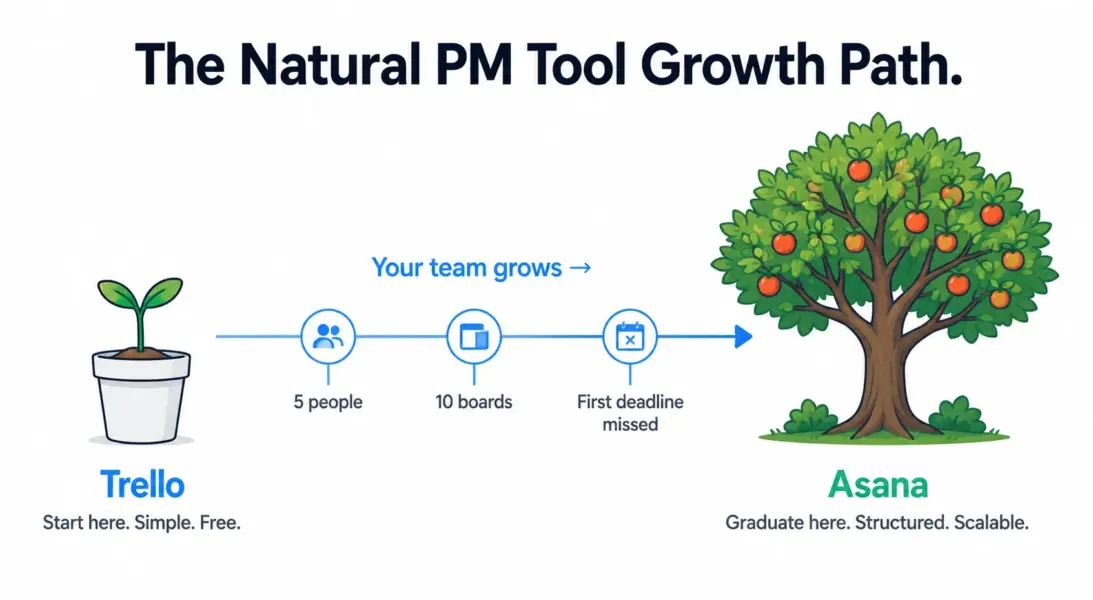
You’ve outgrown Trello when any of these become true: you need to see tasks on a timeline with dependencies. You need automated task routing between team members. You’re managing more than 10 active boards and losing track of what’s where. You need to track goals across multiple projects. Your team is over 10 people and you need workload visibility. You need reporting beyond “how many cards are in each column.”
Migration is straightforward. Asana has a built-in Trello importer that transfers boards, lists, cards, labels, due dates, and attachments. The biggest adjustment: Trello users need to learn that Asana’s Board view is one of seven views, not the only view. Starting with Board view in Asana and gradually introducing List and Timeline views smooths the transition.
Trello vs Asana: Our 2026 Final Verdict
Trello is the starter PM tool. It does one thing — kanban boards — better than any competitor, at the lowest price, with the smallest learning curve. For individuals, freelancers, and tiny teams with simple workflows, Trello is perfect and may never need replacing.
Asana is the growth PM tool. When your team expands, your projects get dependencies, and your workflows need automation, Asana provides the structure that Trello can’t. The upgrade path from Trello to Asana is the most common PM migration in the mid-market.
Our recommendation: start with Trello if your needs are simple. You’ll know when you’ve outgrown it because you’ll start building workarounds for features that Asana includes natively. When the workaround count hits 3-5, it’s migration time.
For a broader view of all PM options, see our complete PM software guide or best free PM tools. If you’re outgrowing Trello but Asana feels too expensive, ClickUp at $7/user is worth evaluating.
Try Trello Free Try Asana Free Last updated: May 15, 2026Frequently Asked Questions
Is Trello better than Asana?
Trello is better for simple kanban-style task tracking with zero learning curve. Asana is better for structured project management with workflows, automation, timelines, and multi-project visibility. Trello suits individuals and small teams with basic needs. Asana suits growing teams that need process enforcement and reporting.
Is Trello free?
Yes. Trello’s free plan includes unlimited users, up to 10 boards, unlimited cards, basic Power-Ups, and 250 automation commands per workspace. It’s more than enough for small teams with simple project tracking needs. Paid plans start at $5/user/month for unlimited boards and advanced Power-Ups.
Can I migrate from Trello to Asana easily?
Yes. Asana has a built-in Trello importer that transfers boards, lists, cards, labels, due dates, and attachments automatically. The migration takes minutes for small workspaces. The main adjustment is learning that Asana offers multiple views beyond kanban boards, including List, Timeline, and Calendar views.
Is Trello still relevant in 2026?
Yes, for its niche. Trello remains the best pure kanban board tool with the smoothest mobile experience. It’s less relevant for teams needing structured PM with timelines, dependencies, and workflow automation. Trello is owned by Atlassian and continues to receive updates, but its feature set has grown slowly compared to competitors.
Which is cheaper, Trello or Asana?
Trello is 50-60% cheaper at every paid tier. Trello Standard costs $5/user/month versus Asana Starter at $10.99/user. For a 10-person team, Trello saves $60/month. For 50 people, the savings reach $750/month at mid-tier pricing. The tradeoff is a significantly narrower feature set.
Does Trello have Gantt charts?
Trello offers a Timeline view on its Premium plan ($10/user/month) that provides basic Gantt-like functionality. It’s not as capable as Asana’s Timeline view, which includes drag-and-drop rescheduling with dependency management. For serious Gantt scheduling needs, both Trello and Asana trail ClickUp and Wrike.
Which has better mobile apps?
Trello’s mobile app is better because the card-based kanban interface translates naturally to phone screens. Dragging cards between columns feels intuitive on touch devices. Asana’s mobile app is functional but cramped, especially for Timeline and List views that work better on desktop screens.
When should I switch from Trello to Asana?
Switch when you need timeline views with dependencies, automated task routing between team members, multi-project portfolio tracking, goal/OKR alignment, or reporting beyond basic card counts. If you’re managing 10+ boards and losing track of cross-project dependencies, you’ve outgrown Trello.
Related Comparisons
- ClickUp vs Asana 2026
- Monday.com vs Asana 2026
- ClickUp vs Monday.com 2026
- Asana Review 2026
- Complete Guide to Project Management Software