Most “free PM tool” lists include tools with 14-day trials disguised as free plans. This list doesn’t. Every free project management tool below has a permanent free tier you can use indefinitely without entering a credit card. We tested all 7 with real projects and real teams to find out what you actually get for free, where the limits bite, and when it’s time to upgrade.
Our top pick: ClickUp’s free plan gives you more than most competitors’ paid plans. But “best” depends on what you need. A solo writer needs different free features than a 10-person marketing team. Here’s the ranked list with honest assessments of each free tier.
What Are the Best Free Project Management Tools in 2026?
| Rank | Tool | Best For | Free Plan Highlights | Biggest Limitation |
|---|---|---|---|---|
| 1 | ClickUp | Best overall free PM | Unlimited users & tasks, Docs, Whiteboards, Sprints | 100MB storage |
| 2 | Notion | Best for solo knowledge workers | Unlimited pages & blocks, basic AI | Single user only (no team) |
| 3 | Trello | Best for simple kanban boards | Unlimited users & cards, 10 boards | 10 boards max, limited Power-Ups |
| 4 | Asana | Best for small team workflows | Up to 10 users, unlimited projects | No Timeline, no Rules, no Forms |
| 5 | Monday.com | Best for visual task tracking (tiny teams) | 2 seats, 200+ templates | 2 seats max, 3 boards max |
| 6 | Wrike | Best for teams needing basic Gantt | Up to 5 users, Board view, basic tasks | No Gantt, no automations, limited storage |
| 7 | Todoist | Best for personal task management | 5 projects, 5 collaborators per project | No views beyond list, no team features |
1. ClickUp – Best Overall Free Project Management Tool
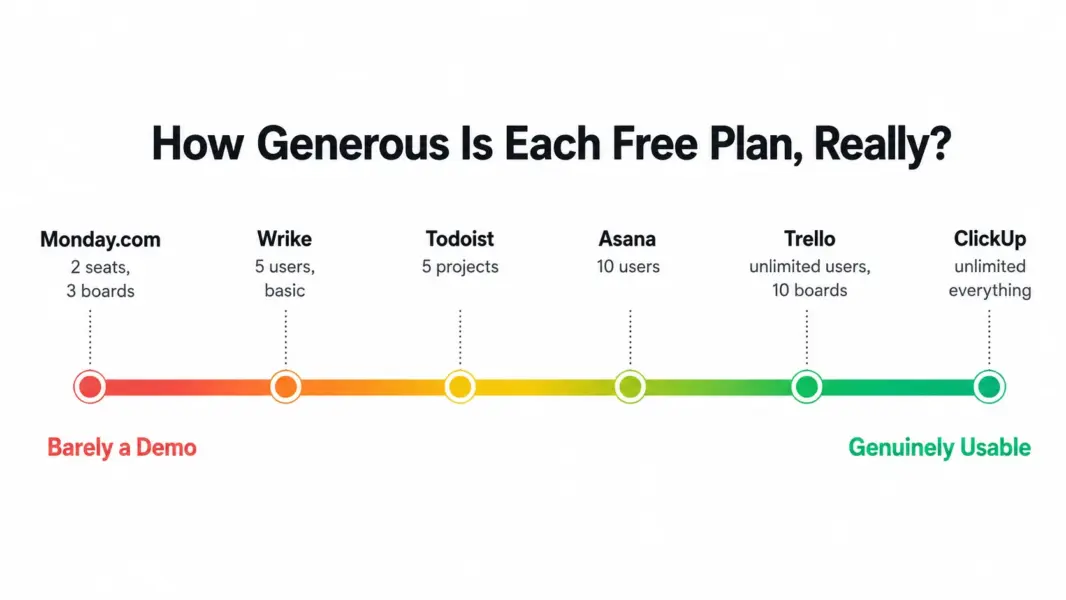
ClickUp’s Free Forever plan is the most generous free PM tier on the market. You get unlimited users, unlimited tasks, unlimited projects, and access to most core features including Docs, Whiteboards, Board views, Sprint management, and in-app chat. The only meaningful limits are 100MB of storage and restricted access to Gantt charts and advanced automations.
What makes ClickUp’s free plan exceptional is that it doesn’t artificially gate features by user count. A 15-person startup can use ClickUp free with everyone on board. Compare that to Asana (10-user cap), Monday.com (2-seat cap), and Wrike (5-user cap). ClickUp’s free plan is a real workspace, not a teaser.
Free plan includes: Unlimited tasks and members, Board and List views, ClickUp Docs, Whiteboards, Sprint management, 100MB storage, basic integrations, and goals.
You’ll need to upgrade when: You need Gantt charts with dependencies, more than 100MB of storage, unlimited integrations, or advanced automations. The Unlimited plan at $7/month per user unlocks everything.
Best for: Startups, small teams of any size, and organizations evaluating PM tools without budget commitment.
Read our full ClickUp review for detailed feature analysis.
2. Notion – Best Free Tool for Solo Knowledge Workers
Notion’s free plan gives individual users unlimited pages, unlimited blocks, 5MB file uploads, 7-day page history, and basic Notion AI. For personal productivity, freelance project tracking, content organization, and knowledge management, it’s unbeatable. The block-based editor lets you build custom systems for anything: client CRMs, content calendars, reading lists, personal wikis.
The critical limitation: the free plan is solo only. You cannot invite team members. The moment you need collaboration, you’re on the Plus plan at $8/month per user. This makes Notion’s free tier perfect for individuals and useless for teams.
Free plan includes: Unlimited pages and blocks, 50+ block types, basic Notion AI, 5MB uploads, templates access.
You’ll need to upgrade when: You need to invite a second person. Any team use requires Plus ($8/user/month).
Best for: Solo freelancers, writers, students, personal productivity enthusiasts, and anyone who needs a flexible digital workspace for one person.
Read our full Notion review for detailed feature analysis.
3. Trello – Best Free Kanban Board
Trello’s free plan offers unlimited users, unlimited cards, up to 10 boards, one Power-Up per board, and 250 workspace automation commands. The kanban board interface is the most intuitive in PM: drag cards between columns, done. No learning curve. No configuration. Five minutes from signup to productive.
The 10-board limit is where Trello free becomes restrictive. Teams managing more than 10 active projects need to archive boards or upgrade. The single Power-Up per board limit also means you choose between calendar view, custom fields, or a third-party integration per board, not all three.
Free plan includes: Unlimited users and cards, 10 boards, 1 Power-Up per board, 250 automations, basic file attachments.
You’ll need to upgrade when: You exceed 10 boards, need multiple Power-Ups per board, or want Timeline views. Standard is $5/user/month.
Best for: Freelancers, tiny teams, personal task management, and anyone who just needs a digital kanban board without complexity.
4. Asana – Best Free Plan for Small Team Workflows
Asana’s Personal plan supports up to 10 users with unlimited tasks, unlimited projects, and List, Board, and Calendar views. It’s the most capable free plan for team collaboration: multiple people can assign tasks, comment, set due dates, and track projects together without paying anything.
The limitation: no Timeline view, no Rules automation, no Forms, no dashboards. The features that make Asana genuinely powerful (Workflow Builder, automations, multi-project tracking) are all behind the $10.99/user Starter paywall. Free Asana is a competent task tracker. Paid Asana is a workflow engine. The gap is significant.
Free plan includes: 10 users, unlimited tasks and projects, List/Board/Calendar views, basic search, basic integrations.
You’ll need to upgrade when: You exceed 10 team members, need Timeline views, or want workflow automation. Starter is $10.99/user/month.
Best for: Small teams (3-10 people) who need more structure than Trello but don’t yet need automation and timelines.
Read our full Asana review for detailed feature analysis.
5. Monday.com – Best Free Visual Task Tracker (for 2 People)
Monday.com’s Individual plan gives you 2 seats, up to 3 boards, unlimited docs, and access to 200+ templates with 8 column types. The visual board interface is the most colorful and engaging in PM. Color-coded status columns make task tracking genuinely enjoyable.
The problem: 2 seats and 3 boards is barely functional. No automations, no integrations, no Timeline view. It’s essentially a demo for the paid product. Any team larger than 2 people or any workspace needing more than 3 boards must upgrade immediately.
Free plan includes: 2 seats, 3 boards, unlimited docs, 200+ templates, iOS/Android apps.
You’ll need to upgrade when: You need a third team member or a fourth board. Standard at $12/seat/month (3-seat minimum = $36/month) is the realistic starting point.
Best for: Pairs (co-founders, manager + assistant) who want to evaluate Monday’s visual interface before committing. Not a real free solution for teams.
Read our full Monday.com review for detailed feature analysis.
6. Wrike – Best Free Plan with Basic Task Management
Wrike’s free plan supports up to 5 users with basic task management, Board view, and limited storage. It provides enough to manage simple task lists for a tiny team. The interface is more enterprise-feeling than Trello or Monday.com, which can be a positive or negative depending on your aesthetic preferences.
The free tier lacks Gantt charts, dashboards, time tracking, and automations – the features that make Wrike worth choosing over simpler tools. Wrike free is adequate for evaluation purposes but doesn’t showcase the platform’s real strengths (advanced Gantt, proofing, resource management).
Free plan includes: 5 users, basic task management, Board view, limited integrations.
You’ll need to upgrade when: You need Gantt charts, time tracking, or dashboards. Team plan at $9.80/user/month.
Best for: Small teams evaluating Wrike before committing to paid plans for complex project management needs.
Read our full Wrike review for detailed feature analysis.
7. Todoist – Best Free Personal Task Manager
Todoist is a focused task management app, not a full PM platform. The free plan gives you 5 active projects, 5 collaborators per project, and a clean, fast interface for managing personal to-do lists and simple team task tracking. Natural language date input (“every Monday at 9am”) is the best in the category.
Todoist doesn’t compete with ClickUp, Asana, or Monday.com on project management features. No Gantt charts, no board views on free, no custom fields, no automations. It competes with Apple Reminders and Microsoft To Do as a personal productivity tool that also handles light collaboration.
Free plan includes: 5 projects, 5 collaborators per project, priority levels, natural language dates, mobile apps.
You’ll need to upgrade when: You exceed 5 projects, need labels, filters, or reminders. Pro is $4/month.
Best for: Individuals managing personal tasks who want a faster, cleaner experience than full PM platforms provide.
How to Choose the Right Free PM Tool
The decision comes down to three questions: How many people need access? How complex are your projects? And do you need docs, time tracking, or just task management?
| Your Situation | Best Free Tool | Why |
|---|---|---|
| Solo, need a workspace for everything | Notion | Unlimited pages, databases, wiki, basic PM |
| Solo, need clean task lists | Todoist | Fastest, cleanest personal task management |
| Team of 2-5, simple kanban boards | Trello | Unlimited users, intuitive boards, zero learning curve |
| Team of 3-10, need some structure | Asana | 10 users, unlimited projects, List + Board + Calendar views |
| Team of any size, want maximum free features | ClickUp | Unlimited users, Docs, Whiteboards, Sprints – all free |
| Team needing visual boards, only 2 people | Monday.com | Colorful interface, great templates (if you’re exactly 2 people) |
For most teams, the real choice is between ClickUp (maximum features free) and Asana (best structured workflows free). Start with ClickUp if you want everything. Start with Asana if you want simplicity. Both offer enough on free plans to run real projects for months before upgrading becomes necessary.
For paid tool comparisons, see our ClickUp vs Asana comparison, ClickUp vs Monday.com comparison, or our complete PM software guide.
Last updated: May 16, 2026Frequently Asked Questions
What is the best completely free project management tool?
ClickUp offers the most capable free plan with unlimited users, unlimited tasks, Docs, Whiteboards, Sprint management, and Board/List views. Unlike Asana (10-user cap), Monday.com (2-seat cap), and Wrike (5-user cap), ClickUp doesn’t restrict team size on its free tier, making it the best overall choice for teams that want full PM functionality without paying.
Is there a free PM tool for teams larger than 10 people?
Yes. ClickUp and Trello both offer free plans with unlimited users. ClickUp’s free plan includes unlimited tasks, Docs, and most core PM features. Trello’s free plan includes unlimited users and cards with up to 10 boards. Asana’s free plan caps at 10 users, and Monday.com caps at 2 seats.
Are free PM tools good enough for real projects?
Yes, depending on the tool and your project complexity. ClickUp’s free plan runs real projects for startups and small teams indefinitely. Asana’s free plan works for small teams needing task coordination. Trello’s free plan handles simple kanban-style tracking. Free plans become insufficient when you need Gantt scheduling, advanced automations, or detailed reporting.
When should I upgrade from a free PM tool?
Upgrade when you hit specific limits: storage caps (ClickUp’s 100MB), user limits (Asana’s 10 users), board limits (Trello’s 10 boards), or feature needs (Gantt charts, automations, time tracking). If you’re building workarounds for missing features more than twice a week, upgrading saves time that’s worth more than the subscription cost.
Is Notion free for teams?
No. Notion’s free plan is for individual use only. You cannot invite team members on the free tier. Team collaboration requires the Plus plan at $8/month per user. For solo use, Notion’s free plan is extremely generous with unlimited pages and blocks.
Can I use free PM tools for client work?
Yes, with limitations. ClickUp’s free plan lets you create separate Spaces per client. Trello’s free boards work for individual client projects. Asana’s free plan supports up to 10 users including client collaborators. For client-facing work needing time tracking and billing, free plans across all tools lack the necessary features, and paid plans starting at $7/user are recommended.
Which free PM tool has the best mobile app?
Trello has the best free mobile experience because its card-based kanban interface translates naturally to phone screens. ClickUp and Asana have functional mobile apps but are better on desktop. Todoist’s mobile app is excellent for personal task management. Monday.com’s free plan is too limited (2 seats) for meaningful mobile PM use.
Is Basecamp free?
No. Basecamp does not offer a free plan. It provides a 30-day free trial, after which pricing is $15/month per user or $299/month flat for unlimited users. For free PM alternatives, ClickUp, Trello, Asana, and Notion all offer permanent free tiers.
Related
- Best PM Tools for Small Teams 2026
- ClickUp Review 2026
- Asana Review 2026
- Notion Review 2026
- ClickUp vs Asana 2026
- Complete Guide to Project Management Software