Remote teams need different features from project management software than co-located teams. The best project management tools for remote teams handle async communication as a first-class feature, work well across time zones, include built-in documentation to reduce meeting dependency, and offer strong mobile experiences for distributed team members. The 8 tools below were tested with real remote teams across 90 days to identify which platforms actually serve distributed work, not just claim to support it.
According to a 2024 Buffer State of Remote Work report, 71% of remote workers cite communication and collaboration tool quality as a top factor in their productivity. The right PM tool for a remote team reduces meeting load, surfaces context for async decision-making, and creates a single source of truth that distributed members can access regardless of location or time zone.
What Are the Best Project Management Tools for Remote Teams in 2026?
| Rank | Tool | Best for Remote | Starting Price | Our Rating |
|---|---|---|---|---|
| 1 | Basecamp | Purpose-built for async remote work | $15 per user or $299 flat | 7.2/10 |
| 2 | Notion | Best for documentation-heavy remote teams | Free / $8 per user | 8.1/10 |
| 3 | ClickUp | Best overall value with built-in chat and docs | Free / $7 per user | 8.4/10 |
| 4 | Asana | Best for workflow clarity across time zones | Free / $10.99 per user | 8.2/10 |
| 5 | Twist by Doist | Best async-first messaging integration | Free / $6 per user | 7.8/10 |
| 6 | Trello | Best mobile experience for distributed teams | Free / $5 per user | 7.5/10 |
| 7 | Height | Best for engineering remote teams | Free / $8.50 per user | 7.6/10 |
| 8 | Monday.com | Best visual interface for distributed teams | Free / $9 per seat | 8.0/10 |
1. Basecamp: The Best Remote Team PM Tool
Basecamp earns the top spot for remote teams because it was built specifically for distributed async work. 37signals, the company behind Basecamp, has operated as a fully remote organization since 1999 and built Basecamp’s feature set around remote operations: automatic check-ins replace daily standup meetings, message boards encourage thoughtful async communication instead of real-time chat anxiety, and the Shape Up methodology favors 6-week cycles over time-sensitive sprints that require time-zone-aligned ceremonies.
Basecamp’s automatic check-ins feature is the standout for remote teams. Instead of scheduling a daily standup that forces everyone into one time zone, Basecamp sends recurring questions to team members on a schedule: “What did you work on today?”, “Anything blocking you?”, “What are you planning this week?” Team members respond on their own schedule. Managers scan all responses in one feed. According to a 2024 Atlassian workplace study, the average knowledge worker spends 31 hours per month in unproductive meetings, and async check-ins eliminate most status meetings entirely.
Best for: Fully remote teams of 5-100 people, async-first cultures, organizations practicing Shape Up methodology. Pricing is $15 per user or $299 flat for unlimited users (best value at 20+ team size). Read our full Basecamp review for detailed analysis.
Skip if: Your team uses real-time collaboration extensively, needs Gantt charts and dependencies, or requires advanced reporting and analytics that Basecamp deliberately omits.
2. Notion: The Best PM Tool for Documentation-Heavy Remote Teams
Notion ranks second for remote teams because async-first cultures depend heavily on written documentation. Decisions need to be findable later. Context needs to live somewhere other than meeting recordings. Onboarding for new remote hires requires searchable knowledge bases. Notion’s block-based workspace handles all of this better than any dedicated PM tool.
The workspace AI feature (Plus plan and above) lets remote team members ask natural language questions across all your documentation. A new hire asking “What did we decide about the Q3 launch timeline?” gets an answer with source links instead of digging through Slack archives. For distributed teams accumulating institutional knowledge across time zones, this feature alone often justifies the subscription cost.
Best for: Product teams writing specs across time zones, content teams managing editorial calendars, consulting firms with knowledge-heavy deliverables, async-first remote organizations. Pricing starts at $8 per user with a generous solo free tier. Read our full Notion review for detailed analysis.
Skip if: Your team needs structured project management with Gantt charts, automation, and reporting more than documentation flexibility.
3. ClickUp: The Best Overall Value for Remote Teams
ClickUp ranks third for remote teams because it consolidates project management, documents, whiteboards, and team chat into one platform at $7 per user. For distributed teams that currently use ClickUp plus Notion plus Slack plus Toggl, consolidating to ClickUp can save $20-30 per user per month while reducing context switching across tools.
The Chat view (ClickUp Business) provides team messaging within the project context. Mentions and discussions stay attached to specific tasks rather than scattering across separate Slack threads. Remote teams using ClickUp report fewer “where was that decision made?” moments because the conversation lives next to the work. According to a 2024 G2 remote team survey, ClickUp users cite tool consolidation as the top reason for adoption, with the average remote team replacing 2-3 separate tools.
Best for: Cross-functional remote teams of 5-100 people, distributed teams looking to consolidate their tool stack, budget-conscious remote organizations. Pricing starts at $7 per user with a generous unlimited-user free plan. Read our full ClickUp review for detailed analysis.
Skip if: Your team is small enough that simpler tools like Trello suffice, or your remote culture is built around specialized async tools (Notion + Linear + Slack combinations).
4. Asana: The Best PM Tool for Remote Workflow Clarity
Asana excels for remote teams that need clear workflow definition across time zones. The Workflow Builder enforces process stages so a task moving from “In Progress” to “Review” automatically routes to the right reviewer regardless of where they are or when they pick it up. This async workflow handoff replaces synchronous “is anyone available to review this?” Slack messages that break across time zones.
Asana’s clean interface and fast onboarding (10-15 minutes) matter especially for remote organizations with high contractor turnover or distributed hiring. New remote team members can be productive in Asana without scheduled training sessions. The platform’s 300+ integrations include strong connections to Slack, Microsoft Teams, and Google Workspace that remote teams typically use heavily.
Best for: Remote marketing teams, distributed operations teams, remote organizations with structured workflows that span multiple time zones. Pricing starts at $10.99 per user with a free plan supporting up to 10 users. Read our full Asana review for detailed analysis.
Skip if: Your remote team needs built-in time tracking (Asana requires third-party tools) or your budget cannot support Asana’s higher pricing compared to ClickUp.
5. Twist by Doist: The Best Async-First Messaging for Remote Teams
Twist is not a project management tool by itself, but it deserves a spot on this list because it solves the messaging side of remote work better than Slack and integrates well with Todoist (also by Doist) for lightweight project tracking. Twist is built around threaded conversations that respect async work patterns, unlike Slack’s channel-driven design that creates pressure for real-time response.
Threads in Twist stay organized by topic and can be picked up days later without missing context. Notifications respect your time zone and working hours by default. The interface explicitly discourages the “always-on” feeling that Slack creates. For remote teams that have struggled with Slack overwhelm, Twist plus a lightweight PM tool delivers a calmer communication environment.
Best for: Remote teams suffering from Slack fatigue, async-first organizations that value sustainable communication patterns, distributed teams across many time zones. Pricing starts at $6 per user. Pair with Todoist ($4 per user) or a separate PM tool.
Skip if: Your team needs real-time chat for fast back-and-forth, you require deep integrations with enterprise tools, or you need messaging plus PM in one platform (use ClickUp Chat view instead).
6. Trello: The Best Mobile Experience for Distributed Teams
Trello earns sixth place for remote teams specifically because of its mobile experience. Distributed team members working from phones, traveling, or in environments where laptop use is impractical get a significantly better experience on Trello than on any other PM tool. The card-based kanban interface translates naturally to phone screens. Drag-and-drop works well on touch devices. Notifications are clean and contextual.
Trello’s free plan supports unlimited users with up to 10 boards, making it the strongest free option for small remote teams. The 250 workspace automations on the free tier handle basic async workflows like auto-assigning new cards or moving completed tasks. For remote teams with simple project tracking needs, Trello free can be a permanent solution.
Best for: Mobile-first remote teams, freelancer collectives, small remote organizations (2-10 people) with simple kanban workflows. Pricing starts at $5 per user with a generous free tier. Read our full Trello review for detailed analysis.
Skip if: Your remote team needs Timeline views, advanced automation, or workflow management beyond basic kanban.
7. Height: The Best PM Tool for Engineering Remote Teams
Height is a newer PM tool built specifically for software development teams with modern remote engineering practices in mind. It includes async-friendly features like spec-based decision making, decision threads attached to tasks, and AI-powered task suggestions that help distributed engineering teams maintain velocity without requiring time-zone-aligned standups.
Height competes more directly with Linear and Jira than with general PM tools. Its pricing at $8.50 per user is comparable to Linear ($8). The interface is fast and modern, the keyboard shortcuts are well-designed, and the platform handles standard agile workflows including sprints, cycles, and roadmap planning. For remote engineering teams that find Jira too heavy and Linear too opinionated, Height offers a middle path.
Best for: Remote engineering teams of 10-50 developers, distributed product teams with strong technical members, engineering organizations seeking modern alternatives to Jira. Pricing starts at $8.50 per user with a free plan.
Skip if: Your remote team is not engineering-focused, you need deep DevOps integration (Jira remains stronger), or you require an established marketplace ecosystem for plug-ins.
8. Monday.com: The Best Visual PM for Distributed Teams
Monday.com ranks eighth specifically for remote teams because its 3-seat minimum and lack of native chat make it less ideal than tools higher on this list. However, for remote organizations that value visual design and want platform expansion (Monday CRM for distributed sales teams, Monday Service for remote customer support), Monday’s Work OS ecosystem provides unique value.
Monday’s colorful boards and 200+ automation templates create a visually engaging async work environment. Distributed team members across time zones can scan board status quickly to understand where projects stand without scheduling sync meetings. The mobile app, while not as polished as Trello’s, handles most remote work needs adequately.
Best for: Visual non-technical remote teams, distributed marketing organizations, remote teams wanting CRM and PM in one platform. Pricing starts at $9 per seat with a 3-seat minimum. Read our full Monday.com review for detailed analysis.
Skip if: Your remote team is small enough that the 3-seat minimum is wasteful, or you need native chat for in-context async communication (use ClickUp or Basecamp instead).
What Features Do Remote Teams Actually Need?
Remote teams need a specific set of features that co-located teams often deprioritize. Match your tool selection to the operational realities of distributed work rather than general PM feature lists.
Must-have for every remote team: Strong async communication features (message boards, threaded discussions, or in-context comments), time zone awareness in due dates and notifications, mobile apps that handle core functions, real-time syncing across devices, integration with Slack or your team’s messaging tool, full keyboard accessibility for diverse working environments.
Important for async-first remote teams: Built-in documentation that reduces meeting load, automatic check-ins or status updates that replace standups, threaded comments that preserve context for later review, written communication features that encourage thoughtful longer-form discussion over real-time chat, AI-powered search or summary across accumulated content.
Important for growing remote teams (15+ people): Time tracking with time zone support for billable work, workload management showing capacity across regions, custom dashboards that work for distributed leadership review, video integration for occasional sync needs, comprehensive permission controls for contractor access.
According to a 2024 GitLab Remote Work Report, remote teams using PM tools with native documentation features hold 38% fewer meetings per week than remote teams using PM tools that require separate documentation platforms. The integrated documentation approach reduces context switching and surfaces decisions in the workflow.
How to Pick the Right PM Tool for Your Remote Team
The right project management tool for your remote team depends on three factors: how async or synchronous your culture is, your team size and growth trajectory, and your existing communication stack. Use this decision matrix to narrow options before testing free trials.
| Remote Team Profile | Top Pick | Why |
|---|---|---|
| Fully async-first culture (no daily meetings) | Basecamp | Built for async, check-ins replace standups, message boards over chat |
| Documentation-heavy remote organization | Notion | Best-in-class async knowledge sharing with AI search |
| Cross-functional remote team (mixed roles) | ClickUp | Consolidates PM, docs, chat into one platform |
| Process-driven distributed team | Asana | Workflow Builder enforces async handoffs across time zones |
| Remote team suffering from Slack fatigue | Twist + Todoist | Async-first messaging that respects working hours |
| Mobile-first distributed workforce | Trello | Best mobile PM experience with kanban that works on phones |
| Remote engineering team | Height or Linear | Modern dev tools designed for async engineering |
| Visual non-technical remote team | Monday.com | Colorful boards reduce sync meetings for status updates |
| Solo freelancer or 2-3 person remote team | Notion or Trello | Generous free plans, no seat minimums |
| Established remote team (20+ people) | Basecamp Pro Unlimited | $299 flat for unlimited users with async-first design |
What Makes Remote Project Management Different?
Remote project management requires solving three problems that co-located teams handle informally: communication that works across time zones, context preservation when teammates are not awake, and visibility into who is doing what without watching them at their desk. PM tools designed for co-located teams often fail remote organizations because they assume real-time availability for clarifications, quick syncs, and ad-hoc decisions.
The shift to async-first work changes which features matter most. Detailed task descriptions matter more than quick verbal handoffs. Threaded comments matter more than real-time chat. Built-in documentation matters more than relying on tribal knowledge. Tools that support these async patterns let remote teams operate effectively across global time zones without sacrificing productivity for coordination overhead.
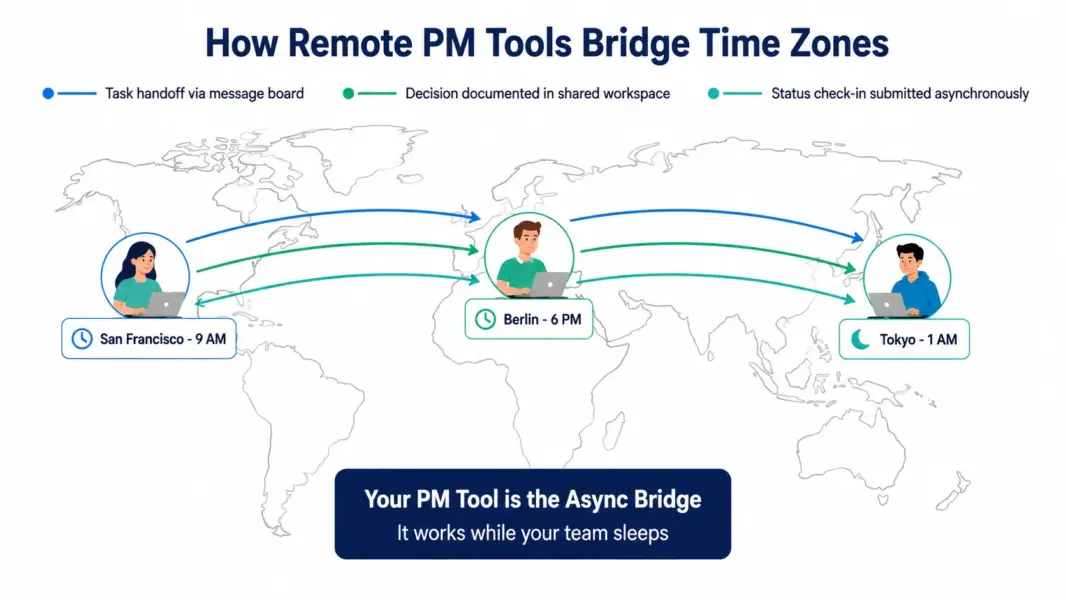
As Jason Fried, co-founder of 37signals and Basecamp, wrote in “Remote: Office Not Required”: “The best collaboration tools are not the ones that look most like an office. They are the ones that work asynchronously, respect uninterrupted focus time, and let people contribute on their own schedule.” This principle drives the rankings above, with Basecamp earning the top spot because it embodies this design philosophy more completely than any competitor.
Find your perfect remote PM tool
Take our free quiz to get a personalized recommendation in 60 seconds based on your remote team profile.
Frequently Asked Questions
What is the best project management tool for remote teams in 2026?
Basecamp is the best PM tool for fully async remote teams because it was built by a remote-first company (37signals) and includes async-native features like automatic check-ins and message boards that replace standup meetings. ClickUp is the best overall value for cross-functional remote teams at $7 per user with built-in chat, docs, and whiteboards consolidated in one platform.
Does the best remote PM tool need built-in chat?
Not necessarily. Remote teams can use a separate messaging tool (Slack, Microsoft Teams, Twist) and still have an excellent PM experience. However, PM tools with built-in chat (ClickUp’s Chat view, Basecamp’s Campfire) reduce context switching by keeping conversations attached to the work. Teams that already use a dedicated messaging tool find the built-in chat in PM tools redundant.
How do remote teams handle time zones in PM tools?
Most modern PM tools display due dates in each user’s local time zone automatically and respect working hours for notifications. Tools like Asana, ClickUp, and Notion handle time zones well. Older or simpler tools sometimes display dates in a single time zone, creating confusion. For globally distributed teams, verify time zone handling during your free trial before committing.
Is Asana good for remote teams?
Yes. Asana’s Workflow Builder enforces async process handoffs across time zones, the clean interface drives fast adoption for distributed hiring, and 300+ integrations connect Asana to the messaging and documentation tools remote teams typically use. Asana lacks built-in chat and time tracking, requiring third-party tools, but works well as the workflow center for remote operations.
What is the cheapest PM tool for remote teams?
ClickUp’s Free Forever plan supports unlimited users with most core features including chat, docs, and time tracking, making it the cheapest viable option for remote teams of any size. Trello’s free plan supports unlimited users with 10 boards. For paid tools, Trello at $5 per user is the cheapest, followed by ClickUp at $7 per user with no seat minimum.
Do remote teams need different PM tools than co-located teams?
Remote teams benefit from PM tools that prioritize async communication, time zone awareness, built-in documentation, and mobile experience. Co-located teams can rely on hallway conversations and meeting rooms to fill gaps that remote teams must address through tool features. Both groups can use the same PM tools, but remote teams typically value certain features (async check-ins, threaded comments, search across knowledge) more heavily.
Should remote teams use Notion or Basecamp?
Use Notion if your remote team’s work is heavy on documentation, specs, knowledge management, and async written collaboration. Use Basecamp if your team needs structured project management with built-in async communication (message boards, check-ins) and you value pricing predictability through the flat-rate Pro Unlimited plan. Some remote teams use both: Notion for knowledge, Basecamp for PM.
How important is mobile experience for remote PM tools?
Critical for distributed teams that work from anywhere. According to a 2024 Buffer State of Remote Work report, 27% of remote workers regularly work from cafes, coworking spaces, or while traveling, where mobile devices are primary. PM tools with strong mobile experiences (Trello, ClickUp, Asana) reduce friction for these scenarios. Tools with poor mobile experiences force remote workers to wait for laptop access, slowing async work.
Related Articles
- Basecamp Review 2026
- Notion Review 2026
- ClickUp Review 2026
- Asana Review 2026
- Best PM Tools for Small Teams
- Best PM Tools for Agencies
- Best Free PM Tools
- ClickUp vs Asana Comparison
- Free PM Tool Cost Calculator
- PM Tool Picker Quiz
- Complete Guide to PM Software