Stop guessing what project management software actually costs your team. This free PM tool cost calculator shows you the real monthly price across every major platform based on your team size and the features you need. Compare ClickUp, Asana, Monday.com, Trello, Notion, Basecamp, Wrike, and Jira side by side. No signup. No email required. Results update instantly.
📊 PM Tool Cost Calculator
💰 Your Monthly Cost by Tool
How to Use This PM Tool Cost Calculator
Enter your team size and check the features your team actually needs. The calculator instantly shows the cheapest plan from each major PM tool that meets your requirements. The cheapest option overall gets a green highlight. Tools without a plan matching your feature checklist appear in a warning below the results.
Two things to know before trusting the results. First, the calculator uses publicly listed annual pricing by default. Monthly billing typically costs 18-30% more. Second, “Native time tracking” means built-in features. Tools like Asana offer time tracking through third-party integrations like Toggl, which adds $8-12 per user per month not reflected in the base price.
What Features Should You Actually Require?
Many teams overpay for PM software because they require features they will not use. Use this guide to figure out which checkboxes matter for your team.
| Feature | When You Need It | When You Don’t |
|---|---|---|
| Gantt charts with dependencies | Multi-phase projects with deadline sequences, construction, software releases, event planning | Simple task lists, content calendars, basic team coordination |
| Native time tracking | Agencies billing by the hour, professional services, consulting firms | Internal teams not tracking billable time |
| Workflow automation | Repeatable processes (campaign approvals, onboarding, request intake), teams of 10+ | Solo work, ad-hoc projects without process patterns |
| Multi-project portfolios | Directors and PMs managing 10+ concurrent projects across teams | Single-team execution, individual contributors |
| Built-in docs/wiki | Knowledge-heavy work, product teams writing specs, async-first teams | Teams already using Notion, Google Docs, or Confluence |
| Creative proofing | Design and marketing teams reviewing visual assets with annotated feedback | Teams without creative review cycles |
How PM Tool Pricing Actually Works
Project management software pricing follows a predictable pattern across vendors. Free plans target individuals and very small teams. Entry paid tiers ($5-12 per user) cover most small team needs. Mid tiers ($12-25 per user) add advanced features like Gantt dependencies, automations, and portfolios. Enterprise tiers ($25+ per user, custom pricing) add SSO, advanced security, dedicated support, and premium features.
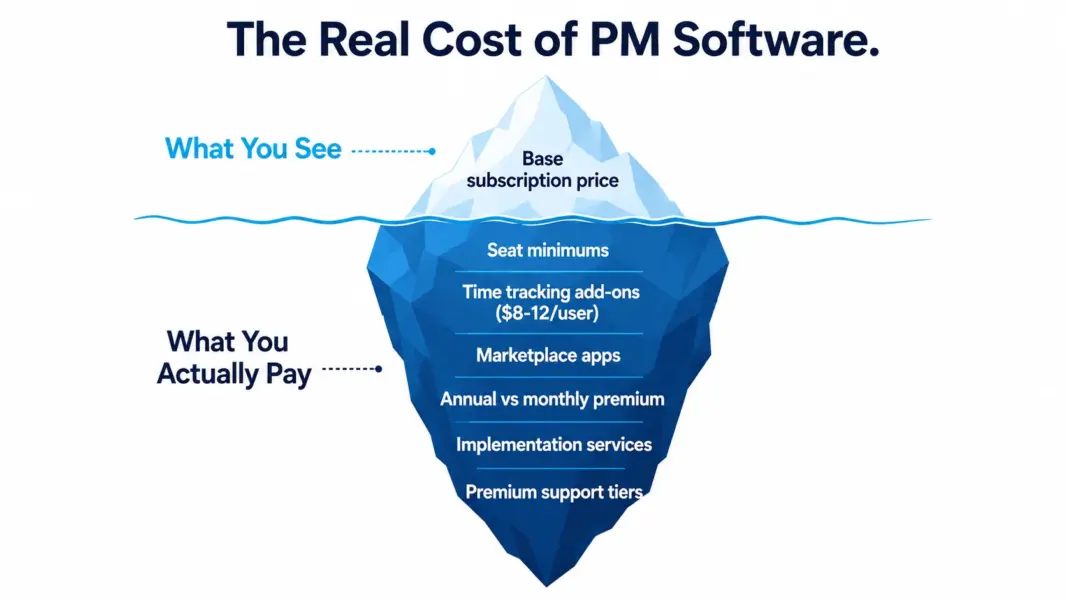
The pricing dynamics that surprise buyers include the following common patterns. Seat minimums on paid plans force you to pay for unused seats. Monday.com requires 3 seats minimum on every paid plan, which means a solo user pays for 3 seats. Annual versus monthly billing creates a 18-30% premium for monthly. Add-on costs for features marketed as included can double the real per-user cost. Time tracking add-ons average $8-12 per user. Resource management add-ons can run $30 per user per month on enterprise PM tools.
According to a 2024 G2 buyer survey, 47% of mid-market PM software buyers reported their actual annual spend exceeded their initial budget by 25% or more. The main causes: tier upgrades to access features they assumed were standard, seat minimums, and add-on costs not visible in initial pricing comparisons.
Which PM Tool Is Cheapest for Different Team Sizes?
The cheapest PM tool depends entirely on your team size. The pricing math changes dramatically at different headcounts because some tools have flat rates, some have seat minimums, and some have steep tier jumps.
| Team Size | Cheapest Paid Option | Monthly Cost | Why |
|---|---|---|---|
| 1 user (solo) | Trello Standard | $5 | No seat minimum, low entry price |
| 3 users | Trello Standard | $15 | Still cheaper than minimums on other tools |
| 10 users | Trello Standard | $50 | ClickUp Unlimited at $70 is close second |
| 20 users | ClickUp Unlimited | $140 | $7 per user with full PM features |
| 30 users | Basecamp Pro Unlimited | $299 (flat) | Flat rate becomes cheaper than per-user math |
| 50 users | Basecamp Pro Unlimited | $299 (flat) | $5.98 per user with unlimited scaling |
| 100 users | Basecamp Pro Unlimited | $299 (flat) | $2.99 per user, unbeatable at scale |
Basecamp’s flat-rate pricing becomes the cheapest option for teams over 25 people. However, Basecamp lacks Gantt charts, time tracking, and most advanced PM features. If your team needs those capabilities, the cheapest option shifts back to ClickUp at $7-12 per user depending on the tier you need. For more on this, see our ClickUp vs Asana comparison.
Need help choosing?
Read our complete PM software guide with detailed comparisons across every major tool.
Frequently Asked Questions
How accurate is this PM tool cost calculator?
The calculator uses publicly listed 2026 pricing from each vendor’s pricing page. Pricing accuracy is high for published plans, but actual costs can vary based on annual versus monthly billing, volume discounts negotiated for enterprise plans, and add-on features purchased separately. Treat results as accurate baseline estimates, then verify final pricing with each vendor.
Why do some tools show “Not available” for my features?
Tools show as unavailable when no tier offers all the features you requested. For example, Notion does not have native Gantt charts at any tier, so checking “Gantt charts” excludes Notion from results. Trello does not have native time tracking on any plan, so requiring it excludes Trello. Uncheck features to see those tools again.
Does this calculator include hidden costs?
The calculator shows base subscription costs from each vendor’s published pricing. It does not include third-party integration costs (like Toggl for Asana time tracking), marketplace app fees (common with Jira), or paid implementation services. For teams expecting heavy customization, add 20-40% to the base cost for realistic budgeting.
Why is annual billing cheaper than monthly?
PM software vendors discount annual billing by 18-30% versus monthly because annual contracts provide predictable revenue and reduce churn. The discount varies by vendor: Monday.com offers 18% off annual versus monthly, ClickUp offers 30% off, and Asana offers approximately 25% off. Switching from monthly to annual usually pays for itself within 2-3 months.
Which PM tool is cheapest for solo users?
Trello Standard at $5 per month is the cheapest paid option for solo users. Free options for solo users include ClickUp’s Free Forever plan (unlimited tasks, 100MB storage), Notion’s free plan (unlimited pages for one person), Trello’s free plan (10 boards), and Asana’s free plan (you can use it solo despite the 10-user cap on the free tier).
When does Basecamp’s flat rate become worth it?
Basecamp Pro Unlimited at $299 per month becomes cheaper than per-user PM tools at around 20-25 users on entry plans and 12-15 users on mid-tier plans. For a 50-person team, Basecamp Pro Unlimited at $299 per month works out to $5.98 per user, cheaper than any other major PM tool. The tradeoff is that Basecamp lacks many features that competitors include.
Are these prices in USD?
Yes. All prices in this calculator reflect USD pricing from each vendor’s US pricing page. Most vendors offer pricing in EUR, GBP, AUD, and CAD with slight variations. International buyers should check their local pricing page for accurate local currency pricing. Currency exchange rates can shift the actual cost in your local currency by 5-15% over time.
Do PM tools offer discounts for nonprofits or education?
Yes, most major PM tools offer discounted or free plans for qualified nonprofits, educational institutions, and open-source projects. Asana offers 50% off for nonprofits. Monday.com provides discounted nonprofit pricing. ClickUp has a nonprofit program. Notion offers free Plus plans for educational use. Apply through each vendor’s nonprofit or education program page for verification.
What to Do After Comparing Costs
Cost matters but it does not determine the right tool. The cheapest PM software for your team only delivers value if your team actually uses it. A tool that costs $200 per month and gets 90% team adoption beats a tool that costs $80 per month and gets 40% adoption. Total value depends on adoption rate as much as price.
After narrowing your options with this calculator, run a real trial with a real project for two weeks. Most PM tools offer 14-30 day free trials with full feature access. Use the trial to test adoption resistance, not just feature checkboxes. Watch how your team responds to the interface, the onboarding flow, and the daily workflow. The tool that your team gravitates toward without prompting is the right answer regardless of price.
For deeper analysis on choosing the right PM tool, see our complete project management software guide, best free PM tools, or our best PM tools for small teams if your team is under 25 people.
Related Free Tools