Catch budget overruns before they sink your project. This free project budget tracker shows planned versus actual cost variance in real time. Add your budget line items by category, enter estimated and actual spending, and instantly see which line items are over budget, your total budget health, and how much runway remains. Unlike the static spreadsheet templates that fill search results, this tool calculates variance automatically and flags overspend the moment it happens. No signup. No email. Your data stays in your browser.
📊 Project Budget Tracker
Why Use a Project Budget Tracker?
Project budget tracking exists because most projects fail at it. According to research cited by Strategy and PwC, an estimated 91.5% of projects exceed their budget, schedule, or both. The single biggest reason is that teams discover overruns too late, after the money is already spent, rather than catching variance early when adjustments are still possible. A budget tracker that surfaces planned versus actual variance in real time turns budget management from a post-mortem into an early-warning system.
This tracker focuses on the one number that matters most: variance, the gap between what you planned to spend and what you actually spent on each line item. Positive variance means under budget. Negative variance means over budget. Watching variance per category lets you spot the specific line items draining your budget before the total project goes red.
How This Project Budget Tracker Works
Add a line item for each major cost category in your project: labor, software, contractors, materials, travel, or whatever fits your work. Enter the planned amount you budgeted and the actual amount spent so far. The tracker instantly calculates variance per line, shows your total budget health with a color-coded status, and displays the percentage of your planned budget consumed.
The color system gives you an at-a-glance read. Green means you are under 90% of planned budget with healthy runway. Amber means you are approaching the limit between 90% and 100%, a signal to slow spending. Red means you have exceeded the planned budget, with the exact overspend amount shown. Catch the amber state and you can still course-correct. Reach red and you are managing a problem rather than preventing one.
What Should You Track in a Project Budget?
Effective project budgets break costs into categories that map to how money actually leaves your account. Tracking a single lump sum hides which areas are overspending. Breaking the budget into line items reveals exactly where variance is building so you can act on the specific problem.
| Cost Category | What It Includes | Why Track It Separately |
|---|---|---|
| Labor / team hours | Internal team time at loaded hourly rates | Usually the largest cost; small hour overruns compound fast |
| Contractors / freelancers | External resources paid by hour or project | Scope creep here is the most common overrun source |
| Software & tools | Subscriptions, licenses, one-time tool purchases | Recurring costs accumulate beyond initial estimates |
| Materials / equipment | Physical goods, hardware, supplies | Price volatility creates variance outside your control |
| Travel & events | Client visits, conferences, team gatherings | Frequently underestimated and easy to cut if over |
| Contingency buffer | Reserve for unknowns (typically 10-15%) | Tracking buffer use signals overall project health |
A common best practice is including a contingency buffer of 10-15% of total budget. According to a 2024 Project Management Institute analysis, projects that allocate and explicitly track a contingency reserve are significantly more likely to finish within budget, because the buffer absorbs the small unknowns that otherwise push line items into the red.
How to Catch Budget Overruns Early
The difference between a project that finishes on budget and one that blows past it is usually how early the team notices the trend. Three habits separate teams that catch overruns early from teams that discover them at the post-mortem.
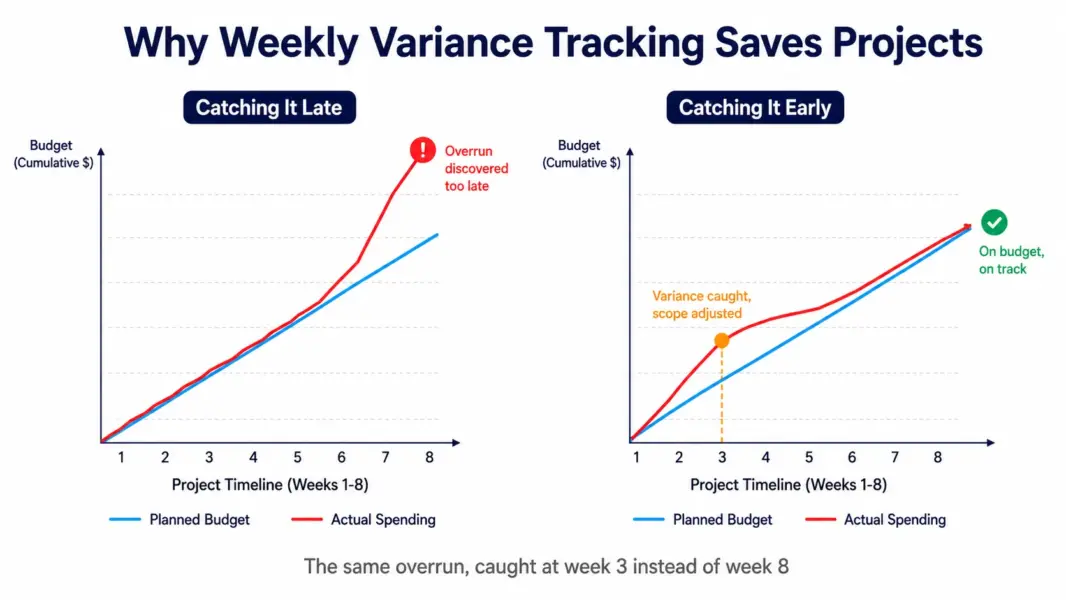
Update actuals weekly, not monthly. Variance that looks small at week two becomes unfixable by week eight. Weekly actual cost updates surface the trend while you still have time to renegotiate scope, shift resources, or cut a line item. Monthly updates often reveal the problem after the money is committed.
Watch the trajectory, not just the total. A project at 40% budget spent and 30% complete is trending over budget even though the total still shows green. Compare your percentage spent against your percentage of work completed. When spending outpaces progress, you have an early warning regardless of what the total variance shows.
Track variance per line, not just overall. A project can show healthy total variance while one category quietly runs 50% over. The contractor line going red while labor runs under can net out to a green total that masks a real problem. Per-line tracking surfaces the specific category that needs intervention.
Beyond Spreadsheets: When to Use Budget Tracking Software
This free tracker handles single-project budget management well. As your project portfolio grows, dedicated project management software with built-in budget tracking automates the variance calculations and connects budget data to the actual tasks and time entries driving the costs.
Several PM tools include native budget tracking. Teamwork tracks project budgets with profitability reporting and connects them to logged billable hours, making it strong for agencies. ClickUp tracks budgets through custom fields and dashboards on its Business plan. Wrike offers budget tracking with resource management on its Business tier. For teams managing multiple concurrent project budgets, these tools eliminate the manual updates this standalone tracker requires.
To compare which PM tools include the budget features you need, see our best PM tools for agencies guide, which covers budget and billing capabilities in depth, or our Teamwork review for the strongest dedicated budget tracking. To estimate your tool costs first, use our PM tool cost calculator.
Track team capacity too
Pair budget tracking with our free team capacity calculator to see if your team can deliver within budget and on time.
Frequently Asked Questions
How do I track a project budget?
Break your total budget into line items by cost category such as labor, contractors, software, and materials. For each line, record the planned amount and update the actual amount spent regularly, ideally weekly. Calculate variance as planned minus actual for each line and the total. Positive variance means under budget; negative means over. This tracker automates all of these calculations as you type.
What is budget variance in project management?
Budget variance is the difference between what you planned to spend and what you actually spent. A positive variance means you spent less than planned (under budget), while a negative variance means you spent more (over budget). Tracking variance per cost category, not just the total, reveals which specific areas are draining your budget so you can intervene on the right problem.
How often should I update my project budget tracker?
Update actual costs weekly for active projects. Variance that looks small at week two often becomes unfixable by week eight. Weekly updates surface spending trends while you still have time to renegotiate scope, reallocate resources, or cut line items. Monthly updates frequently reveal overruns only after the money is already committed and difficult to recover.
What percentage should a project contingency buffer be?
Most project management guidance recommends a contingency buffer of 10-15% of total budget for typical projects, higher for projects with significant unknowns or new technology. The buffer absorbs small unexpected costs that would otherwise push line items over budget. According to a 2024 Project Management Institute analysis, projects that explicitly track contingency use finish within budget more often.
Why do most projects go over budget?
According to research cited by Strategy and PwC, an estimated 91.5% of projects exceed budget, schedule, or both. The most common causes are scope creep (especially in contractor work), discovering overruns too late to correct, optimistic initial estimates, and tracking only the total budget rather than per-category variance that would surface problems earlier. Early, granular tracking addresses most of these causes.
Is this project budget tracker free?
Yes, completely free with no signup, no email, and no account required. The tracker runs entirely in your browser, so your budget data never leaves your device and nothing is stored on any server. You can use it for unlimited projects. For ongoing multi-project budget management with automation, dedicated PM software with budget features becomes worthwhile.
Can I track multiple projects in this budget tracker?
This tracker handles one project budget at a time and does not save data between sessions, since it stores nothing for privacy. For tracking multiple concurrent project budgets with saved history, automated variance, and connection to actual time entries, use dedicated PM software like Teamwork, ClickUp Business, or Wrike Business that include native budget tracking features.
What is the difference between a budget tracker and a budget template?
A budget template is a static spreadsheet you fill in and calculate manually. A budget tracker like this one calculates variance automatically as you enter numbers, color-codes budget health, and flags overspend in real time without formulas to maintain. Templates require manual upkeep and are error-prone; interactive trackers reduce the manual work and surface problems faster.
Related Free Tools and Articles
- Free Team Capacity Calculator
- Free Meeting Cost Calculator
- Free PM Tool Cost Calculator
- Best PM Tools for Agencies
- Teamwork Review (Best for Budgets)
- ClickUp Review (Budget Tracking on Business)
- Complete Guide to PM Software