Most lists of the best project management software for startups rank tools as if every startup is identical. They are not. A bootstrapped solo founder burning personal savings has nothing in common with a Series A team of 30 spending investor money on a 12-month runway. The right tool depends entirely on your funding stage, team size, and how much runway each subscription dollar costs you. This guide sorts 9 tested tools by the stage your startup is actually in.
The core trap to avoid: paying for enterprise features two years before you need them. A 2024 Reddit thread in r/startups with hundreds of upvotes captured the frustration that most teams use roughly 20% of a PM tool’s features while paying for 100% of its price. Startups feel this acutely because every dollar spent on unused software features is a dollar off your runway.
Match the Tool to Your Runway, Not the Feature List
Startups fail at PM tool selection when they choose based on feature comparisons instead of stage fit. The right framework is simple: at each funding stage, your team has a different size, a different burn rate sensitivity, and different process maturity. The tool should match where you are now, with a clear upgrade path for where you are going.
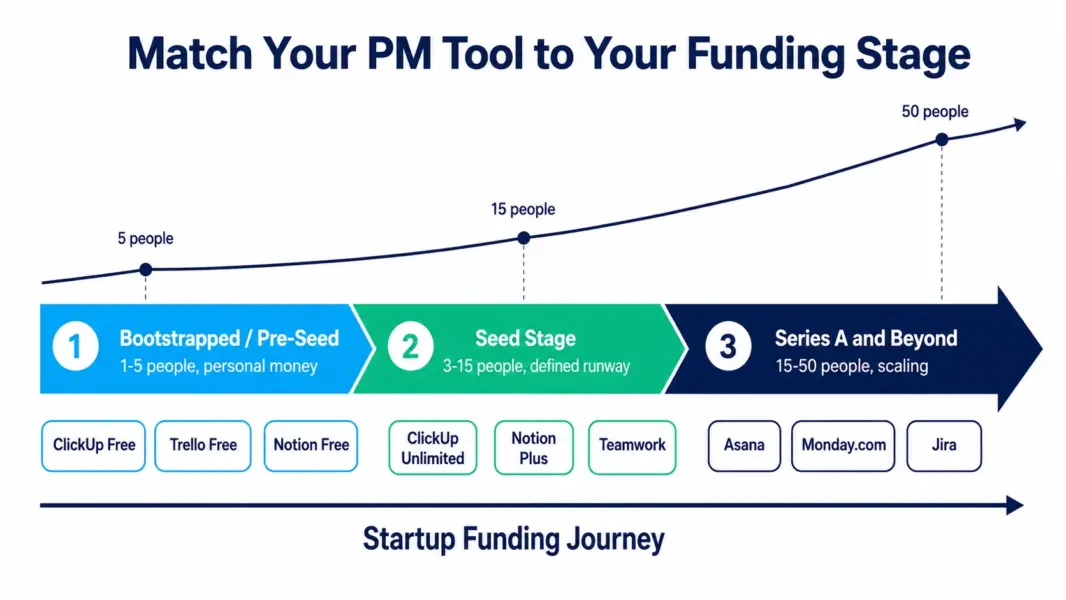
Three stage-based principles guide the picks below. First, bootstrapped startups should pay nothing until a free plan genuinely blocks them. Second, seed-stage startups should optimize for the lowest cost per user that includes the features the team will actually use weekly. Third, Series A and later startups can justify paying for process structure and reporting that supports scaling beyond 15 people.
Bootstrapped and Pre-Seed: Pay Nothing Until You Have To
Bootstrapped startups should run on free plans until a specific limit blocks real work. At this stage, with 1-5 people and personal money funding the operation, every subscription dollar matters more than any feature. The free tiers below are genuinely usable, not crippled demos.
ClickUp Free Forever: The Best Free Plan for Tiny Startups
ClickUp’s free plan supports unlimited users with unlimited tasks, making it the rare free tier that does not penalize team size. A 5-person bootstrapped startup can run real projects on ClickUp free indefinitely, with the main limit being 100MB of storage. When you outgrow free, the upgrade to Unlimited at $7 per user is the lowest-cost path to full features. See our full ClickUp review for details.
Trello Free: The Simplest Starting Point
Trello’s free plan supports unlimited users with 10 boards and the most intuitive interface in project management. For bootstrapped founders who want zero learning curve and simple kanban tracking, Trello free is often a permanent solution rather than a stepping stone. The card-based mobile app is the best in the category for founders working from phones between meetings. See our full Trello review for details.
Notion Free: For Founder-Led Knowledge Work
Notion’s free plan gives a solo founder unlimited pages for building a company wiki, investor update tracker, product spec library, and task system in one workspace. The catch is that the free plan is single-user, so the moment you add a cofounder or first hire, you move to the Plus plan at $8 per user. For solo founders organizing everything before the team grows, Notion free is excellent. See our full Notion review for details.
Seed Stage: Optimize Cost Per Useful Feature
Seed-stage startups with 3-15 people and a defined runway should optimize for the lowest per-user cost that includes the features the team uses weekly. At this stage you have raised money but every month of runway counts, so the goal is maximum capability per dollar without paying for enterprise overhead you will not touch for a year.
ClickUp Unlimited: The Best Value at Seed Stage
ClickUp Unlimited at $7 per user is the strongest value pick for seed-stage startups. It includes time tracking, docs, whiteboards, Gantt charts, and unlimited integrations in one subscription, consolidating tools that would otherwise require separate purchases. According to a 2024 G2 analysis, ClickUp delivers the lowest total cost of ownership among feature-complete PM tools for teams of 5-15. Most seed-stage startups can run their entire operation on ClickUp without adding Notion, Toggl, or a separate wiki.
Notion Plus: For Product-Led Seed Startups
Seed-stage startups whose work centers on product specs, documentation, and async knowledge sharing get more from Notion Plus at $8 per user than from a traditional PM tool. Product teams writing PRDs, founders documenting decisions for future hires, and teams building investor-facing knowledge bases find Notion’s flexible workspace essential. Many product-led startups pair Notion for docs with a lightweight tool like Linear for engineering execution.
Teamwork: For Service-Based and Agency Startups
Service-based startups that bill clients by the hour, including early agencies, consultancies, and dev shops, should consider Teamwork from the start. Its native time tracking, client portals, and project budgets address billing realities that generalist tools ignore. The 3-user minimum on the Deliver plan at $13.99 per user makes it best for teams of 3 or more. See our full Teamwork review for details.
Series A and Beyond: Pay for Structure That Supports Scaling
Series A and later startups with 15-50 people can justify paying for process structure, workflow automation, and reporting that supports scaling. At this stage you have institutional money, a growing team, and the need for repeatable processes that do not depend on founders remembering everything. The cost per user matters less than the tool’s ability to enforce structure as headcount grows.
Asana: For Process Maturity at Scale
Asana becomes worth its higher price ($10.99 per user Starter) when your startup crosses 15 people and informal coordination starts breaking down. The Workflow Builder enforces repeatable processes, the clean interface drives fast adoption among new hires, and the platform scales smoothly to hundreds of users. According to First Round Review, the most common operational failure at the Series A stage is the breakdown of informal coordination that worked at 10 people but collapses at 30. Asana’s structure addresses this directly. See our full Asana review for details.
Monday.com: For Visual Teams Scaling Across Functions
Monday.com suits Series A startups scaling across multiple functions because its Work OS ecosystem expands from project management into CRM, dev, and service management on one data layer. A scaling startup can run sales pipelines in Monday CRM, engineering in Monday Dev, and operations in Work Management without buying separate platforms. The 3-seat minimum is irrelevant at this team size. See our full Monday.com review for details.
Jira: For Engineering-Heavy Scaling Startups
Engineering-led startups scaling their development organization benefit from Jira’s industry-standard agile capabilities once the engineering team passes 10 developers running formal scrum. Jira’s free plan covers up to 10 users, making it accessible earlier, but the value compounds at scale with DevOps integration and marketplace apps. Cross-functional startups should pair Jira for engineering with ClickUp or Asana for non-engineering work. See our full Jira review for details.
The 9 Startup PM Tools at a Glance
This table summarizes all nine picks across the three funding stages, showing the stage fit, starting price, and the single strongest reason each tool earns a place for startup teams.
| Tool | Best Funding Stage | Starting Price | Why Startups Pick It |
|---|---|---|---|
| ClickUp (Free) | Bootstrapped | Free (unlimited users) | Best free plan that does not cap team size |
| Trello (Free) | Bootstrapped | Free (10 boards) | Simplest tool with best mobile app |
| Notion (Free) | Bootstrapped (solo) | Free (1 user) | Founder knowledge hub before team grows |
| ClickUp Unlimited | Seed | $7 per user | Lowest total cost with full features |
| Notion Plus | Seed (product-led) | $8 per user | Best for spec and documentation work |
| Teamwork | Seed (service-based) | $13.99 per user | Native billing for client-services startups |
| Asana | Series A+ | $10.99 per user | Process structure for scaling past 15 people |
| Monday.com | Series A+ (cross-functional) | $9 per seat | Work OS expansion across functions |
| Jira | Series A+ (engineering) | Free / $7.75 per user | Agile depth for scaling dev teams |
The Three Mistakes That Cost Startups the Most
Startups waste money and momentum on PM tools in three predictable ways. Avoiding these matters more than picking the single best-rated tool, because the wrong process around any decent tool costs more than the tool itself.
Mistake one is buying enterprise features too early. A seed-stage startup does not need portfolio management, advanced reporting, or SSO. Paying for the tier that includes them burns runway on capability you will not touch for 18-24 months. Buy the tier your team uses this quarter, not the tier you might need eventually.
Mistake two is migrating tools too often. Every tool migration costs 1-3 weeks of reduced team velocity plus the rebuild of custom workflows. Startups that switch PM tools every six months chasing the perfect fit lose more to migration churn than they would lose to a slightly imperfect tool. Pick a tool with room to grow and commit for at least a year.
Mistake three is ignoring adoption. The best tool nobody uses delivers zero value. According to Gartner research on software adoption, tools chosen by leadership without team input show significantly lower active usage than tools the team helped select. At a startup, where one disengaged person represents a large fraction of the team, adoption is everything. Run a real two-week trial with the whole team before committing.
How to Run a Two-Week Startup PM Trial
The fastest way to find your startup’s right tool is a structured two-week trial, not endless feature comparison. In week one, set up one real project with all its actual complexity: real tasks, real deadlines, real team members, real attachments. Do not use a fake test project, because fake projects hide the friction real work reveals.
In week two, run your actual daily work in the tool. Watch for adoption resistance, not feature gaps. The question is not whether the tool can technically do something. The question is whether your team naturally reaches for it each morning. The tool your team gravitates toward without being reminded is the right one, regardless of how it ranks on feature lists.
To narrow your shortlist before trialing, take our free PM tool picker quiz for a personalized recommendation, then compare exact costs for your team size with our PM tool cost calculator.
Find your startup's PM tool
Take our 60-second quiz to get a personalized recommendation based on your stage and team.
Last updated: July 5, 2026
Frequently Asked Questions
What is the best project management software for startups in 2026?
The best tool depends on your funding stage. Bootstrapped startups should use ClickUp or Trello free plans. Seed-stage startups (3-15 people) get the most value from ClickUp Unlimited at $7 per user. Series A and later startups (15-50 people) benefit from Asana or Monday.com for process structure. No single tool is best for every startup stage.
What project management tool do most startups use?
ClickUp, Notion, and Asana are the most commonly adopted PM tools among startups, according to multiple 2024 startup tooling surveys. ClickUp wins on value for early-stage teams, Notion dominates among product-led startups for its documentation strength, and Asana is popular with Series A startups formalizing processes. Trello remains common among the smallest bootstrapped teams.
Should a bootstrapped startup pay for project management software?
Not until a free plan genuinely blocks real work. ClickUp Free supports unlimited users with unlimited tasks, and Trello Free supports unlimited users with 10 boards. Bootstrapped startups should run on these free tiers until a specific limit, such as storage caps or needed features, forces an upgrade. Every subscription dollar at this stage is runway you could spend elsewhere.
How much should a startup spend on PM software?
Seed-stage startups should budget $7-10 per user per month, with a 10-person team spending $70-100 monthly. Bootstrapped startups can often spend nothing using free plans. Series A startups formalizing processes may spend $11-15 per user. Avoid enterprise tiers ($25+ per user) until you genuinely need portfolio management, SSO, and advanced reporting, typically not before 50 people.
When should a startup switch project management tools?
Switch only when your current tool blocks real work in measurable ways, such as hitting user or storage limits, lacking a feature your team needs weekly, or your team size outgrowing the tool’s effective range. Avoid switching more often than once per year, because each migration costs 1-3 weeks of reduced velocity plus the rebuild of custom workflows.
Is ClickUp or Notion better for startups?
ClickUp is better for startups that need structured project management with tasks, deadlines, Gantt charts, and time tracking. Notion is better for product-led startups whose work centers on specs, documentation, and knowledge management. Many startups use both: Notion for documentation and ClickUp or Linear for execution. For pure value at seed stage, ClickUp Unlimited at $7 per user is the stronger single-tool choice.
What is the biggest PM software mistake startups make?
Buying enterprise features too early. Seed-stage startups frequently pay for tiers including portfolio management, advanced reporting, and SSO that they will not use for 18-24 months. This burns runway on unused capability. Buy the tier your team uses this quarter with a clear upgrade path, not the tier you might eventually need at scale.
Related Articles
- Best PM Tools for Small Teams
- Best Free PM Tools
- ClickUp Review 2026
- Notion Review 2026
- ClickUp vs Asana 2026
- Free PM Tool Cost Calculator
- PM Tool Picker Quiz
- Complete Guide to PM Software