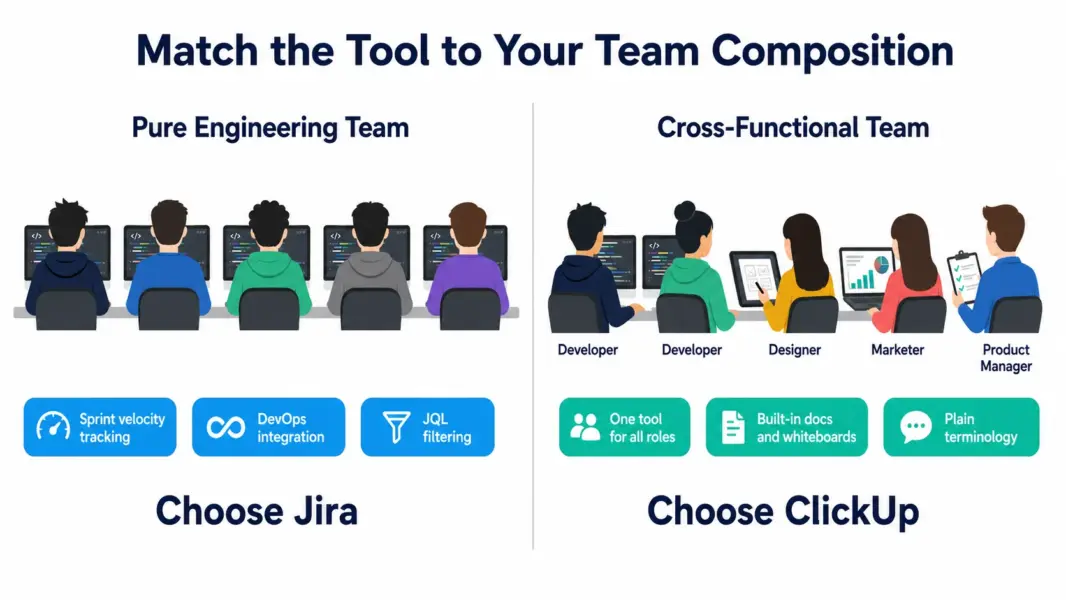
The ClickUp vs Jira decision usually comes down to one question: is your team pure engineering, or cross-functional? Jira is the industry standard for software development teams running formal scrum or kanban with deep DevOps integration. ClickUp is a generalist project management platform that handles software development alongside marketing, operations, and product work without alienating non-technical team members. Both serve developers, but they target fundamentally different audiences.
After running both tools across mixed organizations including pure engineering teams (15 developers) and cross-functional product teams (8 developers plus 12 designers, PMs, and marketers), our verdict: Jira wins for engineering-only contexts. ClickUp wins everywhere developers collaborate with non-developers daily.
What Is the Core Difference Between ClickUp and Jira?
Jira is a specialized agile project management tool built specifically for software development. Every interface element, terminology choice, and default configuration assumes your team writes code, ships software, and practices agile methodologies like scrum or kanban. Issues flow through workflows, get scheduled into sprints, and connect to code repositories and CI/CD pipelines.
ClickUp is a general-purpose PM platform that includes solid agile features alongside broader project management capabilities. Sprint boards work, but so do marketing campaign workflows, content calendars, and product roadmaps. The terminology stays plain (Tasks, Lists, Spaces) rather than developer-specific (Issues, Stories, Epics, Sprints).
For full reviews, see our ClickUp review and Jira review.
How Does ClickUp vs Jira Pricing Compare in 2026?
ClickUp is cheaper than Jira at every paid tier when you include the marketplace apps most Jira teams need. Jira’s base pricing looks competitive, but real-world costs typically run 30-50% higher than published rates due to required add-ons.
| Dimension | ClickUp | Jira |
|---|---|---|
| Free plan | Unlimited users, 100MB storage | Up to 10 users, 2GB storage |
| Entry paid | Unlimited: $7 per user | Standard: $7.75 per user |
| Mid tier | Business: $12 per user | Premium: $15.25 per user |
| Built-in features | Time tracking, docs, whiteboards, automations | Sprint management, basic time logging, automations |
| Required add-ons | None for typical use | Time tracking app ($10/user), test management ($10/user), portfolio ($5/user) |
| 20-user team real cost (mid tier) | $240/month | $305/month + $200-400 in marketplace apps |
Jira’s $7.75 Standard tier looks attractive next to ClickUp’s $7 Unlimited tier. The reality is that most Jira teams add marketplace apps for time tracking (Tempo at $10/user), test management (Zephyr at $10/user), or portfolio management (Structure at $5/user). A 20-user Jira team paying $155/month for Standard often adds $200-400 monthly in marketplace apps, bringing real cost to $355-555 per month.
ClickUp’s published $7 includes time tracking, docs, whiteboards, sprint features, and 100+ automation templates without add-on purchases. The pricing transparency matters for budget planning. According to a 2024 Atlassian Community survey, 71% of Jira teams use at least 3 marketplace apps, with average monthly app spend of $180 per team.
Winner on pricing: ClickUp, especially when factoring real-world marketplace app costs.
Which Has Better Features for Software Development?
Jira wins on pure developer features. ClickUp wins on cross-functional collaboration features that engineering teams often need when they work with designers, PMs, and marketing teammates.
| Feature | ClickUp | Jira | Winner |
|---|---|---|---|
| Scrum boards with velocity tracking | Yes, all paid plans | Best-in-class | Jira |
| Kanban with WIP limits | Yes | Yes (native, more refined) | Jira |
| Backlog grooming tools | Good | Best-in-class | Jira |
| DevOps integration depth | Basic GitHub, GitLab | Deepest in market (commits, PRs, deploys, DORA metrics) | Jira |
| JQL-style advanced filtering | Custom filters via UI | JQL (powerful query language) | Jira |
| Marketplace ecosystem | 1,000+ integrations | 1,000+ apps (deeper development-focused) | Jira |
| Built-in docs and wiki | Yes (ClickUp Docs) | Requires Confluence (separate subscription) | ClickUp |
| Time tracking included | Yes, all paid plans | Basic only, marketplace app for real time tracking | ClickUp |
| Whiteboards built-in | Yes | No | ClickUp |
| Cross-functional team usability | Strong (designers, PMs, marketing all comfortable) | Weak (non-developers resist the interface) | ClickUp |
| Workflow automation depth | 100+ templates | Powerful but complex Jira automation rules | Tie (different strengths) |
| View types | 15+ (List, Board, Gantt, Calendar, Mind Map, Workload) | Scrum and Kanban boards + Timeline | ClickUp |
Jira wins 5 categories, all developer-specific. ClickUp wins 4 categories, all related to cross-functional work and built-in features that Jira charges separately for. The ratio favors Jira for pure engineering use cases and ClickUp for everything that touches engineering plus other functions.
Which Is Easier to Use for Different Team Members?
ClickUp is easier for cross-functional teams. Jira is comparable for developers but creates friction for everyone else. The ease of use story depends entirely on who is using the tool.
For a senior software engineer, both tools are usable within hours. Jira matches their existing mental model of agile work (epics, stories, sprints, velocity). ClickUp feels less specialized but capable. The learning gap exists but does not create resistance for developers.
For a product manager working with both developers and marketing, ClickUp wins clearly. They can run dev sprints in one Space, marketing campaigns in another Space, and product roadmaps in a third, all in the same tool with the same interface. Jira would require them to use Jira for engineering and Asana or another tool for marketing, creating context-switching overhead.
For a marketer who occasionally needs to coordinate with developers, ClickUp is dramatically easier. The terminology is plain (Tasks, not Issues or Stories), the interface is consistent with non-engineering use cases, and onboarding takes 30-60 minutes versus 1-2 weeks for Jira.
G2 2024 Ease of Use scores: ClickUp 7.8/10, Jira 6.5/10. The 1.3-point gap reflects the cross-functional usability difference. For pure dev teams, the gap matters less. For mixed teams, it matters a lot.
Winner on ease of use: ClickUp for cross-functional teams. Tie for pure dev teams.
How Does Customer Support Compare?
ClickUp offers live chat and email support with 5-15 minute chat response times during business hours. Jira provides community forum support on Free, email support on Standard, and 24/7 premium support on Premium and Enterprise. Live chat is not available on Jira at any tier.
Jira’s strength is the Atlassian Community forum, which has millions of posts and active staff participation. Most Jira questions have existing answers in the community. ClickUp’s knowledge base is comprehensive, and the Reddit community is moderately active for peer support.
For enterprise deployments, both offer dedicated customer success managers. Atlassian’s enterprise sales motion is more mature given Jira’s longer market presence and Fortune 500 customer base.
Winner on support: ClickUp for response speed via live chat. Jira for community depth and enterprise infrastructure.
Which Tool Fits Your Team Profile?
| Team Profile | Recommended | Why |
|---|---|---|
| Pure engineering team (10+ developers) | Jira | Sprint depth, DevOps integration, marketplace ecosystem for developer-specific apps |
| DevOps and SRE teams | Jira | CI/CD integration, DORA metrics, incident workflows match operational needs |
| Cross-functional product team (devs + designers + PMs) | ClickUp | One tool serves all roles. Jira alienates designers and PMs. |
| Startup engineering team (5-15 people, mixed roles) | ClickUp | Affordability, cross-functional support, built-in docs avoid tool sprawl |
| Agency with developer team plus client services | ClickUp | Handles both engineering and client project management in one platform |
| Enterprise software organization | Jira | Premium tier with Advanced Roadmaps and Atlassian ecosystem integration |
| Team already using Confluence and Bitbucket | Jira | Native Atlassian ecosystem integration saves on third-party connector work |
| Marketing team that occasionally builds simple software | ClickUp | Primary marketing use case dominates. Jira would be overkill for occasional dev work. |
Can You Use ClickUp and Jira Together?
Yes, and some organizations do exactly that. The most common pattern: Jira for the engineering org running formal scrum, ClickUp for the rest of the company including product management, marketing, design, and operations. Native and third-party integrations sync information between the two systems.
The Jira-ClickUp integration is bidirectional but not seamless. High-level information (issue status, due dates, assignees) syncs reliably. Custom fields, automations, and workflow states require careful mapping. Most organizations syncing both tools dedicate a part-time admin to keeping the integration healthy.
The tradeoff is operational complexity. Two tools means two interfaces, two billing relationships, two admin overheads, and ongoing sync management. Many cross-functional organizations decide that one consolidated tool (usually ClickUp for the mid-market) delivers better total value than maintaining both. For more on this decision, see our ClickUp vs Asana comparison covering similar tool consolidation tradeoffs.
ClickUp vs Jira: Our 2026 Final Verdict
Jira remains the gold standard for software development teams. Its sprint management, DevOps integration, marketplace ecosystem, and JQL-powered filtering have earned its position as the default choice for engineering teams over 20 years. If your team writes code as the primary work output and operates within formal agile methodologies, Jira is the right tool despite its complexity.
ClickUp is the better choice when engineering is one of several functions your team performs. The cross-functional usability advantage matters enormously when designers, PMs, and marketers need to collaborate with developers daily. ClickUp also wins on built-in features, with time tracking, docs, and whiteboards included rather than requiring marketplace apps that inflate Jira’s real cost.
Our recommendation: choose Jira if your engineering team is the primary user and you accept the complexity for the developer-focused depth. Choose ClickUp if your engineering team works alongside other roles and you value tool consolidation over specialized depth. Both offer free plans suitable for evaluation. According to Stack Overflow’s 2024 Developer Survey, Jira holds 53% market share among professional developers, while ClickUp ranks among the fastest-growing PM tools at 14% adoption among cross-functional product teams.
For more options, see our complete PM software guide, Jira vs Asana comparison, or best free PM tools.
Try ClickUp Free Try Jira Free Last updated: May 16, 2026Frequently Asked Questions
Is ClickUp better than Jira for software development in 2026?
Jira is better for pure engineering teams running formal scrum or kanban with deep DevOps integration needs. ClickUp is better for engineering teams that work alongside non-technical colleagues like designers, product managers, and marketers. Choose Jira for specialized developer depth. Choose ClickUp for cross-functional collaboration.
Is ClickUp cheaper than Jira?
ClickUp at $7 per user is cheaper than Jira Standard at $7.75 per user on published pricing. The real-world gap widens because most Jira teams add marketplace apps for time tracking, test management, and portfolio features, adding $200-400 monthly. ClickUp includes these features in the base subscription, making it 30-50% cheaper for typical mid-market teams.
Can ClickUp replace Jira for agile development?
ClickUp handles basic-to-moderate agile workflows including scrum sprints, kanban boards, story points, velocity tracking, and backlog management. It works well for cross-functional product teams. Pure engineering teams running complex sprints with DORA metrics, advanced CI/CD integration, and marketplace-app-based workflows still benefit from Jira’s specialized depth.
Does ClickUp have JQL like Jira?
ClickUp does not have a query language equivalent to JQL. ClickUp uses custom filter combinations through its interface for advanced search and reporting. Power users who rely on JQL for complex filtering across thousands of issues will find ClickUp’s filtering capabilities less powerful, though sufficient for most non-enterprise use cases.
Which has better DevOps integration?
Jira has significantly deeper DevOps integration including native connections to Bitbucket, GitHub, and GitLab with commit-to-issue linking, deployment pipeline visibility, and DORA metrics tracking. ClickUp offers basic Git integration but lacks the deployment dashboard and engineering analytics that Jira provides for software delivery teams.
Is Jira’s interface really that much harder than ClickUp’s?
For developers familiar with agile concepts, Jira is comparable to ClickUp in usability after a short learning period. For non-developers (designers, marketers, product managers), Jira’s interface is significantly harder due to developer-specific terminology, complex workflow configuration, and dense screen layouts. The ease of use gap exists primarily for cross-functional team members.
Should I move from Jira to ClickUp?
Consider the move if your team is more cross-functional than purely engineering, you’re paying significant marketplace app fees, or non-developers resist using Jira. Stay on Jira if your team is pure engineering, you rely on Jira-specific features like JQL or DORA metrics, and your marketplace app investment represents real workflow value rather than capability you could replace with ClickUp’s built-in features.
What is Jira’s biggest disadvantage versus ClickUp?
Jira’s biggest disadvantage is cross-functional usability. The developer-centric design alienates designers, marketers, and product managers who collaborate with engineering teams. This creates tool sprawl in organizations that need both engineering PM and general PM, often resulting in Jira plus a separate tool like Asana. ClickUp consolidates both use cases into one platform.
Related Comparisons
- Jira vs Asana 2026
- ClickUp vs Asana 2026
- ClickUp vs Monday.com 2026
- ClickUp Review 2026
- Jira Review 2026
- Jira Alternatives 2026
- Complete Guide to PM Software