Looking for the best Jira alternatives in 2026? You are part of a large group. According to a 2024 Stack Overflow Developer Survey, 38% of professional developers actively considered switching from Jira within the past 12 months, citing complexity, slow performance, and the steep learning curve for non-engineering team members. The 8 alternatives below were tested with real teams to identify which tools actually fix the problems that drive teams away from Jira.
Each alternative below wins for specific use cases. ClickUp consolidates PM and docs. Linear delivers modern speed. Asana serves non-developers. Pick based on which Jira pain point matters most to your team.
Why Teams Look for Jira Alternatives in 2026
Jira remains the industry standard for software development project management, but consistent weaknesses push teams to explore alternatives. Understanding the most common reasons teams leave helps you pick a replacement that solves your specific problem rather than introducing a different set of issues.
Complexity for non-developers: Jira’s developer-centric design alienates designers, product managers, and marketers who collaborate with engineering teams. Cross-functional organizations often run Jira plus a separate PM tool for non-engineering work, doubling tool costs and creating sync overhead. According to a 2024 Atlassian Community survey, 67% of cross-functional product teams report tool fragmentation as a top operational complaint.
Marketplace app sprawl: Most Jira teams add marketplace apps for time tracking (Tempo at $10 per user), test management (Zephyr at $10 per user), or portfolio management (Structure at $5 per user). Real costs often run 30-50% higher than published Jira pricing, surprising buyers at renewal time.
Slow performance at scale: Large Jira instances with thousands of issues and complex JQL filters can feel sluggish. Loading times for backlog grooming, dashboard rendering, and search degrade as workspaces grow. Modern alternatives like Linear deliver dramatically faster performance on equivalent data sets.
Configuration overhead: Jira’s workflow customization, permission schemes, and field configurations require dedicated administration. Organizations with 50+ Jira users typically need a full-time Jira admin to maintain configurations, automation rules, and integrations.
What Are the Best Jira Alternatives in 2026?
| Rank | Alternative | Best Reason to Switch from Jira | Starting Price | Our Rating |
|---|---|---|---|---|
| 1 | ClickUp | Best overall with consolidated PM and docs | Free / $7 per user | 8.4/10 |
| 2 | Linear | Best modern dev-focused alternative with superior speed | Free / $8 per user | 8.3/10 |
| 3 | Asana | Best for non-developer and cross-functional teams | Free / $10.99 per user | 8.2/10 |
| 4 | Monday.com | Best for visual teams and Work OS expansion | Free / $9 per seat | 8.0/10 |
| 5 | Notion | Best for documentation-heavy product teams | Free / $8 per user | 8.1/10 |
| 6 | GitHub Projects | Best for GitHub-native engineering teams | Free / $4 per user | 7.5/10 |
| 7 | Trello | Best for simple kanban-style workflows | Free / $5 per user | 7.5/10 |
| 8 | Azure DevOps | Best for Microsoft ecosystem teams | Free / $6 per user | 7.6/10 |
1. ClickUp: The Best Overall Jira Alternative
ClickUp is the most-cited Jira alternative for cross-functional product teams because it includes solid agile features (sprints, story points, velocity tracking, kanban with WIP limits) alongside general PM capabilities that serve designers, PMs, and marketers without alienating them. The result is one tool that replaces both Jira and your separate non-engineering PM tool.
ClickUp at $7 per user is cheaper than Jira Standard at $7.75 per user before factoring marketplace app costs. ClickUp includes built-in time tracking, ClickUp Docs (replacing Confluence), whiteboards, and 15+ view types in the base subscription. According to a 2024 G2 cross-functional team survey, organizations switching from Jira plus Asana combinations to ClickUp alone reported saving an average of $11 per user per month while reducing tool sync overhead.
Switch from Jira to ClickUp if: Your team is cross-functional (engineering plus PM, design, or marketing), you are paying significant marketplace app fees, or you want to consolidate Jira plus Confluence plus a separate PM tool into one platform. See our ClickUp vs Jira comparison for the detailed breakdown.
Stay on Jira if: Your team is pure engineering running formal scrum with deep DevOps integration needs, you rely on JQL-specific filtering, or your marketplace app investment represents real workflow value you cannot replicate elsewhere.
2. Linear: The Best Modern Jira Alternative for Engineering Teams
Linear is the closest modern competitor to Jira built specifically for software engineering teams. It delivers Jira’s core agile capabilities (issues, cycles equivalent to sprints, velocity tracking, kanban boards) with a dramatically faster interface, opinionated workflows that reduce configuration overhead, and a developer-first design philosophy that engineering teams actively prefer.
Linear’s pricing at $8 per user is comparable to Jira but lacks the marketplace ecosystem. Teams choosing Linear are betting on simplicity and speed over Jira’s extensibility. According to Linear’s own customer data published in 2024, the average switch from Jira to Linear reduces issue creation time by 60% and sprint planning time by 40%, attributed to the faster interface and reduced configuration complexity.
Switch from Jira to Linear if: Your engineering team is 5-50 developers, you value speed and modern UX over extensibility, you do not rely on marketplace apps, and your work follows standard agile patterns that do not require heavy customization.
Stay on Jira if: You need marketplace apps for time tracking or test management, you have complex custom workflows that Linear’s opinionated design cannot accommodate, or your team is larger than 50 developers needing enterprise governance.
3. Asana: The Best Jira Alternative for Non-Developer Teams
Asana is the right Jira alternative when Jira’s developer-centric design alienates your team. Cross-functional organizations where developers are a minority (marketing teams using Jira reluctantly, operations teams forced into Jira by leadership, or product teams with mostly non-engineering members) find Asana’s plain terminology and clean workflows dramatically easier to adopt.
Asana lacks Jira’s depth for software development. There are no native scrum velocity tracking, no kanban WIP limits, no DORA metrics, and no DevOps integration depth. Teams switching from Jira to Asana for non-dev work often keep Jira for the engineering team and use Asana for everything else, accepting two tools as the price of serving different audiences appropriately.
Switch from Jira to Asana if: Your team is more non-engineering than engineering, you are using Jira reluctantly for non-dev work, or you want a tool that designers, marketers, and product managers will actually adopt. See our Jira vs Asana comparison for the detailed analysis.
Stay on Jira if: Your team is primarily software development and you need agile depth that Asana cannot match.
4. Monday.com: The Best Jira Alternative for Visual Teams
Monday.com beats Jira on visual design and platform breadth. The colorful board interface, 30+ column types, and Work OS ecosystem (CRM, Dev, Service) give cross-functional product organizations a unified platform that handles engineering work alongside sales pipelines and customer support tickets. Monday Dev specifically targets engineering teams as a Jira alternative within the broader Work OS.
Monday Dev is newer and less mature than Jira for pure engineering workflows. It handles standard scrum and kanban adequately but lacks Jira’s marketplace depth, JQL filtering, and battle-tested enterprise features. For engineering teams within larger Monday.com deployments, the tradeoff is unified tooling versus specialized depth.
Switch from Jira to Monday.com if: Your organization values visual design and platform consolidation, you want engineering to share data with sales or service teams, or your engineering team is small enough that Monday Dev’s lighter feature set is sufficient. See our Monday.com review for detailed analysis.
Stay on Jira if: Your engineering team is large or runs complex agile processes requiring Jira’s marketplace ecosystem.
5. Notion: The Best Jira Alternative for Documentation-Heavy Teams
Notion is the right Jira alternative for product teams whose work is more documentation, specs, and roadmaps than structured sprint execution. The block-based workspace excels at PRDs, technical documentation, decision logs, and cross-functional collaboration that Jira handles poorly without Confluence.
Notion lacks dedicated agile features. No native scrum velocity, no WIP limits, no Git integration depth. Teams using Notion as a Jira alternative typically use Notion databases for sprint and backlog management, accepting reduced agile rigor in exchange for unified documentation and project tracking. According to a 2024 Lenny Rachitsky product team survey, 62% of product teams using Notion also use a dedicated PM tool, suggesting Notion alone works best when documentation matters more than sprint execution.
Switch from Jira to Notion if: Your team’s work is heavy on specs, design docs, and async written collaboration, your developers are willing to track issues in databases rather than dedicated sprint tools, or you can pair Notion with a lighter PM tool like Linear. See our Notion review for detailed analysis.
Stay on Jira if: Sprint execution and DevOps integration matter more than documentation flexibility.
6. GitHub Projects: The Best Jira Alternative for GitHub-Native Teams
GitHub Projects is the right Jira alternative when your engineering work already lives entirely in GitHub. Issues and pull requests automatically populate project boards, milestones connect to release tracking, and the developer workflow stays within one platform without context switching. For open-source projects and startups already paying for GitHub, Projects can replace Jira at no additional cost.
GitHub Projects lacks Jira’s depth for non-engineering work and enterprise features. There are no time tracking, no proofing workflows, no customer-facing portals, and limited cross-project portfolio views. Teams choosing GitHub Projects accept narrower capabilities in exchange for tighter integration with their code repositories.
Switch from Jira to GitHub Projects if: Your work is 90%+ engineering, you already use GitHub for code, your team values workflow simplicity over feature depth, and you do not need marketplace-style extensibility. GitHub Projects is included with paid GitHub plans starting at $4 per user.
Stay on Jira if: Non-engineering team members need to collaborate on projects, you require advanced workflows or marketplace integrations, or your code lives outside GitHub.
7. Trello: The Simplest Jira Alternative
Trello is the right alternative when your engineering team’s process is simple enough that Jira’s complexity adds overhead without delivering value. Small dev teams (2-8 developers) running informal agile without formal scrum ceremonies often find Trello’s kanban boards more productive than Jira’s structured sprint management. Trello is owned by Atlassian, making it the easy downgrade path for teams that find Jira too heavy.
Trello cannot handle complex engineering workflows. No sprint velocity tracking, no proper backlog grooming tools, no integrated CI/CD pipeline visibility, no marketplace ecosystem for developer-specific apps. Teams choosing Trello accept a significant feature reduction in exchange for radically simpler daily use.
Switch from Jira to Trello if: Your engineering team is small (under 10 developers), your work follows simple kanban patterns without formal scrum, or you have tried Jira and your team consistently failed to adopt it. See our Trello review for detailed analysis.
Stay on Jira if: You need any agile features beyond basic kanban boards, your team uses sprints with velocity tracking, or you integrate with development pipelines beyond simple GitHub linking.
8. Azure DevOps: The Best Jira Alternative for Microsoft Ecosystem Teams
Azure DevOps is Microsoft’s enterprise development platform that includes work item tracking (Jira equivalent), repos, pipelines, test plans, and artifacts in one integrated suite. For organizations already standardized on Microsoft 365, Azure, and Visual Studio, Azure DevOps delivers tight ecosystem integration that Jira cannot match for Microsoft-centric workflows.
Azure DevOps has a steeper learning curve than Jira and a less mature marketplace. The interface feels enterprise-IT rather than modern-developer, and the work item types (Bug, Task, User Story, Feature, Epic) are configurable but more rigid than Jira’s flexible issue types. Microsoft pricing at $6 per user (Basic plan) is competitive but most teams need the Basic + Test Plans tier at $52 per user, making Azure DevOps expensive at scale.
Switch from Jira to Azure DevOps if: Your organization is deeply embedded in the Microsoft ecosystem, you need integrated test management and CI/CD in one platform, or your enterprise procurement standardizes on Microsoft products. Azure DevOps integrates natively with Visual Studio, GitHub, and Azure cloud.
Stay on Jira if: Your team is not Microsoft-centric or you value modern developer UX over enterprise integration depth.
How to Pick the Right Jira Alternative for Your Team
The right Jira alternative depends on which specific Jira weakness is hurting your team most. Match your primary complaint to the alternative that directly addresses it rather than choosing based on general popularity.
| Your Reason to Leave Jira | Best Alternative | Why |
|---|---|---|
| Non-developers struggle with Jira | ClickUp or Asana | Plain terminology and cross-functional design |
| Marketplace app costs are too high | ClickUp | Built-in time tracking, docs, and reporting included |
| Jira feels slow with large workspaces | Linear | Dramatically faster interface and search |
| Configuration overhead is too much | Linear or Trello | Opinionated workflows reduce admin work |
| Team is small (under 10 developers) | Linear or GitHub Projects | Right-sized for small dev teams |
| Need stronger documentation | Notion (with light PM) | Best-in-class docs and knowledge management |
| Already in GitHub for code | GitHub Projects | Native integration with no context switching |
| Microsoft-standardized organization | Azure DevOps | Tight integration with Microsoft ecosystem |
| Want visual interface for engineering | Monday.com | Visual board design with Monday Dev product |
| Engineering plus broader business teams | ClickUp | One tool serves both engineering and other functions |
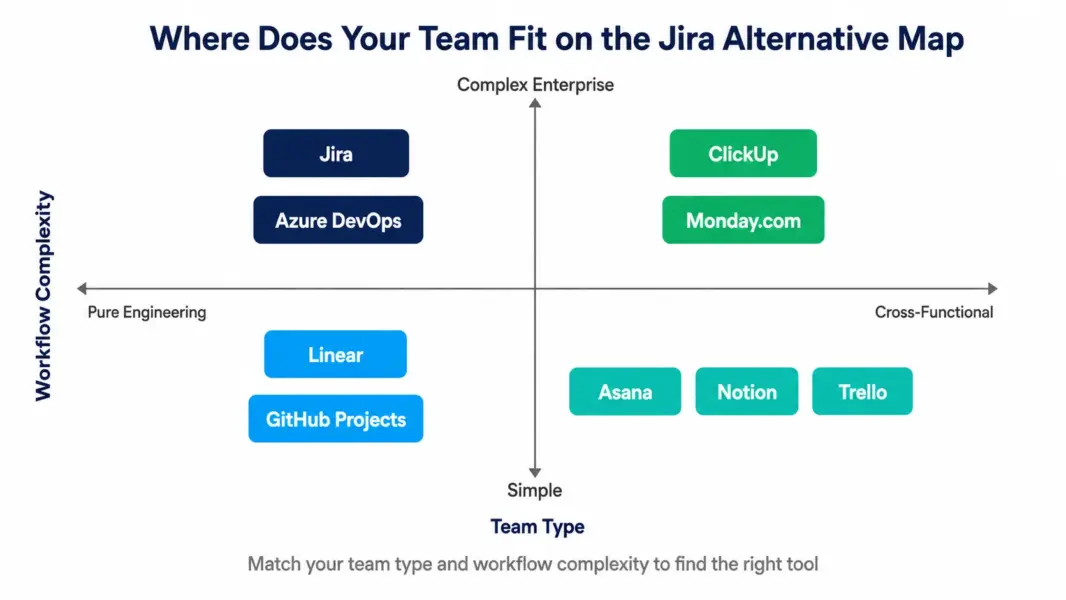
Can You Migrate Data from Jira to These Alternatives?
Yes. Most major PM alternatives support Jira migration through built-in importers or third-party migration tools. The migration quality and effort varies significantly by destination tool.
ClickUp offers a built-in Jira importer that transfers issues, custom fields, comments, attachments, and basic workflows. Linear includes a Jira importer designed for engineering teams that maps Jira fields to Linear equivalents with reasonable fidelity. Asana, Monday.com, and Notion support CSV import from Jira exports with manual field mapping required. GitHub Projects requires API-based migration scripts or third-party tools.
Migration typically takes 1-4 weeks depending on workspace size and complexity. Custom workflows, automation rules, marketplace app data, and complex permission schemes rarely transfer cleanly and require manual recreation. According to a 2024 industry analysis by software migration consultancy ScriptRunner, organizations migrating from Jira to alternatives report planning an average of 6 weeks of total effort including data transfer, team retraining, and parallel running before full cutover.
Compare exact costs
Use our free PM tool cost calculator to see what each Jira alternative actually costs for your team.
Frequently Asked Questions
What is the best alternative to Jira in 2026?
ClickUp is the best overall Jira alternative for cross-functional teams because it consolidates project management, documentation, time tracking, and whiteboards into one platform at $7 per user compared to Jira’s $7.75 plus expensive marketplace apps. Linear is the best alternative for pure engineering teams that want Jira-like agile capabilities with a modern, faster interface and dramatically simpler configuration.
Is ClickUp better than Jira for software development?
Jira remains stronger for pure engineering teams running formal scrum with deep DevOps integration needs and marketplace app dependencies. ClickUp is better for cross-functional teams where engineering works alongside designers, product managers, and marketers, because ClickUp serves all roles in one interface without the developer-centric design that alienates non-technical team members in Jira.
Is Linear really faster than Jira?
Yes. Linear’s interface loads and responds significantly faster than Jira at equivalent data scale. According to Linear’s published customer data from 2024, average issue creation time drops by 60% and sprint planning time drops by 40% after switching from Jira. The speed difference comes from Linear’s modern architecture, opinionated design that reduces configuration complexity, and absence of the marketplace app overhead common in Jira deployments.
How much does it cost to migrate from Jira to another tool?
Direct migration costs typically run $0-$2,000 for software (most importers are free), plus 4-8 weeks of internal team time for data validation, retraining, and parallel running. Large organizations sometimes hire migration consultants ($150-$400 per hour) for complex Jira instances. The bigger cost is productivity loss during the transition period, typically 15-25% reduced velocity for 2-4 weeks.
Can I keep Jira for engineering and use something else for other teams?
Yes, many organizations run this hybrid pattern. Jira serves engineering, while Asana, ClickUp, or Monday.com handle marketing, operations, and cross-functional work. Native integrations sync high-level information between systems. The tradeoff is two tool subscriptions, two interfaces, and ongoing sync management. Smaller organizations often consolidate to ClickUp instead, accepting reduced engineering depth for unified tooling.
Is Jira good for small startups?
Jira can work for small startups but is usually overkill for teams under 15 developers without dedicated agile processes. The configuration overhead, learning curve, and marketplace app costs deliver more value at enterprise scale than startup scale. Most early-stage startups get better results from Linear, GitHub Projects, or ClickUp, which provide adequate agile features without Jira’s complexity.
Why is Jira so complex?
Jira’s complexity comes from its enterprise heritage and 20+ years of accumulating features to serve diverse software development organizations. Custom workflows, permission schemes, field configurations, and screen schemes are powerful for large organizations with specialized agile processes but create overhead for smaller teams with simpler needs. The complexity is a feature for enterprises and a bug for small teams.
Does Jira have a free plan that works for small teams?
Yes. Jira’s free plan supports up to 10 users with scrum and kanban boards, backlog management, basic roadmaps, and 2GB storage. It is sufficient for small engineering teams testing Jira before committing. The free plan does not include audit logs, advanced permissions, or many enterprise features that organizations typically need by the time they exceed 10 users.
Related Articles
- Jira Review 2026
- ClickUp Review 2026
- ClickUp vs Jira 2026
- Jira vs Asana 2026
- Asana Alternatives 2026
- Best Free PM Tools
- Best PM Tools for Small Teams
- Free PM Tool Cost Calculator
- PM Tool Picker Quiz
- Complete Guide to PM Software