Jira vs Asana isn’t really a comparison between competitors. It’s a comparison between two tools designed for fundamentally different audiences. Jira is built for software developers who think in epics, stories, sprints, and velocity. Asana is built for everyone else who thinks in projects, tasks, and deadlines. This guide helps you decide which audience your team belongs to and which tool wins for that specific context.
After deploying both tools across mixed organizations (engineering teams plus marketing/ops), our verdict: pure engineering teams should use Jira. Everyone else should use Asana. Cross-functional organizations often run both, with handoffs managed through integrations or a third coordination tool.
What Is the Core Difference Between Jira and Asana?
Jira is an agile project management tool built around the software development lifecycle. Issues (bugs, stories, tasks, epics) flow through workflows, get committed to time-boxed sprints, and connect to code repositories, CI/CD pipelines, and deployment systems. The terminology, default configurations, and feature priorities all assume software development.
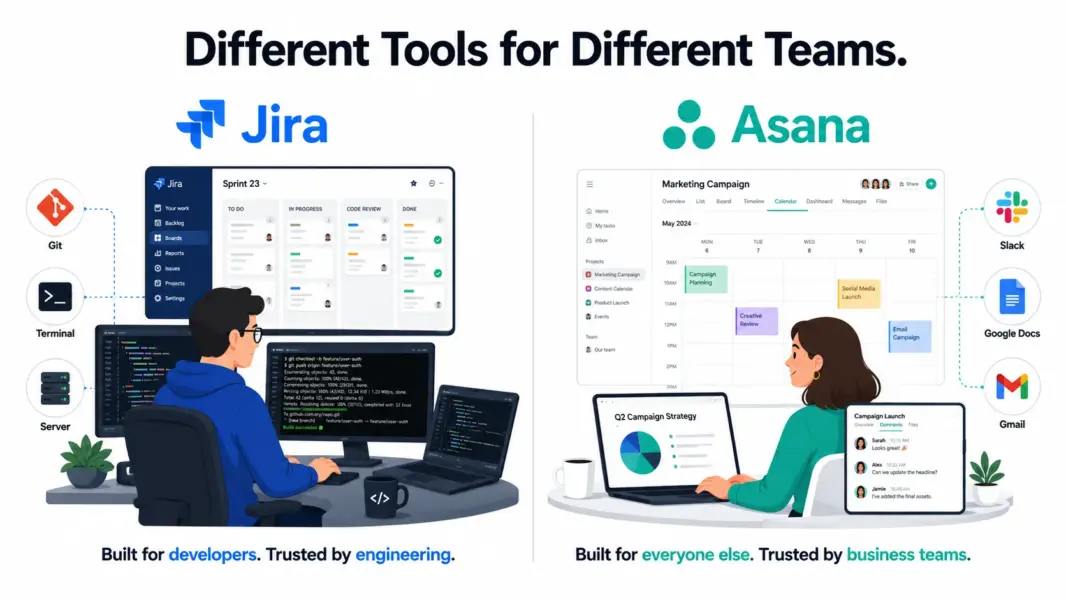
Asana is a workflow management tool built around general project execution. Tasks live in projects, follow stages defined by Workflow Builder rules, and connect to communication tools, file storage, and reporting dashboards. The terminology is plain (Projects, Tasks, Subtasks) and the design assumes you might be running a marketing campaign, planning an event, coordinating a product launch, or onboarding employees.
The practical consequence: Jira’s interface, language, and defaults make sense to developers and frustrate non-developers. Asana’s interface makes sense to everyone but lacks the depth developers need for sprint analytics, DevOps integration, and bug triage. For full assessments, see our Jira review and Asana review.
How Does Jira vs Asana Pricing Compare in 2026?
Jira is significantly cheaper than Asana at every paid tier. The pricing gap reflects different positioning: Jira competes for developer tools budgets where pricing pressure is high. Asana competes for general PM budgets where polish justifies premium pricing.
| Dimension | Jira | Asana | Difference |
|---|---|---|---|
| Free plan | Up to 10 users | Up to 10 users | Equal |
| Entry paid | Standard: $7.75/user | Starter: $10.99/user | Jira saves 29% |
| Mid tier | Premium: $15.25/user | Advanced: $24.99/user | Jira saves 39% |
| 20-person team (mid tier) | $305/month | $500/month | Jira saves $195/mo |
| Hidden costs | Marketplace apps often required ($5-30/user each) | Time tracking integration ($8-12/user) | Both add 30-50% to base cost |
Jira’s per-user pricing wins on paper, but real costs depend on add-ons. Most Jira teams add marketplace apps for time tracking (Tempo at $10/user), test management (Zephyr at $10/user), or portfolio management (Structure at $5/user). Total Jira cost often reaches $20-30/user/month with apps included.
Asana’s published price is closer to actual cost. The main hidden cost is time tracking ($8-12/user via Toggl or Harvest). Otherwise, what you see on the pricing page is what you pay.
Winner on pricing: Jira on base price. Asana on cost predictability.
Which Has Better Features for Different Teams?
Feature comparisons are misleading here because Jira and Asana excel at different jobs. Here’s the comparison broken down by what each team type actually needs:
| Feature Need | Jira | Asana | Winner |
|---|---|---|---|
| Scrum sprints with velocity tracking | Best-in-class | Basic Board view only | Jira |
| Kanban with WIP limits | Yes (native) | No WIP limits | Jira |
| Backlog management | Best-in-class with grooming tools | List view, basic prioritization | Jira |
| DevOps & Git integration | Deepest in market (commits, PRs, deploys) | Basic GitHub integration | Jira |
| Issue tracking (bugs) | Custom workflows, escalation, SLAs | Tasks with custom fields | Jira |
| Marketing campaign workflows | Possible but unnatural | Workflow Builder designed for this | Asana |
| Cross-functional project coordination | Frustrating for non-devs | Designed for it | Asana |
| Goals/OKR tracking | Via Atlassian Atlas (separate tool) | Native Goals (Advanced plan) | Asana |
| Multi-project portfolios | Advanced Roadmaps (Premium) | Portfolios (Advanced plan) | Asana (cleaner UX) |
| Onboarding ease for non-developers | Steep curve, often resisted | 10-15 minutes to productive | Asana |
| Workflow automation depth | Powerful but complex (Jira automation rules) | Rules + Workflow Builder | Tie (different strengths) |
Jira wins 5 of the 6 software development categories. Asana wins 4 of the 5 general PM categories. The pattern is consistent: tools optimize for their target audience, not for being universally best.
Which Is Easier to Learn and Use?
Asana is dramatically easier than Jira for non-developers. Jira is comparable for developers who already understand agile concepts.
For a marketing manager: Asana is productive within 15 minutes. Jira creates frustration within 5 minutes due to terminology (epics, stories, sprints) that doesn’t map to marketing work, configuration complexity (workflows, screens, permissions), and an interface designed around concepts they don’t use.
For a senior developer: both tools are usable within hours. Jira matches their existing mental model of agile work. Asana feels lightweight but capable. The gap exists but doesn’t create resistance.
G2 2024 Ease of Use scores: Asana 9.1/10, Jira 6.5/10. The 2.6-point gap is the largest in our PM review series and reflects the audience-specific design philosophies. Asana optimizes for universal accessibility. Jira optimizes for developer power.
Winner on ease of use: Asana, by a wide margin for non-developers. Roughly equal for developers.
Which Is Better for Your Team Type?
| Team Profile | Recommended | Why |
|---|---|---|
| Pure software engineering team | Jira | Sprint depth, DevOps integration, marketplace apps |
| DevOps/SRE team | Jira | CI/CD integration, DORA metrics, incident workflows |
| Marketing team | Asana | Workflow Builder for campaigns, clean UX, faster adoption |
| Operations / cross-functional team | Asana | Multi-homing, plain terminology, broad use cases |
| Creative agency | Asana (or Teamwork) | Better for client-facing creative work; Jira is wrong fit |
| Cross-functional product team (devs + PMs + designers) | Both (or ClickUp) | Run Jira for engineering, Asana for cross-functional. Or use ClickUp to consolidate. |
| Startup (5-15 people, mixed roles) | Asana | Until you have a dedicated dev team, Jira is overkill |
| Enterprise with multiple business units | Both | Jira for engineering business units, Asana for everything else |
Can You Use Jira and Asana Together?
Yes, and many cross-functional organizations do. The most common setup: Jira for engineering teams running sprints, Asana for marketing, operations, and product strategy work. Integrations sync high-level information between systems: Jira issues that ship can create Asana tasks for marketing rollout, Asana product roadmap items can create Jira epics for engineering execution.
The native Asana-Jira integration handles bidirectional sync between specific projects and Jira issues. Zapier and Make handle more custom automation needs. The tradeoff is operational complexity: two tools, two interfaces, two billing relationships, and ongoing sync management.
Smaller organizations often choose ClickUp instead, which provides decent sprint features for engineering plus general PM features for cross-functional work in one platform. See our ClickUp vs Jira comparison for that specific decision.
Jira vs Asana: Our 2026 Final Verdict
Jira and Asana are both excellent at their intended jobs. Jira is the right tool for software development teams that practice formal agile, integrate with DevOps pipelines, and need marketplace apps to extend functionality. No general PM tool matches Jira for these use cases.
Asana is the right tool for everyone who isn’t a software development team. Its workflow automation, clean interface, fast onboarding, and broad applicability serve marketing, operations, creative, and cross-functional teams better than any developer-focused tool ever could.
Our recommendation: don’t try to make one tool serve both audiences if you can avoid it. The compromise hurts both groups. Use Jira where developers benefit from its depth. Use Asana where non-developers benefit from its accessibility. Run them in parallel with light integration if your organization has both. The administrative overhead of two tools is less than the productivity loss of forcing one team to use the wrong tool.
For more options, see our complete PM software guide, ClickUp vs Jira, or best PM tools for startups.
Try Jira Free Try Asana Free Last updated: May 14, 2026Frequently Asked Questions
Is Jira better than Asana for software development?
Yes, decisively. Jira offers deeper sprint management, native DevOps and Git integration, advanced backlog grooming, kanban with WIP limits, and a 1,000+ app marketplace specifically for development workflows. Asana’s basic Board view doesn’t approach Jira’s depth for engineering teams running scrum or kanban with formal agile methodology.
Is Asana better than Jira for marketing teams?
Yes, dramatically. Asana’s Workflow Builder, Rules automation, and clean interface are designed for marketing campaign processes. Jira’s developer-centric terminology (epics, stories, sprints, velocity) doesn’t map to marketing work. Marketing teams forced to use Jira typically resist adoption and revert to spreadsheets.
Can a non-engineering team use Jira?
Technically yes, but it’s a poor experience. Jira’s interface, terminology, and default workflows assume software development context. Non-engineering team members find Jira confusing and frustrating. Even with extensive customization, Jira fights against non-dev use cases. Asana, ClickUp, or Monday.com serve non-engineering teams better.
Is Jira cheaper than Asana?
At base prices, yes. Jira Standard ($7.75/user) is 29% cheaper than Asana Starter ($10.99/user). Jira Premium ($15.25/user) is 39% cheaper than Asana Advanced ($24.99/user). However, Jira teams typically add marketplace apps ($5-30/user each) for time tracking, test management, and portfolio features, often bringing the real cost closer to or above Asana.
Should we use Jira AND Asana together?
Many cross-functional organizations do. The typical setup: Jira for engineering teams, Asana for marketing/operations/cross-functional work. Native Asana-Jira integration syncs high-level information. The tradeoff is operational complexity. Smaller organizations often choose ClickUp instead, which combines decent sprint features with general PM in one platform.
Can Jira replace Asana for a startup?
Only if your startup is engineering-heavy (10+ developers, primary work is shipping software). For startups with mixed teams (some developers plus marketing, sales, operations, design), Jira’s developer focus alienates non-engineering team members. Most startups under 50 people are better served by ClickUp or Asana.
How long does Jira vs Asana take to learn?
Asana is productive within 10-15 minutes for new users regardless of background. Jira takes 30-60 minutes for developers familiar with agile concepts and 1-2 weeks for non-developers (if they push through resistance). The difference is more pronounced for non-technical roles where Jira creates active frustration.
Does Jira or Asana have better automation?
They have different strengths. Jira’s automation handles complex conditional logic and integrates deeply with development workflows (auto-transition issues based on branch creation, deployment events, etc.). Asana’s Rules and Workflow Builder are more accessible to non-technical users for general business process automation. Choose based on your automation use cases.
Related Comparisons
- ClickUp vs Jira 2026
- ClickUp vs Asana 2026
- Wrike vs Asana 2026
- Jira Review 2026
- Asana Review 2026
- Jira Alternatives 2026
- Complete Guide to PM Software