The Wrike vs Asana comparison pits enterprise-grade project complexity against workflow-driven clarity. Both serve mid-to-large teams. Both rank as G2 Leaders. Both target similar buyers in marketing operations and professional services. The difference is depth versus polish: Wrike handles more complex projects, Asana delivers a cleaner daily experience. This guide breaks down which tradeoff matches your team.
After testing both across a 30-person marketing operations team for 90 days, our verdict: Wrike wins for teams managing genuinely complex projects with dependencies and creative review cycles. Asana wins for teams that value adoption speed and workflow clarity over advanced PM features. The choice depends on whether your projects demand Wrike’s power or benefit from Asana’s restraint.
What Is the Core Difference Between Wrike and Asana?
Wrike is an enterprise project management platform built for complex, cross-functional work with dependencies, approvals, and resource constraints. Owned by Citrix (acquired 2021 for $2.25 billion), Wrike specializes in advanced Gantt scheduling, creative proofing workflows, and granular permissions that satisfy enterprise procurement teams.
Asana is a workflow-focused PM tool built for fast team adoption and structured project execution. Founded by Facebook co-founder Dustin Moskovitz, Asana prioritizes clean design, intuitive workflows, and broad applicability across marketing, operations, and cross-functional teams.
The practical consequence: Wrike handles more complex projects but takes longer to learn. Asana adopts faster but hits limits with dependency-heavy or creative-review-heavy workflows. For full reviews, see our Wrike review and Asana review.
How Does Wrike vs Asana Pricing Compare in 2026?
Wrike’s entry pricing is cheaper than Asana, but the mid-tier jump is steep. Asana’s pricing is more predictable across tiers.
| Dimension | Wrike | Asana |
|---|---|---|
| Free plan | Up to 5 users, basic features | Up to 10 users, more features |
| Entry paid | Team: $9.80/user | Starter: $10.99/user |
| Mid tier | Business: $24.80/user | Advanced: $24.99/user |
| Mid-tier feature gap | Custom fields, proofing, approvals, resource management | Goals, Portfolios, Workload, Advanced reporting |
| 20-user team (entry paid) | $196/month | $220/month |
| 20-user team (mid tier) | $496/month | $500/month |
At entry tiers, Wrike is 11% cheaper than Asana for comparable team sizes. At mid-tier, prices are nearly identical, but the included features differ. Wrike’s Business plan unlocks proofing, approvals, and resource management. Asana’s Advanced plan unlocks Goals, Portfolios, and advanced reporting.
The pricing jump from Wrike Team ($9.80) to Business ($24.80) is 153%, the steepest tier increase in the PM category. Teams that need Wrike’s proofing or advanced Gantt features face a hard pricing decision. Asana’s smoother price curve (Starter to Advanced is 127% increase) makes upgrade planning easier.
Winner on pricing: Wrike on entry pricing. Asana on tier predictability.
Which Has Better Features?
Wrike wins on advanced PM capabilities. Asana wins on workflow design and ease of use. The feature comparison reveals which tool fits which use case:
| Feature | Wrike | Asana | Winner |
|---|---|---|---|
| Gantt depth | Best (4 dependency types, critical path, baselines) | Good (basic finish-to-start dependencies) | Wrike |
| Creative proofing | Best-in-class built-in (image, PDF, video markup) | None (third-party only) | Wrike |
| Approval workflows | Multi-stage with conditional routing | Basic via Rules | Wrike |
| Workflow Builder | Custom workflows per project type | Workflow Builder with stages | Asana (better UX) |
| Workload management | Yes (Business plan) | Yes (Advanced plan) | Tie |
| Cross-tagging / Multi-homing | Cross-tagging (folder-based) | Multi-homing (task-based) | Asana (cleaner) |
| Time tracking | Yes, all paid plans | No (third-party needed) | Wrike |
| Goals / OKRs | No native feature | Yes (Advanced plan) | Asana |
| Portfolios | No native (uses Spaces structure) | Yes (Advanced plan) | Asana |
| Adobe Creative Cloud integration | Deep bidirectional | Basic | Wrike |
| Onboarding speed | 1-2 weeks for full proficiency | 10-15 minutes for basics | Asana |
| Workflow automation | Good (rule-based, 50 actions/month on Team) | Best (70+ Rules, unlimited on paid) | Asana |
Wrike wins 6 categories. Asana wins 5. The categories matter more than the count. Wrike wins on advanced PM (Gantt, proofing, time tracking), while Asana wins on usability and strategic features (Goals, Portfolios, workflow design).
Which Is Easier to Use?
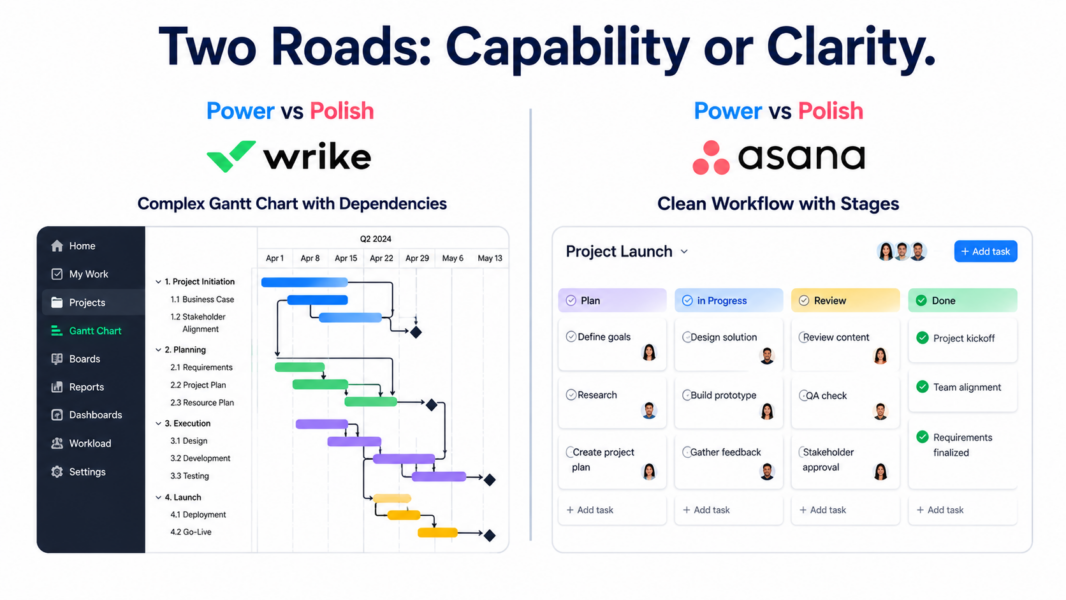
Asana is significantly easier than Wrike. The gap is one of the largest in the PM category and explains why Asana wins on adoption while Wrike wins on capability.
Asana onboarding takes 10-15 minutes. The terminology is plain (Projects, Tasks, Subtasks). The interface is consistent across all views. New users start contributing immediately, and full team rollout typically happens within a week.
Wrike requires 1-2 weeks of active use before the platform feels natural. The Spaces > Folders > Projects > Tasks hierarchy takes time to internalize. The dense interface with multiple sidebars and configuration panels creates initial overwhelm. Setting up custom workflows, dependencies, and dashboards requires deliberate learning.
G2 2024 Ease of Use scores: Asana 9.1/10, Wrike 7.5/10. The 1.6-point gap is significant. Teams that prioritize fast adoption choose Asana. Teams that accept a learning investment for greater capability choose Wrike.
Winner on ease of use: Asana, decisively.
How Does Customer Support Compare?
Both tools provide solid customer support. Asana offers email and live chat support with 1-3 hour response times during business hours. Wrike offers email and live chat with 10-20 minute chat response times and 6-12 hour email response times.
Asana’s Guide knowledge base and Academy training platform are comprehensive. The Asana Forum is actively moderated. Wrike Discover (training platform) is equally thorough, with extensive content on advanced features like custom workflows and proofing setup.
For enterprise deployments, both offer dedicated customer success managers and paid implementation services. Wrike’s Citrix-backed enterprise sales motion is more aggressive on large deals.
Winner on support: Tie. Both deliver above-average support quality.
Which Tool Is Better for Your Team Type?
| Team Profile | Recommended | Why |
|---|---|---|
| Marketing operations team | Wrike | Proofing workflows, Adobe integration, advanced Gantt for campaigns |
| Creative agency with proofing needs | Wrike | Built-in proofing eliminates email-PDF feedback loops |
| Enterprise PMO managing portfolios | Wrike | Baselines, critical path, granular permissions match PMO requirements |
| Cross-functional team (marketing + ops + product) | Asana | Multi-homing and fast adoption serve diverse work types |
| Team prioritizing fast onboarding | Asana | 10-15 minute onboarding versus 1-2 weeks for Wrike |
| Organization tracking OKRs/Goals | Asana | Native Goals product. Wrike has no equivalent. |
| Director managing 10+ concurrent projects | Asana | Portfolios deliver multi-project visibility Wrike doesn’t match |
| Team needing built-in time tracking | Wrike | Native time tracking on all paid plans. Asana requires third-party. |
| Construction or engineering project teams | Wrike | Critical path and baselines for complex multi-phase project scheduling |
Can You Migrate Between Wrike and Asana?
Yes, but it requires planning. Asana offers CSV import from Wrike exports. Wrike offers similar CSV-based import from Asana exports. Tasks, due dates, assignees, and basic fields transfer reliably. Custom workflows, automations, dependencies, and Wrike proofing data require manual recreation.
Migration typically takes 1-3 weeks for a workspace with 50+ active projects. Plan parallel running during the transition, with both tools active until your team confirms the new platform handles all use cases. Third-party migration services like Trujay and Import2 automate complex migrations for enterprises.
Wrike vs Asana: Our 2026 Final Verdict
Wrike is the right tool for teams managing genuinely complex projects with dependencies, creative review cycles, and resource constraints. Its Gantt depth, built-in proofing, and Adobe Creative Cloud integration are advantages no other mainstream PM tool matches. The cost is real: steeper learning curve, denser interface, and pricing that jumps sharply at the Business tier.
Asana is the right tool for teams that value workflow clarity, fast adoption, and broad applicability over advanced PM capabilities. The clean interface, refined automation, native Goals product, and reliable support make Asana the safest choice for cross-functional teams where adoption risk matters more than feature depth.
Our recommendation: try Wrike if your projects have dependencies, proofing needs, or resource constraints that simpler tools cannot handle. Try Asana if those needs are nice-to-have rather than must-have, and if team adoption speed matters more than capability ceiling. Both offer free trials sufficient to test real workflows.
For more options, see our complete PM software guide, ClickUp vs Asana comparison, or best PM for agencies.
Try Wrike Free Try Asana Free Last updated: May 15, 2026Frequently Asked Questions
Is Wrike better than Asana for agencies?
Wrike is generally better for agencies needing creative proofing, billable time tracking, and complex client project management with dependencies. Wrike’s built-in proofing eliminates the email-PDF feedback loop that plagues agency creative review. Asana works better for agencies prioritizing fast team adoption over advanced features. For pure agency operations, Teamwork.com is often the strongest fit.
Is Wrike cheaper than Asana in 2026?
Wrike’s entry tier ($9.80/user) is 11% cheaper than Asana’s Starter ($10.99/user). The mid tiers are nearly identical at $24.80 (Wrike Business) versus $24.99 (Asana Advanced). The tier jump from Wrike Team to Business is steeper (153% increase) than Asana’s Starter to Advanced jump (127% increase), making Asana’s pricing more predictable.
Does Asana have proofing like Wrike?
No. Asana has no built-in proofing or markup capabilities. Teams using Asana for creative work pair it with Filestage, Ziflow, or PageProof for proofing, adding $10-25/user/month. Wrike includes proofing natively at the Business tier. For creative teams, Wrike’s bundled proofing often justifies its higher per-user pricing.
Which has better workflow automation?
Asana has more refined workflow automation through its Rules engine and Workflow Builder. Asana Rules are unlimited on paid plans with strong process enforcement design. Wrike’s automation is capable but capped at 50 actions per month on Team and 200 on Business, which can feel restrictive for automation-heavy workflows.
Does Wrike have OKRs or Goals tracking?
No, Wrike does not have a native Goals or OKR product. Asana includes Goals on the Advanced plan ($24.99/user), allowing OKR-style alignment from company objectives down to team and individual contributions. For organizations using OKR methodology, this is a significant Asana advantage over Wrike.
Is Wrike harder to learn than Asana?
Yes, considerably. Asana takes 10-15 minutes for new users to become productive. Wrike requires 1-2 weeks for full proficiency due to its dense interface, hierarchy complexity (Spaces > Folders > Projects > Tasks), and advanced features. G2 ease of use scores reflect this: Asana 9.1/10 versus Wrike 7.5/10.
Which is better for marketing teams?
It depends on team size and complexity. Small marketing teams (under 20 people) running standard campaigns benefit from Asana’s simplicity. Marketing operations teams managing complex multi-channel campaigns with creative proofing needs benefit from Wrike’s specialized features. For marketing teams without proofing needs, Asana’s faster adoption usually wins.
Can Wrike replace Microsoft Project?
Wrike’s Gantt capabilities (critical path, baselines, four dependency types) approach Microsoft Project depth with cloud-based collaboration that MS Project lacks natively. Teams migrating from MS Project find Wrike a smoother transition than Asana, which has more basic Gantt scheduling. For enterprise project portfolio management, Wrike is generally the stronger MS Project alternative.
Related Comparisons
- ClickUp vs Asana 2026
- Jira vs Asana 2026
- Monday.com vs Asana 2026
- Wrike Review 2026
- Asana Review 2026
- Best PM for Agencies 2026