Notion vs ClickUp is a comparison between two tools that both claim to be “all-in-one” but mean completely different things by it. Notion is an all-in-one workspace: docs, wikis, databases, and lightweight project tracking built on modular blocks. ClickUp is an all-in-one PM platform: tasks, Gantt charts, time tracking, docs, and whiteboards built on structured project management. This comparison helps you decide whether your team needs a workspace that also does PM, or a PM tool that also does docs.
After using both daily for 12+ months across product and marketing teams, our verdict: most teams don’t choose between them. According to a 2024 survey by Lenny Rachitsky, 62% of product teams using Notion also use a separate PM tool. The real question isn’t which is better — it’s which is your primary tool, and whether the other is your secondary tool or unnecessary.
What Is the Fundamental Difference Between Notion and ClickUp?
Notion is a tool for building tools. It gives you blocks, pages, and databases, then lets you construct whatever system your team needs: a wiki, a CRM, a project tracker, a knowledge base, a content calendar. There’s no predefined structure. The ceiling is as high as your willingness to build.
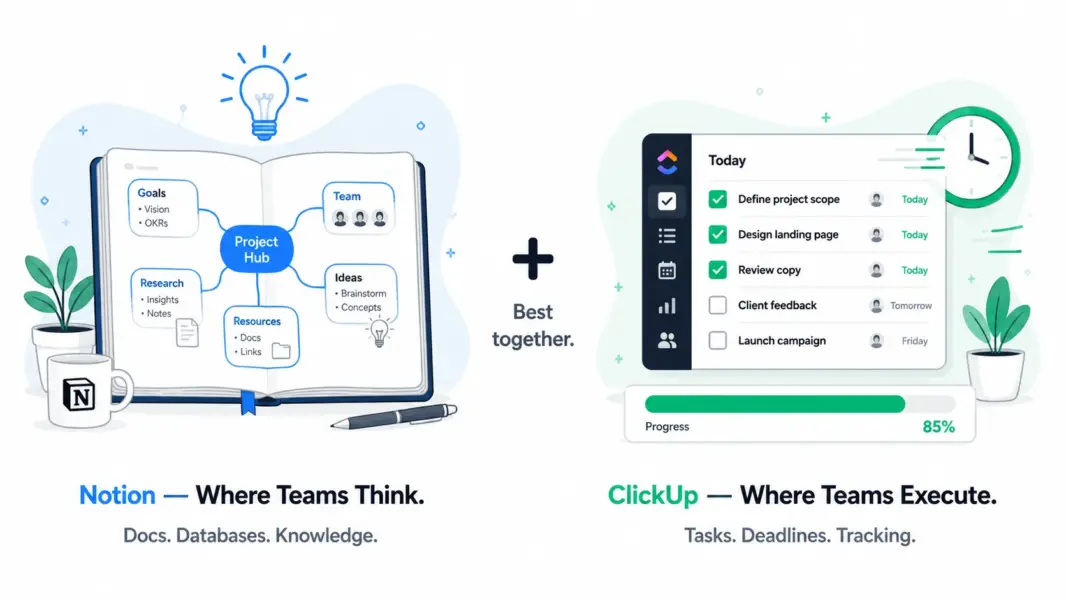
ClickUp is a tool that IS the tool. It gives you Spaces, Folders, Lists, Tasks, Gantt charts, time tracking, and 15+ views out of the box. The structure is predefined. You configure it, but the architecture is already there. The floor is higher; you start productive faster.
This difference shapes everything: learning curve, flexibility, project management depth, documentation quality, and who thrives on each platform. For individual assessments, see our Notion review and ClickUp review.
How Does Notion vs ClickUp Pricing Compare in 2026?
Pricing is close at face value, but the comparison is misleading because you’re buying different products. Notion’s $8/user buys a workspace. ClickUp’s $7/user buys a project management platform. Many teams end up paying for Notion plus a PM tool, or ClickUp plus a wiki tool, making the total cost depend on your stack.
| Dimension | Notion | ClickUp | Key Difference |
|---|---|---|---|
| Free plan | Solo only, unlimited pages | Unlimited users, unlimited tasks | ClickUp free works for teams; Notion free is solo only |
| Entry paid | Plus: $8/user/mo | Unlimited: $7/user/mo | ClickUp $1 cheaper with more PM features |
| Mid tier | Business: $15/user/mo | Business: $12/user/mo | ClickUp 20% cheaper with time tracking included |
| AI add-on | $8/user/mo extra | $5/user/mo extra (Brain) | ClickUp AI cheaper but Notion AI is more integrated |
| Real cost if you need both PM + docs | Notion $8 + Asana $10.99 = $19/user | ClickUp $7 (includes Docs) | ClickUp replaces 2 tools; Notion often needs a PM companion |
ClickUp’s cost advantage becomes significant when you factor in that it includes Docs, time tracking, and Gantt charts that Notion lacks. A team using Notion for docs and Asana for PM pays $19/user/month. A team using ClickUp for everything pays $7/user/month. That’s a 63% savings if ClickUp Docs meets your documentation needs.
Winner on pricing: ClickUp for total cost of ownership. Notion if you’re solo (generous free plan).
Which Tool Has Better Features?
They dominate different categories. Notion is unmatched for documentation and databases. ClickUp is unmatched for project management depth. Here’s where each tool leads and lags:
| Feature | Notion | ClickUp | Winner |
|---|---|---|---|
| Documentation/wiki | Best-in-class (50+ block types, nested pages, verified wikis) | Good (ClickUp Docs, basic formatting) | Notion (by far) |
| Relational databases | Best-in-class (Relations, Rollups, Formulas) | Custom fields only (no relational data) | Notion |
| Templates ecosystem | 10,000+ community + official | 700+ official | Notion |
| AI (workspace Q&A) | Strong (search across all content, write, summarize) | Good (ClickUp Brain, task summaries) | Notion |
| Task management | Database-based (flexible but unstructured) | Native (7-level subtasks, dependencies, custom fields) | ClickUp |
| Gantt / dependencies | Basic Timeline only (no dependencies) | Full Gantt with drag-and-drop dependencies | ClickUp |
| Views | 6 (Table, Board, Calendar, List, Gallery, Timeline) | 15+ (List, Board, Gantt, Mind Map, Whiteboard, etc.) | ClickUp |
| Time tracking | None | Native, all paid plans | ClickUp |
| Workflow automation | Basic (buttons, API-triggered) | 100+ templates, visual builder | ClickUp |
| Whiteboards | No | Yes, built-in | ClickUp |
| Offline support | Limited and unreliable | Limited but functional | Tie (both weak) |
| API / custom integrations | Well-documented REST API | 1,000+ native + REST API | ClickUp (more native integrations) |
Notion wins 4 categories, all related to documentation, databases, and knowledge management. ClickUp wins 6 categories, all related to project execution, scheduling, and team coordination. The 2 ties (offline, integrations) reflect shared weaknesses.
Winner on features: Notion for knowledge work. ClickUp for project management.
Which Is Easier to Learn and Use?
This comparison is nuanced. Notion’s basic editor is easier than ClickUp’s project setup. But Notion’s database system is harder to master than ClickUp’s task hierarchy. The learning curve hits at different points.
Notion: Writing a document takes 5 minutes. Building a relational database system with views, rollups, and linked pages takes 1-2 weeks. The block editor is intuitive. The database layer requires a mental model shift that many users struggle with.
ClickUp: Setting up a project workspace takes 2-4 hours. Using it daily as a team member takes 30-60 minutes to learn. The hierarchy (Spaces > Folders > Lists > Tasks) is rigid but learnable. The overwhelming part is choosing among 15+ views and dozens of configuration options.
G2 2024 Ease of Use: Notion 8.0/10. ClickUp 7.8/10. Nearly identical, reflecting different difficulty profiles. Notion is easier to start but harder to master. ClickUp is harder to start but more predictable once set up.
Winner on ease of use: Tie. Different learning curves for different tasks.
How Does Customer Support Compare?
ClickUp provides better support through more channels with faster response times.
ClickUp offers live chat (5-15 min during business hours) and email. The knowledge base is comprehensive. Complex questions occasionally need escalation.
Notion offers email only with 24-48 hour response times. No chat, no phone. The community (Reddit, YouTube) fills gaps, but official support is the weakest among major PM/productivity tools.
Winner on support: ClickUp.
Which Tool Fits Your Team’s Working Style?
| Team Profile | Recommended | Why |
|---|---|---|
| Product team (specs + roadmaps + tasks) | Notion (primary) + ClickUp (execution) | Notion for specs/PRDs/wikis. ClickUp for sprint tracking and deadlines. |
| Startup (2-10 people, one tool only) | Notion | Free plan for solo. Docs + databases + basic PM covers early-stage needs. |
| Growing team (10-50 people, structured PM) | ClickUp | Gantt, time tracking, automations, and Docs in one tool at $7/user. |
| Agency tracking billable hours | ClickUp | Native time tracking with billing rates. Notion has no time tracking. |
| Content team (editorial calendar + docs) | Notion | Database-powered content calendar + doc drafting in one workspace. |
| Engineering team (sprints + documentation) | Both | ClickUp for sprints/issues. Notion for engineering wiki/runbooks. |
| Consulting firm (knowledge base + projects) | Both | Notion for deliverable templates/knowledge. ClickUp for client project tracking. |
| Personal productivity / solo knowledge worker | Notion | Free plan with unlimited pages. Journals, reading lists, life dashboards. |
Can You Use Notion and ClickUp Together?
Yes, and many teams do. The most common setup: Notion is the knowledge hub (wikis, specs, documentation, meeting notes, onboarding guides). ClickUp is the execution engine (task assignments, sprint tracking, time logging, Gantt scheduling). Documents in Notion link to tasks in ClickUp through URL references or Zapier/Make automations that create tasks from Notion database entries.
The tradeoff of using both: context switching between tools and potential information fragmentation. The benefit: best-in-class documentation plus best-in-class project management without either tool compromising on what it does best.
If you want ONE tool only: choose Notion if your work is 60%+ documentation and knowledge management. Choose ClickUp if your work is 60%+ task execution and project coordination.
Notion vs ClickUp: Our 2026 Final Verdict
Notion and ClickUp aren’t really competitors. They’re complements that happen to overlap in a 20% middle zone. Notion is the best place to think, write, organize knowledge, and build flexible data systems. ClickUp is the best place to execute, track, schedule, and manage team workload.
If forced to pick one: choose Notion if your team’s core work is creating and organizing information. Choose ClickUp if your team’s core work is delivering projects on time and on budget. If your budget allows both ($15/user combined for Notion Plus + ClickUp Unlimited), the combination is stronger than either tool alone.
For more options, see our complete PM software guide, ClickUp vs Asana comparison, or best free PM tools.
Try Notion Free Try ClickUp Free Last updated: May 16, 2026Frequently Asked Questions
Is Notion better than ClickUp for project management?
No. ClickUp is significantly better for structured project management with native Gantt charts, dependencies, 15+ views, time tracking, and workflow automations. Notion handles lightweight PM through databases but lacks dependencies, automations, and time tracking. Choose ClickUp for PM. Choose Notion for documentation with some project tracking.
Can Notion replace ClickUp?
For lightweight project management (task boards, simple tracking, content calendars), yes. For structured PM requiring Gantt dependencies, time tracking, sprint management, and workflow automation, no. Teams with simple task needs can use Notion alone. Teams with complex project requirements need ClickUp or a similar PM tool alongside or instead of Notion.
Is ClickUp cheaper than Notion?
ClickUp ($7/user) is $1 cheaper than Notion ($8/user) at entry tiers and includes significantly more PM features. The bigger cost difference: ClickUp includes Docs, time tracking, and Gantt charts that Notion lacks. Teams needing both PM and docs save money using ClickUp alone versus Notion plus a separate PM tool.
Do teams use both Notion and ClickUp?
Yes, commonly. According to a 2024 survey, 62% of product teams using Notion also use a separate PM tool. The typical setup: Notion for wikis, specs, and documentation; ClickUp for task execution, sprints, and time tracking. The combination costs about $15/user/month and provides best-in-class tools for both knowledge management and project management.
Which has better AI features?
Notion AI is more integrated, offering workspace Q&A that searches across all your content to answer questions with source links. ClickUp Brain focuses on task summarization and status updates. Notion AI costs $8/user/month; ClickUp Brain costs $5/user/month. For knowledge-heavy workspaces, Notion AI adds more value. For task-focused teams, ClickUp Brain is sufficient.
Which is better for remote teams?
Both serve remote teams well but differently. Notion excels at async knowledge sharing: documented decisions, searchable wikis, and AI Q&A reduce meeting dependency. ClickUp excels at async task coordination: clear assignments, deadline tracking, and status dashboards keep distributed teams aligned on execution.
Which has better offline support?
Neither excels offline. Notion caches recent pages for reading but creating content offline is unreliable. ClickUp offers limited offline functionality with manual sync. Teams that regularly work without internet should not depend solely on either tool for critical workflows.
Can ClickUp Docs replace Notion?
For basic documentation (meeting notes, SOPs, project briefs), yes. For advanced use cases requiring relational databases, linked views, synced blocks, and a full wiki system, no. ClickUp Docs covers roughly 60-70% of what Notion offers for documentation. Teams with serious knowledge management needs will find Notion’s editor and database system substantially more capable.
Related Comparisons
- ClickUp vs Asana 2026
- ClickUp vs Monday.com 2026
- Monday.com vs Asana 2026
- Notion Review 2026
- ClickUp Review 2026
- Complete Guide to Project Management Software