The Monday.com vs Trello decision usually comes down to one question: does your team need a project management platform, or just a digital board? Both are visual PM tools. Both share Atlassian roots (Trello was bought by Atlassian in 2017, Monday.com competes against Atlassian’s Jira). But they solve different problems for different teams. Trello does one thing brilliantly. Monday.com does many things well.
After running both tools across a 12-person marketing team for 90 days, our verdict: Trello stays free and stays simple. Monday.com grows with your team and replaces multiple tools. The right choice depends on whether your projects fit on a board or need more structure.
What Is the Difference Between Monday.com and Trello?
Trello is a single-product tool. It is a digital kanban board where you create boards, add cards to columns, and drag cards through workflow stages. That is the core product. Power-Ups add features like calendar views and custom fields, but the foundation is always cards on a board.
Monday.com is a multi-product work operating system. The foundation is a customizable board with 30+ column types, but the platform extends into CRM, dev workflows, IT service management, and custom apps. You can run sales pipelines, sprint boards, IT tickets, and standard projects on the same platform with shared data.
For individual reviews, see our Monday.com review and Trello review.
How Does Monday.com vs Trello Pricing Compare in 2026?
Trello is cheaper at every paid tier, but Monday.com includes more features at each level. The real cost difference depends on team size and which features you need.
| Dimension | Monday.com | Trello |
|---|---|---|
| Free plan users | 2 seats max | Unlimited users |
| Free plan limits | 3 boards, no automations | 10 boards, 1 Power-Up per board |
| Entry paid plan | Basic: $9/seat (3-seat minimum) | Standard: $5/user (no minimum) |
| Mid tier | Standard: $12/seat | Premium: $10/user |
| 10-user team (entry paid) | $90/month | $50/month |
| 10-user team (mid tier) | $120/month | $100/month |
| Seat minimum | 3 seats required on paid plans | No minimum |
Trello wins on pure pricing. A 10-person team saves $40/month on entry plans and $20/month on mid-tier plans by choosing Trello over Monday.com. The 3-seat minimum on Monday.com makes it especially expensive for solo users (forced to pay for 3 seats minimum).
The value calculation flips when you factor in what each plan includes. Monday.com Standard ($12/seat) gives you Timeline views, Calendar view, 250 automations per month, and 250 integration actions. Trello Premium ($10/user) gives you Timeline and Dashboard views but caps automation through Butler. For teams needing automation, Monday.com offers more depth per dollar.
Winner on pricing: Trello for small teams and simple needs. Monday.com for teams needing automation and multiple views.
Which Has Better Features for Project Management?
Monday.com wins on feature depth across every category except mobile experience. Trello wins on simplicity and the polished kanban board.
| Feature | Monday.com | Trello | Winner |
|---|---|---|---|
| View types | 8+ (Table, Kanban, Gantt, Calendar, Chart, Workload, Map, Form) | 1 primary (Board) + Calendar/Timeline on Premium | Monday.com |
| Column/field types | 30+ column types including Mirror, Formula, Connect | Custom fields via Power-Up only | Monday.com |
| Automation | 200+ templates, 250-25,000 actions/month by tier | Butler (basic rules, 250 commands free) | Monday.com |
| Kanban board quality | Good (Kanban view) | Best-in-class (the original) | Trello |
| Dashboards & reporting | Yes, cross-board widgets and Chart view | Workspace-level dashboards (Premium only) | Monday.com |
| Time tracking | Pro plan only ($16/seat) | None (Power-Up needed) | Tie (both weak) |
| Multi-product platform | Yes (PM + CRM + Dev + Service) | No, single product | Monday.com |
| Mobile app | Good | Best-in-class for mobile PM | Trello |
| Integrations | 200+ native | 200+ Power-Ups | Tie |
| Templates | 200+ industry-specific | Hundreds of community templates | Tie |
Monday.com wins 6 categories. Trello wins 2 (kanban board quality and mobile). The ratio tells the story: Monday.com is a fuller PM platform. Trello is a focused single-product tool.
Winner on features: Monday.com, by a wide margin for teams needing PM depth.
Which Is Easier to Use?
Both tools rank high on ease of use, but for different reasons. Trello is easier because there is less to learn. Monday.com is easier because the interface is visually engaging.
Trello requires no training. Open the app, create a board, add columns and cards, start working. A new user is productive in 5 minutes. The kanban metaphor (cards moving through stages) is universally understood.
Monday.com requires 10-15 minutes of initial orientation. Board structure, status columns, and Mirror connections take a few uses to internalize. Once oriented, daily use is smooth and visually engaging. The colorful status columns and smooth animations make Monday.com one of the most pleasant PM tools to use daily.
G2 2024 Ease of Use scores: Trello 9.0/10, Monday.com 8.8/10. Nearly identical, with Trello edging ahead on absolute simplicity and Monday.com competing on visual quality and template-driven setup.
Winner on ease of use: Trello for instant productivity. Monday.com for sustained daily engagement.
Which Has Better Customer Support?
Monday.com offers email-only support with 8-12 hour response times on Standard, faster on higher tiers. No live chat on any plan. Trello provides email support through the Atlassian support system with similar 12-24 hour response times. No live chat on either tool.
Both tools rely heavily on community support, knowledge bases, and YouTube tutorials. Monday.com’s help center is more polished and product-specific. Trello benefits from being part of the broader Atlassian Community.
Winner on support: Monday.com, slightly. Both are average for the PM category.
Which Tool Is Better for Your Specific Team?
| Team Profile | Recommended | Why |
|---|---|---|
| Solo freelancer or individual | Trello | Free, simple, no overhead. Perfect for client and personal task boards. |
| Tiny team (2-4 people) | Trello | Free for unlimited users. Monday’s 3-seat minimum hurts at this size. |
| Marketing team (5-25 people) | Monday.com | Workflow automation, visual campaign tracking, expand to CRM later. |
| Sales team needing CRM + tasks | Monday.com | Monday CRM and Work Management share data natively. |
| Non-profit or volunteer org | Trello | Free for unlimited users. No budget pressure to upgrade. |
| Agency managing client projects | Monday.com | Guest access, dashboards, automation. Trello hits limits fast. |
| Engineering team running sprints | Neither | Use Jira or ClickUp. Both Monday and Trello are weak for dev workflows. |
| Mobile-first field team | Trello | Best mobile PM experience. Cards work great on phone screens. |
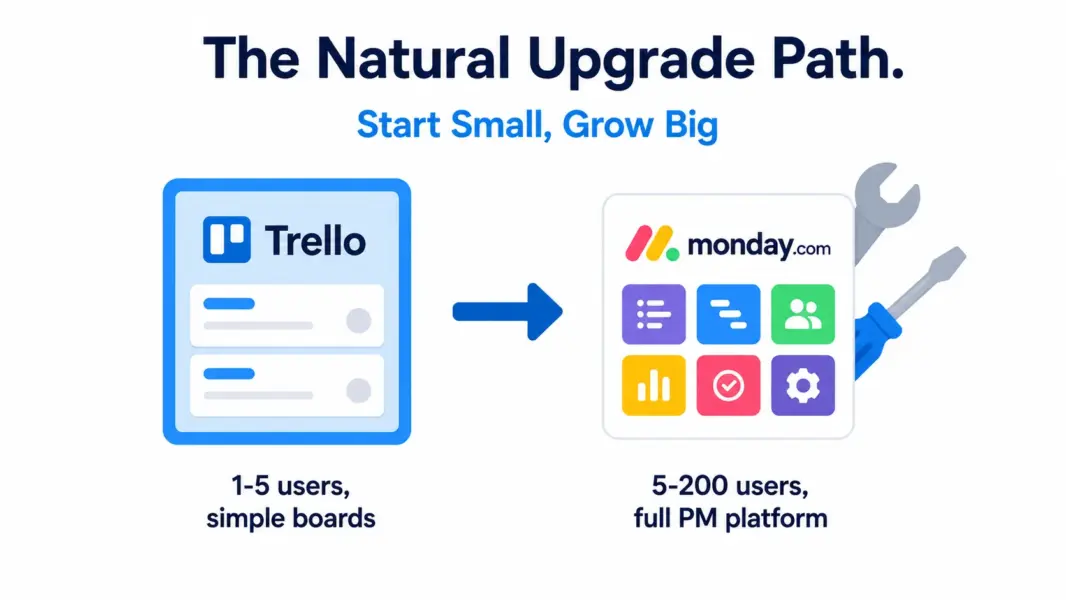
When Should You Migrate from Trello to Monday.com?
You have outgrown Trello when these signs appear: you are creating workarounds for missing features more than twice a week, you need to see tasks in formats other than boards (Gantt, calendar, workload), automation needs go beyond basic Butler rules, you need reporting across multiple boards, your team is over 10 people and boards have become hard to navigate, or you need to coordinate work across multiple departments with different needs.
Migration is straightforward. Monday.com offers a Trello importer that brings boards, lists, cards, due dates, and assignments. Power-Ups do not transfer directly but most have equivalent Monday.com features built in. Plan 1-2 weeks of parallel running before fully switching.
Monday.com vs Trello: Our 2026 Final Verdict
Trello is the right tool for individuals and tiny teams whose project management needs are simple and unlikely to grow. The free plan supports unlimited users, the kanban interface is the best in the category, and the mobile app is the best PM mobile experience available. For some teams, Trello is a permanent solution.
Monday.com is the right tool for growing teams that need more than a board. The 200+ automation templates, multiple view types, dashboards, and Work OS ecosystem deliver real PM capability at reasonable cost. The 3-seat minimum and higher per-user pricing make it a poor fit for solos and pairs, but for teams of 5+, the value calculation favors Monday.com clearly.
Our recommendation: start with Trello if your team is small and your needs are simple. Stay on Trello until you hit specific limits (10+ boards, needing views beyond kanban, automation requirements). When you outgrow Trello, Monday.com is one of the strongest upgrade paths. Both have free plans worth trying.
For more options, see our complete PM software guide, ClickUp vs Monday.com comparison, or best free PM tools.
Try Monday.com Free Try Trello Free Last updated: May 15, 2026Frequently Asked Questions
Is Monday.com better than Trello in 2026?
Monday.com offers more features at every tier including Gantt views, dashboards, 200+ automation templates, and a multi-product platform covering CRM, Dev, and Service. Trello is simpler with the best kanban board and mobile experience. Monday.com is better for teams of 5+ needing PM depth. Trello is better for solo users and tiny teams wanting maximum simplicity.
Is Trello cheaper than Monday.com?
Yes, at every paid tier. Trello Standard costs $5/user versus Monday.com Basic at $9/seat. Trello Premium is $10/user versus Monday Standard at $12/seat. Trello also has no seat minimum while Monday requires 3 seats on paid plans. A 10-person team saves $20-40/month choosing Trello over Monday.com at comparable tiers.
Which has a better free plan, Monday.com or Trello?
Trello, decisively. Trello’s free plan includes unlimited users, 10 boards, and 250 workspace automations. Monday.com’s free plan limits you to 2 seats and 3 boards with no automations. For team use without paying, Trello is functional. Monday.com’s free plan is essentially a single-pair demo.
Can Trello replace Monday.com?
For simple kanban-based workflows, yes. For workflows requiring Gantt views with dependencies, complex automation, cross-board dashboards, or multi-product integration (CRM, dev, service), Trello cannot match Monday.com. The decision depends on whether your team needs the additional capabilities Monday.com provides.
Does Monday.com or Trello have better mobile apps?
Trello has the better mobile app for PM. The kanban card interface translates naturally to phone screens, drag-and-drop works well on touch devices, and the app handles core features without compromise. Monday.com’s mobile app is functional but feels cramped, especially for Gantt and Workload views that work better on larger screens.
Is Monday.com or Trello better for agencies?
Monday.com is better for most agencies because of native time tracking (Pro plan), guest access for clients, dashboards for project visibility, and the option to add Monday CRM for sales pipeline management. Trello can work for very small agencies with simple client tracking but hits limits fast as projects multiply.
When should I switch from Trello to Monday.com?
Switch when you need timeline views with dependencies, are managing more than 10 active boards, need automation beyond basic Butler rules, want cross-board dashboards and reporting, or your team is growing past 10 people. The Monday.com Trello importer handles most migration data automatically, making the switch relatively painless.
Do Monday.com and Trello integrate with each other?
There is no direct integration between Monday.com and Trello. You can connect them through Zapier or Make to sync cards and items between platforms. However, most teams use one or the other rather than both. The migration path from Trello to Monday.com is more common than running both simultaneously.
Related Comparisons
- Trello vs Asana 2026
- ClickUp vs Monday.com 2026
- Monday.com vs Asana 2026
- Monday.com Review 2026
- Trello Review 2026
- Complete Guide to PM Software