Jira pricing is a tale of two numbers: the base price on Atlassian’s pricing page, and the real cost you pay once the Atlassian ecosystem adds up. The base Standard plan looks competitive at around $7.91 per user. The real cost, after Confluence, Marketplace apps, and admin overhead, typically lands 2 to 3 times higher. This guide separates the sticker from the reality, explains the billing quirks unique to Jira, and shows which plan fits engineering teams of different sizes.
Jira Plans and Base Prices in 2026
Jira Cloud prices per user across four tiers, with annual billing slightly cheaper than monthly. Note that Jira uses a tiered volume-discount model, so the per-user rate drops as your team grows past certain breakpoints.
Jira Pricing in 2026
Free
Up to 10 users
community support;Standard
User roles & permissions
000 users;Premium
AI features (Rovo)
99.9% SLA;Enterprise
Unlimited sites
The free plan is one of the most capable in project management, supporting up to 10 users with full Scrum and Kanban boards, backlog management, and basic roadmaps. Standard at roughly $7.91 per user adds storage, audit logs, and higher automation limits. Premium at roughly $14.54 per user unlocks AI, advanced roadmaps, and 24/7 support. You can confirm current rates on Atlassian’s official Jira pricing page, since rates and tiers change periodically.
The Atlassian Tax: Why Real Cost Runs 2-3x the Base
The base Jira price is only the entry fee to the Atlassian ecosystem. Most real-world Jira deployments add several paid components that more than double the sticker price. Understanding this tax before you commit prevents a renewal shock.
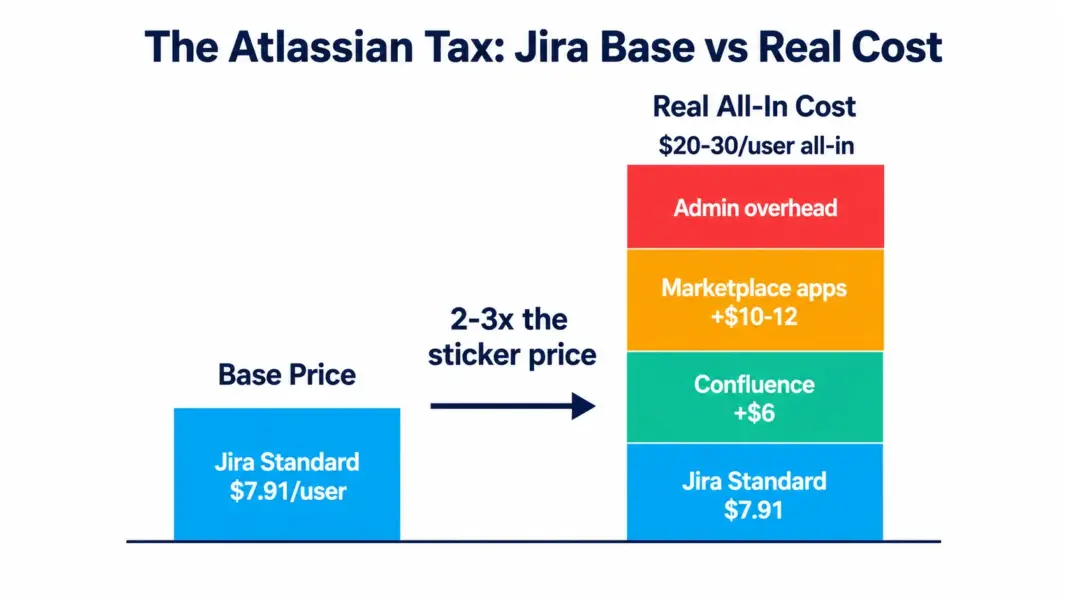
Confluence is sold separately. Most teams use Jira and Confluence together, since Jira tracks work and Confluence holds documentation. Confluence starts around $6.05 per user per month on Standard. Adding it to a Standard Jira setup pushes the real per-user cost from roughly $7.91 to over $14 before any apps.
Marketplace apps fill core gaps. Jira’s base product lacks robust time tracking and test management, so teams add Marketplace apps. Tempo Timesheets runs around $12 per user, and Zephyr for test management around $10 per user. According to a 2024 Atlassian Community survey, the majority of Jira teams use at least three Marketplace apps, with meaningful monthly spend per team.
Admin overhead is a hidden labor cost. Jira’s configuration depth means organizations above 50 users typically need a part-time or full-time Jira admin to maintain workflows, permission schemes, and integrations. This labor cost rarely appears in pricing comparisons but is real money.
Stacking these, a Standard Jira deployment advertised at $7.91 per user commonly reaches $20 to $30 per user in true all-in cost once Confluence, apps, and admin time are included. The independent procurement marketplace Vendr notes that buyers should model the full Atlassian stack, not the Jira line item alone, when budgeting.
Two Billing Quirks That Catch Jira Buyers
Beyond the ecosystem tax, Jira has two billing mechanics that surprise buyers and affect your real spend. Both are easy to miss until the invoice arrives.
User-tier rounding. Jira does not bill for your exact headcount. It bills by user tier. A 12-person team often pays for the 11-to-25 user tier, meaning you pay for capacity you do not use. This rounding makes small teams just above a breakpoint pay disproportionately. Conversely, larger teams benefit from tiered discounts, where per-user rates drop at higher breakpoints, so a 500-person team pays a lower effective rate than the headline $7.91.
Peak-usage billing for monthly subscribers. Atlassian’s Maximum Quantity Billing model, rolled out across 2025, ties monthly subscribers’ bills to peak user count during the cycle rather than end-of-month headcount. Add ten interns for two weeks and your monthly bill reflects the peak, with no credit when they leave. Teams with seasonal or fluctuating headcount should manage user provisioning proactively or choose annual billing to avoid surprises.
What Jira Actually Costs at Common Team Sizes
The table below models annual base cost on Standard and Premium, then shows a realistic all-in estimate including Confluence and typical Marketplace apps. The all-in column reflects what teams more commonly pay.
| Team Size | Standard Base | Premium Base | Realistic All-In (Standard + stack) |
|---|---|---|---|
| 10 users | $949/year | $1,745/year | $2,400-$3,600/year |
| 25 users | $2,373/year | $4,362/year | $6,000-$9,000/year |
| 50 users | $4,746/year | $8,724/year | $12,000-$18,000/year |
| 100 users | $9,492/year | $17,448/year | $24,000-$36,000/year |
The all-in estimates assume Confluence plus two to three common Marketplace apps, which is typical for established Jira teams. The gap between base and all-in is the Atlassian tax in dollars. Teams evaluating Jira against alternatives should compare the all-in column, not the base, to make a fair decision. Model your numbers with our free PM tool cost calculator.
How Jira Pricing Compares to ClickUp and Asana
Jira’s base Standard price undercuts most competitors, but its real all-in cost often exceeds them once the ecosystem tax is included. This is the core nuance buyers miss.
| Tool | Base Entry Paid | Built-In Time Tracking | Docs Included |
|---|---|---|---|
| ClickUp | $7/user | Yes, all paid plans | Yes (ClickUp Docs) |
| Asana | $10.99/user | Advanced tier only | No |
| Jira | $7.91/user (base) | Marketplace app (~$12) | Confluence (~$6 extra) |
ClickUp at $7 includes time tracking and docs in the base price, while Jira charges separately for both through Marketplace apps and Confluence. For cross-functional teams, this makes ClickUp meaningfully cheaper all-in. Jira’s value holds for pure engineering teams that need its agile depth and DevOps integration, where the ecosystem tax buys genuine capability. For the full comparison, see our ClickUp vs Jira comparison and Jira vs Asana comparison. For lighter options, see our Jira alternatives guide.
Which Jira Plan Should You Choose?
Match the plan to your team size and whether you need Jira’s advanced planning and AI features. Factor the full Atlassian stack into your decision, not just the Jira tier.
Choose Free if you are a team of 10 or fewer doing basic sprint and kanban tracking without compliance requirements. It is one of the most functional free plans in the category and a genuine option for small engineering teams.
Choose Standard ($7.91) if you are an engineering team of 10 to 150 needing audit logs, proper storage, and moderate automations. This is the right default for most small and mid-size software teams, especially those already in the Atlassian ecosystem.
Choose Premium ($14.54) if you run three or more simultaneous projects with complex dependencies, need AI-assisted planning via Rovo, or require 24/7 support and a higher SLA. Premium is generally worth it above 50 users or for teams with cross-project planning needs.
Choose Enterprise (custom) if you have several hundred or more users, need data residency, centralized admin, unlimited automations, or operate in a regulated industry requiring the highest SLA.
For the full platform evaluation beyond pricing, see our complete Jira review.
Compare Jira's all-in cost
Model Jira against ClickUp, Asana, and more, including the features Jira charges extra for, with our free calculator.
Last updated: July 5, 2026
Frequently Asked Questions
How much does Jira cost in 2026?
Jira offers a free plan for up to 10 users, then Standard at around $7.91 per user per month and Premium at around $14.54 per user per month, with custom Enterprise pricing. The base price is competitive, but most teams pay 2 to 3 times more all-in once Confluence (sold separately at around $6 per user) and Marketplace apps for time tracking and test management are added.
Why is Jira’s real cost higher than the advertised price?
Three factors inflate Jira’s cost beyond the base price: Confluence for documentation is sold separately (around $6 per user), Marketplace apps fill gaps like time tracking (Tempo around $12) and test management (Zephyr around $10), and admin overhead requires dedicated staff at scale. Together these push a $7.91 base to a realistic $20 to $30 per user all-in.
Is Jira’s free plan good for small teams?
Yes. Jira’s free plan supports up to 10 users with full Scrum and Kanban boards, backlog management, basic roadmaps, and 2GB storage. It is one of the most capable free tiers in project management for engineering teams. The 10-user cap is the most common upgrade trigger, and support is limited to the Atlassian Community rather than direct channels.
What is the difference between Jira Standard and Premium?
Standard at around $7.91 per user includes audit logs, 250GB storage, 1,700 monthly automations, and business-hours support. Premium at around $14.54 per user adds AI features via Rovo, cross-team planning, advanced roadmaps, unlimited storage, a sandbox environment, 24/7 support, and a 99.9% SLA. Premium is generally worth it above 50 users or for teams running multiple complex projects.
Does Jira include Confluence?
No. Confluence is a separate Atlassian product sold independently, starting around $6.05 per user per month on its Standard tier. Most teams use Jira and Confluence together since Jira tracks work and Confluence holds documentation. Adding Confluence to a Standard Jira setup roughly doubles the per-user cost before any Marketplace apps are added.
How does Jira’s user-tier billing work?
Jira bills by user tier rather than exact headcount. A 12-person team typically pays for the 11-to-25 user tier, meaning you pay for capacity you do not use. Larger teams benefit from tiered volume discounts, where per-user rates drop at higher breakpoints, so a 500-person team pays a lower effective rate than the headline $7.91 per user.
Is Jira cheaper than ClickUp?
On base price, Jira Standard at $7.91 is close to ClickUp Unlimited at $7. On all-in cost, ClickUp is usually cheaper because it includes time tracking and docs in the base price, while Jira charges separately for both via Marketplace apps and Confluence. For cross-functional teams, ClickUp’s all-in cost is meaningfully lower. Jira’s value holds for pure engineering teams needing agile depth.
What is Maximum Quantity Billing in Jira?
Maximum Quantity Billing, rolled out by Atlassian across 2025, ties monthly subscribers’ bills to peak user count during the billing cycle rather than end-of-month headcount. If you add temporary users mid-cycle, your bill reflects the peak with no credit when they leave. Teams with fluctuating headcount should manage provisioning proactively or choose annual billing to avoid surprise charges.
Related Pricing Guides and Articles
- PM Software Pricing Comparison
- ClickUp Pricing Guide
- Asana Pricing Guide
- Jira Review 2026
- ClickUp vs Jira 2026
- Jira Alternatives 2026
- Free PM Tool Cost Calculator