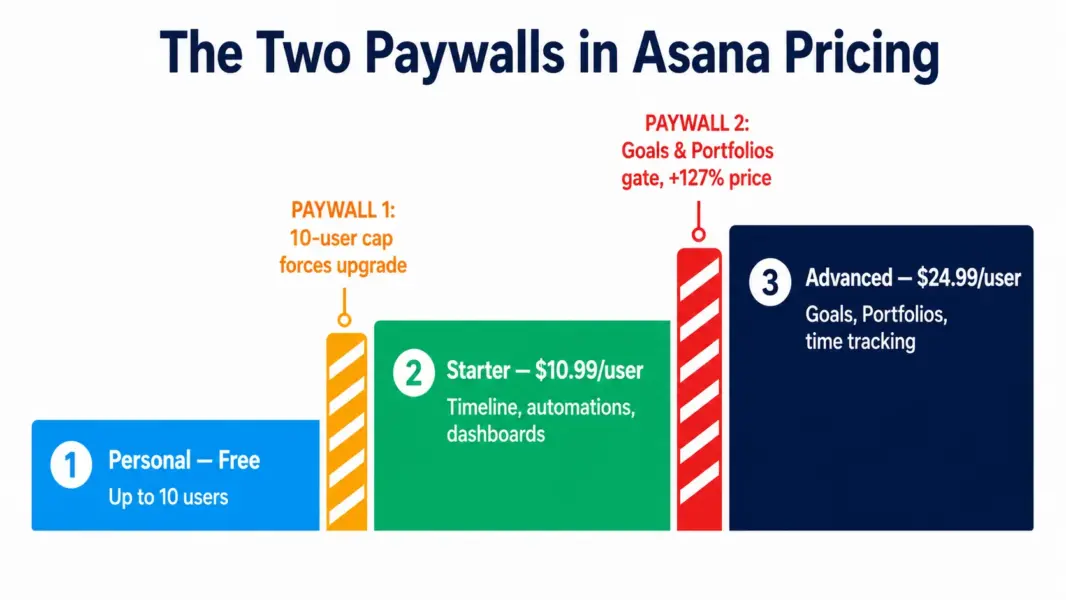
Asana pricing looks like four simple tiers, but your real cost is decided by two paywalls most buyers do not see coming. The first is the 10-user cap on the free plan, which forces your first upgrade the moment your team grows. The second is the feature gate at the Advanced tier, where Goals and Portfolios live, that more than doubles your per-user price. Understanding where these two walls sit is the difference between paying for what you need and paying for what you do not. This guide maps both.
Asana Plans and Prices in 2026
Asana uses per-user, per-month pricing across four main tiers, with annual billing roughly 18 to 22 percent cheaper than monthly. Here are the published rates.
Asana Pricing in 2026
Personal
Up to 10 users, unlimited tasks &
Starter
Timeline &
Advanced
Goals, unlimited Portfolios, Workload, native time tracking, advanced reporting, proofing, 25K automations/mo
Enterprise
SAML SSO, SCIM provisioning, HIPAA, advanced security, data residency, unlimited Portfolios
The Personal plan is genuinely usable for small teams, covering unlimited tasks and projects with list, board, and calendar views. Its hard limit is 10 users. Starter at $10.99 per user (or $13.49 billed monthly) is where Asana becomes a real project management tool, unlocking Timeline, the Workflow Builder, unlimited automations, and dashboards. Advanced at $24.99 per user (or $30.49 monthly) adds Goals, Portfolios, Workload, and native time tracking. You can confirm current rates on Asana’s official pricing page, since SaaS pricing shifts often.
Paywall One: The 10-User Free Cap
Asana’s free Personal plan is more generous than it first appears, with unlimited tasks, projects, messages, and file storage. The catch is the hard 10-user ceiling. The moment your team hits 11 people, the free plan stops being an option, and there is no graceful middle step. You either upgrade everyone to a paid tier or split into separate workspaces, which fragments your data.
This cap is the single most common trigger for upgrading from free, and growing teams hit it fast. A team that adds two hires in a quarter can cross from free to a $130-plus monthly bill overnight. Plan for this transition before it arrives, because the jump from $0 to paid is the steepest proportional increase in the entire Asana pricing structure.
One subtle limit matters even below 10 users: the free plan excludes Timeline, the Workflow Builder, and automations. Teams that need Gantt-style scheduling or process automation hit this feature wall before the user wall, pushing them to Starter regardless of headcount.
Paywall Two: The Jump to Advanced
The second paywall is the one that hurts the budget most. Moving from Starter at $10.99 to Advanced at $24.99 is a 127 percent increase, and it exists to gate two specific features: Goals (OKR and goal tracking) and unlimited Portfolios (cross-project rollup reporting). If your team needs organization-wide goal tracking or executive visibility across many projects, Advanced is the only tier that provides it.
This is the key decision point in Asana pricing. Most teams do not need Goals and Portfolios until they reach a size where leadership wants cross-project reporting, typically 25-plus people or multiple concurrent project streams. Below that, Starter handles the work. According to procurement data from Vendr, teams of 20 to 100 on Starter often negotiate effective rates of $8 to $11 per user on annual contracts, so the gap to Advanced is even wider than list prices suggest.
A useful detail for 2026: Advanced now includes native time tracking, which Asana historically lacked entirely. Teams that previously paid for a separate tool like Toggl alongside Asana Starter should factor this in when weighing the Advanced upgrade, since it can consolidate two subscriptions into one.
What Asana Actually Costs at Common Team Sizes
The table below models annual cost on Starter and Advanced, billed annually, for common team sizes. Use it to budget and to see exactly how much the Advanced paywall adds.
| Team Size | Starter ($10.99) | Advanced ($24.99) | Cost of the Advanced Jump |
|---|---|---|---|
| 5 users | $659/year | $1,499/year | +$840/year |
| 10 users | $1,319/year | $2,999/year | +$1,680/year |
| 25 users | $3,297/year | $7,497/year | +$4,200/year |
| 50 users | $6,594/year | $14,994/year | +$8,400/year |
At 50 users, choosing Advanced over Starter costs an extra $8,400 per year. That premium is justified only if Goals, Portfolios, and Workload deliver real value to your organization. Many teams pay for Advanced to use one or two of these features while ignoring the rest, which is the most common form of Asana overspend. To compare these numbers against other tools, use our free PM tool cost calculator.
How Asana Pricing Compares to ClickUp and Monday.com
Asana sits at the higher end of mainstream PM pricing. Its Starter tier at $10.99 is more expensive than ClickUp ($7) and Monday Basic ($9 per seat), and its Advanced tier at $24.99 is among the priciest mid-tiers in the category.
| Tool | Entry Paid | Mid Tier | Free User Cap |
|---|---|---|---|
| ClickUp | $7/user | $12/user | Unlimited |
| Monday.com | $9/seat (3-seat min) | $12/seat | 2 seats |
| Asana | $10.99/user | $24.99/user | 10 users |
The tradeoff is that Asana is widely praised for the fastest onboarding and cleanest interface in the category, which drives higher team adoption. Teams that have failed to adopt cheaper tools often succeed with Asana, making the price premium worthwhile when adoption is the real risk. For the full feature comparison, see our ClickUp vs Asana comparison and Monday.com vs Asana comparison. For cheaper options, see our Asana alternatives guide.
Which Asana Plan Should You Choose?
Match the plan to where the two paywalls sit relative to your team’s needs. The right choice avoids paying for the Advanced tier before you genuinely use its gated features.
Choose Personal (free) if you are a team of 10 or fewer doing task and project tracking without needing Timeline, automation, or workflow rules. It is one of the more capable free plans for small teams.
Choose Starter ($10.99) if you have crossed 10 users or need Timeline, the Workflow Builder, dashboards, or automations. This is the right tier for the majority of small and mid-size teams and the one most Asana customers land on.
Choose Advanced ($24.99) only if you specifically need Goals for OKR tracking, unlimited Portfolios for cross-project reporting, or Workload for capacity planning. Do not upgrade for features you will not actively use, since the jump more than doubles your cost.
Choose Enterprise (custom) if you require SAML SSO, SCIM provisioning, HIPAA compliance, or data residency for security and regulatory reasons, typically at 100-plus users.
For the full platform evaluation beyond pricing, see our complete Asana review.
Compare Asana against cheaper tools
Model Asana's cost against ClickUp, Monday, and more for your exact team size with our free calculator.
Last updated: May 31, 2026
Frequently Asked Questions
How much does Asana cost in 2026?
Asana offers a free Personal plan for up to 10 users, then Starter at $10.99 per user per month and Advanced at $24.99 per user per month, both billed annually. Monthly billing is higher at $13.49 and $30.49 respectively. Enterprise pricing is custom, typically around $35-plus per user. The free plan covers basic task tracking but excludes Timeline, automation, and Goals.
Why does Asana jump from $10.99 to $24.99?
The jump from Starter to Advanced gates two specific features: Goals for OKR tracking and unlimited Portfolios for cross-project reporting. Advanced also adds Workload and native time tracking. This 127 percent increase exists because these features serve larger organizations that need cross-project visibility. Most teams do not need them until they reach 25-plus people or run multiple concurrent project streams.
Is Asana’s free plan good enough for a small team?
Asana’s free Personal plan works well for teams of 10 or fewer that need task and project tracking with list, board, and calendar views. Its limits are the hard 10-user cap and the exclusion of Timeline, the Workflow Builder, and automations. Teams that need Gantt-style scheduling or process automation must upgrade to Starter regardless of team size.
When should I upgrade from Asana Starter to Advanced?
Upgrade to Advanced only when you specifically need Goals for OKR tracking, unlimited Portfolios for cross-project rollup reporting, or Workload for capacity planning. These features typically matter at 25-plus people or when leadership wants visibility across many projects. Below that, Starter handles the work, and upgrading early wastes the 127 percent price premium on unused features.
Does Asana include time tracking?
Asana added native time tracking to its Advanced tier. The free Personal and Starter plans do not include it. Teams on Starter that need time tracking must either upgrade to Advanced or integrate a separate tool like Toggl or Harvest. The addition of native time tracking to Advanced can consolidate two subscriptions for teams that previously paid for both Asana and a time tool.
Is annual or monthly Asana billing cheaper?
Annual billing is 18 to 22 percent cheaper than monthly. Starter is $10.99 per user annually versus $13.49 monthly, and Advanced is $24.99 annually versus $30.49 monthly. For a 10-person team on Starter, annual billing saves roughly $300 per year compared to monthly. Teams committed to Asana should choose annual billing unless they need the flexibility of month-to-month.
Is Asana more expensive than ClickUp?
Yes. Asana Starter at $10.99 per user is 57 percent more expensive than ClickUp Unlimited at $7, and Asana Advanced at $24.99 is more than double ClickUp Business at $12. ClickUp also includes time tracking on all paid plans, which Asana only added at Advanced. Asana’s advantage is faster onboarding and higher adoption, which can justify the premium when adoption is the real risk.
What is the cheapest way to use Asana?
The cheapest paid option is Starter at $10.99 per user billed annually. Teams of 10 or fewer can use the free Personal plan indefinitely if they do not need Timeline, automation, or Goals. Larger teams can negotiate Starter rates down to $8 to $11 per user on annual contracts at 20-plus seats. Avoid Advanced unless you actively use Goals or Portfolios.
Related Pricing Guides and Articles
- PM Software Pricing Comparison
- ClickUp Pricing Guide
- Monday.com Pricing Guide
- Asana Review 2026
- ClickUp vs Asana 2026
- Asana Alternatives 2026
- Free PM Tool Cost Calculator