Every project management tool advertises a starting price. None advertise what you actually pay once you add the team, the features, and the hidden fees. This project management software pricing comparison models the real annual cost of 8 major tools at four team sizes (5, 10, 25, and 50 users), then exposes the automation caps, storage limits, seat minimums, and AI add-ons that vendors keep off the pricing page. The goal is a budget you can trust before you commit.
According to a 2026 pricing analysis across the category, mid-tier project management software runs $0 to $25 per user per month, with an average starting price around $13. The tools most teams actually choose cluster between $7 and $16, but the gap between sticker price and real cost can reach 50% once hidden charges are included.
Quick Answer: The Cheapest PM Tool by Team Size
The cheapest project management tool changes as your team grows, because some tools have seat minimums, some have flat rates, and some gate essential features behind higher tiers. There is no single cheapest tool for every team. The table below shows the lowest-cost feature-complete option at each common team size, billed annually.
| Team Size | Cheapest Feature-Complete Tool | Monthly Cost | Per User |
|---|---|---|---|
| 1 user (solo) | ClickUp Unlimited | $7 | $7.00 |
| 5 users | ClickUp Unlimited | $35 | $7.00 |
| 10 users | ClickUp Unlimited | $70 | $7.00 |
| 25 users | ClickUp Unlimited | $175 | $7.00 |
| 30 users | Basecamp Pro Unlimited | $299 flat | $9.97 |
| 50 users | Basecamp Pro Unlimited | $299 flat | $5.98 |
| 100 users | Basecamp Pro Unlimited | $299 flat | $2.99 |
The crossover happens around 30 users. Below that, ClickUp Unlimited at $7 per user is the cheapest feature-complete option. Above it, Basecamp’s $299 flat rate for unlimited users wins on pure cost, though Basecamp deliberately omits Gantt charts, automation, and time tracking. If you need those features at scale, ClickUp remains the value leader.
Full Pricing Comparison Across 8 Tools
This table shows the entry paid tier, mid tier, free plan, and seat minimum for the 8 most popular project management tools. All per-user prices reflect annual billing, which typically saves 17 to 30 percent versus monthly.
| Tool | Free Plan | Entry Paid | Mid Tier | Seat Minimum |
|---|---|---|---|---|
| ClickUp | Unlimited users | $7/user (Unlimited) | $12/user (Business) | None |
| Trello | Unlimited users, 10 boards | $5/user (Standard) | $10/user (Premium) | None |
| Jira | Up to 10 users | $7.75/user (Standard) | $15.25/user (Premium) | None |
| Notion | Solo only | $8/user (Plus) | $15/user (Business) | None |
| Wrike | Up to 5 users | $9.80/user (Team) | $24.80/user (Business) | None |
| Monday.com | 2 seats | $9/seat (Basic) | $12/seat (Standard) | 3 seats |
| Asana | Up to 10 users | $10.99/user (Starter) | $24.99/user (Advanced) | None |
| Smartsheet | 1 user | $9/user (Pro) | $19/user (Business) | 3 users (Business) |
For deep dives into individual pricing, see our ClickUp pricing guide, Asana pricing guide, and Monday.com pricing guide. Each breaks down the hidden fees specific to that tool.
Real Annual Cost at 5, 10, 25, and 50 Users
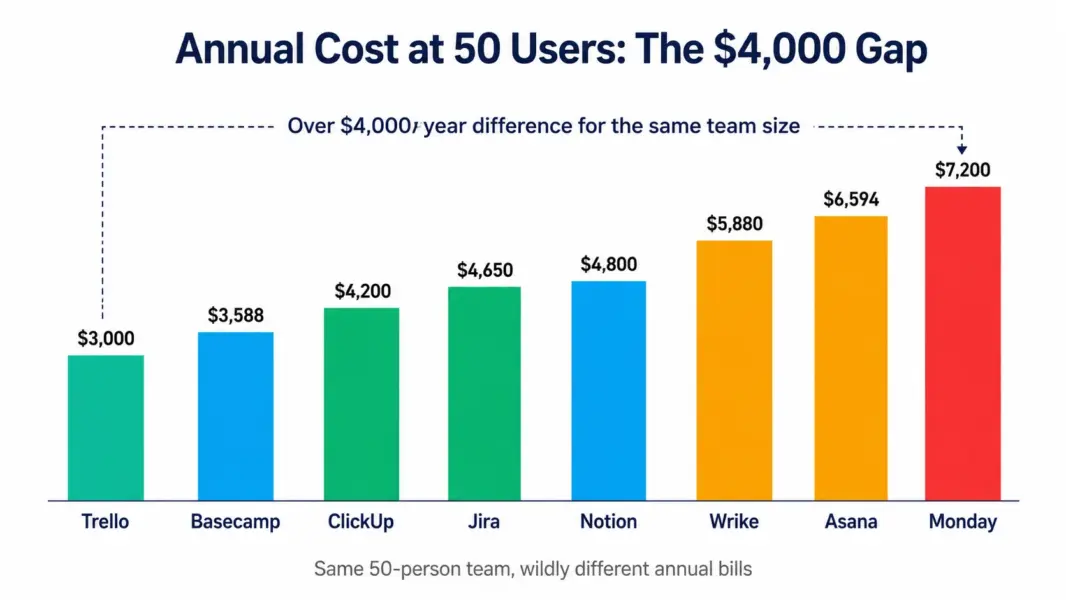
Sticker prices mislead because they ignore team size scaling and seat minimums. The table below shows the real annual cost on each tool’s most popular tier, billed annually, for four common team sizes. This is the number that should drive your budget.
| Tool (Popular Tier) | 5 Users | 10 Users | 25 Users | 50 Users |
|---|---|---|---|---|
| Trello Standard ($5) | $300 | $600 | $1,500 | $3,000 |
| ClickUp Unlimited ($7) | $420 | $840 | $2,100 | $4,200 |
| Jira Standard ($7.75) | $465 | $930 | $2,325 | $4,650 |
| Notion Plus ($8) | $480 | $960 | $2,400 | $4,800 |
| Monday Standard ($12) | $720 | $1,440 | $3,600 | $7,200 |
| Asana Starter ($10.99) | $659 | $1,319 | $3,297 | $6,594 |
| Wrike Team ($9.80) | $588 | $1,176 | $2,940 | $5,880 |
| Basecamp (flat $299/mo) | $3,588 | $3,588 | $3,588 | $3,588 |
Two patterns stand out. First, Basecamp’s flat rate looks expensive at 5 users ($3,588 per year) but becomes the cheapest option at 50 users where per-user tools cost far more. Second, the gap between the cheapest and most expensive per-user tool at 50 users is over $4,000 annually, which is real money that comes straight off your budget. To model your exact numbers, use our free PM tool cost calculator.
The Hidden Fees That Inflate PM Software Bills
The sticker price is the floor, not the ceiling. Several common charges push real costs above the advertised rate, and they rarely appear on the pricing page where buyers compare options. Knowing these in advance prevents renewal surprises.
AI add-ons sold separately. ClickUp Brain, Asana AI on lower tiers, and Monday AI are often priced on top of the base plan. ClickUp Brain alone can add $9 to $28 per user per month, more than doubling the base cost. Budget AI as a distinct line item rather than assuming it is included.
Seat minimums. Monday.com requires 3 seats on every paid plan, and Smartsheet’s Business tier requires 3 users. A solo user on Monday Standard pays for 3 seats ($36 per month) instead of one. This penalizes small teams disproportionately.
Automation and storage caps. Many entry tiers cap monthly automations and file storage. Hitting these caps forces a tier upgrade. According to a 2026 analysis by a PM migration consultancy that worked with over 110 teams, automation and storage caps are the single most common trigger for unplanned tier upgrades within the first six months.
Workspace-wide tier billing. On ClickUp, every workspace member must be on the same plan. If one person needs a Business feature, the entire team upgrades to Business pricing. This all-or-nothing mechanic can raise costs sharply when a single power user has advanced needs.
The independent procurement marketplace Vendr reports that buyers above 50 to 100 seats frequently negotiate below list rates, so larger teams should treat published pricing as a starting point for negotiation rather than a fixed cost.
How to Choose Based on Price and Value
The cheapest tool is worthless if your team will not adopt it, so price should be one factor among several rather than the deciding one. Use this framework to balance cost against fit.
For budget-first small teams, Trello at $5 or ClickUp at $7 deliver the lowest cost. Choose Trello if simple kanban suffices. Choose ClickUp if you need Gantt charts, time tracking, and docs, since it includes them at a price Trello cannot match for those features.
For value-first growing teams, ClickUp Unlimited at $7 offers the most features per dollar among feature-complete tools, including native time tracking that Asana and Monday charge extra for or lack entirely.
For scale-first large teams, Basecamp’s $299 flat rate wins on pure cost above 30 users, but only if your team fits its deliberately simple feature set. If you need automation and Gantt at scale, ClickUp remains the value leader even at 50-plus users.
To narrow your shortlist by fit rather than price alone, take our PM tool picker quiz, then return here to compare the cost of your top matches.
Model your exact PM software cost
Enter your team size and required features to see real monthly costs across every major PM tool.
Last updated: July 5, 2026
Frequently Asked Questions
How much does project management software cost in 2026?
Project management software costs $0 to $25 per user per month at mid-tier, with most popular tools between $7 and $16. ClickUp is cheapest among feature-complete tools at $7 per user. Trello is cheapest overall at $5 but lacks Gantt and time tracking. Basecamp’s $299 flat rate becomes cheapest above 30 users. The average starting price across the category is around $13 per user.
What is the cheapest project management software?
Trello at $5 per user per month is the cheapest paid tool, but it lacks Gantt charts and time tracking. Among feature-complete tools, ClickUp at $7 per user is cheapest with no seat minimum. For teams over 30 people, Basecamp’s $299 flat rate for unlimited users delivers the lowest per-user cost, working out to under $6 per user at 50 people.
Which PM tool has the best free plan?
ClickUp has the most generous free plan, supporting unlimited users and unlimited tasks. Trello’s free plan supports unlimited users with 10 boards. Asana and Jira free plans cap at 10 users. Notion’s free plan is solo only. Monday.com’s free plan caps at 2 seats. For teams that want a usable free tier without a user cap, ClickUp and Trello lead.
Why is project management software more expensive than the advertised price?
Several hidden fees inflate the real cost: AI add-ons sold separately (ClickUp Brain adds $9 to $28 per user), seat minimums (Monday requires 3 seats), automation and storage caps that force tier upgrades, and workspace-wide tier billing where one power user raises everyone’s cost. The gap between sticker and real price can reach 50 percent.
Is annual or monthly billing cheaper for PM software?
Annual billing is cheaper, typically saving 17 to 30 percent versus monthly. For example, ClickUp Unlimited is $7 per user annually versus $10 monthly, and Asana Starter is $10.99 annually versus $13.49 monthly. For teams committed to a tool, annual billing usually pays for itself within two to three months compared to monthly billing.
How much should a 10-person team budget for PM software?
A 10-person team spends roughly $600 to $1,440 per year on a popular mid-tier plan: $600 on Trello Standard, $840 on ClickUp Unlimited, $1,319 on Asana Starter, or $1,440 on Monday Standard, all billed annually. Add 30 to 50 percent if you need AI features or hit automation and storage caps that force a tier upgrade.
Which PM tool is cheapest at 50 users?
At 50 users, Basecamp’s flat $299 per month ($3,588 per year, or $5.98 per user) is the cheapest option, followed by Trello Standard at $3,000 per year. Among feature-complete per-user tools, ClickUp Unlimited at $4,200 per year is cheapest. The most expensive popular option at 50 users is Monday Standard at $7,200 per year.
Do PM software vendors negotiate pricing?
Yes, particularly above 50 to 100 seats. According to procurement marketplace data, larger buyers frequently secure discounts below published list rates through volume commitments and annual contracts. Small teams generally pay list price, but enterprise buyers should treat published pricing as a negotiation starting point rather than a fixed cost.
Related Pricing Guides and Tools
- ClickUp Pricing Guide
- Asana Pricing Guide
- Monday.com Pricing Guide
- Free PM Tool Cost Calculator
- Best Free PM Tools
- Best PM Tools for Small Teams
- Complete Guide to PM Software