Monday.com pricing carries two traps that make the real cost higher than the per-seat sticker suggests. The first is the 3-seat minimum on every paid plan, which means a solo user or a pair still pays for three seats. The second is aggressive tier gating, where features most teams consider essential, like time tracking and task dependencies, are locked to the Pro plan. This guide breaks down the plans, exposes both traps, and shows what your team actually pays.
Monday.com Plans and Per-Seat Prices in 2026
Monday.com prices per seat across four main work management tiers plus custom Enterprise, with annual billing roughly 18 percent cheaper than monthly. Critically, every paid tier requires a minimum of 3 seats.
Monday.com Pricing in 2026
Free
Up to 2 seats, unlimited boards, 200+ templates, 20 board columns, iOS &
Basic
Unlimited free viewers, unlimited items, 5GB storage, priority support, dashboard (1 board)
Standard
Timeline &
Pro
Private boards, time tracking, formula column, dependency column, automations (25K/mo), dashboard (10 boards)
Enterprise
Enterprise scale automations, advanced security, multi-level permissions, tailored onboarding, 99.9% SLA
The free plan is essentially a 2-seat demo, useful for solo evaluation but not team work. Basic at $9 per seat removes item limits but lacks Timeline, automations, and integrations. Standard at $12 per seat is the most popular tier, adding Timeline, Gantt, automations, and integrations. Pro at $16 per seat unlocks time tracking, dependencies, private boards, and formula columns. You can verify current rates on Monday.com’s official pricing page, since SaaS pricing changes frequently.
Trap One: The 3-Seat Minimum
Every paid Monday.com plan requires a minimum of 3 seats. This means there is no true single-user or two-user paid option. A solo consultant who wants Standard features pays for 3 seats at $12 each, or $36 per month, for software only one person uses. A two-person startup pays the same $36 for the third unused seat.
This minimum disproportionately penalizes the smallest teams, the exact group most sensitive to cost. According to a 2024 small business software survey, a significant share of solo users and 2-person teams who tried Monday.com switched to alternatives without seat minimums, such as ClickUp or Trello, specifically because of this charge. If your team is 3 or more, the minimum is irrelevant. If you are 1 or 2 people, factor in paying for the empty seats.
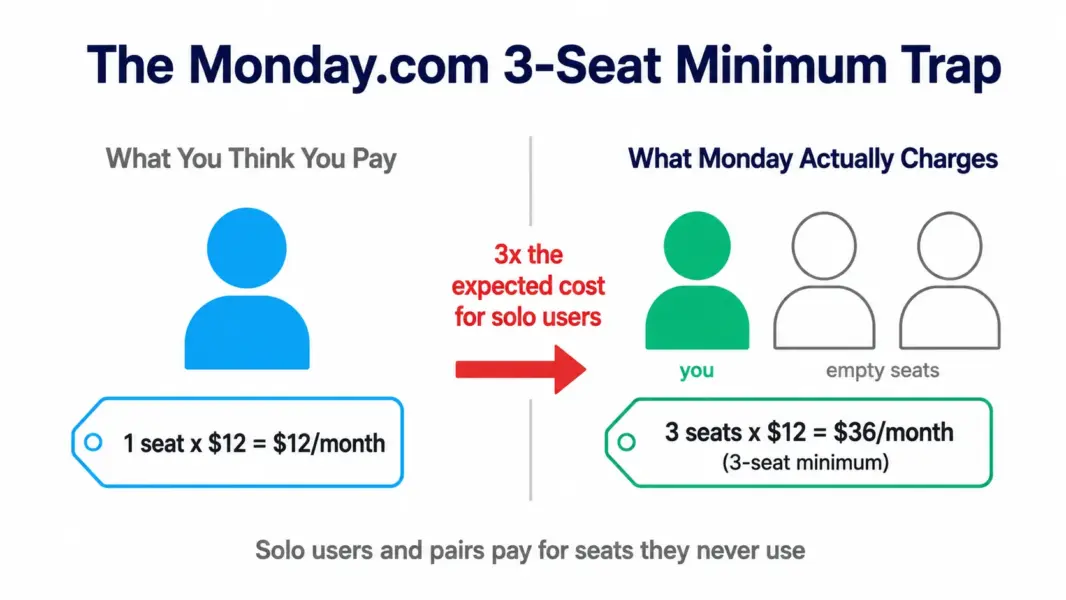
The math turns in Monday’s favor at 3-plus seats, where the per-seat pricing becomes competitive with the category. The trap only bites the smallest teams, but it bites hard, effectively tripling the entry cost for a solo user compared to the advertised per-seat rate.
Trap Two: Essential Features Gated to Pro
Monday.com gates several features that many teams consider essential behind the Pro tier at $16 per seat. The two that catch teams most often are time tracking and the dependency column. If you need to track billable hours or model task dependencies in your projects, Standard at $12 will not do, and you must jump to Pro at $16, a 33 percent increase per seat.
| Feature Teams Often Need | Minimum Required Tier | Per-Seat Cost |
|---|---|---|
| Timeline and Gantt views | Standard | $12 |
| Automations and integrations | Standard (capped) | $12 |
| Time tracking | Pro | $16 |
| Task dependencies | Pro | $16 |
| Private boards | Pro | $16 |
| Formula columns | Pro | $16 |
The pattern to watch is that the features teams discover they need after adopting Standard, particularly time tracking and dependencies, all live on Pro. Many teams sign up for Standard at $12, then upgrade to Pro within months once these needs surface. Budget for Pro from the start if you know you need time tracking or dependencies, rather than treating Standard as your real cost.
What Monday.com Actually Costs at Common Team Sizes
The table below models annual cost on Standard and Pro, billed annually, including the 3-seat minimum at the smallest size. This shows the real spend, not just the per-seat rate.
| Team Size | Standard ($12) | Pro ($16) | Notes |
|---|---|---|---|
| 1 user | $432/year (3-seat min) | $576/year (3-seat min) | Pays for 3 seats minimum |
| 3 users | $432/year | $576/year | Minimum met exactly |
| 10 users | $1,440/year | $1,920/year | Standard mid-market rate |
| 25 users | $3,600/year | $4,800/year | Volume discounts may apply |
| 50 users | $7,200/year | $9,600/year | Among priciest at this size |
At 50 users, Monday Standard at $7,200 per year is one of the more expensive options in the category, and Pro at $9,600 is higher still. The visual design and Work OS ecosystem justify the premium for teams that value them, but cost-sensitive teams should compare against cheaper alternatives. Model your exact spend with our free PM tool cost calculator.
How Monday.com Pricing Compares to ClickUp and Asana
Monday.com sits in the mid-to-upper range of PM pricing. Its Standard tier at $12 per seat matches ClickUp Business but exceeds ClickUp Unlimited ($7) and undercuts Asana Advanced ($24.99). The 3-seat minimum is unique among these three.
| Tool | Entry Paid | Time Tracking Tier | Seat Minimum |
|---|---|---|---|
| ClickUp | $7/user (Unlimited) | All paid plans | None |
| Asana | $10.99/user (Starter) | Advanced ($24.99) | None |
| Monday.com | $9/seat (Basic) | Pro ($16) | 3 seats |
ClickUp includes time tracking on every paid plan starting at $7, while Monday gates it to Pro at $16. For teams that need time tracking, this makes ClickUp substantially cheaper. Monday’s advantage is its visual board design and the Work OS expansion into CRM and Dev. For the full comparison, see our ClickUp vs Monday.com comparison and Monday.com vs Asana comparison. For cheaper options, see our Monday.com alternatives guide.
Which Monday.com Plan Should You Choose?
Match the plan to your feature needs while accounting for the 3-seat minimum. The key is anticipating whether you will need Pro-gated features before you commit to Standard.
Skip the free plan for real team work. At 2 seats it functions as a demo, not a working plan. Use it only to evaluate the interface before buying.
Choose Basic ($9) only if you need unlimited items and basic boards without Timeline, automations, or integrations. Most teams find Basic too limited and move up quickly, so it is rarely the right long-term choice.
Choose Standard ($12) if you need Timeline, Gantt, automations, and integrations but not time tracking or dependencies. This is the most popular tier and the right fit for the majority of visual teams that do not bill hourly.
Choose Pro ($16) if you need time tracking, task dependencies, private boards, or formula columns. Agencies and teams that bill by the hour usually need Pro from the start, so budget for it rather than starting on Standard.
For the full platform evaluation beyond pricing, see our complete Monday.com review.
Compare Monday against cheaper tools
Model Monday.com's per-seat cost against ClickUp, Asana, and more for your team size.
Last updated: July 5, 2026
Frequently Asked Questions
How much does Monday.com cost in 2026?
Monday.com offers a limited free plan for 2 seats, then Basic at $9 per seat, Standard at $12 per seat, and Pro at $16 per seat, all billed annually with a 3-seat minimum. Enterprise pricing is custom. The 3-seat minimum means the lowest real paid cost is $27 per month on Basic, even for a solo user. Monthly billing runs roughly 18 percent higher.
Why does Monday.com require 3 seats minimum?
Monday.com enforces a 3-seat minimum on all paid plans as a pricing floor that guarantees minimum revenue per account. It means solo users and 2-person teams pay for seats they do not use. A solo user on Standard pays $36 per month for 3 seats. The minimum is the most common reason very small teams choose alternatives like ClickUp or Trello that have no seat minimum.
What is the difference between Monday Standard and Pro?
Standard at $12 per seat includes Timeline, Gantt, calendar view, guest access, and capped automations and integrations. Pro at $16 per seat adds time tracking, task dependencies, private boards, formula columns, and far higher automation limits. The most common reasons to choose Pro over Standard are needing time tracking for billable work or dependencies for complex project scheduling.
Is Monday.com free plan usable?
The free plan supports only 2 seats, making it function as a demo rather than a working team plan. It includes unlimited boards and 200-plus templates but lacks the team capacity for real collaboration. Use the free plan to evaluate Monday’s interface and decide whether to buy, but expect to upgrade to a paid tier for any team of 3 or more.
Is Monday.com more expensive than ClickUp?
Yes, in most scenarios. Monday Standard at $12 per seat matches ClickUp Business but exceeds ClickUp Unlimited at $7. ClickUp includes time tracking on all paid plans, while Monday gates it to Pro at $16, making ClickUp substantially cheaper for teams that need time tracking. Monday’s 3-seat minimum also raises costs for small teams that ClickUp does not charge.
When should I upgrade from Monday Standard to Pro?
Upgrade to Pro when you need time tracking for billable hours, task dependencies for project scheduling, private boards for confidential work, or formula columns for calculations. These features are gated to Pro and not available on Standard. Agencies and teams that bill hourly typically need Pro from the start, so budget for $16 per seat rather than the $12 Standard rate.
Does Monday.com offer annual billing discounts?
Yes. Annual billing saves roughly 18 percent versus monthly. Standard is $12 per seat annually versus about $14 monthly. For a 10-person team on Standard, annual billing saves a few hundred dollars per year. Volume discounts also become available at higher seat counts, so larger teams should ask about negotiated rates rather than paying list price.
What is the real cost of Monday.com for a small team?
For a solo user or pair, the real cost is the 3-seat minimum: $27 per month on Basic, $36 on Standard, or $48 on Pro, billed annually. For a team of exactly 3, the same totals apply with all seats used. The minimum makes Monday.com poor value below 3 people and competitive at 3 or more, so factor team size carefully.
Related Pricing Guides and Articles
- PM Software Pricing Comparison
- ClickUp Pricing Guide
- Asana Pricing Guide
- Monday.com Review 2026
- ClickUp vs Monday.com 2026
- Monday.com Alternatives 2026
- Free PM Tool Cost Calculator