Building a website takes 30 to 60 hours of real work. Writing copy, sourcing images, arranging pages, fixing the mobile layout, wiring up forms, then rewriting the copy again. Almost all of that effort goes into content and structure, not into the builder itself.
Which means the platform question isn’t really “whose editor feels nicer this week.” It’s whether those 40 hours belong to you or to a company. Three years from now your business will need something the builder doesn’t do, and when that happens one of these platforms lets you pack up and leave with everything intact while the other doesn’t.
That’s the honest frame for WordPress vs Wix. This comparison covers ease of use, design, customisation, SEO, blogging, ecommerce, speed, security, support, and full pricing for both platforms, then explains exactly why the export question outweighs every other difference.
WordPress vs Wix: The Short Answer by Use Case
If you’re skimming, here’s where each platform wins outright before we get into the detail.
Wix wins on speed to launch, beginner friendliness, template variety, and direct customer support. It’s the better choice for local service businesses, portfolios, and anyone who needs a professional-looking site live within a day without technical help.
WordPress.com wins on SEO depth, blogging and content architecture, plugin extensibility, and site ownership. It’s the better choice for content-driven businesses, anyone relying on organic search, and any site likely to outgrow a website builder.
Neither wins if design quality is your top priority, where Squarespace produces better results than both, or if product selling is the core business, where Shopify handles scale and multi-channel selling far better.
WordPress vs Wix: Side-by-Side Comparison Table
| Factor | WordPress.com | Wix | Winner |
|---|---|---|---|
| Starting price | $4/mo (Starter, annual) | $17/mo (Light, annual) | WordPress |
| Free plan | Yes, wordpress.com subdomain | Yes, Wix ads and subdomain | Tie |
| Ease of setup | Moderate, template-led | Easiest, AI builds site in 5 min | Wix |
| Templates | Themes, switchable anytime | 2,700 plus AI generator, locked after publish | Depends |
| SEO control | Plugin-level via RankMath or Yoast | Solid built-in basics | WordPress |
| Blogging | Purpose-built, full taxonomy control | Functional but secondary | WordPress |
| Ecommerce entry | Commerce plan $45/mo | Core plan $29/mo | Wix |
| Plugins and apps | 60,000+ (needs $25 Business) | Wix App Market, smaller | WordPress |
| Support | Email and chat, priority on Business | 24/7 phone callback and chat | Wix |
| Export your site | Yes, full export anytime | No, not supported | WordPress |
WordPress.com vs WordPress.org: Clearing Up the Confusion
This trips up more buyers than any other detail, and getting it wrong costs money. There are two entirely different products called WordPress.
WordPress.org is free, open-source software you install on hosting you buy separately. You control everything: server, code, database, plugins, themes. You’re also responsible for security, updates, and backups. Total cost runs from roughly $60 per year on shared hosting to several thousand on managed infrastructure.
WordPress.com is a managed hosting service run by Automattic. They handle servers, security, updates, and uptime. You get the WordPress editing experience without the maintenance burden, but with platform restrictions on lower plans.
This comparison covers WordPress.com, because that’s the fair like-for-like against Wix. Both are hosted platforms with plans and support. The critical point is that WordPress.com gives you an exit to WordPress.org whenever you want it, which is a door Wix simply doesn’t have.
Ease of Use: Wix Wins the First Afternoon
Wix’s AI site generator asks what your business does, then produces a complete site with pages, layout, placeholder copy, and navigation in about five minutes. For someone who has never built a website, that removes the blank-canvas paralysis that kills most projects before they start.
The editor is genuinely drag-and-drop with pixel-level freedom. You place an element exactly where you want it, and it stays there. That freedom cuts both ways, though. It’s entirely possible to build a layout that looks polished on desktop and breaks badly on mobile, because Wix won’t stop you from positioning elements in ways that don’t reflow.
WordPress.com uses the block editor, which assembles pages from content blocks rather than free positioning. It’s more structured and slightly slower to learn, but it produces more consistent responsive behaviour and handles long-form content considerably better. Expect a couple of hours to get comfortable versus Wix’s few minutes.
Verdict: Wix for day one. WordPress once you’re publishing regularly and want structure rather than freeform placement.
Design and Templates: Volume vs Flexibility
Wix offers roughly 2,700 templates across every industry vertical. Quality varies widely. Some are genuinely excellent, others feel five years old, and there’s no reliable filter separating them.
The constraint that matters more than count: on Wix you cannot switch templates after publishing without rebuilding your pages. Your template choice on day one is effectively permanent. Teams that outgrow their initial design end up rebuilding rather than redesigning.
WordPress.com offers fewer themes out of the box, but you can change themes at any point and your content survives intact. On the Business plan you can install any third-party WordPress theme, opening access to a market of thousands including well-regarded options like Astra, Kadence, and Blocksy, plus premium marketplaces.
Verdict: Wix for out-of-the-box variety on day one. WordPress for the freedom to redesign in year two without starting over.
Customisation and Flexibility: WordPress Goes Deeper
Wix customisation happens inside Wix’s boundaries. You adjust layouts, colours, fonts, and animations through the editor, and Velo by Wix lets developers add JavaScript for custom functionality. It covers most standard business needs comfortably.
WordPress.com on Business unlocks a different tier entirely: custom CSS, custom themes, SFTP access, database access, and Git deployment. You can modify anything, build custom post types, and shape the site around a workflow rather than fitting the workflow to the platform.
Below the Business plan, though, WordPress.com is more restricted than Wix. Free, Starter, and Premium plans block plugin and theme installation entirely, which surprises buyers who assumed “WordPress” meant full flexibility at any price.
Verdict: Wix below $25 per month. WordPress above it, by a wide margin.
WordPress vs Wix for SEO: Where WordPress Pulls Ahead
Both platforms cover SEO fundamentals properly: custom title tags, meta descriptions, clean URL structures, automatic XML sitemaps, SSL certificates, and mobile-responsive output. For a straightforward local business site, either ranks perfectly well, and claims that Wix “can’t rank” are outdated by roughly a decade.
The difference shows up at depth. WordPress on the Business plan gives you plugin-level control through RankMath or Yoast, covering schema markup types, breadcrumb configuration, redirect management, canonical control, robots directives per page, internal linking suggestions, and content analysis on every post. You also get content architecture that Wix doesn’t match: categories, tags, custom taxonomies, and archive templates that support genuine topic clusters and pillar structures.
Wix’s built-in SEO has improved substantially and includes a guided setup checklist that walks beginners through the essentials, plus structured data for common page types. But you work within what Wix exposes. Advanced schema types, granular redirect rules, and custom taxonomy structures aren’t available in the same way, and there’s no equivalent to the plugin ecosystem for extending capability.
Verdict: WordPress, clearly, when organic search is a primary growth channel. Wix is adequate when search is secondary to referrals, ads, and local discovery.
Blogging and Content Publishing: No Real Contest
WordPress began as blogging software and that heritage still shows. The block editor handles long-form content properly, with revision history, scheduled publishing, multi-author workflows with role permissions, comment threading and moderation, category and tag hierarchies, and RSS handling that just works.
Wix has a blog module and it functions. You can publish posts, categorise them, and allow comments. But the editing experience is built around pages rather than articles, and content-heavy sites feel like they’re fighting the tool. Multi-author workflows and taxonomy control are notably thinner.
This matters more than it sounds. If your growth plan involves publishing two or more articles weekly, the difference compounds into hours saved every month.
Verdict: WordPress, decisively, for any content-led strategy.
Ecommerce: Both Work Small, Neither Scales Like Shopify
Wix enables online payments at the Core plan ($29 per month). You get product listings, cart, checkout, basic inventory management, and abandoned cart recovery on higher tiers. It’s a reasonable fit for stores under roughly 30 products, particularly when the store is secondary to a services business.
WordPress.com requires the Commerce plan ($45 per month) for full store functionality with WooCommerce pre-installed. That’s more expensive at entry, but WooCommerce is the most extensible ecommerce system available once you’re on it, with 800-plus official extensions covering subscriptions, bookings, memberships, and complex shipping rules.
Neither is the right answer for a product-first business. If selling is your main activity rather than a feature of your site, Shopify handles multi-channel selling, apps, and scale considerably better. See our Shopify vs WooCommerce comparison and the best ecommerce for small business guide.
Verdict: Wix for a small store attached to a services site. WordPress if you plan to grow the catalogue. Shopify if selling is the business.
Apps and Plugins: 60,000 vs a Curated Market
WordPress has over 60,000 plugins in the official directory plus thousands of commercial options. Whatever you need, whether that’s advanced forms, membership gating, learning management, booking systems, or CRM integration, a mature plugin exists. This is WordPress’s most durable competitive advantage, and it’s why sites outgrow Wix but rarely outgrow WordPress.
The catch: plugins require the Business plan at $25 per month. Below that, WordPress.com is a closed platform.
The Wix App Market is curated and far smaller, though it covers common needs like bookings, events, restaurant menus, and memberships with first-party apps that integrate cleanly. Fewer options, less to break, less to maintain.
Verdict: WordPress on Business. Wix below that price point.
Performance, Speed and Security: Managed Either Way
Both platforms handle hosting infrastructure, so neither leaves you configuring a server. Wix serves sites from its own global CDN with automatic image optimisation and no configuration required. WordPress.com runs on Automattic’s infrastructure with edge caching, automatic image compression, and CDN delivery included on paid plans.
Wix sites are typically fast enough out of the box because the platform controls the entire stack and prevents you from installing anything that slows it down. WordPress.com performance is comparable while managed, though performance becomes your responsibility if you later migrate to self-hosted WordPress and install plugins carelessly.
Security follows the same pattern. Both handle SSL, patching, and infrastructure hardening. Wix’s closed system has a smaller attack surface. WordPress.com is managed and secure, though WordPress generally attracts more attack attention because of its market share, which becomes relevant only once you self-host.
Verdict: Effectively a tie while you stay hosted. Wix has a marginal edge in requiring zero thought.
Customer Support: Wix Holds a Clear Edge
Wix provides 24/7 customer support through phone callback and chat on paid plans, plus a substantial help centre and video library. For a non-technical owner who hits a problem on a Sunday, that phone callback is genuinely valuable.
WordPress.com includes email and live chat support on paid plans, with priority support on Business and above. Response quality is good, but there’s no phone option. The counterweight is that WordPress has the largest community, documentation library, and developer pool of any web platform, so answers exist somewhere even when official support isn’t available.
Verdict: Wix for direct access and phone support. WordPress for community depth and finding a developer who knows your platform.
WordPress vs Wix Pricing: What Each Plan Unlocks
Both platforms advertise annual rates. Monthly billing runs meaningfully higher on both, and Wix renewal pricing in year two commonly rises 25 to 50% above the introductory annual rate, so compare renewals rather than first-year offers.
| Plan Level | WordPress.com | Wix | What Actually Changes |
|---|---|---|---|
| Free | $0, wordpress.com subdomain | $0, Wix ads and subdomain | Not viable for professional use |
| Entry | Starter $4/mo | Light $17/mo | Custom domain, branding removed |
| Mid | Premium $8/mo | Core $29/mo | Wix adds payments here, WordPress does not |
| Business | Business $25/mo | Business $39/mo | WordPress unlocks plugins and custom themes |
| Top | Commerce $45/mo | Business Elite $159/mo | Full ecommerce capability |
The line that matters on WordPress.com is $25. Below the Business plan you cannot install plugins or custom themes, which is what most people actually mean when they say “WordPress.” The line that matters on Wix is $29, because the $17 Light plan cannot accept payments at all. Full details in our WordPress.com review and Wix review.
The Export Question: Why Lock-In Decides This
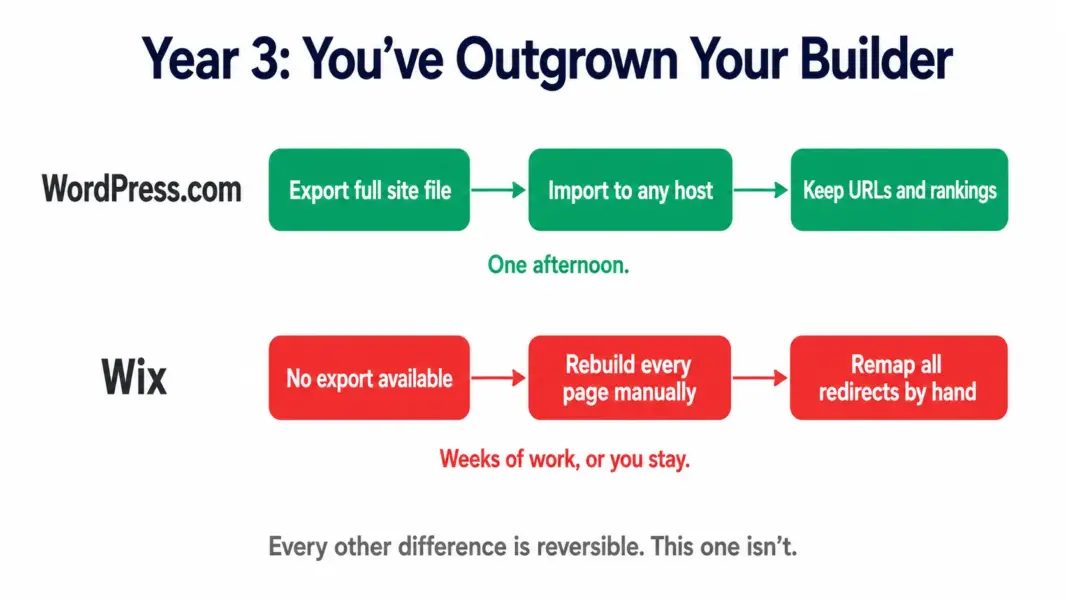
WordPress.com lets you export your entire site: posts, pages, media, categories, tags, comments, and settings. Import that file into self-hosted WordPress on any host and your site continues running. Point your custom domain at the new install and every URL stays identical, which preserves rankings, backlinks, and bookmarks.
Wix does not offer site export. There is no migration file. Moving off Wix means recreating every page manually on the new platform, re-uploading all media, rebuilding navigation, and mapping redirects by hand. For a 10-page brochure site that’s a weekend of work. For a site carrying 200 blog posts and years of accumulated search equity, it’s a project most businesses never start, which is precisely why they stay.
This isn’t a hypothetical risk. Businesses outgrow website builders routinely, usually when they need a specific integration, a membership system, a custom post type, or a plugin that only exists in the WordPress ecosystem. On WordPress that’s a plan upgrade. On Wix it’s a rebuild, and the cost of that rebuild grows every month you publish.
Which Should You Choose: WordPress or Wix?
Choose Wix if you’ve never built a website, you need it live within a day, your site is a local business presence or portfolio that won’t need plugins, direct phone support matters to you, and you’re comfortable staying on the platform indefinitely.
Choose WordPress.com if content and SEO drive your growth, you publish regularly, you’ll likely need plugins for forms, memberships, or integrations, you want the option to redesign without rebuilding, or there’s any realistic chance you’ll want to self-host later.
Choose neither if design quality is your top priority, where Squarespace produces better-looking results than both, or if selling products is your main business, where Shopify is the stronger foundation. Compare all options in our best website builders guide and the Wix vs Squarespace comparison.
Last updated: July 29, 2026
Frequently Asked Questions
Is WordPress or Wix better in 2026?
WordPress.com is better for content-driven sites, SEO depth, and long-term flexibility because you can export your site and self-host at any time. Wix is better for absolute beginners who need a site live within a day and don’t expect to need plugins or migration later.
Can you move a Wix site to WordPress?
Not through any export tool. Wix does not support site export, so migration means manually recreating every page, re-uploading media, and setting up redirects by hand. WordPress.com by contrast exports your full site including posts, pages, media, and settings for import anywhere.
Is WordPress or Wix better for SEO?
WordPress is stronger for SEO. On the Business plan you get plugin-level control through RankMath or Yoast covering schema markup, redirects, canonicals, and internal linking, plus better content architecture with categories and custom taxonomies. Wix covers the fundamentals well but caps out at what the platform exposes.
Is WordPress cheaper than Wix?
At entry, yes. WordPress.com Starter is $4 per month versus Wix Light at $17. At comparable capability the gap narrows, with WordPress Business at $25 versus Wix Core at $29. Wix renewal pricing commonly rises 25 to 50% in year two, so compare renewal rates rather than introductory ones.
Which is easier for beginners, WordPress or Wix?
Wix. Its AI generator produces a complete site from a text description in about five minutes, and the drag-and-drop editor requires no technical knowledge. WordPress.com’s block editor takes a couple of hours to learn but handles long-form content and site structure better once you’re comfortable.
Can I sell products on WordPress or Wix?
Both support ecommerce. Wix enables payments on the Core plan at $29 per month. WordPress.com requires the Commerce plan at $45 per month with WooCommerce included. For catalogues above roughly 30 products or multi-channel selling, Shopify is the better fit than either.
Do I need coding skills for WordPress?
No. WordPress.com’s block editor is fully visual and requires no code. Coding knowledge helps if you self-host and want deep customisation, but for a standard business site or blog on WordPress.com you never need to touch code.
Can you change your Wix template after publishing?
No. Wix does not allow template switching after a site is published without rebuilding your pages. WordPress.com lets you change themes at any time with your content remaining intact, which makes redesigns straightforward rather than a full rebuild.
Which is better for blogging, WordPress or Wix?
WordPress, decisively. It was built as blogging software and handles revision history, scheduled publishing, multi-author roles, comment moderation, and category and tag hierarchies far better. Wix has a functional blog module but content-heavy sites feel constrained by it.
Related Website Builder Guides
- WordPress.com Review 2026
- Wix Review 2026
- Squarespace Review 2026
- Wix vs Squarespace 2026
- Best Website Builders 2026
- Best Free Website Builders