Pros
- Free plan exists with basic site and wordpress.com subdomain
- Starter at $4 per month annual is one of the cheapest website plans available
- Business plan gives full plugin access on managed hosting without dealing with servers
- All paid plans include free domain for the first year and SSL
- Automatic updates security patches and backups handled by Automattic
- Block editor has matured into a genuinely good content creation tool
- You can export and migrate your site at any time without platform lock-in
Cons
- People confuse WordPress.com with WordPress.org constantly which causes wrong purchase decisions
- Free and Starter plans show WordPress.com branding and limit theme choices
- No custom plugins or themes until the Business plan at $25 per month annual
- Premium plan at $8 per month still blocks plugin installation which surprises upgraders
- Commerce plan at $45 per month is expensive versus Shopify Basic at $39 with more ecommerce depth
- Storage caps range from 1GB free to 50GB on Business which feels restrictive
- The name WordPress carries self-hosted expectations that the hosted plans don't meet until Business tier
Most people searching for a WordPress review don’t realize there are two completely different products called WordPress. WordPress.org is free open-source software you install on your own server. WordPress.com is a managed hosting platform run by Automattic where they handle the servers for you. This review covers WordPress.com, the hosted version. If you want to install your own plugins and control your own server, you want WordPress.org with a host like Kinsta or Cloudways, and our WooCommerce review covers that world.
That confusion matters because WordPress.com’s cheaper plans don’t let you do what most people expect from “WordPress.” Custom plugins? Locked until the $25 per month Business plan. Custom themes? Same. The free and low-cost tiers are WordPress in name but Squarespace-like in restrictions. This review explains where each plan actually delivers value.
Starting Price: $0 (Free) | $4/mo Starter (annual) | Free Plan: Yes | Free Trial: No
What Does Each WordPress.com Plan Actually Include?
Free ($0). A wordpress.com subdomain, 1GB storage, basic themes, and WordPress.com ads on your site. Fine for a personal blog you share with friends. Not for anything you’d hand a business card with.
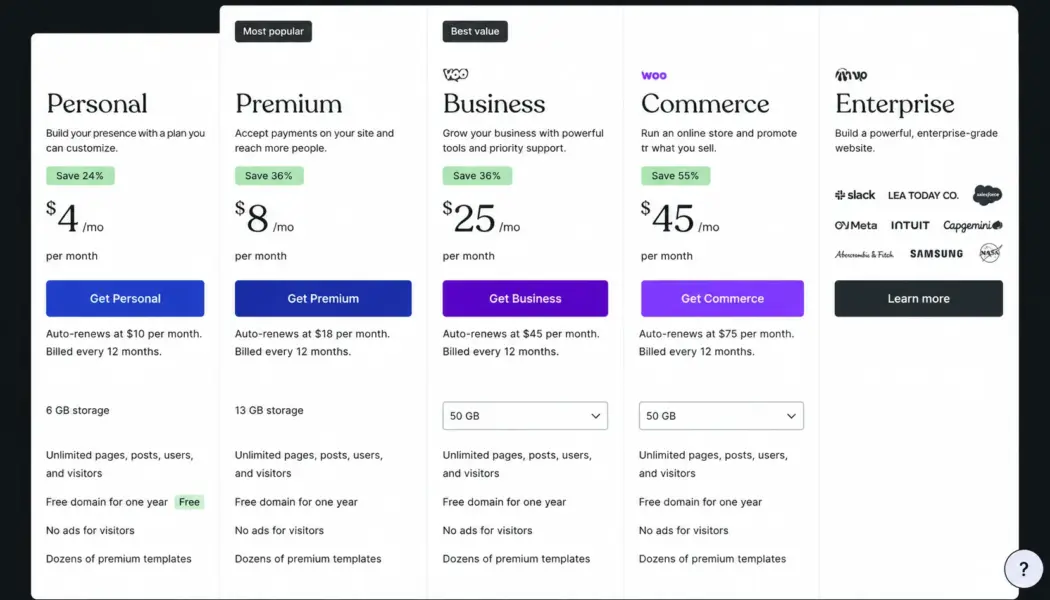
Starter ($4 per month annual, $9 monthly). Custom domain (free first year), 6GB storage, remove WordPress.com ads, email support. Still no custom plugins or themes. You’re working within WordPress.com’s curated selection, which is a dozen or so free themes and a handful of premium ones.
Premium ($8 per month annual, $14 monthly). 13GB storage, premium themes, design tools, Google Analytics integration, VideoPress hosting, monetization features. Still no custom plugins. This is where most people expect “WordPress” to start feeling like WordPress, and it doesn’t yet. You can’t install Yoast, WooCommerce, or any third-party plugin.
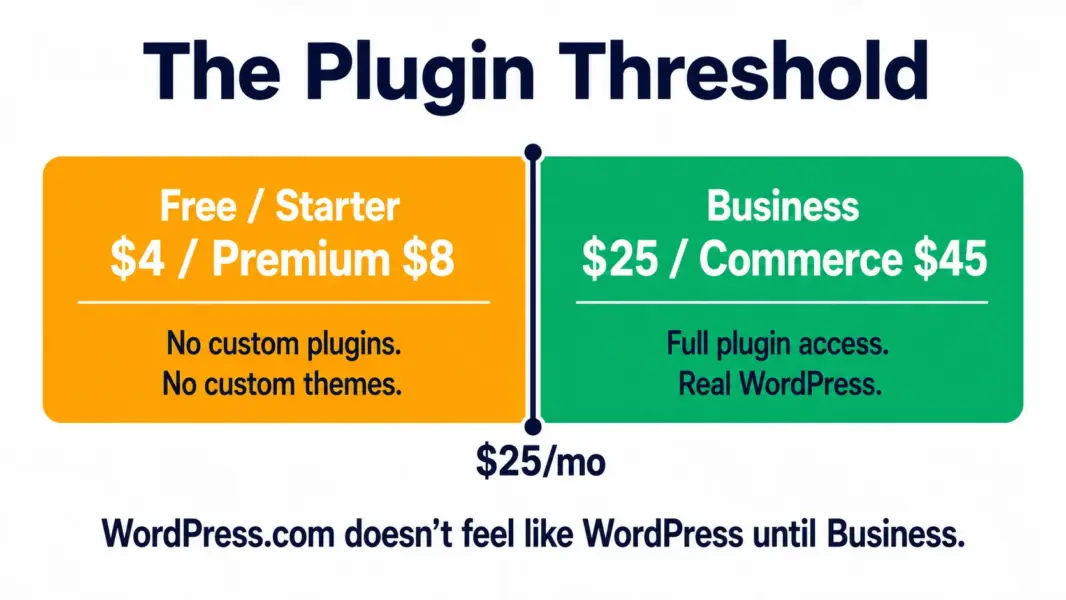
Business ($25 per month annual, $33 monthly). This is the plan where WordPress.com becomes real WordPress. 50GB storage. Install any of 60,000-plus plugins. Upload custom themes. SFTP and Git access for developers. Staging sites. 24/7 priority support. If you need WordPress functionality, Business is the starting point.
Commerce ($45 per month annual, $59 monthly). Everything in Business plus WooCommerce pre-installed, premium store themes, and ecommerce tools for selling in 60-plus countries. Competes with Shopify Basic at $39 per month, though Shopify offers deeper ecommerce features at that price. See our Shopify vs Squarespace comparison for the ecommerce platform landscape.
When WordPress.com Makes More Sense Than Self-Hosted
You don’t want to manage servers. WordPress.com handles hosting, security patches, backups, and software updates automatically. For non-technical users, this removes the single biggest barrier to running WordPress: keeping it secure and updated.
You want a safety net. WordPress.com’s infrastructure is run by Automattic, the company behind WordPress itself. Uptime is reliable. Automatic backups are daily. If something breaks, support is available on paid plans. Self-hosted WordPress on cheap shared hosting doesn’t offer any of that unless you configure it yourself.
You might self-host later. Unlike Wix or Squarespace, WordPress.com lets you export your entire site and move it to self-hosted WordPress at any time. You’re not locked in. Start with the managed convenience, and if you outgrow it, migrate without losing your content or design.
When Self-Hosted WordPress Is the Better Call
You need plugins on a budget. WordPress.com gates plugins behind the $25 per month Business plan. Self-hosted WordPress on a $5 to $10 per month shared host gives you plugin access from day one. If your site needs a contact form plugin, an SEO plugin, and a caching plugin but your budget is under $15 per month, self-hosting is cheaper.
You want full control. Self-hosted WordPress lets you modify any file, access the database directly, install server-level caching, and run custom code. WordPress.com’s managed environment has restrictions, and some plugins that require server-level access won’t work even on the Business plan.
WordPress.com vs Squarespace vs Wix
Squarespace has better design templates out of the box. WordPress.com has more flexibility once you reach the Business plan. Wix is easiest for complete beginners who will never need plugins or custom code.
If you might ever need plugins, custom functionality, or the ability to self-host later, WordPress.com is the right choice among these three. If design quality matters most and you’ll never need plugins, Squarespace delivers a more polished visual experience. If you just want the simplest possible site builder and don’t care about portability, Wix works.
For ecommerce specifically, WordPress.com Commerce at $45 per month is weaker than Shopify at $39 per month. Shopify is purpose-built for selling. WordPress.com Commerce is a general-purpose platform with WooCommerce added on. See our best ecommerce for small business guide for the full comparison.
Last updated: July 21, 2026
Frequently Asked Questions
How much does WordPress.com cost?
WordPress.com has a free plan and four paid tiers billed annually: Starter at $4 per month, Premium at $8, Business at $25, and Commerce at $45. Monthly billing is 50 to 80% higher. All paid plans include a free domain for the first year. Custom plugins and themes require the Business plan at $25 or above.
Is WordPress.com the same as WordPress.org?
No. WordPress.com is a managed hosting platform run by Automattic. WordPress.org is free open-source software you install on your own server. WordPress.com handles hosting, security, and updates for you. WordPress.org gives you full control but requires your own hosting provider. Most “how to build a WordPress site” guides assume WordPress.org with separate hosting.
Can I install plugins on WordPress.com?
Only on the Business plan at $25 per month or higher. Free, Starter, and Premium plans do not allow custom plugin installation. This is the most common point of frustration for people who choose WordPress.com expecting the same flexibility as self-hosted WordPress.
Is WordPress.com good for ecommerce?
The Commerce plan at $45 per month includes WooCommerce for online selling. It works for small to mid-size stores but Shopify at $39 per month offers deeper ecommerce features, more apps, and multi-channel selling. WordPress.com Commerce is best for businesses that need a content-first site with some selling, not stores where selling is the primary activity.
Can I switch from WordPress.com to self-hosted WordPress?
Yes. WordPress.com lets you export your entire site (content, media, pages) and import it into a self-hosted WordPress installation at any time. This portability is a genuine advantage over Wix and Squarespace, which make migration harder. The process takes a few hours for a typical small site.
Is the WordPress.com free plan usable?
For a personal blog shared with friends, yes. For anything professional, no. The free plan uses a wordpress.com subdomain, shows WordPress.com ads on your site, provides only 1GB of storage, and limits theme choices. The Starter plan at $4 per month removes ads and adds a custom domain, making it the minimum for any professional use.
Related Guides
- WooCommerce Review 2026
- Squarespace Review 2026
- Shopify vs Squarespace 2026
- Best Ecommerce for Small Business
WordPress.com is the easiest way to get a real WordPress site without touching a server. The free plan works for personal blogs. Starter at $4 per month handles simple business sites. But the platform doesn't feel like "real WordPress" until the Business plan at $25 per month, which is where you finally get custom plugins and themes. If you're comparing WordPress.com to Squarespace or Wix, it wins on long-term flexibility because you can always export and self-host later. If you're comparing it to self-hosted WordPress on Kinsta or Cloudways, it wins on convenience but loses on control and sometimes on cost at the Business tier and above.