Pros
- AI site generator builds a functional website from a text description in under 5 minutes
- Drag-and-drop editor with pixel-level freedom is the most intuitive for first-time builders
- Free plan lets you build and preview without entering payment information
- 900 plus designer-made templates across every business category
- App Market with hundreds of add-ons for bookings events restaurants and more
- 14-day money-back guarantee on all paid plans
- Built-in email marketing tool included on paid plans
Cons
- Sites cannot be exported or migrated to another platform once built on Wix
- Renewal pricing jumps 25 to 50 percent in year two which most users don't expect
- Light plan at $17 per month cannot accept online payments so ecommerce starts at Core $29
- Free plan shows Wix ads and uses a wixsite.com subdomain
- Storage caps are tight at 2GB Light and 50GB Core compared to unlimited on Squarespace
- Pixel-level freedom can produce messy responsive designs on mobile without careful testing
- No Git access or code export for developers who want to own the codebase
I built a Wix site in 4 minutes and 38 seconds using the AI generator. Typed a description of a fictional coffee shop, picked a color scheme, and had a homepage, menu page, and contact form ready to publish. No other builder gets you from zero to live that fast.
That speed comes with a cost most reviews don’t mention until the last paragraph: you can’t take your site with you. Wix doesn’t offer export. If you outgrow the platform or find a better option in two years, you rebuild from scratch somewhere else. That lock-in is the trade you make for the easiest setup in the category.
Starting Price: $17/mo Light (annual) | $29/mo Core | Free Plan: Yes | Free Trial: 14-day money-back
What Does Wix Cost?
Wix pushes annual billing hard. The prices you see advertised are annual rates. Monthly billing runs 30 to 41% higher. Here’s what you actually pay.
Free ($0). Build and publish on a wixsite.com subdomain with Wix ads showing on your site. Good for testing the editor. Not for anything professional.
Light ($17 per month annual, $24 monthly). Custom domain (free first year), remove Wix ads, 2GB storage. No online payments. This plan is for personal sites, simple blogs, and one-page portfolios that don’t sell anything.
Core ($29 per month annual, $36 monthly). Online payments, booking tools, 50GB storage, analytics. This is the real starting plan for any business that takes money online. According to Website Builder Expert, Core is the best value if you need the balance of price and ecommerce features.
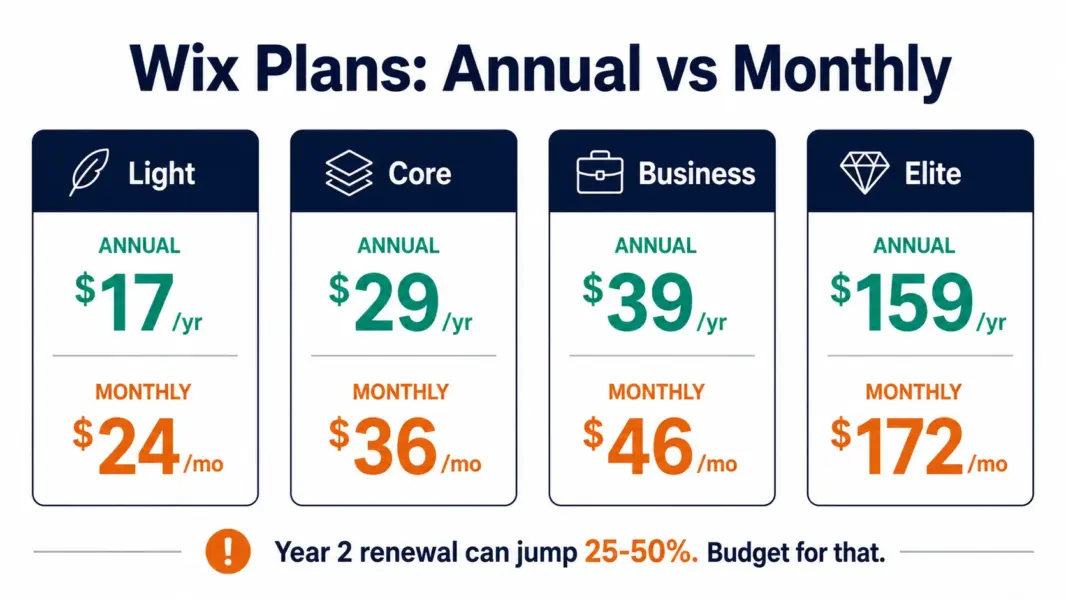
Business ($39 per month annual, $46 monthly). 100GB storage, automated sales tax for up to 500 monthly transactions, advanced shipping. The $10 jump from Core is worth it once you ship across multiple states or countries.
Business Elite ($159 per month annual, $172 monthly). Unlimited storage, priority support, advanced ecommerce. Most small businesses don’t need this. It exists for high-volume stores that have outgrown Business but haven’t moved to Shopify.
Here’s what catches people: Wix’s annual prices are first-year rates. Renewals jump 25 to 50% in year two. A Core plan that costs $348 the first year can renew significantly higher. Budget for the renewal price, not the introductory rate.
The AI Site Generator: Real Speed, Real Limits
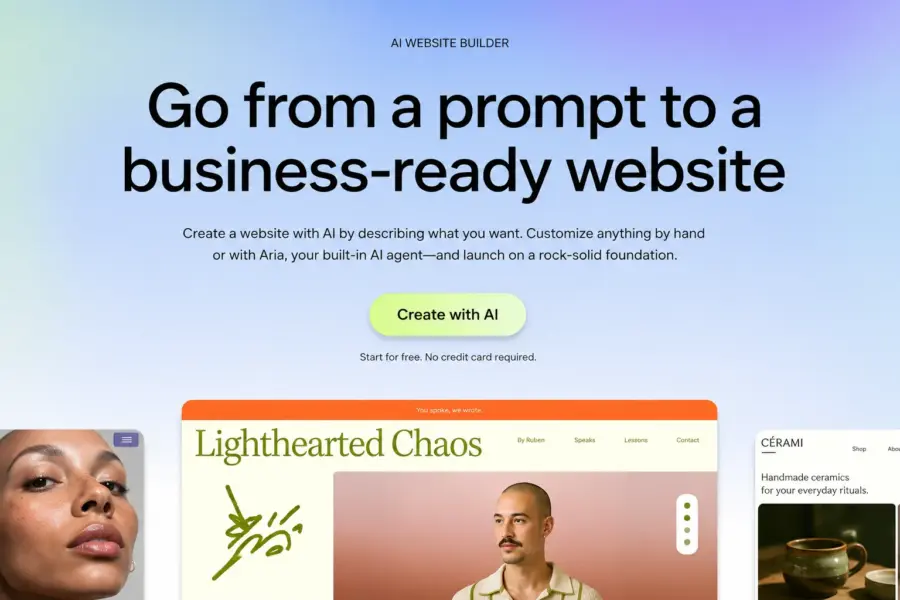
Wix ADI (Artificial Design Intelligence) generates a complete website from a text prompt. Describe your business, pick preferences, and the AI produces pages, images, text, and navigation. For someone who’s never touched a website builder, this removes the blank-canvas anxiety that stops most people from starting.
The output is a starting point, not a finished site. AI-generated text reads generic. Stock images don’t match your actual business. Layout decisions sometimes produce awkward spacing on mobile. Plan 1 to 3 hours of editing after the AI generates the initial structure. It’s still faster than building from scratch on any platform.
The Lock-In Problem Nobody Else Mentions First
Wix sites cannot be exported. Not to WordPress. Not to Squarespace. Not to any other platform. Your design, your pages, your content structure, all of it lives exclusively on Wix’s servers. If you decide to leave, you copy-paste your text into a new builder and start over.
WordPress.com lets you export your entire site to self-hosted WordPress. Squarespace exports content to XML. Even Shopify provides data export for products and customers. Wix’s lack of portability is the most significant downside of the platform. If your business might outgrow a website builder within 2 to 3 years, this lock-in should weigh heavily in your decision.
Who Should Build on Wix
First-time website builders who want the lowest barrier to entry. Local businesses (restaurants, salons, contractors) that need a professional site live this week without hiring anyone. Personal portfolio sites and blogs where the content matters more than the platform. Anyone who’s confident they won’t need to migrate platforms in the next 3 to 5 years.
Who Should Choose Squarespace or WordPress Instead
Businesses planning to grow significantly and wanting migration flexibility. Anyone who might self-host WordPress later. Design-focused businesses where template quality drives purchasing decisions (Squarespace’s templates are more polished). Ecommerce businesses selling 50-plus products (Shopify handles scale better). See our best website builders guide for the full platform comparison.
Last updated: July 22, 2026
Frequently Asked Questions
How much does Wix cost in 2026?
Wix has a free plan and four paid tiers on annual billing: Light at $17 per month, Core at $29, Business at $39, and Business Elite at $159. Monthly billing is 30 to 41% higher. All prices are first-year rates. Renewals in year two can increase 25 to 50%.
Can I export my Wix site to another platform?
No. Wix does not offer site export. If you leave Wix, you rebuild your site from scratch on the new platform. WordPress.com and Squarespace both offer content export. This lock-in is Wix’s most significant limitation for businesses that might outgrow the platform.
Is the Wix free plan usable?
For testing the editor, yes. For a professional site, no. The free plan uses a wixsite.com subdomain, shows Wix ads, and provides very limited storage. The Light plan at $17 per month removes ads and adds a custom domain. Core at $29 is the minimum for any site accepting payments.
Does Wix have AI website building?
Yes. Wix ADI generates a complete website from a text description in under 5 minutes including pages, images, and navigation. The output needs editing (generic text, stock images, mobile layout adjustments) but it’s the fastest way to get a starting structure without design experience.
Is Wix good for ecommerce?
Wix Core at $29 handles basic ecommerce for small stores. Business at $39 adds automated sales tax and advanced shipping. For stores with 50-plus products or multi-channel selling needs, Shopify provides significantly more ecommerce depth. Wix works for small catalogs but doesn’t scale like dedicated ecommerce platforms.
Does Wix increase prices after the first year?
Yes. Wix’s advertised prices are first-year annual rates. Users report renewal price increases of 25 to 50% in year two. Budget for the renewal rate, not the introductory price, when calculating your long-term website cost.
Related Guides
- Best Website Builders 2026
- WordPress.com Review 2026
- Squarespace Review 2026
- Shopify vs Squarespace 2026
Wix is the easiest website builder for someone who has never built a site before. The AI generates a working website in 5 minutes. The drag-and-drop editor places elements exactly where you want them. For a first website, nothing gets you live faster. The tradeoff you accept is permanent. Wix sites can't be exported. Once you build on Wix, you're on Wix. Squarespace and WordPress.com both allow site migration. If there's any chance you'll outgrow your builder, that lock-in matters more than which editor feels friendlier on day one.