Pros
- Unlimited users on every plan including the cheapest tier
- Multi-currency invoicing and reporting built in from Standard plan
- 1,000 plus third-party app integrations the broadest after QuickBooks
- Bank feeds connect to over 21,000 financial institutions globally
- Clean dashboard shows real-time cash position and outstanding invoices
- Flat monthly pricing regardless of team size makes cost predictable
- 30-day free trial on all plans with no credit card required
Cons
- Starter plan caps at 20 invoices and 5 bills per month making it barely functional
- Pricing varies wildly by country and Xero renames plans regionally causing confusion
- No built-in payroll in the US requiring a third-party add-on like Gusto at $40 plus per month
- Inventory tracking locked to Premium at roughly $75 to $90 per month
- Customer support is email-only with no phone support on any plan
- Price increases of 15 to 30% over the past 2 years concern existing customers
- US market share trails QuickBooks significantly with fewer US accountants trained on Xero
Xero does two things no other small business accounting tool matches. First, unlimited users on every plan, including the cheapest. QuickBooks caps users per tier. FreshBooks charges per team member. Xero lets your entire team and your accountant access the books at one flat price. Second, multi-currency invoicing that handles exchange rates, currency conversion, and foreign-denominated financial statements without workarounds.
If your business invoices clients in multiple currencies or has a team of 5-plus people accessing the books, Xero is the most cost-effective option. If you’re a US-only business with employees needing payroll, QuickBooks handles that without the $40-plus Gusto add-on Xero requires.
Starting Price: ~$20-29/mo Starter | ~$47-55/mo Standard | Free Plan: No | Free Trial: 30 days
What Does Xero Cost?
I’ll be direct: Xero’s pricing is confusing. They use different plan names in different countries (Starter/Standard/Premium in some markets, Early/Growing/Established in the US), run aggressive promotional offers (currently 90% off for 6 months in some regions), and have renamed and repriced plans multiple times since 2024. Always check the official Xero pricing page for your country before committing. Here’s the approximate US pricing as of 2026.
Starter (~$20 to $29 per month). 20 invoices per month. 5 bills. Bank reconciliation. Unlimited users. That 20-invoice cap is the functional limit. A business sending more than 20 invoices per month, which is most active businesses, needs Standard immediately. Starter is essentially a trial at a paid price.
Standard (~$47 to $55 per month). Unlimited invoices and bills. Multi-currency support. Bank feeds from 21,000-plus institutions. Expense claims via Hubdoc (included). Custom dashboards. This is where Xero becomes a real accounting tool and the plan most businesses actually need.
Premium (~$75 to $90 per month). Everything in Standard plus project tracking, expense management, inventory tracking, and 180-day cash flow forecasting. Multi-currency is also available here for businesses needing the full international toolkit. Required for product-based businesses and project-based billing.
Xero frequently runs promotional pricing. As of 2026, offers like $5.50 per month for 6 months appear regularly. Don’t budget based on the promotional rate. Budget based on the standard price you’ll pay after month 6.
Where Xero Stands Out
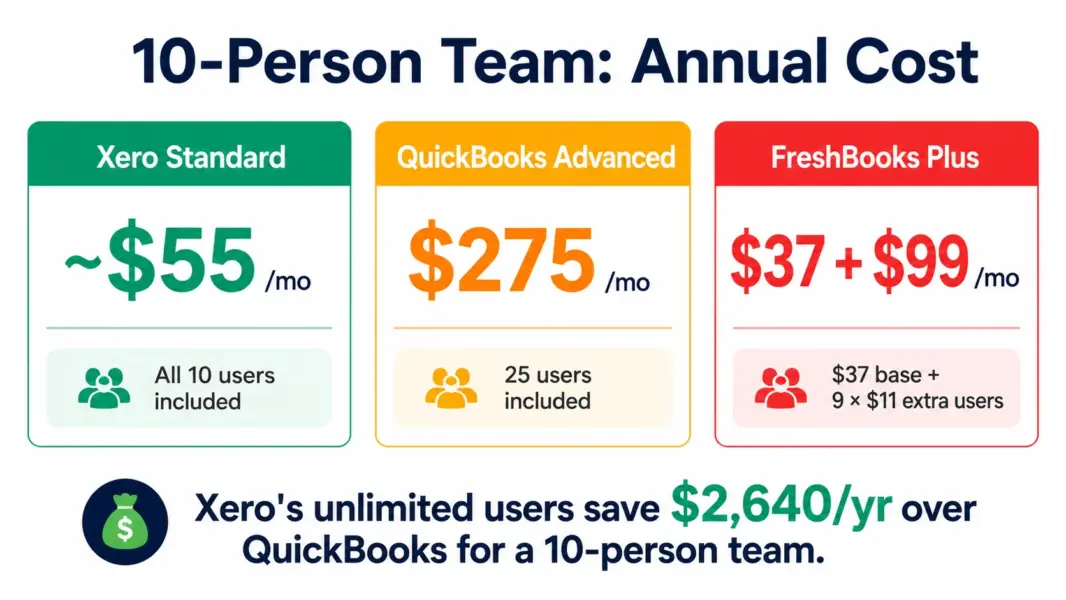
Unlimited users at flat pricing. A 10-person team on Xero Standard pays the same as a 1-person team. On QuickBooks, the same team would need Advanced at $275 per month to get 25 user seats. On FreshBooks, each additional team member costs $11. For growing teams, Xero’s flat pricing becomes progressively better value as headcount increases.
Multi-currency. Invoice a client in euros, another in pounds, a third in yen. Xero manages exchange rates, converts currencies at spot rates, and produces financial statements in your home currency. The multi-currency gains and losses report is a specific feature international businesses need that most competitors either skip or gate behind premium tiers.
Integration depth. 1,000-plus third-party apps connect to Xero, second only to QuickBooks’ 750-plus. Stripe, PayPal, Shopify, Square, HubSpot, Gusto, inventory tools, and industry-specific apps all plug in. The API is well-documented and developers report it’s pleasant to work with.
Where Xero Falls Short in the US
No built-in payroll. US businesses using Xero need Gusto ($40-plus per month plus $6 per employee) or another third-party payroll provider. QuickBooks includes payroll integration natively. For a US business with 5 employees, adding Gusto to Xero wipes out the pricing advantage over QuickBooks.
Email-only support. No phone support on any Xero plan. Response times average 24 to 48 hours. QuickBooks offers phone support on higher tiers. Sage includes phone support on every plan. For businesses that value calling someone when the books don’t balance, Xero’s support model is a real gap.
US accountant ecosystem. QuickBooks dominates the US accounting market. Most US accountants and bookkeepers are trained on QuickBooks. Fewer know Xero. If your accountant prefers QuickBooks, switching to Xero adds friction. Ask your accountant before choosing.
Xero vs QuickBooks vs Wave
Xero wins for international businesses, teams with 5-plus users, and anyone needing multi-currency. QuickBooks wins for US businesses with employees, built-in payroll needs, and accountant compatibility. Wave wins for zero-budget solopreneurs who need free accounting. For the full accounting landscape, see our best accounting software guide and QuickBooks vs FreshBooks comparison.
Last updated: July 25, 2026
Frequently Asked Questions
How much does Xero cost in 2026?
Approximately $20-29 per month for Starter, $47-55 for Standard, and $75-90 for Premium in the US. Pricing varies by country and Xero runs frequent promotions (sometimes 90% off for 6 months). Always check the official Xero pricing page for current rates in your region.
Does Xero include unlimited users?
Yes. Every Xero plan, including the cheapest Starter, supports unlimited users at no additional per-user fee. This is Xero’s biggest pricing advantage over QuickBooks (which caps users per tier) and FreshBooks (which charges per team member).
Does Xero have payroll in the US?
No built-in payroll. US businesses need a third-party payroll provider like Gusto ($40-plus per month plus $6 per employee). QuickBooks includes payroll integration natively. Factor the Gusto add-on cost into your total when comparing Xero to QuickBooks.
Is Xero better than QuickBooks?
Xero is better for international businesses needing multi-currency and teams wanting unlimited users at flat pricing. QuickBooks is better for US businesses needing built-in payroll, phone support, and compatibility with the US accountant ecosystem. The choice depends on your specific needs.
Why is Xero pricing so confusing?
Xero uses different plan names in different countries, runs aggressive promotional offers, and has renamed plans multiple times. US plans may be called Early/Growing/Established while other regions use Starter/Standard/Premium. Promotional pricing as low as $5.50 per month masks the standard rates you’ll pay after the promotional period ends.
Does Xero support multi-currency?
Yes, from the Standard plan. Xero handles invoicing in multiple currencies, manages exchange rates, and produces reports in your home currency. This is a genuine differentiator over FreshBooks (no multi-currency) and Wave (no multi-currency). QuickBooks adds multi-currency on higher tiers at more cost.
Related Accounting Guides
- Best Accounting Software 2026
- QuickBooks vs FreshBooks 2026
- FreshBooks Review 2026
- Wave Review 2026
- Sage Review 2026
Xero is the best accounting software for businesses that invoice internationally or need unlimited users without per-seat fees. Multi-currency support from the Standard plan handles exchange rates and currency conversion that QuickBooks gates behind higher tiers. The 1,000-plus integration library is second only to QuickBooks. The US-specific gaps are real though: no built-in payroll, email-only support, and fewer US accountants know Xero than QuickBooks. For international businesses and teams with 5-plus users, Xero's flat pricing delivers better value. For US-only businesses with employees, QuickBooks' built-in payroll and accountant ecosystem are hard to beat.