This FreshBooks review starts with a clarification most reviews skip: FreshBooks is not trying to be QuickBooks. It is an invoicing-first tool that includes enough accounting to keep freelancers and service businesses organized without requiring an accounting background. Founded in 2003 after its founder accidentally overwrote an invoice in Excel, FreshBooks has grown to serve over 30 million users by doing one thing better than anyone: making invoicing dead simple. This review covers where that simplicity delivers genuine value and where it creates limits growing businesses eventually hit.
Starting Price: $19/mo (Lite) | Free Plan: No | Free Trial: Yes (30 days, no credit card)
Where FreshBooks Wins: Invoicing That Clients Actually Like
FreshBooks produces the cleanest, most professional invoices in the small business accounting category. Creating an invoice takes under two minutes, with customizable templates, your logo, and automatic payment reminders built in. The client portal lets customers view invoices, ask questions, and pay online, all from a branded page. According to FreshBooks’ published data, users get paid up to two times faster than with manual invoicing, driven by online payment options and automated reminders that reduce the uncomfortable “following up” conversation.
The mobile app deserves specific mention. Freelancers who invoice between client meetings, on job sites, or while commuting get a fully functional invoicing experience from their phone: create invoices, accept payments, track mileage, log expenses, and message clients. The mobile experience is more polished than QuickBooks’ mobile app for invoicing-specific tasks.
Time Tracking: Included on Every Plan
FreshBooks includes time tracking on all plans, which matters for freelancers and consultants who bill by the hour. You can start a timer, log hours to a specific project, and convert tracked time directly into invoice line items. This workflow eliminates the separate time-tracking tool (Toggl, Harvest) that many freelancers pair with less integrated accounting software.
Mileage tracking is also included on all plans, automatically logging trips using your phone’s GPS. For service providers who travel to client sites, the automatic mileage deduction tracking reduces tax-time overhead significantly. Both features being included rather than charged as add-ons contributes to FreshBooks’ value proposition for service-based businesses.
FreshBooks Pricing: The Client Cap Trap
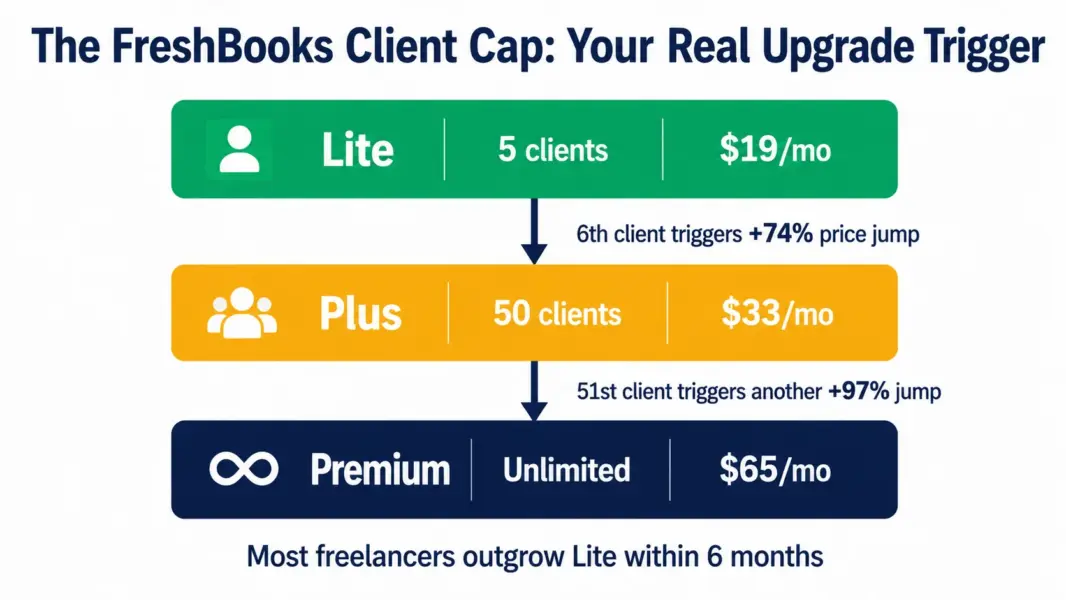
FreshBooks pricing is based on the number of billable clients, not the number of users or transactions, which is unusual in accounting software and creates a specific cost dynamic.
| Plan | Monthly Price | Annual Price | Billable Client Cap |
|---|---|---|---|
| Lite | $19/mo | $17.10/mo | 5 clients |
| Plus | $33/mo | $29.70/mo | 50 clients |
| Premium | $65/mo | $54/mo | Unlimited |
| Select | Custom | Custom | Unlimited + migration support |
The client cap is the upgrade trigger to watch. A freelancer billing 5 regular clients fits Lite perfectly. The moment a sixth client arrives, the jump to Plus at $33 per month nearly doubles the cost. According to a 2026 pricing analysis by SaaS Price Pulse, most freelancers outgrow the Lite plan’s 5-client cap within six months, making Plus at $29.70 per month (annual) the realistic baseline for actively freelancing professionals.
Additional team members cost $11 per month each on top of the plan price, which adds up for small teams. A 3-person business on Plus pays $29.70 plus $22 for two additional users, reaching $51.70 per month, which approaches QuickBooks Online territory.
Where FreshBooks Falls Short: Accounting Depth
FreshBooks is an invoicing tool with accounting features, not a full accounting suite. Understanding this distinction prevents frustration.
No inventory management. FreshBooks is designed for service businesses, not product sellers. There is no stock tracking, purchase orders, or product catalog management. Retailers and product businesses need QuickBooks, Xero, or a dedicated inventory system.
Lite plan lacks double-entry accounting. Bank reconciliation and double-entry reports are only available on Plus and above. Lite users get income and expense tracking but not the full accounting foundation that auditors and tax professionals expect. Upgrading to Plus for $29.70 per month is worth it for any business that files taxes beyond basic Schedule C freelancer returns.
Reporting is basic. FreshBooks offers profit and loss, expense, tax summary, and a few other standard reports. QuickBooks Online and Xero provide significantly more reporting depth, customization, and multi-dimensional analysis. Businesses that need detailed financial insights beyond basic income and expenses will find FreshBooks limiting.
Who Should Use FreshBooks?
| Use FreshBooks If | Skip FreshBooks If |
|---|---|
| You are a freelancer or solopreneur billing clients | You sell physical products and need inventory |
| Invoicing is your primary accounting need | You need advanced reporting and financial analysis |
| You bill by the hour and need time tracking | You have a team of 5-plus and need multi-user access affordably |
| You are not an accountant and want dead-simple software | You need payroll included (it is a $40-plus add-on) |
| You want mobile invoicing and mileage tracking | You need double-entry accounting on the cheapest plan |
For service-based businesses that outgrow FreshBooks, QuickBooks Online is the natural next step with deeper accounting at $30 per month entry. For free alternatives, Wave offers accounting and invoicing for free with paid payment processing. See our upcoming guides in the complete guide to accounting software for comparisons across the category.
Try FreshBooks Free for 30 Days
Last updated: July 7, 2026
Frequently Asked Questions
How much does FreshBooks cost in 2026?
FreshBooks Lite costs $19 per month ($17.10 annual) for up to 5 billable clients. Plus costs $33 per month ($29.70 annual) for up to 50 clients. Premium costs $65 per month ($54 annual) for unlimited clients. There is no free plan, but a 30-day free trial requires no credit card. Additional team members cost $11 per month each. FreshBooks frequently offers 90% off the first 4 months for new users.
Is FreshBooks good for freelancers?
FreshBooks is one of the best tools for freelancers who primarily need invoicing, time tracking, and expense management. The Lite plan at $19 per month covers up to 5 clients with professional invoices, built-in time tracking, mileage tracking, and a mobile app for invoicing on the go. Most freelancers outgrow Lite within six months and move to Plus for $29.70 per month.
Is FreshBooks cheaper than QuickBooks?
Yes for basic invoicing needs. FreshBooks Lite at $19 per month covers what QuickBooks Simple Start provides at $30 per month for solo freelancers billing a few clients. However, QuickBooks includes more accounting depth (inventory, advanced reporting, multi-user access) at its entry tier. For growing businesses, QuickBooks often provides better long-term value despite the higher starting price.
Does FreshBooks have a free plan?
No. FreshBooks does not offer a permanent free plan. It provides a 30-day free trial with no credit card required, giving you full access to test the platform before committing. For free accounting software, Wave offers invoicing and accounting for free with paid payment processing, though it lacks FreshBooks’ time tracking and mobile polish.
Can FreshBooks handle inventory?
No. FreshBooks is designed for service-based businesses and does not include inventory management, stock tracking, or purchase orders. Retailers and product-based businesses should use QuickBooks Online, Xero, or a dedicated inventory management system. FreshBooks works best for freelancers, consultants, and service providers who invoice for time and expertise rather than physical products.
What is the FreshBooks client cap?
Each FreshBooks plan limits the number of clients you can bill: Lite allows 5 billable clients, Plus allows 50, and Premium allows unlimited. You can send unlimited invoices to each client, but the client count cap forces a tier upgrade when you add clients beyond the limit. The 5-client cap on Lite is the most common trigger for upgrading to Plus.
Is FreshBooks easy to use?
FreshBooks is one of the easiest accounting tools for non-accountants. The interface is clean and intuitive, setup takes about an hour, and creating an invoice takes under two minutes. G2 and Capterra reviewers consistently rate FreshBooks higher on ease of use than QuickBooks Online. The simplicity comes with a tradeoff of reduced accounting depth and fewer customization options.
Related Accounting Reviews and Guides
FreshBooks is the best invoicing tool for freelancers and service-based small businesses who are not accountants. Its invoicing, time tracking, and expense management are best-in-class for simplicity. The tradeoff is limited accounting depth: no inventory management, basic reporting, and client caps that force tier upgrades as you grow. For freelancers billing 5 or fewer clients, FreshBooks Lite is cheaper and simpler than QuickBooks. For growing businesses needing real accounting depth, QuickBooks Online or Xero is the better long-term fit.