Pros
- Starter plan is genuinely free forever with unlimited invoicing and expense tracking
- Double-entry bookkeeping produces real financial statements accepted by accountants
- Unlimited users and ability to manage multiple businesses under one account
- Professional invoice templates with online payment acceptance built in
- G2 ease of use score of 9.0 out of 10 making it the easiest accounting tool for non-accountants
- Mobile app for invoicing and receipt capture on the go
- No credit card required to start using the free plan
Cons
- No inventory management for product-based businesses
- Free plan requires manual bank transaction imports which is time-consuming
- Customer support is email-only on the free plan with no phone or live chat
- Pro plan at $19 per month adds automated bank feeds but still lacks advanced reporting
- No multi-currency support for international invoicing
- No multi-factor authentication which is a security concern for financial data
- Limited to roughly 10 native integrations versus QuickBooks's 750-plus
This Wave review answers the question 2 million small businesses already answered with their wallets: can you run real accounting on free software? With Wave’s Starter plan, yes. Unlimited invoicing, expense tracking, and double-entry bookkeeping at $0 per month is not a trial, not a teaser, and not a bait-and-switch. It is a permanently free accounting tool that produces the same financial statements your accountant needs at tax time. The limits are equally real: no inventory, no multi-currency, manual bank imports, and email-only support. This review tells you when free is enough and when it stops being enough.
Starting Price: $0 (Starter, free forever) | $19/mo (Pro) | Free Plan: Yes | Free Trial: Yes (Pro features)
What Free Actually Includes
Wave’s Starter plan provides capabilities that cost $30 to $50 per month on QuickBooks Online and Xero. Unlimited invoicing with customizable templates, your logo, and online payment acceptance. Unlimited expense tracking with categorization. Double-entry bookkeeping that produces balance sheets, profit and loss statements, cash flow reports, and sales tax summaries. Unlimited users. The ability to manage multiple businesses under one Wave account, which is valuable for freelancers running several side ventures simultaneously.
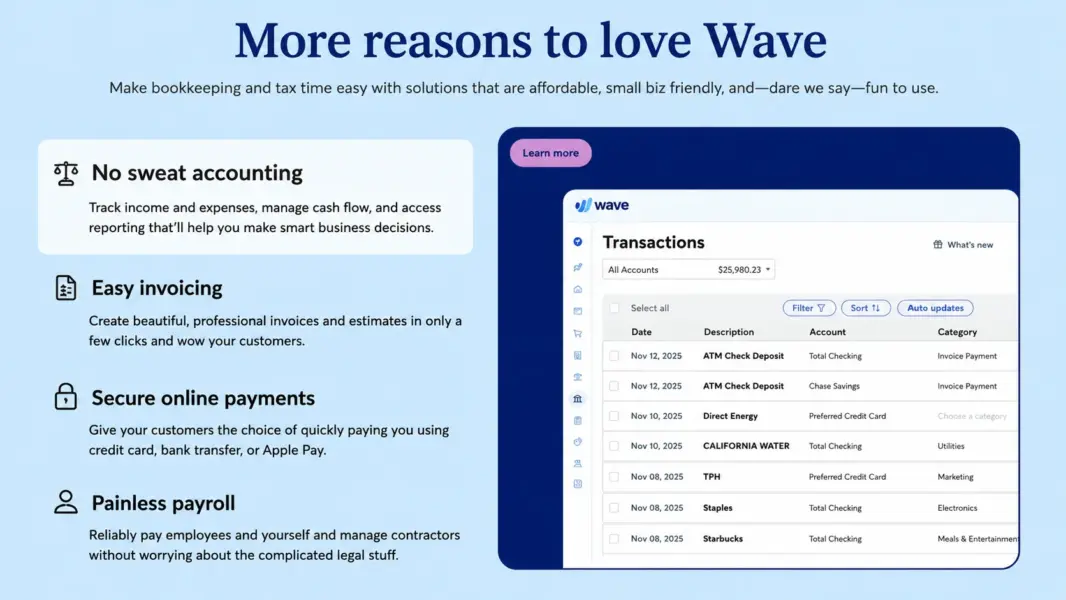
The invoicing is genuinely professional. Clients receive branded invoices via email and can pay online through credit card or bank transfer. Recurring invoices automate regular billing. Payment reminders reduce the follow-up work that consumes freelancer hours. According to Business.org, Wave offers many of the invoicing perks you get with invoice-heavy software like FreshBooks, but at no cost.
The bookkeeping foundation matters: Wave uses proper double-entry accounting. Every transaction posts to both a debit and credit account. This is not a simplified cash-in-cash-out tracker. It produces accurate financial statements that your accountant or tax preparer can work with directly. According to iFeeltech, Wave’s accounting foundation is sound and the reason it holds up well against paid alternatives for basic business use.
When to Upgrade to Pro
Wave Pro at $19 per month ($190 per year) adds automated bank transaction imports, automated categorization, receipt scanning with data extraction, invoice attachments, and priority email plus live chat support. The trigger for upgrading is time spent on manual data entry. On the Starter plan, you import bank transactions manually via CSV. For a freelancer with 20 transactions per month, this takes 15 minutes. For a small business with 50 to 100 monthly transactions, it takes 2 or more hours. When manual imports consume more time than $19 per month of your hourly rate, Pro pays for itself.
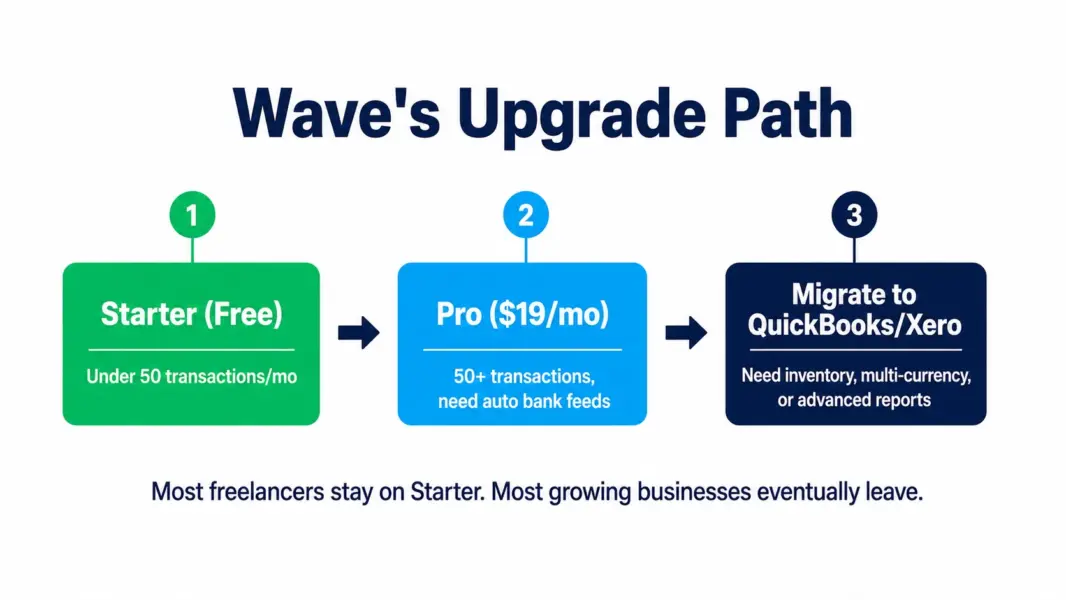
According to iFeeltech, the breakpoint is roughly 50 monthly transactions. Below that, manual imports on the free plan are manageable. Above that, automated bank feeds on Pro save enough time to justify the subscription. Receipt scanning on Pro also eliminates the paper chase at tax time, automatically extracting vendor, amount, and date from photographed receipts.
When to Leave Wave Entirely
Wave serves freelancers and micro-businesses well but hits a hard ceiling as complexity grows. Three scenarios signal it is time to migrate.
You sell physical products. Wave has no inventory management. No stock tracking, no purchase orders, no cost-of-goods-sold calculations, no reorder alerts. Product businesses need QuickBooks Online, Xero, or a dedicated inventory system from day one. Wave is built for service businesses, not retailers.
You invoice international clients in multiple currencies. Wave does not support multi-currency invoicing or reporting. If you bill clients in USD, EUR, and GBP, you need Xero (which handles multi-currency natively) or QuickBooks Online (which adds it on higher tiers).
You need advanced reporting or custom dashboards. Wave provides standard reports: profit and loss, balance sheet, cash flow, sales tax, aged receivables. You cannot customize columns, build custom reports, or create multi-dimensional analysis. QuickBooks and Xero both offer significantly deeper reporting for businesses that need financial insights beyond the basics.
Wave vs FreshBooks vs QuickBooks
Wave is free. FreshBooks starts at $19 per month (Lite, 5 clients). QuickBooks Online starts at $30 per month (Simple Start). The comparison is not feature-for-feature because each targets a different user.
Wave is for cost-conscious freelancers who need professional invoicing and basic bookkeeping at zero cost. FreshBooks is for freelancers who prioritize time tracking, mobile invoicing, and client portals and are willing to pay for polish. QuickBooks is for growing businesses that need inventory, advanced reporting, payroll integration, and 750-plus app integrations. For the FreshBooks deep dive, see our FreshBooks review.
The practical migration path: start on Wave free, move to Wave Pro when manual imports become burdensome, migrate to QuickBooks or Xero when you need inventory, multi-currency, or reporting depth that Wave cannot provide.
Last updated: July 12, 2026
Frequently Asked Questions
Is Wave Accounting really free in 2026?
Yes. Wave’s Starter plan is permanently free with unlimited invoicing, expense tracking, double-entry bookkeeping, and basic financial reporting. There is no time limit, no credit card required, and no hidden upgrade trigger. Wave generates revenue from payment processing fees, the Pro plan subscription, and payroll add-ons rather than forcing free users into paid tiers.
How much does Wave Pro cost?
Wave Pro costs $19 per month or $190 per year. It adds automated bank transaction imports, automated categorization, receipt scanning, invoice attachments, and priority support via email and live chat. The upgrade is worth it when manual bank imports on the free plan consume more than 2 hours per month.
Does Wave have payroll?
Yes, as a separate add-on. Wave Payroll costs $20 per month plus $6 per employee. It handles direct deposits, tax calculations, and year-end tax forms. It is not included in either the Starter or Pro plan. For dedicated payroll, alternatives like Gusto and OnPay offer more features at comparable pricing.
Can I use Wave for a product business?
Wave is not suitable for product businesses. It has no inventory management, no stock tracking, no purchase orders, and no cost-of-goods-sold calculations. Product businesses should use QuickBooks Online, Xero, or a dedicated inventory management system. Wave is designed for service businesses, freelancers, and consultants.
Is Wave safe for financial data?
Wave uses 256-bit TLS encryption and PCI-compliant payment processing. The notable security gap is the absence of multi-factor authentication, which is a concern for software handling financial data. Use a strong, unique password and consider whether this gap is acceptable for your business before committing financial records to the platform.
What is the difference between Wave and QuickBooks?
Wave is free with basic features suitable for freelancers and micro-businesses. QuickBooks Online starts at $30 per month with advanced reporting, inventory management, 750-plus integrations, and responsive phone support. Wave is better when budget is the priority. QuickBooks is better when you need depth, scalability, and integration with other business tools.
Related Accounting Guides
Wave is the best free accounting software for freelancers and micro-businesses that need professional invoicing, expense tracking, and basic financial reporting without paying for it. The Starter plan is genuinely free forever with unlimited invoicing and double-entry bookkeeping, which is remarkable given that comparable features cost $30 to $50 per month on QuickBooks and Xero. The ceiling is real: no inventory, no multi-currency, no custom reports, and email-only support on free. Upgrade to Pro at $19 per month when manual bank imports consume more than 2 hours monthly. Outgrow Wave entirely when you need inventory tracking, advanced reporting, or payroll integration beyond Wave's own add-on.