Pros
- Native Mac performance is noticeably faster than browser-based Figma
- $12 per editor monthly with viewers always free is honest transparent pricing
- One-time Mac license at $120 lets solo designers avoid subscriptions entirely
- Symbols and shared libraries have been production-ready for years
- Offline editing works without internet which no browser tool can match
- 30-day free trial gives full access to everything no credit card required
- Clean focused interface that stays out of your way while designing
Cons
- Mac only with no Windows Linux or browser-based editor available
- Figma has taken the default position in hiring portfolios and team workflows
- Plugin ecosystem is shrinking as developers build for Figma first
- Real-time collaboration added late and still feels less native than Figma
- No AI design features by deliberate choice which may feel limiting against newer tools
- No free plan so you commit after the 30-day trial or walk away
- Web app is view and comment only so non-Mac collaborators can't edit
Every UI designer who started before 2019 remembers when Sketch was the only serious option. It replaced Photoshop for interface design, introduced Symbols and artboards, and basically invented the modern design workflow. Then Figma made all of that collaborative and cross-platform, and the industry moved.
Sketch is still here though. The team ships regular updates. The Mac app is still faster than anything browser-based. And at $12 per editor, it’s cheaper than Figma Professional. So is it still worth using? That depends entirely on two things: whether your team is Mac-only and whether you work alone or with others.
Starting Price: $12/editor/mo (annual) | $14/mo (monthly) | $120 one-time (Mac license) | Free Plan: No | Free Trial: 30 days
What Does Sketch Cost Right Now?
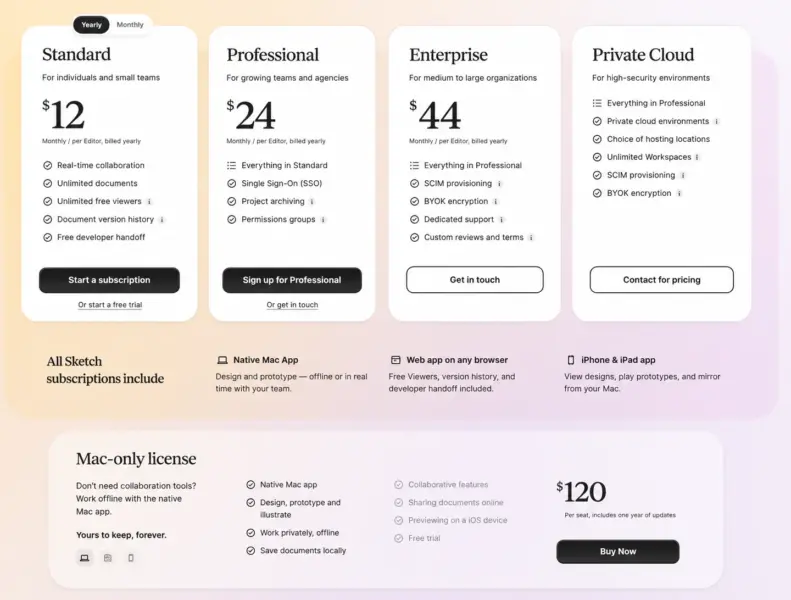
Sketch keeps pricing simple. Standard runs $12 per editor per month on annual billing, or $14 if you pay monthly. That gets you the native Mac app, web viewer, version control, and real-time collaboration.
There’s also a one-time Mac license for $120. Pay once, get the current version forever. You receive one year of updates. After that year, you keep whatever version you have but stop receiving new features unless you renew. For a freelancer who just needs a reliable design tool without recurring costs, this is rare in the software world.
Viewers are free. Always. Unlimited. Your clients and developers can view, inspect, and comment on designs without paying anything. Guest editors who already pay for Sketch through their own workspace can edit your files without adding to your costs either.
Students and teachers qualify for a free Education plan. Nonprofits get 50% off with documentation.
What Sketch Still Does Better Than Figma
Native Mac performance. Open a 200-artboard file in Sketch and it responds instantly. Open the same complexity in Figma’s browser and you’ll notice the difference. According to UIGuides, Sketch’s native rendering “feels like the app was designed specifically for the hardware you’re holding,” which it was.
Offline editing. Sketch works without internet. If you travel frequently, work on planes, or live somewhere with unreliable WiFi, this matters more than people admit. Figma’s browser app stops working entirely without a connection.
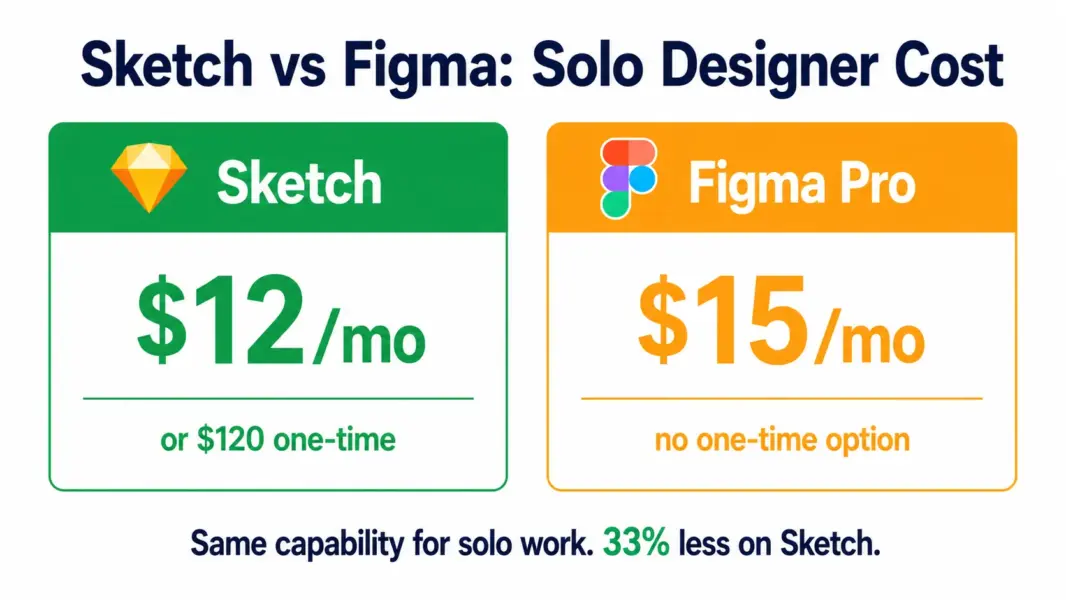
Pricing honesty. $12 per editor includes everything. No seat tiers, no feature gates between “Professional” and “Organization” plans. Figma charges $15 per editor for Professional and $25 for Organization. For freelancers, Sketch is 33% cheaper for full capability.
Why Most Teams Choose Figma Instead
Collaboration was bolted on to Sketch years after Figma built it from the ground up. Figma’s real-time multiplayer editing, commenting, and developer handoff feel native. Sketch’s collaboration features work but feel secondary to the design tool.
Cross-platform access. Figma runs in any browser on any OS. Sketch’s editor only runs on macOS Sonoma 14 or newer. If your development team uses Windows or Linux, they can view Sketch files in the browser but can’t edit them. That limitation kills Sketch for mixed-OS teams.
The ecosystem has moved. According to DockShare, plugins, UI kits, component libraries, tutorials, and job listings now default to Figma. You can still find Sketch resources, but you’re working against the current. When you hire a junior designer in 2026, they learned Figma in school. Training them on Sketch adds onboarding time.
Who Should Use Sketch in 2026
Solo Mac designers who value native performance and want the cheapest professional design tool available. Freelancers who prefer a one-time $120 payment over monthly subscriptions. Designers with established Sketch-based symbol libraries where migrating to Figma would be more disruption than benefit. Small Mac-only teams (2-3 people) who don’t need cross-platform collaboration with non-Mac users.
Who Should Use Figma
Any team with members on Windows or Linux. Any team larger than 3 designers where real-time collaboration is daily practice. Anyone hiring designers in 2026 since Figma is the assumed tool in portfolios and interviews. Teams that need the broadest plugin ecosystem and community resources. For more on design tool options, see our best free design tools and best portfolio platforms guides.
Last updated: July 21, 2026
Frequently Asked Questions
Does Sketch work on Windows?
No. Sketch’s design editor is Mac-only, requiring macOS Sonoma 14 or newer. The web app allows viewing, inspecting, and commenting from any browser on any OS, but editing requires a Mac. This is the biggest limitation for cross-platform teams.
Should I switch from Sketch to Figma?
Switch if your team includes non-Mac users, if you collaborate with developers on Windows or Linux, or if you’re hiring designers who learned Figma. Stay if you work solo on Mac, have an established Sketch workflow with symbol libraries, and value native performance over browser-based tools.
Does Sketch have a free plan?
No. Sketch offers a 30-day free trial with full access and no credit card required. After the trial, you choose a paid plan or stop using the tool. Students and teachers can apply for a free Education plan. Nonprofits receive 50% off.
Related Design Guides
Sketch defined how we design interfaces from 2013 to 2019. Figma took over by making collaboration native and running in the browser on any OS. That's the reality. But Sketch didn't die. It got cheaper, kept shipping, and carved out a clear niche: solo Mac designers and small Mac-only teams who want native performance, honest pricing, and offline access. At $12 per editor or $120 one-time, it costs less than Figma Professional ($15 per editor). If you're a freelance UI designer on a Mac who doesn't need cross-platform collaboration, Sketch still earns its place. If you're building a design team or hiring designers who need to share files with developers on Windows, use Figma.