Pros
- Free plan is genuinely usable with thousands of templates and 5GB storage
- Pro at $10 per month annual gives 100 million premium assets and background remover
- Drag-and-drop editor needs zero design experience to produce professional results
- Brand Kit on Pro keeps colors fonts and logos consistent across everything
- Magic Studio AI generates images edits backgrounds and writes copy inside the editor
- Content scheduling built in so you design and publish social posts from one tool
- Education and nonprofit accounts get Pro features completely free
Cons
- Free plan shows premium asset watermarks that push you toward upgrading
- Teams pricing jumped 300% in late 2024 from flat $120 per year to $10 per seat per month
- Downloaded designs lose editability so you can't reopen them outside Canva
- Advanced photo editing still can't match Photoshop or even Photopea for complex work
- AI credit limits mean heavy Magic Studio users hit walls mid-month
- Print order pricing is separate and not always competitive with local print shops
- No offline editing mode so you need internet to work
You probably already use Canva. Most people reading this do. 190 million monthly active users make it the most widely used design tool in the world. The question isn’t whether Canva works. It’s whether the free plan is enough, whether Pro is worth $10 per month, and where Canva stops being the right tool.
Short answers: free is enough for occasional use. Pro is worth it the moment you need brand consistency or background removal. And Canva stops being the right tool the moment your work requires layer-based photo compositing or interface design. Everything between those points, Canva handles better than anything else at its price.
Starting Price: $0 (Free) | $15/mo or $120/yr Pro ($10/mo effective) | Free Plan: Yes | Free Trial: Yes (30 days Pro)
What Does Canva Cost Right Now?
Canva changes pricing more often than most tools, so always check the official page. Here’s what it looks like as of 2026.
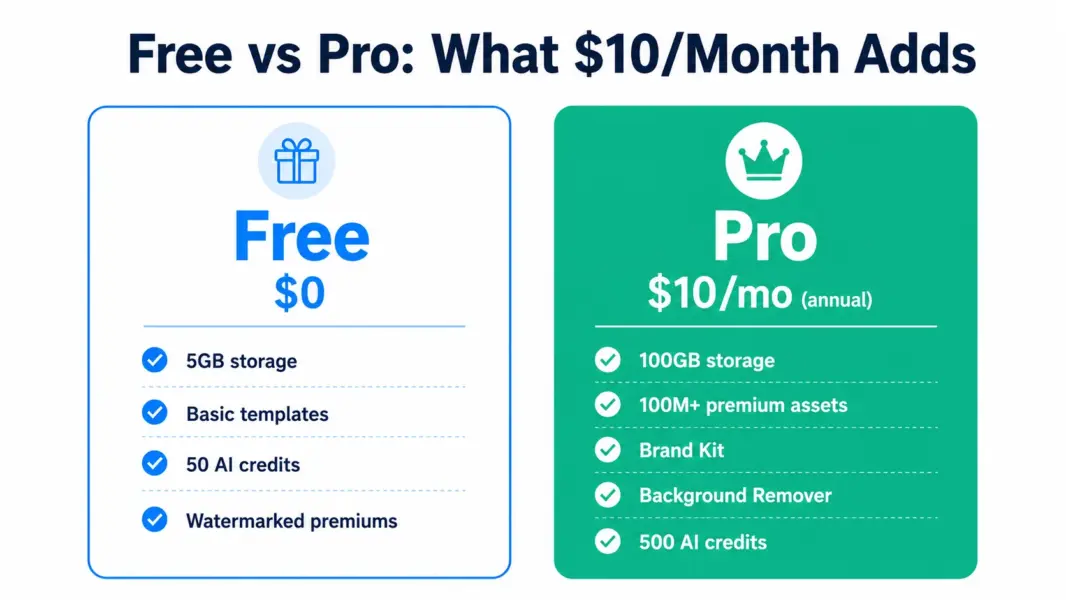
Free ($0). 5GB cloud storage. Thousands of templates. Basic design tools. 50 AI credits per month for Magic Studio. This isn’t a crippled demo. You can design social posts, presentations, flyers, and business cards without paying. The catch: premium stock images and elements show watermarks, and you’ll see upgrade prompts regularly.
Pro ($15 per month or $120 per year, effectively $10 per month). 100GB storage. 100 million premium stock photos, videos, and graphics. Brand Kit (save your brand colors, fonts, and logo). Background Remover. Magic Resize (adapt one design to every social platform size). 500 AI credits per month. 24/7 support. This is where Canva becomes a legitimate business tool.
Teams ($10 per user per month annual, 3-seat minimum, or $20 monthly). Everything in Pro plus shared brand assets, approval workflows, team folders, and admin controls. The minimum spend is $30 per month for 3 users. Canva raised Teams pricing 300% in late 2024 from a flat $120 per year to per-seat billing, which remains a sore point in reviews.
Enterprise (custom). SSO, SCIM, audit logs, dedicated success manager. For organizations with 25-plus seats.
Education accounts (verified K-12 teachers and students) and registered nonprofits get Pro features free. If you qualify, don’t pay for Pro.
What Makes Canva Different From Everything Else
Canva isn’t the most powerful design tool. It’s the most accessible one. A marketing manager who’s never opened Photoshop can produce a professional Instagram carousel in 15 minutes on Canva. That’s not possible on Photoshop, Figma, or Illustrator without weeks of learning.
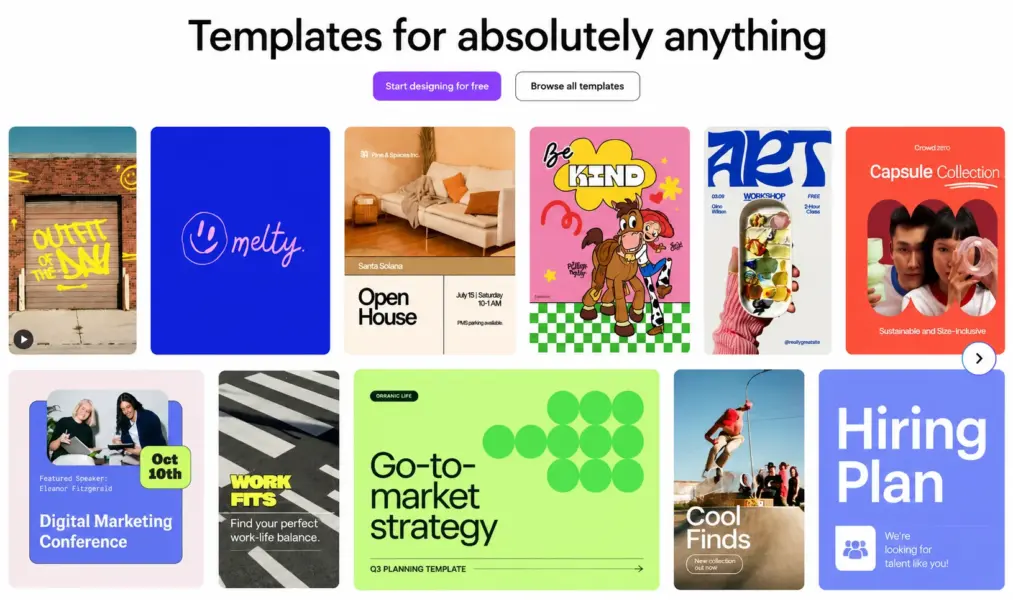
The template library does most of the work. Pick a template, swap in your text and images, adjust colors to match your brand, export. The result looks like you hired a designer. It works because Canva’s templates are actually designed well, unlike most stock template marketplaces where you wade through garbage to find something usable.
Brand Kit on Pro is the feature that turns Canva from a toy into a business tool. Save your brand colors, fonts, and logos. Every new design starts on-brand. According to SocialRails, Brand Kit is what drives most free-to-Pro upgrades because manually applying brand colors to every design wastes the time Canva is supposed to save.
Magic Studio AI: Good Enough, Not Magic
Canva’s AI suite includes Magic Write (text generation), Magic Media (image generation), Magic Edit (object removal and replacement), Magic Eraser (background element removal), and Magic Expand (extend images beyond their borders). On Pro, you get 500 AI credits per month. Free gets 50.
Here’s the honest take: the AI features are convenient, not revolutionary. Magic Write produces acceptable first drafts for social captions. Magic Media generates usable but generic images. Magic Edit works for simple object removal but struggles with complex scenes. If you already use ChatGPT for writing and Midjourney for images, Canva’s AI won’t replace them. If you don’t use separate AI tools, having basic AI built into your design editor saves the context-switching.
Where Canva Can’t Help You
Complex photo editing. Canva handles cropping, filters, and basic adjustments. Layer-based compositing, advanced masking, frequency separation, and color channel manipulation need Photoshop or Photopea (free). If you edit product photos professionally, Canva isn’t the tool.
UI/UX design. Canva can’t do component libraries, auto-layout, prototyping, or developer handoff. That’s Sketch or Figma territory. Don’t try to design app interfaces in Canva.
Print-ready design for professional publishing. Canva exports print PDFs but doesn’t handle CMYK color profiles, bleed marks, or press-ready specifications the way InDesign does. For business cards and flyers, Canva’s print export is fine. For magazine layouts or packaging, use professional print tools.
Who Should Pay for Canva Pro
Anyone creating social media content more than twice a week. The Brand Kit, premium assets, and background remover pay for themselves in saved time within the first month. Small business owners handling their own marketing. The $10 per month annual cost replaces a $500 per month designer for routine social graphics, presentations, and email headers. Content creators who post consistently and need their visual identity to stay cohesive across platforms.
Who Should Stay on Free
Occasional users making a presentation once a month. Students and personal users who don’t need brand consistency. Anyone who qualifies for Education or Nonprofit free access. If you design fewer than 4 things per month, the free plan covers it without the Pro subscription collecting dust.
Last updated: July 24, 2026
Frequently Asked Questions
Is Canva really free?
Yes. Canva’s free plan has no time limit and includes thousands of templates, basic design tools, 5GB storage, and 50 AI credits per month. Premium stock assets show watermarks on free, but you can design and export professional graphics without paying. It’s one of the most capable free design tools available.
How much does Canva Pro cost?
Canva Pro costs $15 per month on monthly billing or $120 per year ($10 per month effective). Annual billing saves roughly $60 per year. A 30-day free trial is available. Canva adjusts pricing by region, so check the official pricing page for your country’s rates.
Is Canva Pro worth it?
Pro is worth it if you create branded content more than twice a week. Brand Kit alone saves hours of manual color and font matching. Background Remover, Magic Resize, and 100 million premium assets add real value for regular content creators. If you design fewer than 4 items per month, the free plan is sufficient.
Can Canva replace Photoshop?
For social media graphics, presentations, and basic marketing materials, yes. For complex photo compositing, layer-based editing, advanced masking, and professional print production, no. Canva replaces the designer you hired for routine graphics. It doesn’t replace Photoshop for professional photo editing.
Why did Canva Teams pricing increase?
Canva raised Teams pricing in September 2024 from a flat $119.99 per year to $10 per seat per month billed annually. A 5-person team went from $120 per year to $500 per year, a 300-plus percent increase. The change remains a common complaint in user reviews.
Is Canva good for business?
Canva Pro and Teams are excellent for small business marketing. Brand Kit keeps all materials on-brand. Templates cover social posts, presentations, business cards, flyers, and email headers. The tool won’t replace professional design for complex projects, but it handles 80% of routine business design needs at $10 per month.
Related Design Guides
- Best Free Design Tools 2026
- Best Portfolio Platforms 2026
- Sketch Review 2026
- Squarespace Review 2026
Canva is the most accessible design tool ever made. 190 million people use it because it turns non-designers into people who can produce genuinely professional graphics in 15 minutes. The free plan is more capable than many paid tools were 5 years ago. Pro at $10 per month annual is the best value in design software, period. The limits are real though. Canva won't replace Photoshop for complex photo compositing, Figma for UI design, or InDesign for print layouts. It replaces the expensive designer you hired for social posts, presentations, and marketing materials. For that job, nothing comes close.