Pros
- Industry standard for UI/UX design used by virtually every product team
- Real-time multiplayer collaboration that feels native not bolted on
- Free Starter plan with 3 design files and unlimited viewers
- Browser-based so it works on Mac Windows Linux and Chromebook
- Dev Mode gives developers pixel-perfect specs without exporting
- Component libraries and auto-layout make design systems scalable
- 150 AI credits per day on free plan with more on paid
Cons
- Professional at $12 per editor annual is above the design tool median of $14
- Auto-billing for editor seats when you share files with edit access catches teams off guard
- Performance slows on very large files with hundreds of frames
- Offline editing is limited compared to native apps like Sketch
- Organization plan at $55 per editor is a steep jump from Professional
- Dev Mode as a separate seat type adds billing complexity
- AI credits are usage-capped and heavy users hit limits mid-month
You probably don’t need a Figma review to tell you it’s the standard. Your team already uses it. Your developers already inspect it. Your job postings already require it. The question isn’t whether Figma is good. It’s whether you’re on the right plan and whether any alternative is worth considering in 2026.
Short answers: the free plan covers solo designers surprisingly well. Professional at $12 per editor is fair but watch the auto-billing trap. And the only alternatives worth serious consideration are Sketch (if you’re solo on Mac) and Penpot (if you want open-source).
Starting Price: $0 (Starter, 3 files) | $12/editor/mo Professional (annual) | Free Plan: Yes | Free Trial: No (free plan serves as trial)
What Does Figma Cost?
Starter (Free). 3 Figma design files, 3 FigJam boards, unlimited viewers and commenters, 150 AI credits per day (up to 500 per month). This isn’t a demo. You can design, prototype, and share production work on the free plan. Solo freelancers doing small projects can stay here indefinitely.
Professional ($12 per editor per month annual, $15 monthly). Unlimited files, unlimited version history, team libraries for shared components, custom fonts, and advanced prototyping. This is where most working designers land. According to Vendr’s data across 162 verified purchases, the median Figma customer pays $484 per year, which is close to a single Professional seat billed annually ($144).
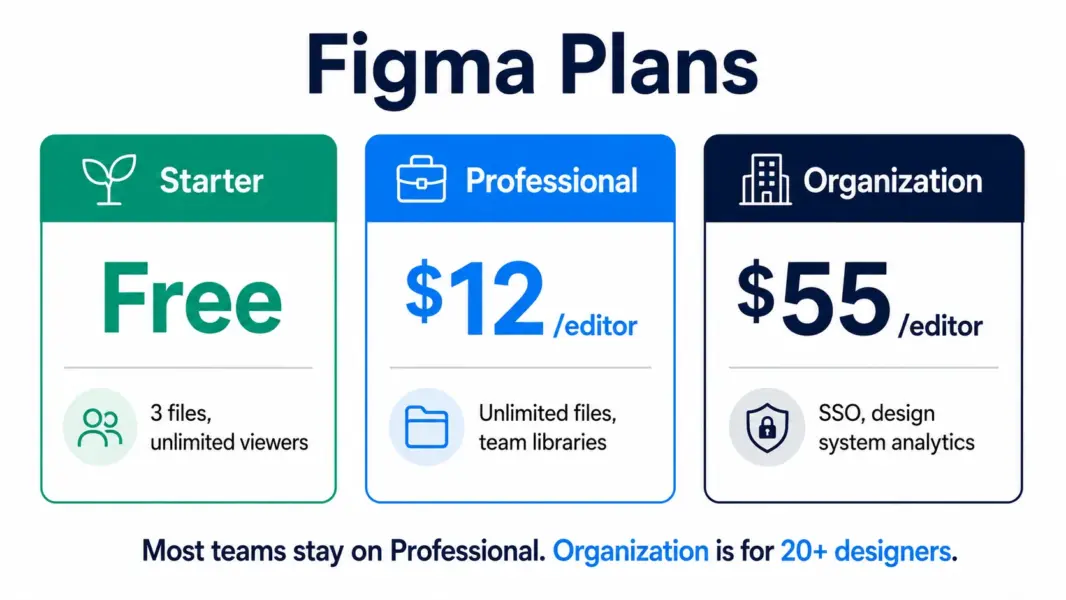
Organization ($55 per editor per month, annual only). SSO, centralized admin, shared libraries across teams, design system analytics. The jump from $12 to $55 is steep. It makes sense for companies with 20-plus designers managing a shared design system. For teams under 15, Professional handles the work.
Enterprise ($90 per editor per month, annual only). Advanced security, audit logs, dedicated support. Required for regulated industries and Fortune 500 compliance requirements.
One billing trap that catches teams: when you share a file with edit access, Figma automatically adds that person as a billed editor. If you invite 3 colleagues to comment and they switch to edit mode, you get 3 new charges. Monitor your billing dashboard and set team permissions carefully.
Why Figma Became the Standard
Three things that no competitor has replicated together. First, real-time collaboration that works like Google Docs for design. Multiple designers edit the same file simultaneously with cursors visible. No file versioning nightmares, no “who has the latest file” conversations.
Second, browser-based access on any OS. Mac, Windows, Linux, Chromebook. No install required. A developer on Linux inspects the same design a designer on Mac created. That cross-platform access eliminated the ecosystem lock-in that kept Sketch Mac-only and Adobe Windows-heavy.
Third, Dev Mode. Developers get pixel-perfect specs, CSS values, spacing measurements, and asset exports directly from the design file. No more redlining, no more “can you export that at 2x,” no more guessing padding values. Design-to-development handoff went from a multi-step process to a shared URL.
Where Figma Falls Short
Performance on large files. A design system file with 500-plus components and hundreds of frames will slow down, especially on older machines or slower connections. Sketch handles large files faster because native rendering doesn’t depend on browser performance.
Offline editing is limited. Figma needs internet for its core collaborative features. You can view cached files offline, but editing offline is restricted. Sketch works fully offline, which matters for designers who work on planes or in areas with unreliable WiFi.
AI credits run out. Heavy users of Figma’s AI features (auto-layout suggestions, content generation, design recommendations) hit the daily and monthly caps. Extra credits cost more, and the pricing per credit isn’t prominently documented.
Figma vs Sketch vs Canva: Quick Positioning
Figma is for teams designing interfaces collaboratively. It’s the industry standard for UI/UX. See this review.
Sketch is for solo Mac designers who want native performance and simpler pricing ($10 per editor or $120 one-time). Better for individual work, weaker for team collaboration.
Canva is for non-designers making marketing graphics. Not a UI design tool. If you’re designing app screens, Canva can’t help. If you’re making social posts, Figma is overkill.
For more design tool options, see our best free design tools guide.
Last updated: July 22, 2026
Frequently Asked Questions
Is Figma free?
Yes. The Starter plan includes 3 design files, 3 FigJam boards, unlimited viewers, and 150 AI credits per day. It’s a fully functional design tool, not a demo. Solo freelancers can use it indefinitely for small projects without paying.
How much does Figma Professional cost?
$12 per editor per month on annual billing, or $15 per month billed monthly. Professional includes unlimited files, version history, team libraries, and advanced prototyping. Viewers are always free on all plans.
Is Figma better than Sketch in 2026?
For teams, yes. Figma’s real-time collaboration, browser access on any OS, and Dev Mode make it the better choice for collaborative design work. For solo Mac designers who want native performance and cheaper pricing ($10 per editor or $120 one-time), Sketch still has advantages.
Does Figma work offline?
Limited offline capability. You can view cached files but full editing requires an internet connection. Sketch works fully offline as a native Mac app. For designers who frequently work without internet, this is a real limitation.
What is Dev Mode in Figma?
Dev Mode gives developers pixel-perfect specs, CSS values, spacing measurements, and asset exports directly from design files. It’s available as a separate seat type (Dev seat at lower cost than a full editor seat). It eliminates manual design-to-code handoff.
Is Figma or Canva better?
They solve different problems. Figma is for designing app interfaces, websites, and product screens collaboratively. Canva is for non-designers making social media graphics, presentations, and marketing materials. If you’re designing UI, use Figma. If you’re making social posts, use Canva.
Related Design Guides
Figma is the design tool the industry standardized on, and that's not changing in 2026. Real-time collaboration, browser access on any OS, Dev Mode for developers, and component libraries that scale from 2 people to 200 make it the default for product teams. The free Starter plan is more capable than most paid tools were 3 years ago. Professional at $12 per editor annual is fair for what it delivers. The only real competitors are Sketch (Mac-only, cheaper for solo designers) and Penpot (open-source, free). If you're building interfaces with a team, Figma is the tool. Everything else is the alternative.