Pros
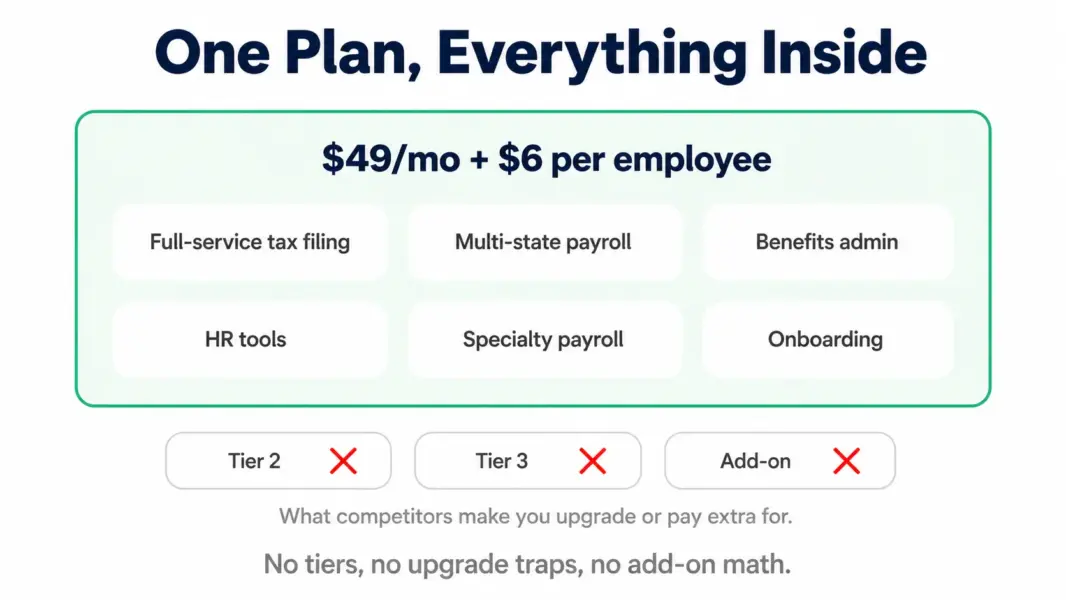
- Single flat plan at 49 dollars plus 6 per employee with every feature included
- Multi-state payroll included at no extra cost unlike tiered competitors
- Full-service tax filing in all 50 states backed by an accuracy guarantee
- Specialty payroll for farms restaurants churches and nonprofits at base price
- Ranked number one in G2 Summer 2026 Payroll Results Index ahead of Gusto and Rippling
- Rated 4.8 out of 5 on both G2 and Capterra across over 800 reviews
- Hands-on onboarding with a real consultant frequently praised in reviews
- Benefits administration and HR tools included rather than gated to higher tiers
Cons
- No native mobile app for employers so payroll runs from desktop only
- No built-in time tracking which reviewers consistently wish was included
- Fewer third-party integrations than Gusto centred on core accounting tools
- Reports and dashboard are less customizable than larger platforms
- Some recent reviews note customer service friction as the company scales
- No tiered options so you cannot pay less for a stripped-down plan
- Interface is functional rather than as polished as Gusto
Payroll pricing is designed to make you second-guess yourself. Which tier do I need? Will I have to upgrade when I hire in another state? Is the feature I want locked behind a plan that costs double? Most providers turn a simple question, how much to run payroll, into a decision tree.
OnPay’s whole pitch is deleting that tree. One plan. One price. Every feature included. Multi-state payroll, benefits administration, HR tools, and specialty tax handling all come in a single flat rate, so the only variable is how many people you pay. That clarity is why OnPay ranked number one in G2’s Summer 2026 Payroll Results Index, ahead of both Gusto and Rippling.
This OnPay review covers what the platform does, what the flat plan actually includes, what over 800 verified reviewers report, where the gaps genuinely are, and which alternatives handle those gaps better.
Starting Price: $49/mo + $6/employee (flat, all features) | Free Plan: No | Free Trial: Yes
What Is OnPay and Who Is It Built For
OnPay is a cloud-based full-service payroll and HR platform built for small and midsize US businesses. It runs payroll, files taxes in all 50 states, administers benefits, and handles core HR, all through a single plan rather than tiered packages.
The defining decision is the pricing model. Where Gusto, QuickBooks, and most competitors split features across tiers, OnPay puts everything in one flat plan. That means the feature you need is never locked behind a more expensive package, and your only cost variable is headcount.
The typical OnPay customer is a US small business, often one that competitors underserve: a farm running agricultural payroll, a restaurant managing tipped wages, a church handling clergy tax treatment, a nonprofit, or a distributed team hiring across state lines. OnPay’s Capterra reviews skew heavily toward small businesses, with 97.7% of its G2 reviews coming from the small-business segment.
OnPay Features Tested: What the Flat Plan Includes
Full-Service Payroll in All 50 States
OnPay runs payroll for W-2 employees and 1099 contractors across all 50 states with no multi-state upcharge. It supports multiple pay schedules, multiple pay rates per employee, and payment by direct deposit, paper check, or pay card.
The multi-state inclusion is a genuine differentiator. If you have staff in more than one state, OnPay’s flat pricing can significantly undercut providers that charge per state or force a plan upgrade. For a remote-first business, this alone can decide the choice.
Automatic Tax Filing With Accuracy Guarantee
OnPay calculates, withholds, pays, and files federal, state, and local payroll taxes, including forms 940, 941, W-2, and 1099. The accuracy guarantee means OnPay works with the IRS and covers penalties if it makes an error, provided your data is accurate and timely.
This is the core job of a payroll service, and OnPay’s reviewers consistently cite reliable, accurate filing as a key strength. The guarantee provides the peace of mind that separates a genuine payroll service from a calculator.
Specialty Industry Payroll
This is where OnPay pulls ahead of general-purpose competitors. It handles agricultural payroll with Form 943, tipped-wage restaurants with tip calculations and reporting, clergy tax treatment for churches, and nonprofit-specific needs, all at the base price.
General payroll tools either don’t handle these scenarios or charge extra for them. For a farm, restaurant, or religious organisation, OnPay’s built-in specialty support is often the reason it’s the only suitable option without expensive add-ons.
Benefits Administration
OnPay includes benefits administration in all 50 states through a licensed insurance brokerage, covering health, dental, and vision plans plus 401(k) administration. Deductions sync into payroll automatically. Because it’s part of the flat plan rather than a higher tier, every OnPay customer has access to benefits administration without paying more.
HR Tools and Onboarding
Employee self-onboarding, PTO tracking, HR document management, org charts, and an HR resource library are all included rather than locked behind a premium tier. New hires enter their own details, and the HR resource library gives small businesses without an HR person access to compliant templates and guidance.
The notable omission is native time tracking, which OnPay doesn’t include and which reviewers frequently wish were part of the platform.
OnPay Pricing: One Flat Plan Explained
Verified from OnPay’s official sources in July 2026.
| Component | Cost | What's Included |
|---|---|---|
| Base fee | $49/mo | The single flat plan, no tiers |
| Per employee | $6/employee/mo | Each W-2 employee or 1099 contractor |
| Multi-state | Included | No upcharge for additional states |
| Benefits admin | Included | Health dental vision 401k in all 50 states |
| HR tools | Included | Onboarding PTO documents org charts |
| Tax filing | Included | Federal state local, all 50 states, accuracy guarantee |
The math is simple by design. A 5-person team pays $49 + (5 × $6) = $79 per month. A 10-person team pays $109. A 25-person team pays $199. Every feature is in that price, with no add-ons for core functionality and no upgrade triggers. Model your figure with our payroll cost calculator.
OnPay becomes a particularly strong value at 10-plus employees, because there’s nothing to upsell and the per-employee fee stays flat regardless of the features you use. Some legacy sources cite a $40 base fee; OnPay’s current official pricing is $49 plus $6.
What Real Users Say About OnPay
OnPay’s review data is among the strongest in the payroll category. It holds a 4.8 out of 5 rating across both G2 (400-plus reviews) and Capterra (465 reviews), averaging 4.6 to 4.8 across more than 1,100 reviews on the major platforms. Most significantly, OnPay ranked number one in G2’s Summer 2026 Payroll Results Index, calculated purely from verified customer reviews, ahead of every competitor including Gusto and Rippling.
What reviewers praise: ease of use and customer support dominate the positive reviews. Reviewers repeatedly describe hands-on onboarding with a real consultant reaching out within minutes of signup, responsive support, and an interface that makes payroll straightforward. The transparent flat pricing is frequently cited as a reason for switching from Gusto, ADP, or Paychex. OnPay customers report reaching ROI in under six months against a category average of eleven.
What reviewers criticise: the missing mobile admin app is the most consistent complaint, with reviewers noting there’s no strong native app for employers. The lack of native time tracking comes up repeatedly as a wished-for feature. Some reviewers find the dashboard and reports less customizable than they’d like, and a minority report customer service friction, including slow ticket responses, which may reflect growing pains as the company scales.
OnPay Pros and Cons After Real Use
Where OnPay Genuinely Wins
Flat all-inclusive pricing. No tiers, no upgrade traps, no add-on math. The feature you need is always included, which removes the anxiety that defines most payroll purchasing.
Multi-state at no cost. For distributed teams, including multi-state payroll free is a decisive advantage over tiered competitors that charge per state or force upgrades.
Specialty industry support. Farms, restaurants, churches, and nonprofits get built-in handling of their specific tax scenarios at the base price, which general tools don’t match.
Category-leading satisfaction. A 4.8 rating and the #1 spot in G2’s payroll index reflect genuine customer happiness, particularly around support and onboarding.
Where OnPay Falls Short
No mobile admin app. Administrators run payroll from desktop only, which is a real limitation for owners who want to approve payroll on the go.
No native time tracking. You’ll integrate a separate tool, where competitors like Gusto include it on higher plans.
Fewer integrations. OnPay’s integration library centres on core accounting tools and is smaller than Gusto’s 100-plus, which matters if your stack is integration-heavy.
Less customizable reporting. The dashboard and reports are functional but less flexible than larger platforms offer.
Best OnPay Alternatives Worth Considering
Gusto ($49 + $6 Simple). The closest competitor, matching OnPay’s entry price with a more polished interface, deeper benefits, 100-plus integrations, native time tracking on Plus, and a mobile admin app. But it splits features across tiers and forces a Plus upgrade for multi-state. See the full Gusto vs OnPay comparison and our Gusto review.
Patriot ($17 + $4 Basic). Significantly cheaper, especially the self-service Basic plan, though with thinner HR, benefits, and a more dated interface. The budget pick for owners comfortable with hands-on work.
QuickBooks Payroll ($50 + $6 Core). The better choice if you already run QuickBooks Online accounting, thanks to automatic sync. Less compelling as standalone payroll. See our QuickBooks review.
Compare all five side by side in our best payroll software for small business guide.
Is OnPay Worth It? Final Verdict
OnPay is worth it, and for specific businesses it’s the clear best choice. If you hire across state lines, run a farm or restaurant or nonprofit, or simply want every feature in one flat plan without tier decisions, OnPay delivers exactly that, backed by category-leading customer satisfaction and support that reviewers consistently single out.
The gaps are real but narrow: no mobile admin app, no native time tracking, and fewer integrations than Gusto. If any of those three is a dealbreaker for how you work, Gusto is the better fit despite the tier structure. If none of them blocks you, OnPay is arguably the best value in small business payroll.
Practical guidance: OnPay’s value grows with headcount, so it’s especially compelling at 10-plus employees where flat pricing beats per-feature upsells. Use the free trial to run a real payroll and test the onboarding support that reviewers rate so highly before committing.
Last updated: July 29, 2026
Frequently Asked Questions
How much does OnPay cost in 2026?
OnPay is a single flat plan at $49 per month plus $6 per employee, with every feature included: full-service tax filing, multi-state payroll, benefits administration, and HR tools. There are no tiers and no add-ons for core functionality. A 10-person team pays $109 per month. Some legacy sources cite $40 base; the current official price is $49.
Is OnPay better than Gusto?
They’re closely matched at the same $49 plus $6 entry price. OnPay wins on flat all-inclusive pricing, free multi-state payroll, specialty industry support, and user ratings, holding 4.8 versus Gusto’s 4.6. Gusto wins on interface polish, benefits depth, 100-plus integrations, native time tracking, and a mobile admin app. OnPay suits simplicity, Gusto suits polish.
Does OnPay have a mobile app?
OnPay provides a mobile portal for employees to view pay stubs and documents, but it has no native mobile app for employers. Administrators run payroll from desktop only. This is OnPay’s most commonly cited limitation, so if you need to run payroll from a phone, Gusto is the better choice.
Does OnPay include time tracking?
No. OnPay does not include native time tracking, which reviewers frequently mention as a wished-for feature. You would integrate a separate time-tracking tool. If native time tracking is important, Gusto includes it on its Plus plan.
Is OnPay good for multi-state payroll?
Yes, exceptionally. OnPay includes multi-state payroll in its flat plan at no extra cost, letting you pay employees across as many states as needed without a price change or plan upgrade. This is a decisive advantage over tiered competitors like Gusto, which forces a Plus upgrade for any out-of-state employee.
Does OnPay file payroll taxes automatically?
Yes. OnPay calculates, withholds, pays, and files federal, state, and local payroll taxes automatically in all 50 states, including forms 940, 941, W-2, and 1099. It backs this with an accuracy guarantee, covering penalties from its own filing errors as long as your data is accurate and timely.
Is OnPay good for farms and restaurants?
Yes, notably so. OnPay handles specialty payroll at its base price, including agricultural payroll with Form 943, tipped-wage restaurants, and clergy tax treatment for churches. This built-in specialty support, which general payroll tools often lack or charge extra for, makes OnPay a strong fit for farms, restaurants, and nonprofits.
What is OnPay’s customer rating?
OnPay holds a 4.8 out of 5 rating across both G2 (400-plus reviews) and Capterra (465 reviews), and ranked number one in G2’s Summer 2026 Payroll Results Index ahead of Gusto and Rippling. Reviewers particularly praise its hands-on onboarding and responsive support, though a minority note occasional service friction as the company scales.
Related HR and Payroll Guides
- Gusto vs OnPay 2026
- Gusto Review 2026
- Best Payroll Software for Small Business
- Best HR Software for Small Business
- Payroll Cost Calculator
OnPay does something rare in payroll: it removes the decision. One flat plan, every feature included, multi-state at no upcharge, and specialty payroll for farms and restaurants that competitors gate or ignore. The result is a platform that ranked number one in G2's Summer 2026 Payroll Index ahead of Gusto and Rippling, with a 4.8 rating across more than 800 reviews and ROI reported in under six months against a category average of eleven. The gaps are specific and honest: no mobile admin app, no native time tracking, and fewer integrations than Gusto. If those three things don't block you, OnPay is arguably the best value in small business payroll, and for multi-state or specialty operations it's the clear pick. Buy it for the flat pricing and the support, not for polish.