Pros
- Full-service tax filing across all 50 states with automatic calculation and payment
- Unlimited payroll runs on every plan at no additional charge
- Genuine benefits administration with health 401k workers comp and HSA in one platform
- Employee self-onboarding and lifetime accounts reduce administrative requests
- Clean interface that non-accountants operate confidently without training
- Integrates with over 100 tools including QuickBooks Xero and major time trackers
- Next-day and same-day direct deposit available on higher plans
- Contractor payments in 120 countries plus Gusto Global EOR for international hiring
Cons
- Multi-state payroll forces an upgrade from Simple to Plus doubling base cost
- Time tracking and PTO management gated behind the Plus plan
- Per-employee fees compound significantly for teams above 25 people
- Premium plan pricing is quote-only and not published openly
- Simple plan base fee rose from 40 to 49 dollars in early 2026
- No free trial so you commit before testing with real payroll
- International employee hiring costs 599 to 699 dollars per person monthly
Running payroll for the first time is genuinely frightening. You’re responsible for calculating tax withholdings correctly, filing with three different levels of government on their schedules, and making sure real people get paid the right amount on the right day. Get any of it wrong and the consequences range from an annoyed employee to an IRS penalty notice.
Gusto’s entire pitch is that it makes that fear go away. You enter hours, click run, and Gusto calculates the taxes, files them with the IRS and your state, pays them on schedule, and deposits your team’s wages. For over 400,000 small businesses, that’s worth paying for.
This Gusto review covers what the platform actually does, what it costs after the 2026 price increase, what real reviewers report after living with it, where it frustrates people, and which alternatives handle its weak spots better.
Starting Price: $49/mo + $6/employee (Simple) | Free Plan: No | Free Trial: No
What Is Gusto and Who Is It Built For
Gusto is a cloud-based platform that combines full-service payroll, benefits administration, and HR tools for small and midsize US businesses. It launched in 2011 and has held the default-recommendation position in small business payroll for most of the time since.
The defining characteristic is integration. Payroll, benefits deductions, time tracking, and HR records all live in one system, so a health insurance premium deduction flows into payroll automatically and a new hire’s onboarding populates every connected function at once. That unification is what separates Gusto from standalone payroll calculators.
The typical Gusto customer is a US business with 1 to 50 employees that wants to run payroll without hiring a specialist, offer benefits without a separate broker relationship, and handle basic HR without a dedicated HR person. Businesses over 200 employees, those with complex multi-state compliance, or international teams will find Gusto’s edges, which we’ll cover honestly.
Gusto Features Tested: What You Actually Get
Full-Service Payroll and Automatic Tax Filing
This is the core, and Gusto does it reliably. Enter hours or run automatic payroll for salaried staff, and Gusto calculates federal, state, and local tax withholdings, files the returns with each authority on schedule, pays the taxes, and deposits net wages to employees.
Unlimited payroll runs is a genuine advantage. You can run an off-cycle bonus payroll or correct a mistake without paying per run, which some legacy providers charge for. Gusto files in all 50 states, and year-end W-2 and 1099 generation is included rather than a separate charge.
Benefits Administration
Gusto operates a licensed insurance brokerage, so you can shop and administer health, dental, and vision plans directly in the platform. Deductions sync automatically into payroll, which removes the manual reconciliation that otherwise consumes hours each pay period.
Beyond health insurance, Gusto administers 401(k) plans through partners, workers’ compensation, HSA and FSA accounts, and commuter benefits. For a small business, having benefits and payroll in one system rather than coordinating a broker, a 401(k) provider, and a payroll tool separately is a real reduction in administrative load.
Employee Onboarding and Self-Service
New hires receive a self-onboarding flow where they enter their own personal details, tax withholding elections, and direct deposit information. That shifts data entry from the owner to the employee and reduces errors.
Employees keep lifetime access to their Gusto accounts, so pay stubs and tax documents remain available even after they leave. This quietly eliminates one of the most common administrative requests a small business owner fields: former employees asking for old pay stubs or W-2s.
Time Tracking and PTO Management
Gusto includes time tracking and PTO management, with employees clocking in and requesting time off in the platform and approved hours flowing directly into payroll. The important caveat: these features require the Plus plan. On Simple, you’ll need a separate time-tracking tool or the Time and Attendance add-on.
HR Tools and Compliance
Higher plans add HR resources including offer letters, document management with e-signature, org charts, and compliance alerts. Premium adds access to certified HR professionals for direct guidance. For a small business without a dedicated HR person, these tools cover the fundamentals, though they aren’t a substitute for a full HRIS at larger scale.
Gusto Pricing Plans and What Each Tier Unlocks
Verified from Gusto’s official pricing in July 2026. Gusto raised the Simple base fee from $40 to $49 in early 2026.
| Plan | Base + Per Employee | Best For | Key Unlocks |
|---|---|---|---|
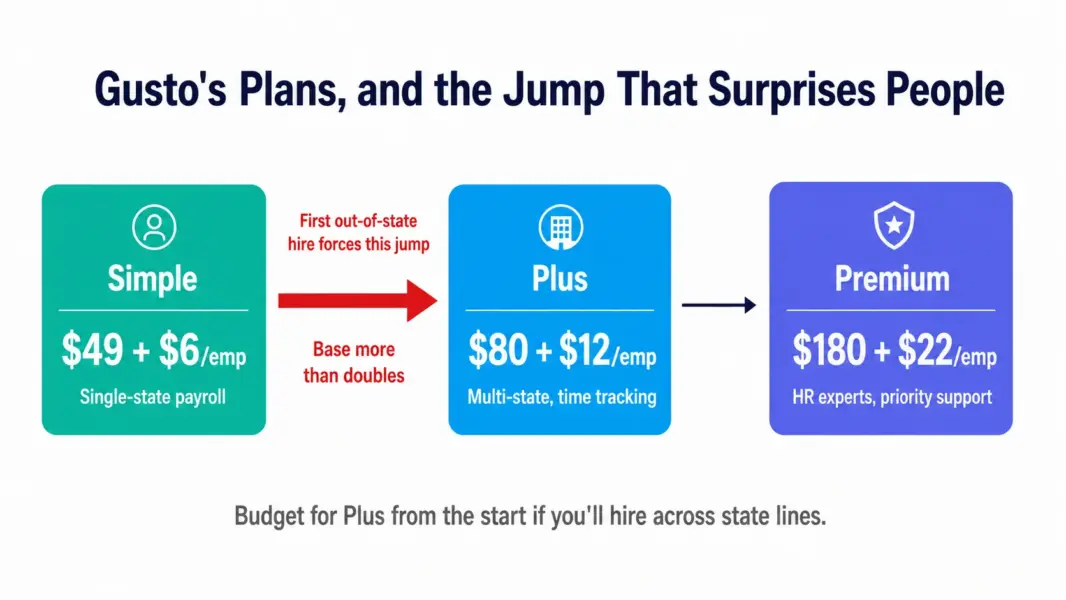
| Simple | $49/mo + $6 | Single-state small teams | Full-service payroll, benefits, basic HR, unlimited runs |
| Plus | $80/mo + $12 | Growing multi-state teams | Multi-state payroll, time tracking, PTO, next-day deposit, advanced reporting |
| Premium | $180/mo + $22 | Businesses needing HR support | Priority support, certified HR experts, custom reports, payroll migration |
| Contractor Only | $35/mo + $6 | 1099-only businesses | Contractor payments, no W-2 payroll |
The per-employee fee is the number that compounds. At 10 employees, Simple runs about $109 per month and Plus about $200. At 50 employees, Plus reaches $680 before add-ons. Model your cost at your real and projected headcount, since the per-head fee matters more than the base at scale. Use our payroll cost calculator to work out your exact figure.
The Multi-State Upgrade Trap
The detail that catches small businesses by surprise deserves its own section. Gusto’s Simple plan handles single-state payroll only. The moment you hire your first out-of-state employee, you’re forced up to Plus, which more than doubles your base cost from $49 to $80 and raises the per-employee fee from $6 to $12.
Gusto could handle multi-state on Simple with a modest per-state surcharge, as some competitors do, but it doesn’t. If you have any near-term plan to hire remotely across state lines, budget for Plus from the outset rather than being surprised by the jump.
What Real Users Say About Gusto
Gusto holds strong ratings across G2 and Capterra, and the review patterns are consistent enough to be useful.
What reviewers praise: the flat-fee structure with unlimited payroll runs comes up constantly, with reviewers noting it makes Gusto cost-effective compared to per-run providers. The interface earns repeated praise for being genuinely usable by non-accountants. Many reviewers explicitly state Gusto costs less than ADP, Paychex, and QuickBooks Payroll while delivering comparable or better functionality, and the benefits integration is frequently cited as a time-saver.
What reviewers criticise: feature gating is the dominant complaint. Reviewers frequently report that time tracking and advanced HR resources feel locked behind more expensive plans, which frustrates smaller teams on tight budgets. The multi-state upgrade surprises people. And the early-2026 price increase from $40 to $49 sparked a wave of “is Gusto still worth it” commentary, with some reviewers reassessing the value gap against OnPay.
Gusto Pros and Cons After Real Use
Where Gusto Genuinely Wins
The complete package. Payroll, benefits, and HR in one integrated system removes the coordination overhead of running three separate tools, and the automatic syncing between them saves real time each pay period.
Interface quality. Gusto is the easiest payroll platform to actually operate, which matters when the person running payroll is a founder or office manager rather than an accountant.
Benefits depth. The licensed brokerage and integrated administration of health, 401(k), and workers’ comp genuinely reduce the administrative burden of offering benefits.
Where Gusto Falls Short
The multi-state trap. Being forced from Simple to Plus for a single out-of-state hire is a real cost jump that surprises growing teams.
Feature gating. Time tracking and PTO on Plus, HR experts on Premium. Features that feel core get distributed across tiers in a way that pushes costs up.
Price at scale. Per-employee fees compound, and at 25-plus employees the monthly cost becomes substantial, narrowing the gap with more enterprise-focused platforms.
No trial. You commit before running real payroll, which is a meaningful ask for a business-critical function.
Best Gusto Alternatives Worth Considering
OnPay ($49 + $6 flat). Matches Gusto on value with everything in one plan and no tiers, plus stronger specialty industry support and a slightly higher user rating. Less polished interface, no mobile admin app. The strongest direct alternative for single-plan simplicity. See our best payroll software guide.
Patriot ($17 + $4 Basic). Dramatically cheaper, especially the self-service Basic plan. Thinner HR and benefits, dated interface. The right pick for budget-conscious owners comfortable with some hands-on work.
QuickBooks Payroll ($50 + $6 Core). The better choice if you already run QuickBooks Online accounting, thanks to automatic sync. Less compelling as standalone payroll. See our QuickBooks review.
Rippling (from $8 per user). Better for teams scaling past 20 that want payroll unified with HR and IT management. More complex and more expensive, and more than a small team needs.
Is Gusto Worth It? Final Verdict
Gusto is worth it for the business it’s designed for: a US company with 1 to 50 employees that wants payroll, benefits, and HR handled together with the least possible friction. The interface is the best in the category, full-service tax filing works reliably, and the integrated benefits administration saves time that a standalone payroll tool wouldn’t.
It’s less compelling if price is your primary concern, where Patriot undercuts it substantially, or if you want single-plan simplicity, where OnPay matches its value without the tier decisions. The 2026 price increase and multi-state trap are legitimate reasons to compare alternatives rather than defaulting to Gusto out of habit.
Practical guidance: if you’re single-state with a small team and want the smoothest experience, Simple is a strong choice. If you’re hiring across state lines, budget for Plus from the start. And if the per-employee math at your projected headcount gives you pause, run the numbers against OnPay before committing.
Last updated: July 30, 2026
Frequently Asked Questions
How much does Gusto cost in 2026?
Gusto Simple is $49 per month plus $6 per employee, Plus is $80 plus $12, and Premium is $180 plus $22. A Contractor-Only plan is $35 plus $6. All plans include full-service tax filing and unlimited payroll runs. Gusto raised the Simple base fee from $40 to $49 in early 2026.
Is Gusto worth it for small business?
Yes, for US businesses with 1 to 50 employees wanting payroll, benefits, and HR in one polished platform. Reviewers consistently rate it good value versus ADP, Paychex, and QuickBooks Payroll. It’s less compelling if you want the absolute lowest price, where Patriot wins, or single-plan simplicity, where OnPay matches its value.
Does Gusto have a free trial?
No. Gusto does not offer a free trial in the traditional sense, though it occasionally runs promotional periods for new accounts. You can request a demo and speak with sales before committing. This means you evaluate through the demo rather than by running real payroll first.
Does Gusto charge extra for multi-state payroll?
Yes, indirectly. The Simple plan handles single-state payroll only, so hiring your first out-of-state employee forces an upgrade to Plus, which raises your base from $49 to $80 and the per-employee fee from $6 to $12. Budget for Plus if you plan to hire across state lines.
Is Gusto or OnPay better?
Both are excellent and closely matched on value. OnPay includes everything in one flat plan with no tiers and slightly higher user ratings, but lacks a mobile admin app. Gusto has a more polished interface, deeper benefits and HR, and better integrations, but gates features across tiers. OnPay wins on simplicity, Gusto on polish.
Does Gusto file payroll taxes automatically?
Yes. Gusto calculates, files, and pays federal, state, and local payroll taxes automatically on every plan, in all 50 states. Year-end W-2 and 1099 filing is included. This full-service tax handling is the core reason small businesses choose Gusto over payroll calculators that leave filing to you.
Can Gusto handle international employees?
Partially. Gusto pays contractors in 120 countries through a partner network, and Gusto Global offers employer-of-record hiring in 120-plus countries at roughly $599 to $699 per employee per month. For businesses with significant international teams, dedicated global platforms like Deel may be more cost-effective.
How many payroll runs does Gusto allow?
Unlimited on every plan. You can run regular payroll, off-cycle bonus payrolls, and corrections without any per-run charge. Reviewers frequently cite this as a key value advantage over legacy providers that charge per payroll run, making Gusto more cost-effective for businesses that run payroll frequently.
Related HR and Payroll Guides
- Best Payroll Software for Small Business
- Best HR Software for Small Business
- QuickBooks Review 2026
- Payroll Cost Calculator
Gusto has earned its decade-long position as the default small business payroll recommendation by doing the entire job well: full-service tax filing, real benefits administration, and HR tools in one platform a non-accountant can actually run. The interface is the best in the category, unlimited payroll runs are genuinely valuable, and the benefits integration removes the manual reconciliation that eats small business owners' time. The 2026 price increase and the multi-state upgrade trap are real friction points, and OnPay now matches Gusto on value while undercutting it on tier simplicity. But for a US small business that wants payroll, benefits, and HR handled together with the least friction, Gusto remains the strongest all-round choice. Buy it for the polish and depth, not the lowest price.