Getting payroll wrong is expensive in a way that getting most software wrong isn’t. A missed tax deadline means IRS penalties. A misclassified employee means back taxes. A late direct deposit means your team doesn’t get paid on Friday, which is the fastest way to lose good people. The software you choose is the thing standing between you and all of that.
So the real question isn’t which payroll tool has the most features. It’s which one files your taxes correctly, pays your team on time, and doesn’t force you into a plan you don’t need. This guide compares the five best payroll software for small business on exactly those terms, with every price verified from official sources and every tool assessed on what it actually does rather than what its marketing claims.
How We Evaluated These Payroll Software Tools
Five criteria, weighted for what actually matters when you’re running payroll for a small team rather than a large enterprise.
Full-service tax filing. Whether the software calculates, files, and pays federal, state, and local payroll taxes automatically, or leaves some of that to you. This single factor separates genuine payroll services from calculators, and getting it wrong carries real penalties.
True total cost. Base fee plus per-employee fee plus the add-ons you’ll realistically need. Headline prices hide the real number, so we calculated cost at actual team sizes.
What triggers an upgrade. The specific moment a plan stops being enough, whether that’s hiring across state lines, adding benefits, or needing time tracking, because a surprise upgrade is a hidden cost.
Verified user sentiment. Aggregate G2 and Capterra ratings alongside recurring themes in recent reviews, prioritising complaints that appear repeatedly.
Ease of running payroll. How much time and anxiety a payroll run actually costs, since this is a task you’ll repeat every two weeks indefinitely.
Pricing verified against official sources in July 2026. Payroll pricing changes, so confirm current rates before committing.
Best Payroll Software for Small Business Compared
| Tool | Base + Per Employee | Tax Filing | Best For |
|---|---|---|---|
| Gusto | $49 + $6/mo (Simple) | Full-service, all states | Best overall for SMBs |
| OnPay | $49 + $6/mo (flat) | Full-service, all states | Best value, no tiers |
| Patriot | $17 + $4 (Basic) / $37 + $5 (Full) | Self or full-service | Cheapest option |
| QuickBooks Payroll | $50 + $6/mo (Core) | Full-service | QuickBooks accounting users |
| Rippling | $8 + per employee | Full-service | Scaling teams needing HR and IT |
Gusto: Best Overall Payroll Software for Small Business
Gusto has held the default-recommendation spot in small business payroll for a decade, and it earns that position by doing the whole job well rather than any single part brilliantly. Full-service payroll, benefits administration, and genuine HR tools sit in one clean platform that a non-accountant can actually operate.
Standout Features
Unlimited payroll runs with automatic tax filing. Run payroll as often as you need at no extra charge, and Gusto calculates, files, and pays federal, state, and local taxes automatically. This is the core job and Gusto does it reliably across all 50 states.
Full benefits administration. Health insurance brokerage, 401(k), workers’ compensation, HSA, and FSA administration run through the same platform that runs payroll, so deductions sync automatically rather than requiring manual reconciliation.
Next-day and same-day direct deposit. Higher plans offer faster deposit timing, which matters when cash flow is tight and you’re timing payroll against incoming revenue.
Employee self-onboarding and lifetime accounts. New hires enter their own details, and employees keep access to pay stubs and tax documents even after leaving, which cuts the administrative requests that land on a small business owner’s desk.
Pricing
Simple at $49 per month plus $6 per employee covers single-state full-service payroll and basic HR. Plus at $80 plus $12 adds multi-state payroll, time tracking, PTO management, and advanced reporting. Premium at $180 plus $22 adds priority support, HR experts, and payroll migration. Gusto raised the Simple base fee from $40 to $49 in early 2026.
What Reviewers Say
Gusto holds strong ratings across G2 and Capterra, with reviewers consistently praising the flat-fee structure, unlimited payroll runs, and an interface that non-experts navigate confidently. Many reviewers explicitly note it costs less than ADP, Paychex, and QuickBooks Payroll while delivering comparable or better functionality. The recurring criticism is feature gating: reviewers frequently report that time tracking and advanced HR feel locked behind more expensive plans, which frustrates smaller teams on tight budgets.
The Multi-State Trap to Know About
Here’s the detail that catches small businesses by surprise. Hire your first out-of-state employee while on Simple, and you’re forced up to Plus, which more than doubles your monthly cost. Gusto could handle multi-state on Simple with a per-state surcharge but chooses not to. If you have any near-term plan to hire remotely across state lines, budget for Plus from the start.
Pros and Cons
Pros: full-service tax filing in all states, genuine benefits and HR depth, unlimited payroll runs, excellent onboarding, strong integrations with 100-plus tools.
Cons: multi-state forces a Plus upgrade, time tracking gated to higher tiers, per-employee fees compound at scale, limited international support without Gusto Global.
Who It’s For
Choose Gusto if you’re a US small business with 1 to 50 employees wanting payroll, benefits, and HR in one polished system. Skip it if you only need bare payroll at the lowest possible price, where Patriot wins, or you’re purely single-state and flat pricing appeals, where OnPay does. Full detail in our Gusto review.
OnPay: Best Value Payroll With Everything Included
OnPay solves the problem that makes payroll pricing so frustrating: tiers. There’s one plan, one price, and every feature is included. No upgrade pressure, no add-on math, no discovering the thing you need sits behind a more expensive tier. For a business that wants full capability without managing plan decisions, that simplicity is the entire appeal.
Standout Features
Everything in one flat plan. Full-service tax filing, benefits administration, HR tools, and multi-state payroll all included at the base price. OnPay files in multiple states at no extra cost, where competitors charge per additional state.
Specialty industry support built in. OnPay handles scenarios that trip up general payroll tools: agricultural payroll with Form 943, tipped-wage restaurants, churches with clergy tax handling, and nonprofits. This depth at the base price is unusual.
Same-day direct deposit and unlimited runs. Fast deposit timing and unlimited payroll runs are standard rather than premium features.
Full benefits integration. Health, dental, vision, and 401(k) administration in all 50 states, with a licensed insurance brokerage included rather than sold separately.
Pricing
A single flat plan at $49 per month plus $6 per employee, with every feature included. No tiers, no add-ons for core functionality. Some legacy sources cite $40 base, but OnPay’s current official pricing is $49 plus $6.
What Reviewers Say
OnPay holds one of the highest ratings in the category, around 4.8 on G2, with reviewers consistently praising the flat all-inclusive pricing, hands-on customer support, and strong tax compliance. Reviewers who switched from ADP or Paychex frequently cite the absence of upsells as a relief. The most common complaint is the lack of a mobile admin app: employees get a mobile portal, but administrators run payroll from desktop only. Integrations are also more limited than Gusto’s.
Pros and Cons
Pros: everything included at one flat price, excellent specialty industry support, high user ratings, strong support, multi-state at no extra cost.
Cons: no mobile admin app, fewer integrations than Gusto, less polished onboarding, interface feels more functional than modern.
Who It’s For
Choose OnPay if you want full-service payroll with no tier decisions, or you run a specialty operation like agriculture, restaurants, or a nonprofit. It’s a particularly strong value at 10-plus employees. Skip it if you need a mobile admin app or deep third-party integrations.
Patriot Payroll: Cheapest Option for Budget-Conscious Owners
Patriot occupies the budget end deliberately, and it does it honestly. It offers a genuine choice most competitors don’t: pay less and file your own taxes, or pay a bit more and have Patriot file them for you. For a price-sensitive owner comfortable with some hands-on work, nothing else comes close on cost.
Standout Features
The self-service versus full-service choice. Basic Payroll lets you run payroll while filing taxes yourself. Full Service has Patriot file federal, state, and local taxes on your behalf. This split is unique, and it lets confident owners save meaningfully.
Unlimited payroll runs and free direct deposit. Both plans include unlimited runs and free direct deposit, which some pricier competitors treat as premium.
Native accounting integration. Patriot sells its own accounting software that integrates directly with payroll, making it a low-cost combined bookkeeping and payroll stack for very small businesses.
Free health benefits integration. Even on the Basic plan, health insurance integration is included, which is generous at this price point.
Pricing
Basic Payroll at $17 per month plus $4 per employee, where you file your own taxes. Full Service Payroll at $37 per month plus $5 per employee, where Patriot files for you. A 30-day free trial and a 50% discount for the first three months are available. Note that Full Service charges $12 for each additional state where you file.
What Reviewers Say
Patriot earns strong ratings, particularly for value and customer support, with reviewers repeatedly noting it’s dramatically cheaper than brand-name competitors while still handling core payroll reliably. Reviewers describe the support as responsive and US-based. The consistent criticisms: the interface feels dated, there’s no mobile admin app, integrations are limited to QuickBooks, Xero, and a few time-tracking tools, and the multi-state surcharge adds up for distributed teams.
Pros and Cons
Pros: lowest cost in the category, self-service option for further savings, strong US-based support, native accounting integration, free trial plus intro discount.
Cons: dated interface, no mobile admin app, limited integrations, per-state charges on Full Service, thinner HR and benefits than Gusto or OnPay.
Who It’s For
Choose Patriot if you run a 1 to 15 person team, pay mostly W-2 staff, and want the lowest all-in cost, especially if you’re comfortable with self-service tax filing on Basic. Skip it if you want digital onboarding, a mobile app, or deep HR features, where Gusto’s small premium is worth it.
QuickBooks Payroll: Best for QuickBooks Accounting Users
QuickBooks Payroll makes sense for one clear reason: you already live in QuickBooks. If your books, invoices, and expenses run through QuickBooks Online, adding its payroll means wages, taxes, and liabilities sync into your accounting automatically with zero manual entry. That integration is the whole case, and for existing QuickBooks users it’s a strong one.
Standout Features
Seamless QuickBooks accounting sync. Payroll data flows directly into your general ledger, so wages and payroll taxes appear in your books without export-import steps. For a business already reconciling in QuickBooks, this eliminates a recurring manual task.
Automated tax filing with penalty protection. Full-service tax calculation, filing, and payment, with higher tiers offering a tax penalty guarantee where Intuit covers penalties from filing errors.
Same-day direct deposit. Available on core plans, faster than many competitors, which helps with cash-flow timing.
Automated payroll option. For salaried teams with consistent pay, QuickBooks can run payroll automatically each period with no manual action.
Pricing
Core starts around $50 per month plus $6 per employee, Premium around $85 plus $9, and Elite around $130 plus $11. Intuit runs frequent promotional discounts on the base fee for new accounts, so introductory pricing is often lower.
What Reviewers Say
QuickBooks Payroll rates well among existing QuickBooks users, who praise the accounting integration above all else. Reviewers outside the QuickBooks ecosystem are more critical, noting it costs more than OnPay or Patriot for comparable payroll and that the value depends heavily on already using QuickBooks accounting. Some reviewers report that support quality varies and that the tax penalty guarantee has conditions worth reading closely.
Pros and Cons
Pros: unmatched QuickBooks accounting integration, full-service tax filing, tax penalty protection on higher tiers, same-day deposit, automated payroll for salaried teams.
Cons: more expensive than OnPay and Patriot for equivalent payroll, value tied to using QuickBooks accounting, support quality inconsistent, HR features thinner than Gusto.
Who It’s For
Choose QuickBooks Payroll if you already run QuickBooks Online accounting and want payroll that syncs automatically. Skip it if you don’t use QuickBooks, where OnPay or Gusto deliver better value and stronger standalone payroll. See our QuickBooks review for the accounting side.
Rippling: Best for Scaling Teams Needing HR and IT
Rippling isn’t really a payroll tool that grew HR features. It’s a unified workforce platform where payroll is one module alongside HR, benefits, device management, and app provisioning. For a growing company that wants to manage people, payroll, laptops, and software access from one system, Rippling does something none of the others attempt.
Standout Features
Unified employee system of record. One employee record drives payroll, benefits, IT access, and device management. Onboard someone once and Rippling provisions their payroll, enrolls benefits, ships their laptop, and grants app access from a single workflow.
Full-service payroll with deep automation. Automatic tax filing across states, plus rule-based automation that handles complex pay scenarios, garnishments, and compliance without manual intervention.
Device and app management. Rippling can manage employee laptops and software access, which is genuinely unusual in a payroll platform and valuable for remote-first companies.
Global payroll and contractor payments. Pay international employees and contractors through the same system, supporting companies hiring across borders.
Pricing
Rippling starts around $8 per user per month and scales based on the modules you add, with payroll, benefits, and IT management priced separately. Pricing is quote-based and depends heavily on which modules you enable, so the effective cost is higher than the headline once you build a real stack.
What Reviewers Say
Rippling rates highly for its unified platform and automation depth, with reviewers praising how much it consolidates and how powerful the automation is once configured. The consistent criticisms: it’s more complex and more expensive than dedicated small-business payroll tools, the modular pricing makes total cost hard to predict, and it’s genuinely more than a very small team needs. Reviewers also note the initial setup requires real effort.
Pros and Cons
Pros: unified payroll, HR, benefits, and IT, powerful automation, global payroll support, excellent for scaling and remote teams.
Cons: more expensive and complex than SMB payroll tools, quote-based modular pricing is hard to predict, overkill for very small teams, meaningful setup effort.
Who It’s For
Choose Rippling if you’re scaling past 20 employees and want payroll inside a platform that also handles HR, benefits, and IT. Skip it if you’re a small team that just needs reliable payroll, where Gusto or OnPay deliver more simply and cheaply.
Full-Service vs Self-Service Payroll: Which Do You Need?
This is the decision that determines your real cost, and most guides skip it. Full-service payroll calculates, files, and pays your federal, state, and local taxes automatically. Self-service calculates payroll and shows you what to file, but leaves the actual filing and payment to you.
Full-service is the right choice for almost everyone. Payroll tax filing is where penalties live, deadlines are unforgiving, and a single mistake can cost more than a year of the service fee. Gusto, OnPay, QuickBooks, and Patriot’s Full Service plan all handle it for you.
Self-service, like Patriot’s Basic plan, makes sense only if you’re confident with payroll tax deadlines, have a simple single-state situation, and genuinely want to save the difference. For most owners, the peace of mind of full-service is worth the modest premium.
Hidden Payroll Costs to Watch For
The advertised price is rarely the real price. Five costs commonly inflate the bill beyond the headline.
Multi-state fees. Gusto forces a Plus upgrade for multi-state, and Patriot charges per additional state. If you hire remotely, factor this in before choosing.
Per-employee fees compounding. A $6 per-employee fee is trivial at 3 employees and $300 per month at 50. Model your cost at your actual and projected headcount, not just today’s.
Benefits administration. The payroll fee rarely includes the cost of the benefits themselves, only the administration. Premiums and plan fees are separate.
Time tracking add-ons. Often a separate charge or a higher tier, as with Gusto’s Plus requirement.
Year-end filings. Confirm W-2 and 1099 filing is included rather than a per-form year-end charge, which some legacy providers still levy.
How to Choose the Right Payroll Software
Start with team size and tax-filing preference. A 1 to 15 person single-state team wanting the lowest cost should look at Patriot, choosing Basic if comfortable self-filing or Full Service if not. A small business wanting full features without tier decisions should choose OnPay’s flat plan. A business wanting the most polished all-round experience with benefits and HR should choose Gusto, budgeting for Plus if multi-state. A QuickBooks accounting user should choose QuickBooks Payroll for the sync. And a company scaling past 20 employees that wants HR and IT unified with payroll should evaluate Rippling.
Whichever you choose, prioritise full-service tax filing unless you have a specific reason not to, and model your cost at your real headcount including the add-ons you’ll actually use. For related tools, see our best accounting software and best HR software for small business guides.
Last updated: July 28, 2026
Frequently Asked Questions
What is the best payroll software for small business in 2026?
Gusto is the best overall, combining full-service payroll, benefits, and HR from $49 per month plus $6 per employee. OnPay is the best value at a flat $49 plus $6 with everything included. Patriot is cheapest at $17 plus $4 for self-service. The right choice depends on team size, tax-filing preference, and whether you need benefits and HR.
What is the cheapest payroll software?
Patriot Payroll is the cheapest at $17 per month plus $4 per employee for its Basic self-service plan, where you file your own taxes. Its Full Service plan, where Patriot files taxes for you, is $37 plus $5. Wave Payroll is also low-cost at around $20 base but files taxes in only a limited set of states.
What is the difference between full-service and self-service payroll?
Full-service payroll calculates, files, and pays your federal, state, and local payroll taxes automatically. Self-service calculates payroll and shows you what to file but leaves the actual filing and payment to you. Full-service suits almost everyone because payroll tax mistakes carry real penalties. Self-service saves money only if you’re confident with tax deadlines.
Does payroll software file taxes automatically?
Full-service payroll does. Gusto, OnPay, QuickBooks Payroll, and Patriot’s Full Service plan all calculate, file, and pay federal, state, and local payroll taxes automatically. Patriot’s Basic plan is self-service, meaning it calculates payroll but you file the taxes yourself. Always confirm which states a provider files in.
How much does payroll software cost for 10 employees?
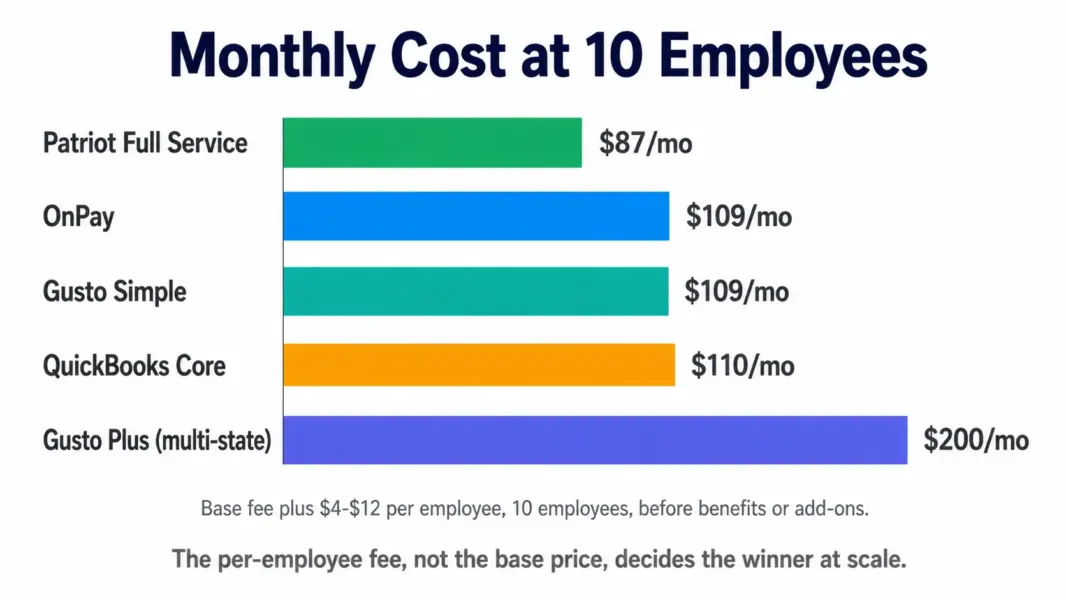
Roughly $100 to $200 per month for full-service payroll at 10 employees. Gusto Simple is about $109 ($49 + $60), OnPay is $109 ($49 + $60), Patriot Full Service is about $87 ($37 + $50), and QuickBooks Core is about $110. Add-ons like benefits administration and time tracking increase these figures.
Which payroll software is best for QuickBooks users?
QuickBooks Payroll, because it syncs payroll data directly into QuickBooks Online accounting with no manual entry. Wages, taxes, and liabilities flow into your general ledger automatically. If you don’t use QuickBooks accounting, OnPay or Gusto deliver better value and stronger standalone payroll.
Does Gusto charge extra for multi-state payroll?
Yes, indirectly. Gusto’s Simple plan handles only single-state payroll, so hiring your first out-of-state employee forces an upgrade to the Plus plan, which more than doubles your base cost from $49 to $80 plus higher per-employee fees. Budget for Plus if you plan to hire across state lines.
Is OnPay or Gusto better for small business?
Both are excellent. OnPay offers everything in one flat plan with no tiers, strong specialty industry support, and a slightly higher user rating, but lacks a mobile admin app. Gusto has a more polished interface, deeper benefits and HR, and better integrations, but gates some features behind higher tiers. OnPay wins on simplicity and value, Gusto on polish and depth.
Related HR and Payroll Guides
- Gusto Review 2026
- Best HR Software for Small Business
- Best Accounting Software
- QuickBooks Review 2026