Most payroll comparisons pit a good tool against a weak one, and the winner is obvious by the second paragraph. Gusto vs OnPay isn’t that. These are two genuinely excellent payroll platforms that start at the identical price, file taxes in all 50 states, and satisfy their customers, and choosing between them comes down to a real philosophical split rather than one being better.
Gusto puts features in tiers and asks you to pick the right one. OnPay puts everything in a single flat plan and removes the decision. That difference sounds small but it shapes what you pay, what you’re forced to upgrade for, and how the tool feels to run. This comparison works through pricing, tax filing, features, support, and user ratings with a verdict on each, then tells you which philosophy fits your business.
Gusto vs OnPay: The Short Answer
Choose Gusto if you want the most polished interface, the deepest benefits administration, over 100 integrations, and a mobile experience, and you’re comfortable choosing a tier and possibly upgrading for multi-state. Best for businesses that value product polish and ecosystem.
Choose OnPay if you want every feature included in one flat plan with no tier decisions, multi-state payroll at no extra cost, and specialty payroll for farms, restaurants, or nonprofits, and you don’t need a mobile admin app. Best for businesses that value simplicity and predictable pricing.
Gusto vs OnPay Comparison Table
| Factor | Gusto | OnPay | Winner |
|---|---|---|---|
| Entry price | $49/mo + $6 (Simple) | $49/mo + $6 (flat) | Tie |
| Pricing model | 3 tiers plus contractor plan | Single flat plan | OnPay |
| Multi-state payroll | Forces Plus upgrade ($80 + $12) | Included, no upcharge | OnPay |
| Tax filing | Full-service, all 50 states | Full-service, all 50 states | Tie |
| Benefits admin | Deep, licensed brokerage | Included, all 50 states | Gusto |
| Time tracking | Plus plan only | Not included | Gusto |
| Integrations | 100+ tools | Fewer, core accounting | Gusto |
| Mobile admin app | Yes | No | Gusto |
| G2 rating | 4.6 (8,300+ reviews) | 4.8 (400+ reviews) | OnPay |
| Specialty payroll | Standard | Farms, tips, clergy built in | OnPay |
Pricing: Identical Entry, Different Philosophy
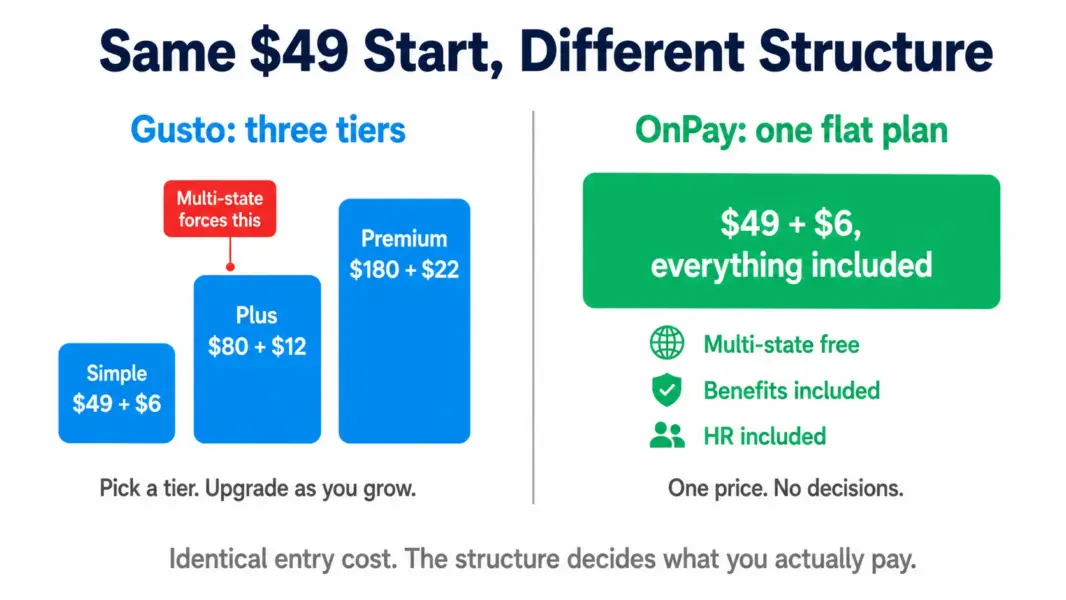
Both start at exactly $49 per month plus $6 per employee, verified from official sources in July 2026. The identical entry price makes this the fairest payroll comparison available, but the structure beneath diverges sharply.
Gusto splits capability across three tiers: Simple ($49 + $6), Plus ($80 + $12), and Premium ($180 + $22), plus a Contractor-Only plan at $35 + $6. You choose a tier based on what you need, and you upgrade as your needs grow.
OnPay has one plan at $49 + $6 with everything included. No tiers, no upgrade decisions, no add-on math. Full-service tax filing, benefits administration, HR tools, and multi-state payroll all come in the single price.
For a single-state business needing only core payroll, the two cost the same at entry. The divergence appears the moment you need multi-state, benefits depth, or time tracking, which is where the tier structure starts to matter. Model your specific situation with our payroll cost calculator.
Verdict: Tie on entry price. OnPay wins on predictability, Gusto wins if you only need Simple and value its polish.
The Multi-State Difference That Decides Many Buyers
This single factor resolves the comparison for a large share of businesses, so it deserves its own section.
Gusto’s Simple plan handles single-state payroll only. Hire your first out-of-state employee and you’re forced up to Plus, which raises your base from $49 to $80 and your per-employee fee from $6 to $12. For a 10-person team, that’s a jump from roughly $109 to $200 per month, triggered by one remote hire.
OnPay includes multi-state payroll in its flat plan at no extra cost. Hire in as many states as you want and the price doesn’t change. For a distributed or remote-first team, this is a decisive advantage, and it’s the most common reason businesses choose OnPay over Gusto.
Verdict: OnPay, decisively, for any business hiring across state lines.
Tax Filing and Compliance: Both Excellent
Both platforms deliver genuine full-service tax filing: they calculate, withhold, file, and pay federal, state, and local payroll taxes automatically, including forms 940, 941, W-2, and 1099, in all 50 states.
Both back this with an accuracy guarantee, covering penalties from filing errors as long as your data is accurate and timely. This is table stakes done well on both sides, and neither has a meaningful edge in reliability according to user reviews.
OnPay earns slight distinction for specialty tax scenarios, handling agricultural payroll with Form 943, tipped-wage restaurants, and clergy tax treatment at the base price. Gusto handles standard scenarios excellently but doesn’t match OnPay’s specialty-industry depth.
Verdict: Tie on core tax filing. OnPay edges ahead for specialty industries.
Features and Benefits: Gusto Goes Deeper
Both include benefits administration, but Gusto’s is deeper. Its licensed insurance brokerage lets you shop and administer health, dental, and vision plans directly, with 401(k), workers’ comp, HSA, and FSA administration integrated. OnPay also offers benefits administration in all 50 states through a licensed brokerage, but Gusto’s ecosystem and depth are more extensive.
On time tracking, Gusto wins by having it at all. Gusto includes time tracking and PTO management on its Plus plan. OnPay doesn’t include native time tracking, which G2 reviewers specifically note as a wished-for feature, meaning you’d integrate a separate tool.
On integrations, Gusto’s 100-plus connections substantially outnumber OnPay’s more limited library, which centres on core accounting tools like QuickBooks and Xero. If your stack depends on many integrations, Gusto is the safer choice.
Verdict: Gusto, for benefits depth, native time tracking, and integration breadth.
Ease of Use and Mobile: Gusto’s Polish vs OnPay’s Simplicity
Both are genuinely easy to use, and both earn praise for it. The difference is character. Gusto feels polished and modern, with a consumer-grade interface and a mobile admin app that lets you run payroll from a phone. OnPay feels clean and functional, straightforward but less visually refined, and critically, it has no native mobile app for employers, meaning admins run payroll from desktop only.
For an owner who wants to approve payroll from their phone between meetings, Gusto’s mobile capability is a real advantage. For one who runs payroll from a desk every two weeks, OnPay’s lack of a mobile app is irrelevant.
Verdict: Gusto for polish and mobile. OnPay is close behind on desktop usability.
User Ratings and Support: OnPay’s Standout
The review data here is striking. OnPay holds a 4.8 out of 5 rating across both G2 (400-plus reviews) and Capterra (465 reviews), and was named the #1 product in G2’s Summer 2026 Payroll Results Index, ranking ahead of every competitor including Gusto and Rippling. OnPay customers report reaching ROI in under six months against a category average of eleven.
Gusto holds a strong 4.6 across a much larger review base of over 8,300 on G2, reflecting its far greater scale. The larger sample makes Gusto’s rating impressive in its own right, but OnPay’s 4.8 and category-leading index position signal exceptional customer satisfaction.
Support is where OnPay’s reviewers are most enthusiastic, repeatedly praising hands-on onboarding with a real consultant and responsive service, though some recent reviews note occasional customer service friction as the company grows. Gusto’s support is solid but rated slightly lower by its user base.
Verdict: OnPay, on both rating and support sentiment, though Gusto’s rating across a vastly larger base is genuinely strong.
Which Should You Choose: Gusto or OnPay?
Choose Gusto if you want the most polished interface, a mobile admin app, the deepest benefits administration, over 100 integrations, or native time tracking, and you’re single-state or willing to pay for Plus. See our Gusto review.
Choose OnPay if you want every feature in one flat plan, multi-state payroll at no upcharge, specialty payroll for farms, restaurants, or nonprofits, category-leading support, and you don’t need a mobile admin app. It’s a particularly strong value at 10-plus employees.
The deciding questions: Do you hire across state lines? OnPay, for the free multi-state. Do you need a mobile app and many integrations? Gusto. Do you want zero tier decisions? OnPay. Do you want the most polished all-round product? Gusto. For the full landscape including Patriot, QuickBooks, and Rippling, see our best payroll software for small business guide.
Last updated: July 29, 2026
Frequently Asked Questions
Is Gusto or OnPay better in 2026?
Both are excellent and start at the same $49 plus $6 per employee. OnPay wins on flat all-inclusive pricing, free multi-state payroll, specialty industry support, and user ratings, holding 4.8 on G2 and Capterra. Gusto wins on interface polish, benefits depth, 100-plus integrations, native time tracking, and a mobile admin app. The choice depends on whether you value simplicity or polish.
Is OnPay cheaper than Gusto?
At entry they’re identical at $49 plus $6 per employee. OnPay becomes effectively cheaper for multi-state businesses because it includes multi-state payroll free, while Gusto forces an upgrade to its Plus plan at $80 plus $12 for any out-of-state employee. For single-state teams needing only core payroll, the two cost the same.
Does OnPay charge extra for multi-state payroll?
No. OnPay includes multi-state payroll in its single flat plan at no additional cost, letting you pay employees in as many states as needed without a price change. This contrasts with Gusto, which requires upgrading from Simple to the more expensive Plus plan for multi-state payroll.
Does Gusto or OnPay have better customer support?
OnPay’s support is more highly rated, with reviewers consistently praising hands-on onboarding with a real consultant and responsive service, contributing to its 4.8 rating and #1 ranking in G2’s Summer 2026 Payroll Index. Gusto’s support is solid but rated slightly lower across its much larger user base.
Does OnPay have a mobile app?
OnPay offers a mobile portal for employees but has no native mobile app for employers, meaning administrators run payroll from desktop only. Gusto offers a mobile admin experience that lets owners approve and run payroll from a phone. If mobile payroll matters to you, Gusto is the better choice.
Which is better for benefits administration, Gusto or OnPay?
Both offer benefits administration in all 50 states through licensed brokerages, but Gusto goes deeper with a more extensive ecosystem covering health, dental, vision, 401(k), workers’ comp, HSA, and FSA. OnPay’s benefits administration is capable and included in its flat plan, but Gusto’s depth and integration breadth are greater.
Does OnPay include time tracking?
No. OnPay does not include native time tracking, which G2 reviewers specifically cite as a wished-for feature, so you would integrate a separate tool. Gusto includes time tracking and PTO management on its Plus plan. If native time tracking matters, Gusto has the advantage.
Is OnPay good for farms and restaurants?
Yes. OnPay handles specialty payroll scenarios at its base price, including agricultural payroll with Form 943, tipped-wage restaurants, and clergy tax treatment for churches. This specialty-industry depth is a genuine OnPay strength that Gusto doesn’t fully match, making OnPay a strong fit for farms, restaurants, and nonprofits.
Related HR and Payroll Guides
- Gusto Review 2026
- OnPay Review 2026
- Best Payroll Software for Small Business
- Best HR Software for Small Business
- Payroll Cost Calculator