Every best email marketing for beginners list ranks the same tools in the same order. The problem is that beginners are not identical. A Shopify store owner starting email for the first time needs a fundamentally different tool than a blogger building a newsletter or a consultant sending updates to clients. The right first tool depends on what you are building, not just which platform has the friendliest interface. This guide matches 6 tested tools to 6 specific beginner starting points so you pick the tool that fits your business, not just the one with the easiest tutorial.
Two principles guide every recommendation below. First, your first email tool should be simple enough to send a campaign within an hour of signing up. Second, it should have enough runway that you do not need to migrate to a new tool within a year. The tools below hit both criteria for their specific starting points.
First: What Kind of Beginner Are You?
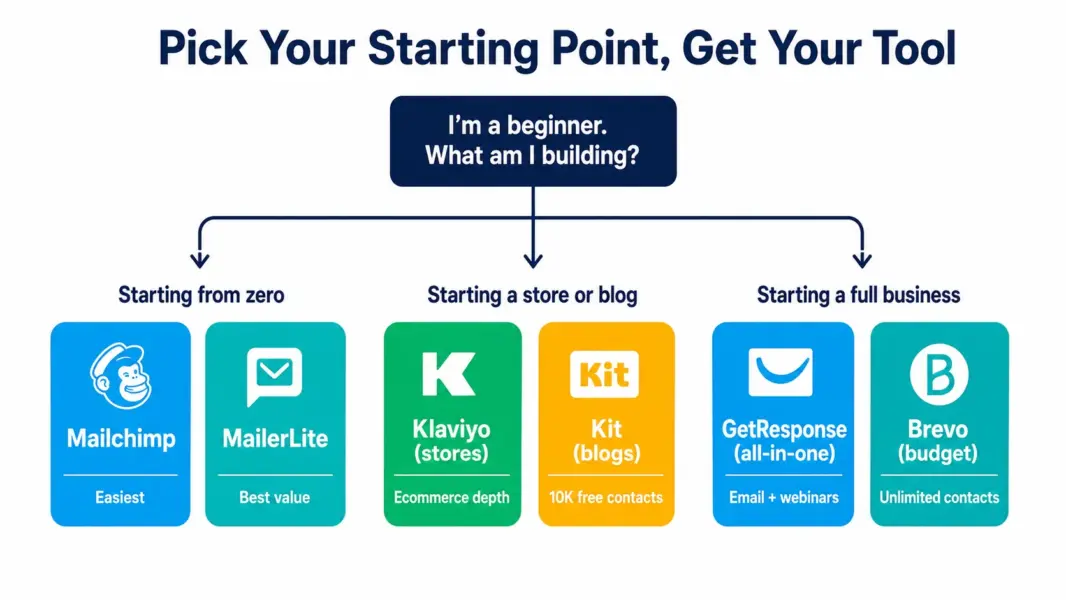
The starting point determines the tool. Match yourself to the closest description below, then read the recommendation for that path. Trying to compare all six tools against each other without knowing your starting point leads to analysis paralysis, which is why most beginners spend weeks evaluating and delay sending their first email.
| Your Starting Point | Recommended Tool | Why This One |
|---|---|---|
| Absolute beginner, no idea where to start | Mailchimp | Most familiar brand, easiest onboarding, broadest learning resources |
| Beginner who wants the best value | MailerLite | Same ease as Mailchimp at 30-40% lower cost with more free features |
| Beginner on a tight budget with a growing list | Brevo | Unlimited contacts free, charges only per email sent |
| Blogger, creator, or newsletter builder | Kit (ConvertKit) | Built for creators, 10,000 free contacts, sell digital products |
| Beginner wanting email + webinars + funnels | GetResponse | All-in-one with built-in webinar hosting |
| Shopify or WooCommerce store owner | Klaviyo | Best ecommerce email with one-click store integration |
Starting from Zero: Mailchimp for the Absolute Beginner
If you have never sent a marketing email and do not know where to start, Mailchimp is the safest first choice. It has the most tutorials, the largest user community, and the most intuitive interface in the category. You can go from sign-up to sending your first campaign in under 60 minutes, and the free plan (500 contacts, 1,000 sends per month) gives you room to practice without paying.
Mailchimp’s broad marketing suite also means you can experiment with landing pages, social posting, and basic audience management alongside email without switching tools. The beginner-friendly template library is the largest in the category, giving you polished designs for every common use case. Mailchimp’s limitation for beginners is that automation was removed from the free plan, so your first automated sequence requires a paid upgrade. For the full review, see our MailerLite vs Mailchimp comparison.
Starting Lean: MailerLite for the Value-Conscious Beginner
MailerLite matches Mailchimp’s ease of use at 30-40% lower cost and includes automation and landing pages on the free plan that Mailchimp gates behind paid tiers. For beginners who want simplicity without overpaying, MailerLite delivers more for less at every stage from free through paid.
The free plan supports 500 subscribers and 12,000 monthly sends (versus Mailchimp’s 500 contacts and 1,000 sends), includes basic automation, 10 landing pages, and a website builder. The interface is clean and focused because MailerLite does not try to be a broad marketing suite. This focus actually helps beginners: fewer menus and options mean less cognitive load. The paid Growing Business plan at $10 per month includes unlimited sends and branding removal, making it one of the most affordable upgrade paths in email marketing.
Starting Broke: Brevo for the Budget-First Beginner
Brevo is the best tool for beginners whose primary constraint is money and whose list is growing faster than their budget. Unlike every other tool on this list, Brevo charges per email sent rather than per contact. You can store an unlimited number of contacts for free and only pay when you send more than 300 emails per day. For a beginner building a list without immediate sending needs, this model means your list can grow to thousands of contacts before you pay anything.
Brevo includes automation on the free plan, which is rare and valuable for beginners who want to set up a welcome series or follow-up sequence without paying. Paid plans start at just $9 per month for 5,000 emails. For the full platform analysis, see our Brevo review.
Starting a Blog or Newsletter: Kit (ConvertKit) for Creators
Kit, formerly ConvertKit, is built specifically for creators: bloggers, YouTubers, podcasters, and writers building an audience. Its free Newsletter plan supports up to 10,000 contacts (the most generous contact limit of any major free plan) with unlimited landing pages, signup forms, and native commerce that lets you sell digital products and paid subscriptions even without paying.
Kit’s design philosophy prioritizes content-first newsletters with a clean editor optimized for text-driven emails that match creator audiences. The onboarding guides creators through building a signup form, connecting it to a landing page, and writing their first welcome sequence in under an hour. For beginners starting a blog, newsletter, or content-based business, Kit’s creator-specific design outperforms general tools that treat creators as an afterthought.
Starting an Online Business: GetResponse for the All-in-One Beginner
GetResponse suits beginners who know they need more than email from the start. If you plan to use landing pages, conversion funnels, and webinars alongside email campaigns, GetResponse bundles all of these in one platform. The Email Marketing plan at $19 per month includes unlimited sends, unlimited landing pages, and basic automation with pre-built funnel templates that guide beginners through setting up lead magnet and sales sequences.
The tradeoff is interface density. GetResponse packs more features into one interface than any other beginner recommendation, which can feel overwhelming for someone who only needs email right now. Choose GetResponse if you plan to use its breadth from the start. Choose MailerLite or Mailchimp if you want to start simple and add complexity later. For the complete evaluation, see our GetResponse review.
Starting an Online Store: Klaviyo for Ecommerce Beginners
Shopify and WooCommerce store owners starting email marketing for the first time should consider Klaviyo despite its steeper learning curve, because no general email tool matches its ecommerce-specific features. The one-click Shopify integration pulls in customer and order data immediately, and pre-built flows for abandoned cart, post-purchase, and browse abandonment start generating revenue from day one.
Klaviyo’s free plan supports 250 contacts and 500 sends, enough to test the platform with your store data before paying. The learning curve is steeper than Mailchimp or MailerLite, but ecommerce beginners who invest the time build a genuine revenue-driving email system rather than a basic newsletter. For the full ecommerce-focused analysis, see our Klaviyo review.
The Three Mistakes Beginners Make With Email Tools
The tool matters less than avoiding the three mistakes that cause most beginners to give up on email marketing within six months.
Choosing based on feature lists instead of starting point. A comparison table with 50 feature rows tells you nothing about which tool fits your business. Match the tool to your starting point (the table above), then ignore features you will not use this year.
Waiting for the perfect tool before sending. Your first email will not be perfect regardless of which tool you use. Send it from whatever free plan you sign up for today. You can migrate later if needed, but the cost of delaying is zero emails and zero subscribers, which is the only outcome that guarantees failure.
Starting with a tool you will outgrow in three months. A tool that only handles basic broadcasts forces a migration once you need automation, segmentation, or integrations. All six tools recommended above have enough runway to serve you for at least a year, so the migration risk is low as long as you pick from this list rather than from the cheapest or simplest option available.
Compare free plans side by side
See which email tool offers the most generous free tier for your starting point.
Last updated: July 9, 2026
Frequently Asked Questions
What is the best email marketing tool for a complete beginner?
Mailchimp is the safest first tool for complete beginners because it has the most tutorials, the largest user community, and the most intuitive interface. You can send your first campaign within an hour. MailerLite is equally easy at 30-40% lower cost with more features on the free plan. Both are excellent starting points for someone who has never sent a marketing email.
Is email marketing hard to learn?
Basic email marketing is easy to learn. All six tools recommended in this guide let a beginner send a polished campaign within an hour of signing up. Building automated sequences and advanced segmentation takes more time, typically 2-4 weeks of learning on any platform. The key is starting with a simple tool that matches your business type and building complexity gradually.
Do I need to pay for email marketing as a beginner?
Not necessarily. Mailchimp, MailerLite, Brevo, Kit, and Klaviyo all offer free plans with enough capability to start sending real campaigns. MailerLite and Brevo include automation on their free plans. Kit offers up to 10,000 free contacts. Most beginners can run their first 3-6 months entirely free before needing to upgrade, if they need to upgrade at all.
Should a beginner start with Mailchimp or MailerLite?
MailerLite offers better value: 12 times more monthly sends on the free plan (12,000 versus Mailchimp’s 1,000), includes automation and landing pages free, and costs 30-40% less on paid plans. Mailchimp has more templates, a broader marketing suite, and stronger brand familiarity. Choose MailerLite for value; choose Mailchimp for ease and ecosystem.
What email tool should a beginner Shopify store owner use?
Klaviyo is the best choice for Shopify beginners because its one-click integration pulls in customer and order data immediately, and pre-built automation flows for abandoned cart, post-purchase, and browse abandonment start generating revenue from day one. The learning curve is steeper than Mailchimp, but the ecommerce-specific features deliver substantially more value for online stores.
Is it too late to start email marketing?
No. Email marketing remains the highest-ROI digital marketing channel. Industry benchmarks consistently show email generating substantially more revenue per dollar spent than social media, paid advertising, or content marketing. Starting now with even a small list gives you a direct communication channel you own, unlike social media platforms that can change algorithms and reduce your reach at any time.
How long does it take to see results from email marketing?
Basic results (open rates, click-through rates) appear with your first campaign. Revenue results depend on your business model: ecommerce stores with abandoned-cart flows often see revenue within the first week, while service businesses building a newsletter may take 2-3 months to see leads from email. Consistency matters more than perfection for beginners.
Related Guides and Reviews
- Best Free Email Marketing Tools
- Klaviyo Review 2026
- Brevo Review 2026
- GetResponse Review 2026
- MailerLite vs Mailchimp
- ActiveCampaign vs Mailchimp
- Complete Guide to Email Marketing Software