
Most people learning SEO buy a tool before they need one. A $139 monthly subscription gets opened twice, produces a spreadsheet nobody acts on, and renews for eight months before someone cancels it.
The reason isn’t laziness. It’s that paid SEO platforms are built for competitor research, and a beginner’s actual problem is usually simpler: which of my pages already rank, what are people searching for, and why isn’t Google indexing this. Google answers all three for free, and answers them with better data than any third-party tool because it’s Google’s own index.
This guide covers the best SEO tools for beginners in the order you should actually adopt them, starting with free tools that cover most early needs, then the specific signals that mean it’s genuinely time to pay.
How We Picked These SEO Tools for Beginners
Four criteria, weighted for people who are learning rather than optimising an existing programme.
Cost to start. Free tools ranked first because a beginner’s biggest risk is spending money on capability they can’t yet use.
Learning curve. A tool that requires a training course before producing value isn’t a beginner tool regardless of how powerful it is.
Does it answer a real beginner question? Rankings, indexation, keyword volume, and on-page structure are the early problems. Backlink gap analysis and SERP feature tracking are not.
Upgrade path. Whether the tool grows with you or becomes a migration project once you outgrow it.
Pricing verified against official vendor pages in July 2026.
Best SEO Tools for Beginners Compared
| Tool | Price | What It Solves | Adopt It When |
|---|---|---|---|
| Google Search Console | Free | Your rankings, clicks, indexation, errors | Immediately, before anything else |
| Google Analytics 4 | Free | Traffic, behaviour, conversions | Immediately, alongside Search Console |
| Google Keyword Planner | Free | Keyword volume and related terms | When planning your first content |
| RankMath or Yoast | Free tier | On-page SEO inside WordPress | As soon as you publish on WordPress |
| Ahrefs Starter | $29/mo | Competitor keywords and backlinks | When you need to see rivals' data |
| Surfer SEO | $79/mo | On-page content optimisation | At 4+ published articles monthly |
| Semrush Pro | $139/mo | SEO plus paid search and content | When you own more than organic |
Google Search Console: The First Tool Everyone Should Use
Search Console is the only tool that reports what Google itself sees. Not an estimate, not a third-party crawl, but actual impressions, clicks, average position, and indexation status straight from the index that decides your rankings.
What It Does
Performance reporting. Every query that produced an impression, with clicks, click-through rate, and average position. Filter by page, country, device, or date range.
Indexation diagnostics. Which pages Google has indexed, which it has crawled but chosen not to index, and why. This single report resolves the most common beginner panic, which is “my page isn’t showing up in Google.”
Core Web Vitals and mobile usability. Real user performance data grouped by URL pattern, so you fix categories of pages rather than chasing individual scores.
Manual actions and security issues. Direct notification if Google has penalised your site, which no third-party tool can tell you.
The Beginner Workflow Nobody Explains
Open the Performance report, sort by impressions, and filter to positions 5 through 20. Those are queries where Google already considers you relevant but you’re not winning the click. Improving an existing page ranking eleventh is dramatically easier than ranking a new page from nothing, and this report hands you that list for free.
Adopt it: before anything else, on day one. There is no argument for delaying this.
Google Analytics 4: Understanding What Traffic Does
Search Console tells you how people arrive. Analytics tells you what happens next. You need both, and they answer genuinely different questions.
What It Does
GA4 tracks sessions, engagement time, pages per session, conversion events, and traffic source attribution. Connected to Search Console, it lets you see which organic queries produced not just clicks but actual conversions.
The honest assessment: GA4 has a steeper learning curve than the Universal Analytics it replaced, and beginners frequently find the event-based model confusing. Start with two reports only. Traffic acquisition tells you where visitors come from. Pages and screens tells you what they read. Ignore everything else until those two feel routine.
Where It Falls Short for Beginners
GA4’s interface assumes familiarity with events, parameters, and explorations. Setting up conversion tracking properly takes real effort. Many beginners configure it once, never verify it works, and make decisions on broken data for months.
Adopt it: day one, but limit yourself to two reports until the basics are automatic.
Google Keyword Planner: Free Keyword Volume Data
Keyword Planner is built for Google Ads, which is exactly why beginners overlook it. You need an Ads account to access it, but you don’t need to run a campaign.
What It Does
Enter a seed keyword and receive related terms with monthly search volume ranges, competition level for advertisers, and suggested bid ranges. The bid data is a useful proxy for commercial intent, since advertisers only bid meaningfully on terms that convert.
The Catch
Without an active ad spend, volume appears as broad ranges rather than precise numbers. A keyword might show as “1K to 10K monthly searches,” which is directionally useful but imprecise. It also gives you no competitor data and no difficulty score, so you can see that a keyword has volume but not whether you could realistically rank for it.
Adopt it: when planning your first content, and accept the range imprecision as the cost of free.
RankMath or Yoast: On-Page SEO Inside WordPress
If your site runs on WordPress, an SEO plugin is not optional. Both RankMath and Yoast offer free tiers that cover what beginners need.
What They Do
Meta title and description control per page, with live previews of how the result appears in Google.
XML sitemap generation that updates automatically as you publish, which is how Google discovers new content efficiently.
Schema markup for articles, products, FAQs, and reviews, which drives rich results in search.
On-page analysis scoring keyword placement, heading structure, readability, internal links, and image alt text as you write.
RankMath vs Yoast for Beginners
RankMath’s free tier is more generous, including schema types and redirect management that Yoast reserves for its premium version. Yoast has the longer track record and a gentler onboarding flow with clearer explanations of why each recommendation matters.
Either works. The genuine mistake is treating the green score as the goal. These plugins check mechanical signals, not whether your content answers the query better than the pages currently ranking. A green light on thin content ranks nothing.
Adopt it: immediately on any WordPress site. Free tier is sufficient for most beginners.
Ahrefs Starter: The Cheapest Real Competitor Data
Free Google tools share one blind spot: they show you your own data and nothing about anyone else. You cannot see which keywords a competitor ranks for, which pages earn their links, or why they outrank you. That gap is the only legitimate reason for a beginner to start paying.
What You Get for $29
Ahrefs Starter provides Site Explorer, Keywords Explorer, and Site Audit with 100 monthly credits. One credit is consumed each time you open a report or apply a filter, so roughly 100 research actions per month.
The single most valuable beginner workflow: run a competitor through Site Explorer, sort their top pages by traffic, and you have a ranked list of what actually works in your niche. That one report replaces weeks of guessing what to write about.
Real Limitations
You cannot buy additional credits on Starter, cannot add users, and cannot downgrade to Starter later if you upgrade. A heavy research session will exhaust 100 credits faster than you expect. It’s an on-ramp rather than a permanent home, but at $29 it’s the cheapest genuine access to competitor data among major platforms. Full detail in our Ahrefs review.
Adopt it: once you’ve used Search Console for at least two months and specifically need to see what competitors are doing.
Surfer SEO: On-Page Optimisation at Publishing Volume
Surfer analyses the pages currently ranking for your target keyword and tells you what yours needs to compete: which terms to include, how to structure headings, what length range works, and how your draft scores as you write.
Who It Actually Helps
The economics are straightforward. Essential costs $79 per month and includes 15 to 30 Content Editor articles. At 15 articles that’s roughly $5 per optimised piece. At four articles it’s nearly $20 each. Below four articles monthly, the subscription sits unused most of the month.
Surfer isn’t a research platform and won’t replace Ahrefs or Semrush. It has no backlink data, no technical site audit, and no rank tracking on base plans. It complements a research tool rather than substituting for one. See our Surfer SEO review for the full breakdown.
Adopt it: only once you’re publishing four or more optimised articles monthly.
Semrush Pro: When SEO Is One Channel Among Several
Semrush Pro at $139 per month is not a beginner’s first purchase, and buying it early is the most common overspend in this category.
When It Genuinely Makes Sense
Semrush earns its price when your responsibilities extend beyond organic search. The Advertising Toolkit shows competitor paid keywords, ad copy, and spend estimates. The Local Toolkit manages listings across directories. The Content Marketing Toolkit handles topic research and briefs. If you own SEO plus paid search plus content, Semrush replaces two or three subscriptions.
If you only need keyword research and rank tracking, you’re paying for six toolkits to use two, and Ahrefs Starter covers that need at a fifth of the cost. Our Semrush review and the Ahrefs vs Semrush comparison cover the decision in depth.
Adopt it: when you own more than organic search, not before.
What Order to Buy SEO Tools In
Follow this sequence and you’ll avoid the overspend that catches most beginners.
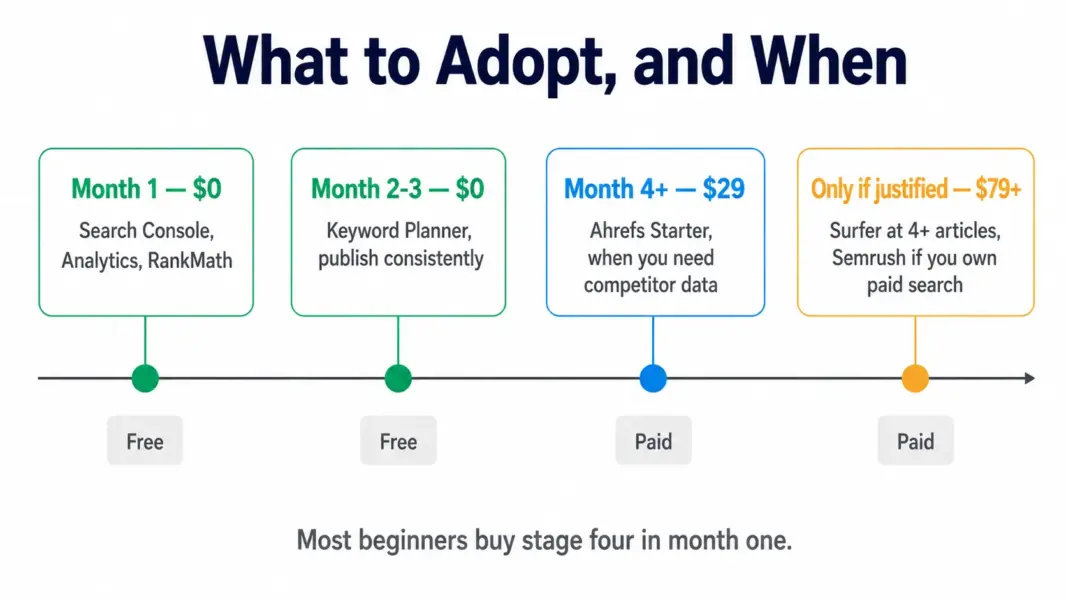
Month one: Google Search Console, Google Analytics 4, and RankMath or Yoast if you’re on WordPress. Total cost: $0. Learn to read the Performance report properly before doing anything else.
Month two to three: Google Keyword Planner for content planning. Still $0. Publish consistently and watch which pages gain impressions.
Month four onward: add Ahrefs Starter at $29 when you specifically need competitor data. You’ll know the moment arrives because you’ll find yourself unable to answer “why does that site outrank me.”
Only when justified: Surfer at four-plus articles monthly, Semrush when you own paid search or local alongside SEO.
Mistakes Beginners Make With SEO Tools
Buying before diagnosing. A paid tool doesn’t tell you what to fix on a site with twelve pages and no traffic. Search Console does, for free.
Chasing plugin scores. A green RankMath light means your keyword appears in the right places. It says nothing about whether your page deserves to rank, and optimising toward the score produces mechanically correct content that nobody links to.
Tracking too many keywords. Beginners track fifty terms and watch them all fluctuate meaninglessly. Track ten that genuinely matter to revenue and review them monthly rather than daily.
Ignoring the positions 5 to 20 opportunity. Pages ranking eleventh need small improvements to reach page one. New pages need months. Beginners consistently prioritise the harder work because Search Console’s most valuable report isn’t obvious until someone points at it.
Treating volume as the only keyword metric. A term with 200 monthly searches and clear buying intent beats one with 20,000 informational searches that Google answers in an AI Overview.
Last updated: July 28, 2026
Frequently Asked Questions
What are the best free SEO tools for beginners?
Google Search Console for rankings, clicks, and indexation. Google Analytics 4 for traffic and conversions. Google Keyword Planner for search volume. RankMath or Yoast free tier for on-page SEO on WordPress. Together these cover most beginner needs at zero cost.
Do I need to pay for SEO tools as a beginner?
Not initially. Free Google tools cover your own rankings, traffic, indexation, and keyword volumes. The single thing they don’t provide is competitor data, which is the legitimate reason to start paying. Ahrefs Starter at $29 per month is the cheapest genuine entry point when you reach that stage.
Is Semrush or Ahrefs better for beginners?
Ahrefs, because of pricing. Its Starter plan at $29 per month is far more accessible than Semrush Pro at $139, and its interface is simpler to learn. Semrush becomes the better choice once you also own paid search, local SEO, or content marketing.
Is RankMath better than Yoast for beginners?
RankMath’s free tier includes more, notably schema types and redirect management that Yoast keeps in its premium version. Yoast has clearer onboarding and explains recommendations more thoroughly. Either is sufficient, and the plugin choice matters far less than content quality.
How long before SEO tools show results?
The tools show data immediately, but SEO results typically take three to six months for a new site. Search Console data becomes meaningful after roughly a month of consistent publishing. Judging a strategy on two weeks of data is the most common cause of beginners abandoning tactics that were working.
Can I do SEO without any tools?
Technically yes, but you’d be working blind on indexation and rankings. Google Search Console is free, takes ten minutes to set up, and reports data no other source has. There’s no reasonable argument for skipping it.
What is the cheapest paid SEO tool?
Ahrefs Starter at $29 per month is the cheapest entry point among major platforms, providing Site Explorer, Keywords Explorer, and Site Audit with 100 monthly credits. Surfer SEO at $79 and Semrush Pro at $139 both sit substantially higher.
Should beginners track keyword rankings daily?
No. Daily rankings fluctuate for reasons unrelated to your work, and watching them produces anxiety rather than insight. Review a focused set of ten to twenty commercially relevant keywords monthly, and use Search Console impressions as your leading indicator between reviews.
Related SEO Guides
