
The Evernote vs Notion comparison is not really a comparison. It is a migration decision. Of Evernote’s 225 million registered users, roughly 8 million remain active according to 2026 usage data. The rest either left for Notion already or are still deciding. If you are reading this, you are probably in the deciding group. Two questions settle it faster than any feature table.
Question 1: Do You Depend on Web Clipping and OCR Search?
Evernote’s web clipper and its ability to search text inside images, scanned documents, and handwritten notes are still the best in the market. Nothing else comes close, and this is not an exaggeration. The clipper saves full articles, simplified text, selected regions, screenshots, and bookmarks with formatting control that Notion’s basic web bookmarking cannot replicate. The OCR search finds text inside photos of whiteboards, Post-It notes, scanned receipts, and handwritten journal pages.
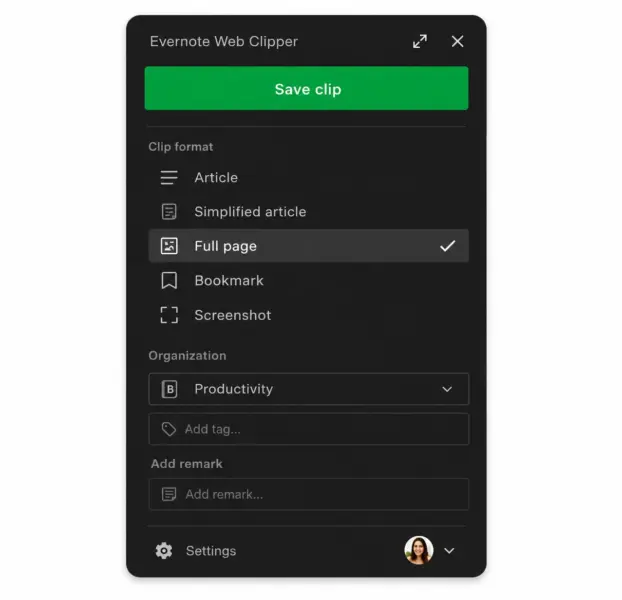
If your workflow depends on these two features, if you clip 5-plus web articles per week into a reference archive, or if you photograph handwritten notes and need to search them later, stay on Evernote. Notion cannot replace this. Switching means losing capabilities you use daily, and no amount of database flexibility compensates for that.
If you rarely clip web pages and never search inside images, this advantage is irrelevant to your decision. Move to Question 2.
Question 2: Do You Need More Than Notes?
Evernote is a digital filing cabinet. You put notes in, you find them later. It does this well and has done it since 2008. What it does not do is project management, databases, wikis, team collaboration, or workflow automation. If your work has outgrown “store and retrieve notes” into “organize knowledge, manage projects, and collaborate with others,” Notion handles all of it in one workspace.
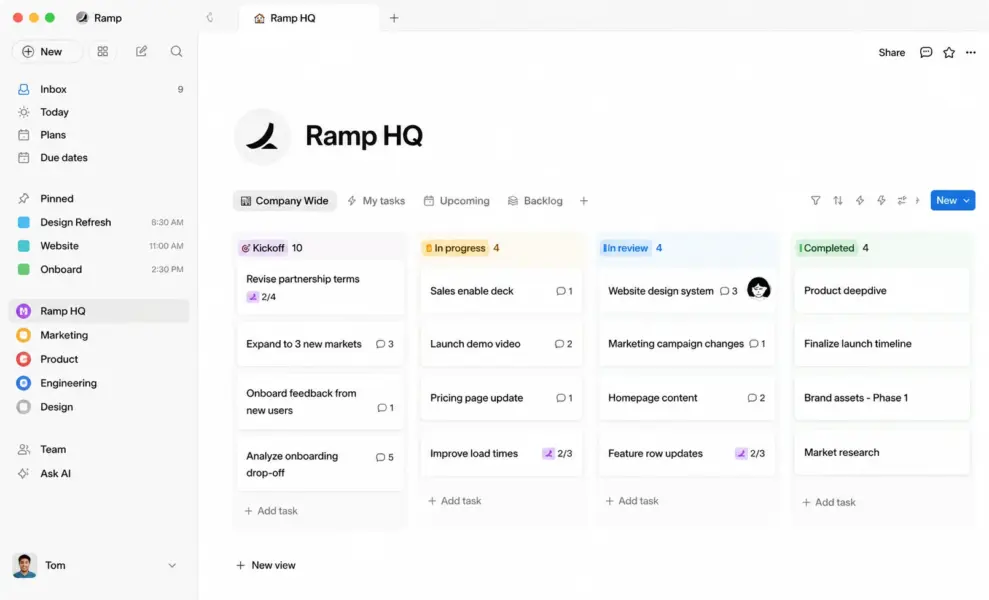
Notion’s block-based editor lets you build databases with linked relations, wiki-style knowledge bases, kanban boards, calendar views, and team workspaces. Over 50% of Fortune 500 companies use Notion as a team workspace according to SQ Magazine. The platform passed 100 million users because it does what Evernote cannot: serve as a system for thinking and working, not just storing.
If you need only note storage and retrieval, Evernote still works for that, though Notion’s free plan (unlimited pages, one user) does it too. If you need anything beyond notes, Notion is the tool and Evernote is not a competitor.
The Migration Pain: Is It Worth It?
Notion includes a built-in Evernote importer that transfers notebooks, notes, and tags. The process is straightforward. The results are imperfect. According to multiple 2026 migration reports, formatting breaks during import: tables may misalign, embedded files may not transfer cleanly, and the tag-to-page structure mapping requires manual cleanup. A 500-note Evernote account takes roughly a weekend to migrate and clean up. A 5,000-note archive can take weeks.
The honest advice from Zapier’s comparison: if Evernote works for you and you have invested years in its organizational structure, the switching cost is real, and there is no compelling reason to switch just because Notion is newer. Migration is worth it when Evernote is failing you: when you need collaboration it cannot provide, when the $14.99 per month Personal price feels steep for what it delivers, or when you want a workspace that grows with your work rather than just storing it.
The Pricing Shift That Changed the Equation
Evernote’s pricing changed dramatically after Bending Spoons acquired it in 2023. The free plan dropped from unlimited devices to one device only. Personal pricing rose to $14.99 per month. Aggressive upgrade pop-ups frustrate free users. These changes pushed millions of users to evaluate Notion for the first time.
Notion’s free plan gives a single user unlimited pages, unlimited databases, and a limited AI trial. The Plus plan at $10 per user per month adds unlimited file uploads and team collaboration. For the same $14.99 per month that Evernote charges for Personal (one user, standard features), Notion Plus delivers databases, wikis, project management, real-time collaboration, and AI features with model selection (Claude, GPT, Gemini).
The value gap is stark. Evernote at $14.99 gives you notes and search. Notion at $10 gives you notes, databases, wikis, projects, collaboration, and AI. Unless Evernote’s specific strengths (web clipper, OCR) are essential to your work, the pricing argument favors Notion clearly.
The AI Factor in 2026
Both tools added AI, but the implementations differ substantially. Notion AI includes writing assistance, summarization, and autonomous AI agents that execute multi-step tasks across your workspace. You choose which model to use: Claude, GPT, or Gemini. The AI agents represent a genuine capability leap, automating workflows across hundreds of pages with scheduled triggers.
Evernote’s AI covers note cleanup, writing assistance, and AI-powered semantic search. The semantic search is notable: searching “Spain vacation” finds a note titled “Barcelona Trip” based on meaning rather than exact keywords, and it works on the free plan. For users with large, messy note archives, this semantic search can surface forgotten information in ways keyword search misses.
Notion’s AI is more powerful and versatile. Evernote’s AI search is more targeted for its specific use case. Neither AI alone should drive the platform decision, but Notion’s broader AI capability reinforces the gap between a note-taking tool and an all-in-one workspace.
If You Are Starting Fresh
For anyone who does not already have years of Evernote data, the choice is simple: start with Notion. It offers more capability, a more generous free plan, stronger collaboration, and a larger community of templates and resources. The only reason to choose Evernote as a new user in 2026 is if you specifically need its web clipper and OCR features and do not need databases or collaboration.
For more on how Notion fits into a broader productivity stack, see our full Notion review covering its use as a project management and documentation tool.
Last updated: July 10, 2026
Frequently Asked Questions
Is Notion better than Evernote in 2026?
For most users, yes. Notion offers databases, wikis, project management, collaboration, and AI agents alongside note-taking, while Evernote focuses solely on note storage and retrieval. Evernote remains better for two specific features: its web clipper (best in class for saving web content) and OCR search (searching text inside images, scans, and handwriting). If you do not depend on those, Notion is the stronger tool.
Should I switch from Evernote to Notion?
Switch if Evernote is failing you: if you need collaboration, databases, or wikis it cannot provide, if the $14.99 per month pricing feels steep for notes-only, or if you want a workspace that does more than store information. Stay if you depend on Evernote’s web clipper and OCR search, or if you have a large archive and the migration effort is not worth the gains.
Is the migration from Evernote to Notion hard?
Notion includes a built-in Evernote importer that handles the basic transfer. The process is straightforward but imperfect. Formatting breaks in some notes, tables may misalign, and tags require manual cleanup. A 500-note account takes roughly a weekend. A large archive of 5,000-plus notes can take weeks to clean up fully. The importer works; the cleanup takes time.
Is Evernote still worth paying for?
Evernote is worth paying for if you actively use its web clipper and OCR search, which remain the best in the market. At $14.99 per month for Personal, the value is hard to justify for users who only need basic note-taking, since Notion’s free plan offers unlimited pages with databases and wikis included. Evernote’s value has narrowed to its two unique strengths.
Does Notion have a web clipper?
Notion has a basic web clipper browser extension that saves pages as bookmarks or simplified text. It does not match Evernote’s clipper in formatting fidelity, clipping options (full page, simplified, region, screenshot), or integration quality. If web clipping is central to your workflow, Evernote’s clipper remains significantly better.
Can Notion search inside images like Evernote?
No. Notion cannot search text inside images, scanned documents, or handwritten notes. Evernote’s OCR search indexes text in images, PDFs, whiteboard photos, and handwriting, making it searchable alongside regular notes. This is one of Evernote’s two remaining competitive advantages and a genuine capability Notion does not offer.
Is Notion free?
Notion’s free plan for individual users includes unlimited pages, databases, and a limited AI trial. The Plus plan at $10 per user per month adds unlimited file uploads and team collaboration. For solo users, the free plan is genuinely usable long-term. Evernote’s free plan limits you to one device, which is significantly more restrictive.
Related Note-taking and Productivity Guides
