
Every best note-taking apps list ranks tools by features. The problem is that note-taking apps in 2026 all have the same features: block editing, bidirectional links, AI summarization, and mobile capture are table stakes everywhere. What actually differentiates them is the thinking style they reward. Pick by how you think, not by how many features the marketing page lists. This guide sorts 8 apps by the retrieval style you will live with for years.
How You Think Determines Which Tool Fits
Note-taking is three jobs: capture (get an idea into the system fast), connect (link related notes so retrieval is non-linear), and retrieve (find it again in 10 seconds two years later). According to a 2026 evaluation by NoteApps.info covering 40 apps across 356 features each, the category split that matters is data architecture, not feature lists. Five architectures serve five thinking styles.
Database thinkers organize in tables, properties, and relations → Notion
Graph thinkers connect ideas through bidirectional links and visualize connections → Obsidian
Simple capturers want zero friction between thought and text → Apple Notes or Google Keep
Freeform thinkers mix handwriting, images, audio, and text on a canvas → OneNote or GoodNotes
Research archivists clip web content and search inside scanned documents → Evernote
Notion: For Database Thinkers and Teams
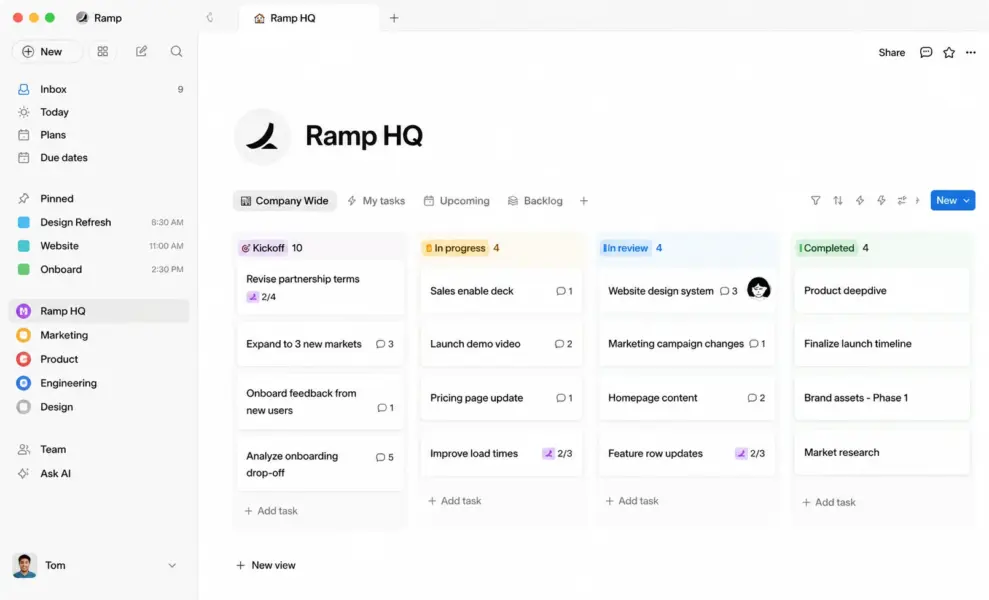
Notion is the default recommendation for teams and individuals who think in structured systems. Notes live inside databases with properties, filters, relations, and views (table, kanban, calendar, timeline). Over 50% of Fortune 500 companies and 100 million users worldwide use Notion because it serves as notes, docs, wiki, and project management in one workspace. The free personal plan is genuinely unlimited: no page caps, no block limits.
The tradeoff is setup time. Teams spend hours configuring the workspace before writing anything. If you prefer opening an app and typing immediately, Notion’s flexibility becomes friction. Offline mode remains unreliable in 2026, which frustrates users without consistent internet access. For the full evaluation, see our Notion review.
Cost: Free (personal, unlimited pages) | Plus $10/user/mo | Business $15/user/mo
Obsidian: For Graph Thinkers and Privacy
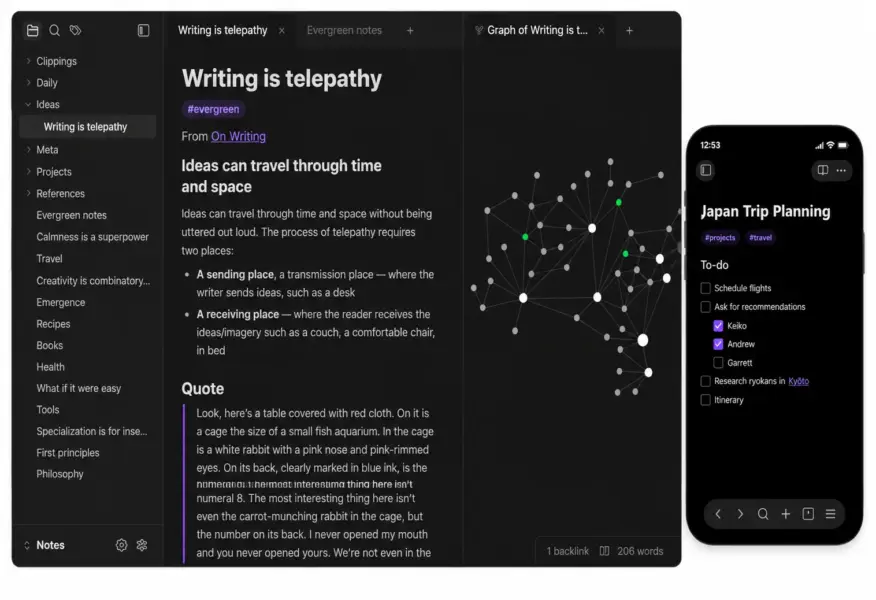
Obsidian stores notes as plain Markdown files in a folder you own on your device. No cloud dependency, no proprietary format, no risk of a vendor pivot locking away your decade of writing. The plugin ecosystem (2,000-plus community plugins) extends functionality to match almost any workflow. The graph view visualizes connections between linked notes, revealing patterns that linear note-taking hides.
Obsidian is free for personal use. The optional Sync add-on ($5 per month) handles cross-device sync through end-to-end encryption. For personal knowledge management with full data ownership, Obsidian is the strongest free tool available. The learning curve is steeper than Apple Notes but gentler than Notion’s database setup. According to a 2026 review by Toolradar, Obsidian and Notion together cover 100% of note-taking use cases at zero cost: Obsidian for personal notes, Notion for team docs.
Cost: Free (personal) | Sync $5/mo | Publish $8/mo | Commercial $50/user/yr
Apple Notes: For Simple Capture in the Apple Ecosystem
Apple Notes is the most underrated tool on this list. It is free, pre-installed on every Apple device, syncs instantly via iCloud, supports rich text, images, handwriting with Apple Pencil, folders, tags, and password-locked notes. In 2026, Apple Intelligence adds proofreading, rewriting, and smart summarization directly in the notes app.
For Apple users who want to open an app and type without configuration, templates, or onboarding, Apple Notes is the fastest path from thought to text. The limitation is ecosystem lock-in: no Android app, no Windows native client (browser-only via iCloud.com), and no database or linking features. If your notes are simple text and checklists and you live in Apple’s ecosystem, nothing beats the speed and simplicity of what is already on your phone.
Cost: Free (included with Apple devices) | iCloud storage plans from $0.99/mo
Microsoft OneNote: For Freeform Canvas Thinkers
OneNote treats each page as a freeform canvas where you can click anywhere to add text, images, audio recordings, or handwritten notes. This spatial freedom makes it the strongest tool for people who think visually, who need to place a diagram next to typed notes next to a pasted screenshot and arrange them by spatial position rather than linear order. Students, researchers, and visual learners consistently rate OneNote highest for this spatial note-taking style.
OneNote is completely free across Windows, Mac, iOS, Android, and web. It syncs via OneDrive and integrates deeply with Microsoft 365. For organizations already in the Microsoft ecosystem, OneNote is the natural choice. It lacks Notion’s database structure and Obsidian’s graph linking, but for canvas-style note-taking, no tool matches its freeform flexibility.
Cost: Free (all platforms) | Included with Microsoft 365 subscriptions
Evernote: For Web Clipping and OCR Search Only
Evernote’s position has narrowed. Its web clipper remains the best tool for saving web content with formatting fidelity. Its OCR search finds text inside images, scanned documents, and handwritten notes. These two features are genuinely unmatched. Everything else Evernote does, basic note-taking, tagging, notebooks, free alternatives now do equally well or better.
At $14.99 per month for Personal (after the Bending Spoons acquisition raised prices), Evernote is one of the most expensive individual note subscriptions in the category. The free plan restricts to one device. For users who depend on the web clipper and OCR, the price is justified. For everyone else, Notion (free), Obsidian (free), Apple Notes (free), and OneNote (free) all outclass it on value. For the full comparison, see our Evernote vs Notion comparison.
Cost: Free (1 device) | Personal $14.99/mo | Professional $17.99/mo
Google Keep: For Quick Lists and Reminders
Google Keep is the lightest tool on this list, designed for quick text notes, checklists, voice memos, and photo captures that sync across Google Workspace. The card-style interface with color-coding and labels makes it easy to scan and organize short notes visually. Integration with Google Docs, Calendar, and Drive means captured notes flow into other Google tools without manual export.
Google Keep is not for long-form notes, structured knowledge, or project management. It is for the sticky-note use case: quick thoughts, grocery lists, meeting reminders, and ideas you capture in five seconds and reference later in the day. For that narrow job, it is the fastest and simplest option that requires zero learning.
Cost: Free (included with Google account)
GoodNotes: For Handwriting on iPad
GoodNotes is the best handwriting experience on iPad with Apple Pencil. The Fountain Pen, Ballpoint, and Brush tools respond to pressure and rotation with the most natural feel in digital note-taking. In 2026, GoodNotes added a block-based text editor, infinite whiteboard, and real-time audio transcription alongside its signature handwriting capabilities.
For students taking lecture notes, professionals annotating PDFs, and anyone who prefers pen to keyboard, GoodNotes delivers an experience that typed-note apps cannot match. The free plan includes core features with ads. A subscription unlocks premium features including AI-powered quizzes and flashcard generation from handwritten notes.
Cost: Free (core features with ads) | Subscription for premium features
Logseq: For Open-Source Outliner Thinkers
Logseq is the open-source alternative for users who want Obsidian’s local-first philosophy with an outliner interface (every note is a bullet point that nests and links). It stores data as plain Markdown files you own, supports bidirectional linking, and offers a journal-based daily note system that captures thoughts chronologically. For privacy-focused users who prefer outlines to documents, Logseq fills a niche that Obsidian’s long-form editor and Notion’s database approach do not.
Cost: Free (open-source) | Optional cloud sync in development
Starting Fresh? Here Is the Default Stack
If you are choosing a note-taking system from scratch in 2026, the strongest free combination is Obsidian for personal notes (private, local, your data) plus Notion for team collaboration (shared, cloud, structured). This covers every use case at zero cost. Add Apple Notes or Google Keep for quick capture if you want a third tool for speed.
Do not default to Evernote for new setups. Its value has concentrated in web clipping and OCR, which are real strengths but narrow ones that most new users do not need on day one. Start with the free tools that offer more capability per dollar, and add Evernote only if you discover you clip web content frequently enough to justify the subscription.
Coming from Evernote?
See our full comparison to decide whether to stay or switch.
Last updated: July 10, 2026
Frequently Asked Questions
What is the best note-taking app in 2026?
There is no single best. Notion is best for database thinkers and teams. Obsidian is best for graph thinkers who want local data ownership. Apple Notes is best for simple capture in the Apple ecosystem. OneNote is best for freeform canvas thinkers. The right tool matches how you think and retrieve information, not which feature list is longest.
Is Evernote still worth using in 2026?
Evernote is worth using only if you depend on its web clipper and OCR search inside images. At $14.99 per month for Personal with a one-device free plan, it is the most expensive option relative to what free alternatives offer. Notion, Obsidian, Apple Notes, and OneNote all provide better overall value for most note-taking needs.
Is Obsidian or Notion better?
Obsidian is better for personal knowledge management with full data privacy (local Markdown files you own). Notion is better for team collaboration with structured databases and real-time editing. Many users combine both: Obsidian for private thinking, Notion for shared work. Together they cost $0 and cover every use case.
What is the best free note-taking app?
For Apple users, Apple Notes is the simplest free option with zero setup. For all platforms, OneNote and Google Keep are completely free. Obsidian is free for personal use with the deepest feature set for knowledge management. Notion’s free plan is unlimited for personal use. All four outperform Evernote’s restricted one-device free plan.
Which note-taking app is best for students?
OneNote for typed notes with freeform canvas layouts. GoodNotes for handwritten notes on iPad with Apple Pencil. Notion for students building interconnected knowledge systems across courses. Apple Notes for quick capture between classes. The right choice depends on whether you type, handwrite, or build systems.
Should I switch from Evernote to Notion?
Switch if you need databases, wikis, or collaboration that Evernote cannot provide, or if the $14.99 per month price feels steep for notes-only functionality. Stay if you depend on Evernote’s web clipper and OCR search. Notion has a built-in Evernote importer, though formatting cleanup takes time. See our full Evernote vs Notion comparison.
Do I need a paid note-taking app?
Most people do not. Apple Notes, OneNote, Google Keep, Obsidian (personal), and Notion (personal) are all free and cover the vast majority of note-taking needs. Paid subscriptions make sense for cloud sync on Obsidian ($5 per month), team features on Notion ($10 per user), or Evernote’s specialized web clipping and OCR ($14.99 per month).
Related Productivity Guides
