The Freshsales vs Pipedrive decision splits along your team’s selling style. Pipedrive is built by salespeople for salespeople who manage deals through visual stages. Freshsales is built for outbound teams that prospect by phone, email, and chat, with all three channels built into the CRM rather than bolted on as integrations. Both are strong small-team CRMs, but they optimize for fundamentally different sales motions. This comparison breaks down where each wins and which selling style matches which tool.
The Core Difference: How Your Team Sells
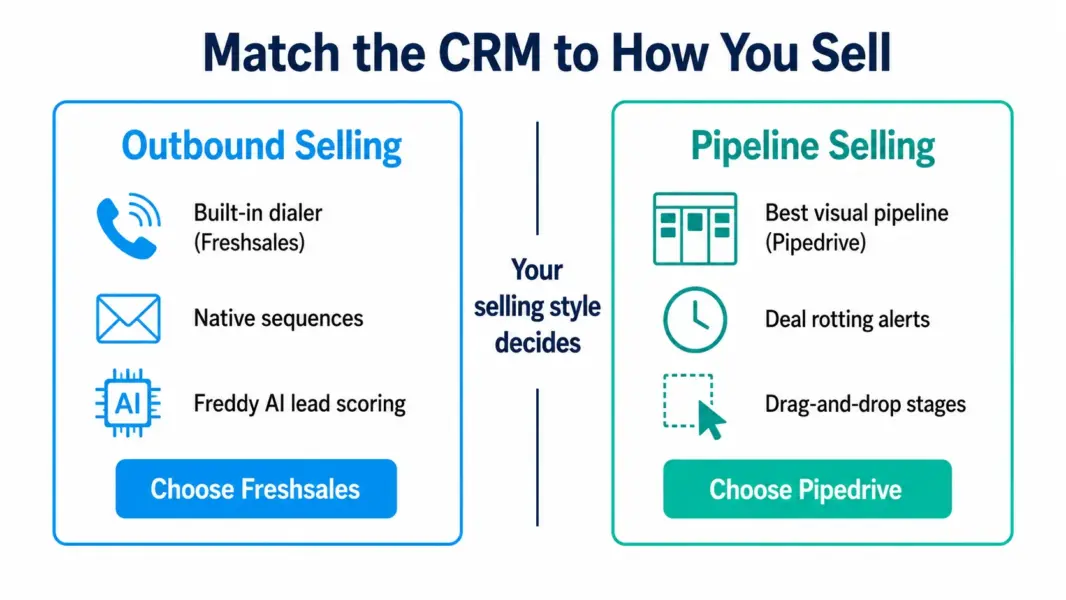
Pipedrive’s identity is the visual pipeline. You open it and see a kanban board of deals arranged by stage, with drag-and-drop to move deals forward. The “deal rotting” feature flags deals that have sat in a stage too long. Everything about Pipedrive assumes your primary workflow is managing deals through a defined process. It does this better than any CRM in the SMB category. For teams whose sales motion is tracking deals through stages, Pipedrive’s focus is its strength.
Freshsales’ identity is the communication hub. Built-in phone dialer, email sequences, and live chat mean outbound teams can call, email, and follow up from inside the CRM without connecting separate tools. Freddy AI scores leads and predicts deal outcomes, directing reps toward the highest-value opportunities. For teams whose sales motion is outbound prospecting with heavy calling and emailing, Freshsales consolidates the tools other CRMs force you to buy separately.
Pricing: Freshsales Has a Free Plan, Pipedrive Does Not
Freshsales undercuts Pipedrive on entry pricing and offers a free plan that Pipedrive lacks entirely.
| Tier | Freshsales | Pipedrive |
|---|---|---|
| Free plan | Up to 3 users, basic CRM | None (14-day free trial only) |
| Entry paid | $9/user (Growth) | $14/user (Essential) |
| Mid tier | $39/user (Pro) | $39/user (Advanced/Growth) |
| Top tier | $59/user (Enterprise) | $79/user (Ultimate) |
| Free trial | Yes (21 days) | Yes (14 days) |
| Starting Price | $0 (free plan) | $14/user |
Freshsales’ free plan for up to 3 users is genuinely usable for a tiny sales team getting started, though it excludes AI features and advanced automation. Pipedrive offers only a 14-day trial before requiring payment. For startups and solopreneurs evaluating their first CRM, Freshsales’ free tier is a real advantage. At the mid tier ($39 per user), both tools reach price parity, and the decision shifts entirely to features and selling style.
Pipeline Management: Pipedrive’s Home Turf
Pipedrive’s visual pipeline is the best in the SMB CRM category. The drag-and-drop kanban board is clean, fast, and purpose-built for tracking deals through stages. The “deal rotting” indicator highlights deals that have been sitting idle too long, prompting action before they go cold. Custom pipelines let teams build stage sequences matching their specific sales process.
Freshsales includes kanban pipeline views and deal management that cover the core needs, but the implementation feels secondary to its communication features. Pipedrive’s pipeline visualization is more refined, more responsive, and has been its primary product focus for over a decade. According to a 2026 review by DecisionCircuit, teams that prioritize pipeline visualization and deal-stage management consistently rate Pipedrive higher than Freshsales for that specific function.
Communication Tools: Freshsales’ Built-In Advantage
Freshsales includes a built-in phone dialer, native email sequencing, and live chat without requiring integrations or add-ons. Outbound sales teams can call prospects, send follow-up sequences, and log every interaction inside the CRM automatically. The phone dialer includes call recording, voicemail drop, and automatic call logging.
Pipedrive requires integrations for phone calling (connecting tools like Aircall or JustCall) and offers email sync rather than native email sequences at the entry tier. Adding calling capability to Pipedrive typically costs $25 to $40 per user per month on top of the CRM subscription, which erases Pipedrive’s base-price advantage for teams that need phone. For outbound-heavy teams making 20-plus calls per day, Freshsales’ built-in dialer saves both money and context-switching overhead.
AI Features: Freshsales’ Freddy AI vs Pipedrive’s AI Assistant
Freshsales’ Freddy AI provides lead scoring, deal predictions, and next-best-action recommendations starting at the Pro tier ($39 per user). The AI genuinely helps outbound teams prioritize which leads to call first and which deals are most likely to close. For teams working large contact lists, this prioritization translates to measurable efficiency gains.
Pipedrive introduced its AI Sales Assistant more recently, offering deal suggestions and performance insights. It is functional but less mature than Freddy AI. Pipedrive’s AI focuses more on pipeline coaching (“this deal has stalled, consider these actions”) rather than predictive scoring across your entire lead database. For AI-driven selling, Freshsales has the edge.
Who Should Choose Which?
| Choose Freshsales If | Choose Pipedrive If |
|---|---|
| Your team makes 20-plus calls per day | Your primary workflow is managing deals through stages |
| You want phone, email, and chat in the CRM | You want the cleanest visual pipeline in CRM |
| You need AI lead scoring on larger contact lists | Your team values simplicity and fast onboarding |
| You want a free plan to start with | You prefer a mature, field-tested sales CRM |
| You use Freshdesk or other Freshworks tools | You want extensive third-party integrations |
| Budget is tight at entry ($9 vs $14) | Your reps have resisted CRMs before (easiest adoption) |
For broader CRM options including marketing-integrated platforms, see our Zoho CRM vs HubSpot comparison and our best free CRM tools guide.
Final Verdict
Pipedrive is the right CRM for pipeline-focused sales teams that manage deals through visual stages and value simplicity above all. It has the best pipeline interface in the category and the highest adoption rate among CRM-skeptical reps. Freshsales is the right CRM for outbound teams that prospect by phone and email, want AI-powered lead prioritization, and prefer built-in communication tools over integrations. Choose by how your team sells: pipeline management picks Pipedrive, outbound communication picks Freshsales.
Last updated: July 6, 2026
Frequently Asked Questions
Is Freshsales cheaper than Pipedrive in 2026?
Yes at entry level. Freshsales starts at $9 per user with a free plan for up to 3 users. Pipedrive starts at $14 per user with no free plan. At the mid tier ($39 per user), both reach price parity. When factoring in Pipedrive’s need for separate phone integrations ($25-40 per user), Freshsales is often significantly cheaper for teams that need calling capability.
Does Freshsales have a free plan?
Yes. Freshsales offers a free plan for up to 3 users with basic contact management, deal tracking, and a mobile app. It excludes AI features, advanced automation, and the built-in phone dialer. The free plan is usable for tiny teams getting started but most growing teams upgrade to the Growth plan at $9 per user within a few months.
Which has better pipeline management?
Pipedrive has the better pipeline management. Its visual kanban board, drag-and-drop deal stages, and “deal rotting” feature are best-in-class for SMB CRMs. Freshsales includes pipeline views that cover core needs, but pipeline visualization is Pipedrive’s primary product focus and it shows in the refinement. Teams whose primary workflow is deal-stage management should choose Pipedrive.
Does Freshsales include a phone dialer?
Yes. Freshsales includes a built-in phone dialer with call recording, voicemail drop, and automatic call logging on paid plans. No integration or additional cost required. Pipedrive requires connecting a third-party calling tool like Aircall or JustCall, typically adding $25-40 per user per month. For outbound teams making heavy call volumes, Freshsales’ built-in dialer is a significant cost and convenience advantage.
Which CRM is easier to learn?
Pipedrive is easier to learn. Its focused interface and visual pipeline can be set up in under an hour, and CRM-skeptical reps adopt it more readily than most alternatives. Freshsales is clean but has more features under the hood (phone, chat, AI, sequences), which creates a slightly steeper learning curve. For teams where adoption is the biggest risk, Pipedrive’s simplicity wins.
Can I migrate from Pipedrive to Freshsales or vice versa?
Yes. Both support CSV import and export. Freshsales has a dedicated migration tool for common CRM switches. A standard migration for a small team (contacts, companies, deals, activities) takes 1-2 days. Rebuilding custom fields, automation, and team processes takes longer. Budget a full week for a clean migration including team retraining.
Which is better for a startup choosing its first CRM?
Freshsales is better for startups because it offers a free plan, lower entry pricing ($9 vs $14), and built-in communication tools that reduce the need for separate subscriptions. Pipedrive is better for startups that have a clear pipeline-focused sales process and want the simplest possible CRM with the fastest adoption. For more startup-specific guidance, see our best CRM for startups guide.
Related CRM Comparisons and Guides