The first sign you’ve outgrown your Zapier plan usually isn’t the invoice. It’s a customer emailing to ask why they never received their receipt, and you discovering a Zap hit its task ceiling on the 19th and quietly stopped running for eleven days.
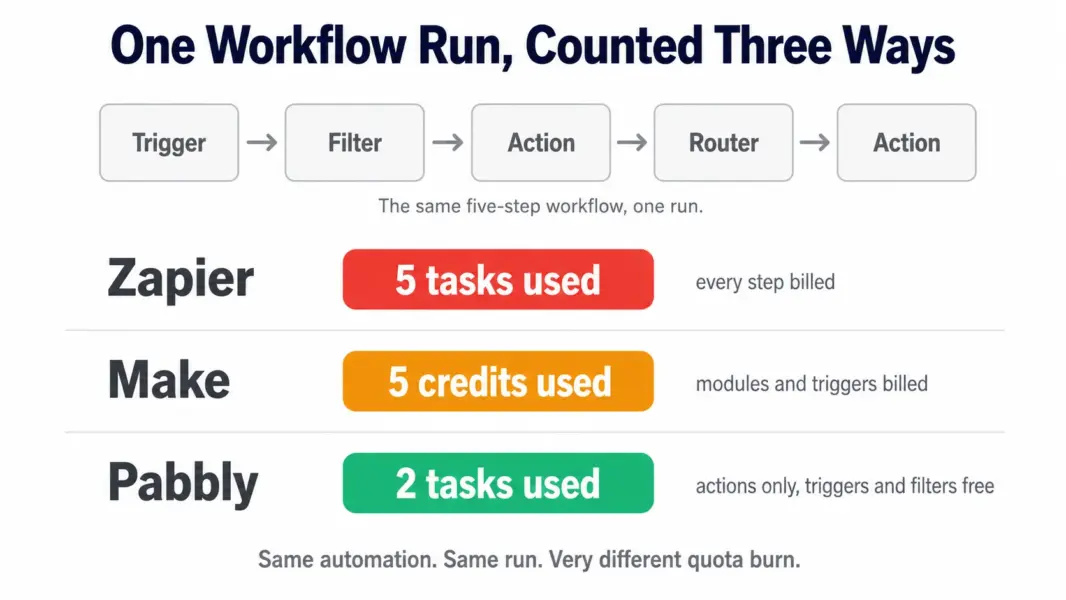
That happens because of how Zapier counts. Every action step in every workflow consumes a task on every single run. A five-step Zap firing 200 times a month burns 1,000 tasks. Add a filter, a formatter, and a second destination app, and your quota disappears far faster than your business volume grows.
The tools below either count differently, charge less for identical work, or run on infrastructure you control outright. This guide covers the best Zapier alternatives in 2026, comparing how each one bills, what it genuinely does better, where it falls short, and which team it actually suits.
Why Teams Leave Zapier: Three Real Reasons
Understanding why people switch tells you which alternative will actually help, because the three drivers point to different tools.
Task counting burns quota faster than expected. Zapier bills per action step per run. That means workflow complexity, not business volume, determines your bill. A team automating five simple things pays less than a team automating one complicated thing, even if the second team processes fewer records.
Costs scale steeply with volume. Zapier’s entry plan covers 750 tasks for roughly $20 per month. Moving to 2,000 tasks pushes toward $50, and 10,000 tasks lands near $150. For a growing operation, automation becomes a line item somebody starts questioning.
Branching logic hits a ceiling. Zapier added Paths, but the editor remains fundamentally linear. Workflows needing parallel routes, loops through arrays, or fallback logic on failure require chaining multiple Zaps, which fragments visibility and makes debugging genuinely painful at 3am.
How We Evaluated These Zapier Alternatives
Each tool was assessed on four criteria that determine real-world fit rather than feature-list size.
Billing model, not headline price. Two platforms with identical monthly costs can differ threefold in effective value depending on what counts as a billable unit. We compared how each one meters the same workflow shape.
Workflow complexity ceiling. Whether the platform handles conditional branching, loops, data transformation, and error handling natively, or forces workarounds that create maintenance debt.
Who can realistically build in it. A tool only a developer can operate isn’t a Zapier replacement for a marketing team, regardless of how capable it is.
Integration coverage against real stacks. Raw app counts matter less than whether your specific tools are supported natively rather than through generic webhooks.
Pricing was verified against official vendor pages in July 2026.
Zapier Alternatives Compared: Pricing and Billing Model
| Tool | Entry Price | How It Bills | Best For |
|---|---|---|---|
| Make | $9/mo (10,000 credits) | Per module run, including triggers | Complex branching workflows on a budget |
| Pabbly Connect | $16/mo (10,000 tasks) | Action steps only, triggers free | Lowest total cost and lifetime licences |
| n8n | Free self-hosted | Per execution, unlimited if self-hosted | Developers wanting full control |
| Power Automate | $15/user/mo | Per user | Microsoft 365 organisations |
| IFTTT | $3.49/mo (Pro) | Per applet | Simple personal and smart home automations |
| Zapier | $19.99/mo (750 tasks) | Every action step, every run | Non-technical teams needing 8,000 apps |
Make: The Strongest All-Round Zapier Alternative
Make, formerly Integromat, replaces Zapier’s linear step list with a visual canvas where the entire workflow appears as connected modules. That visual model is what makes complex automation manageable instead of fragile, because you can see every path a piece of data might take.
Standout Features
Routers for parallel paths. Split a workflow into multiple simultaneous branches, each with its own filter conditions. A new lead can trigger a CRM record, a Slack alert to the right regional channel, and an email sequence, all from one scenario rather than three separate Zaps.
Iterators and aggregators. Iterators loop through arrays item by item, processing each line of an order or each row of a spreadsheet individually. Aggregators recombine those results afterwards. Zapier has no clean equivalent, which is why line-item processing is a common reason teams switch.
Error handlers. Attach fallback routes to any module so a failed API call retries, logs, or notifies someone instead of silently breaking the chain. This is the feature that turns automation from something you monitor into something you trust.
AI Agents and AI Toolkit included. Available on every paid plan rather than sold as separate add-ons, which is a meaningful difference from Zapier’s approach of charging separately for AI capability.
Pricing
Free plan includes 1,000 credits monthly with unlimited steps per scenario. Core is $9 per month for 10,000 credits. Pro is $16 and Teams is $29, with higher operation limits and additional features at each tier.
What Reviewers Say
Make is consistently praised for power and value, with reviewers describing the visual canvas as the reason they can maintain workflows that would be unmanageable elsewhere. The recurring criticism is the learning curve, with multiple reviewers noting that non-technical colleagues struggled to build anything without help. Credit consumption is the second theme, since triggers, polling checks, and failed runs all draw down quota, making forecasting harder than Zapier’s success-only model.
Pros and Cons
Pros: genuine branching and looping, error handling, roughly a third of Zapier’s cost at comparable volume, AI included, generous free tier.
Cons: steeper learning curve, credits consumed by triggers and failures, fewer integrations than Zapier, harder to forecast monthly usage.
Who It’s For
Choose Make if your workflows need conditional paths, someone on the team thinks comfortably in flowcharts, and volume has made Zapier a noticeable cost. Skip it if the person building automations is non-technical and has no appetite for a learning curve. Full breakdown in our Zapier vs Make comparison.
Pabbly Connect: Lowest Cost With a Lifetime Option
Pabbly Connect’s advantage is arithmetic rather than features. It counts only action steps as tasks. Triggers are free. Filters are free. Routers are free. Internal formatting steps are free. A workflow Zapier bills as five tasks per run might cost Pabbly two.
Standout Features
Action-only task counting. The effective value of a 10,000-task quota is roughly two to three times what the same number means on Zapier, depending on how many non-action steps your workflows contain.
Lifetime licences. One-time payments starting around $249 for 3,000 tasks monthly, $499 for 12,000, and higher tiers beyond that. Pabbly has honoured these since 2018, and for a stable automation footprint the payback against a subscription arrives within roughly eight to twelve months.
Premium apps on every plan. Integrations that competitors reserve for higher tiers, including Salesforce and PayPal, are available at entry level.
Unlimited workflows and team members. No per-workflow or per-seat charges on any paid plan, so adding people or automations doesn’t change your bill.
Pricing
Free plan includes 100 tasks monthly with 5 workflows. Standard is $16 per month for 10,000 tasks, with higher tiers scaling from there. Lifetime licences start at $249. Over 2,000 app integrations are supported.
What Reviewers Say
Reviewers consistently cite cost savings as the primary reason for choosing and staying with Pabbly, with several reporting savings above $1,000 annually versus Zapier. The interface draws the most criticism, described as dated and occasionally confusing, particularly in the newer workflow builder. Support is the second recurring complaint, with roughly 24-hour email response times and no live chat, which reviewers flag as a genuine risk when an automation breaks during a launch.
Pros and Cons
Pros: lowest effective cost in the category, lifetime licence option, unlimited workflows and users, premium apps on all plans, SOC 2 and ISO 27001 certified.
Cons: dated interface, no true in-workflow branching, email-only support with 24-hour responses, documentation frequently lags UI updates, no sandbox for testing.
Who It’s For
Choose Pabbly if your workflows run largely in a straight line, budget is the deciding factor, and you’d rather pay once than subscribe indefinitely. Skip it if you need complex branching or fast support during business-critical periods. See our Pabbly Connect review for the full assessment.
n8n: Best Open Source Zapier Alternative
n8n is source-available workflow automation you host on your own server. Self-hosted, it costs nothing and imposes no execution limits, which changes the economics of high-volume automation entirely.
Standout Features
Unlimited self-hosted executions. Volume stops being a pricing variable. A workflow running 500,000 times monthly costs the same as one running a hundred times, which no metered platform can match.
Custom code in any node. Drop JavaScript or Python directly into a workflow step for data transformation, custom logic, or API calls that no connector supports.
Full data control. Your data never leaves infrastructure you own, which resolves compliance questions in regulated industries that block cloud automation platforms outright.
Native AI workflow nodes. Built-in support for LLM chaining, vector stores, and AI agent patterns, positioning n8n well for teams building AI-driven internal tools.
Pricing
Free and unlimited when self-hosted under the fair-code licence. Managed cloud hosting starts around $24 per month for teams that prefer not to run infrastructure themselves.
What Reviewers Say
Technical reviewers rate n8n highly for flexibility and the absence of usage anxiety, with the self-hosted model repeatedly described as liberating for high-volume use. Criticism centres on the operational burden: you own deployment, updates, backups, monitoring, and uptime. Reviewers also consistently note it isn’t a tool you hand to a marketing team, since the node editor assumes comfort with APIs, JSON, and data structures.
Pros and Cons
Pros: free and unlimited self-hosted, complete data control, custom code anywhere, strong AI workflow support, active open source community.
Cons: requires engineering capacity, you own uptime and maintenance, steeper learning curve than any other option here, smaller connector library than Zapier.
Who It’s For
Choose n8n if you have engineering capacity, run high automation volume, or data residency is non-negotiable. Skip it if nobody on the team wants to own a server.
Microsoft Power Automate: Best for Microsoft 365 Teams
Power Automate’s value is entirely contextual. If your organisation already runs Microsoft 365, it connects Outlook, Teams, SharePoint, OneDrive, Excel, and Dynamics 365 natively with no third-party middleware and no additional vendor relationship to manage.
Standout Features
Deep Microsoft integration. SharePoint list operations, Teams approval flows, and Excel table manipulation work at a depth generic connectors never reach.
Desktop flows for RPA. Automate legacy Windows applications that expose no API at all by recording and replaying UI interactions. Nothing else in this comparison offers this.
Built-in approval workflows. Route requests through named approvers with tracking and audit trails, which suits internal process automation rather than app-to-app data movement.
Enterprise governance. Data loss prevention policies, environment separation, and admin controls that satisfy IT departments in larger organisations.
Pricing
Roughly $15 per user per month for the standard plan. Some Microsoft 365 licences already include limited Power Automate capability, so audit your existing entitlements before purchasing seats.
What Reviewers Say
Reviewers inside Microsoft-centric organisations rate it highly for internal process automation and note that the licensing often costs less than expected once existing entitlements are counted. The consistent criticism is interface complexity relative to Zapier, confusing licensing tiers, and noticeably weaker connectors outside the Microsoft ecosystem.
Pros and Cons
Pros: unmatched Microsoft 365 depth, desktop RPA capability, enterprise governance, often partially covered by existing licences.
Cons: complex interface, confusing licensing, weak non-Microsoft connectors, pointless outside the Microsoft stack.
Who It’s For
Choose Power Automate if Microsoft 365 is effectively your company’s operating system. Skip it if it isn’t, because there’s no other reason to consider it.
IFTTT: Simplest Option for Personal Automations
IFTTT handles single-trigger, single-action connections between consumer apps and smart home devices. Save Instagram posts to Dropbox, log Fitbit data to Google Sheets, turn on lights when you arrive home.
Standout Features
Consumer and smart home coverage. Connectors for devices and services that business automation platforms ignore entirely, including lighting, thermostats, wearables, and voice assistants.
Pre-built applets. Thousands of ready-made automations you activate in one tap rather than building from scratch.
Pricing
Free tier with limited applets. Pro is $3.49 per month. Pro+ runs around $14.99 for unlimited applets and multi-action support.
Pros and Cons
Pros: cheapest option available, simplest interface, unmatched smart home and consumer app coverage.
Cons: not a business automation platform, thin multi-step logic, no meaningful error handling, limited business app coverage.
Who It’s For
Choose IFTTT if your automations are personal, simple, and mostly involve consumer or smart home services. Skip it if anything you’re automating touches business operations.
When Staying on Zapier Is the Right Decision
Switching isn’t automatically correct, and Zapier still wins decisively on three fronts.
App coverage. Zapier supports 8,000-plus integrations versus roughly 2,000 each for Make and Pabbly. If your stack includes a regional payment processor, a vertical-specific CRM, or a niche scheduling tool, Zapier is frequently the only platform supporting it natively.
Adoption across non-technical teams. Zapier’s plain-language editor means a marketing manager builds a working automation in ten minutes without asking anyone. That matters more than pricing if the realistic alternative is nobody building automations at all.
Predictable billing. Zapier charges only for successful action steps. Triggers, filters, and failed runs don’t count. Make’s credits are consumed by all three, which can make Zapier easier to forecast even when it’s more expensive per unit.
How to Migrate Off Zapier Without Breaking Things
No automation platform imports workflows from a competitor’s format. Every workflow gets rebuilt manually, so plan the move rather than improvising it.
Audit first. List every active Zap, how often it runs, and what breaks if it stops. Most teams discover a third of their Zaps are dormant or redundant and never need rebuilding at all.
Rebuild in priority order. Start with the highest-volume workflows, since those deliver the largest share of your savings immediately.
Run both platforms in parallel briefly. Keep Zapier active for one billing cycle while the new workflows prove themselves. Paying twice for a month is far cheaper than discovering a silent failure after cancelling.
Budget realistically. Around 20 active workflows takes three to five days of focused work. At Make or Pabbly pricing, that effort typically pays back within two to three months. Compare the full landscape in our best automation tools guide.
How to Choose the Right Zapier Alternative
Match the tool to the reason you’re leaving. If complexity is the problem and Zapier can’t express your logic cleanly, choose Make. If cost is the problem and your workflows are linear, choose Pabbly, and consider the lifetime licence if your automation footprint is stable. If volume or data control is the problem and you have engineering capacity, choose n8n. If you’re a Microsoft organisation automating internal processes, choose Power Automate. If your automations are personal rather than commercial, choose IFTTT.
And if none of those describe you, staying on Zapier is a legitimate answer rather than a failure to optimise.
Last updated: July 28, 2026
Frequently Asked Questions
What is the cheapest Zapier alternative in 2026?
Pabbly Connect at $16 per month for 10,000 tasks, with lifetime licences from $249 that remove recurring cost entirely. Make Core is $9 per month for 10,000 credits. n8n is free when self-hosted with no execution limits. IFTTT Pro is $3.49 per month for simple personal automations.
Is there a free Zapier alternative?
Yes. n8n is free and unlimited when self-hosted on your own server. Make offers a free plan with 1,000 credits monthly and unlimited steps per scenario. Pabbly Connect includes 100 free tasks monthly. Zapier’s own free plan covers 100 tasks with two-step workflows only.
What is the best open source Zapier alternative?
n8n. It’s source-available, self-hostable at no cost, imposes no execution limits, and supports custom JavaScript and Python inside any node. The trade-off is that you handle deployment, updates, and uptime yourself, so it suits teams with engineering capacity.
Why is Make cheaper than Zapier?
Different billing models and volume tiers. Make Core provides 10,000 credits for $9 while Zapier’s comparable entry plan provides 750 tasks for around $20. Note that Make consumes credits on triggers, polling, and failed runs whereas Zapier only bills successful action steps, so compare against your actual workflow shape rather than headline numbers.
Can I migrate my Zaps to another platform?
Not automatically. No automation tool imports workflows from a competitor’s format, so every workflow gets rebuilt manually. Budget three to five days for around 20 active workflows, and run both platforms in parallel for one billing cycle before cancelling to catch silent failures.
Which Zapier alternative handles complex workflows best?
Make. Its visual canvas supports routers for parallel paths, iterators for looping through arrays, aggregators for recombining data, and error handlers for fallback logic. Zapier added Paths, but the linear editor still constrains genuinely complex branching.
Should I use Power Automate instead of Zapier?
Only if your organisation runs on Microsoft 365. Power Automate integrates deeply with Outlook, Teams, SharePoint, and Dynamics 365 and adds desktop RPA for legacy Windows apps. Outside the Microsoft ecosystem its connector coverage is weaker than Zapier or Make.
How does Zapier task counting actually work?
Zapier bills one task for every successful action step in every run. Triggers, filters, and failed runs are not billed. A five-action workflow running 200 times consumes 1,000 tasks. Pabbly counts only actions and treats triggers, filters, and routers as free, which is why the same workflow costs less there.
Is Pabbly Connect’s lifetime deal legitimate?
Yes. Pabbly has offered and honoured lifetime licences since 2018, and the parent company has operated for over 17 years. Existing licence holders report continued access to updates. Plans start around $249 for 3,000 tasks monthly, typically paying back against a subscription within eight to twelve months.
Related Automation Guides