
Pros
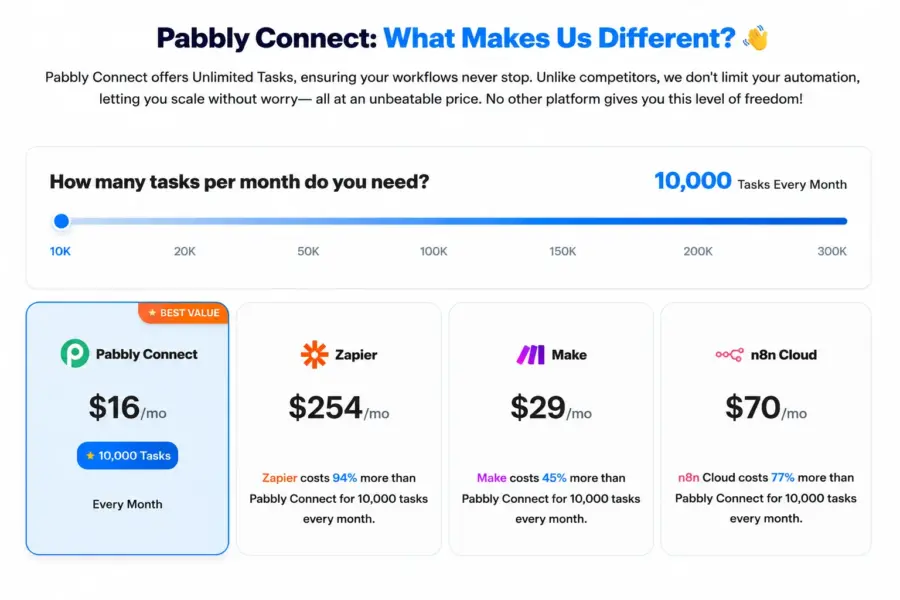
- 10,000 tasks per month for $16 which is roughly 90% cheaper than Zapier for the same volume
- Only action steps count as tasks so triggers and filters are free giving you 2-3x more real executions
- Unlimited workflows and unlimited team members on every paid plan
- Lifetime deals from $249 one-time payment eliminate recurring subscription costs entirely
- 2,000 plus app integrations including premium apps like Salesforce and PayPal on all plans
- SOC 2 Type 2 and ISO 27001 certified covering security and compliance baselines
- Free plan with 100 tasks per month and 5 workflows to test before committing
Cons
- No monthly billing option at all so you commit to annual or lifetime upfront
- Interface feels dated compared to Zapier and Make with confusing UI quirks in the new builder
- Support response times average 24 hours with no live chat and no phone support
- No true branching logic inside a single workflow so complex if-then-else trees require workarounds
- Documentation often lags behind UI updates with outdated screenshots in tutorials
- No sandbox or test mode so debugging requires creating real data
- Silent failures reported by users where automations stop running without error notifications
I’ll save you some math. Zapier charges around $150 per month for 10,000 tasks. Pabbly Connect charges $16 for the same number. And because Pabbly doesn’t count triggers or internal steps like filters as tasks, your 10,000 tasks stretch roughly 2 to 3 times further than Zapier’s 10,000. That’s the pitch. It’s also true.
But cheaper raises fair questions. Can it actually handle your workflows? Will things break at 3 AM with nobody to call? Is the interface usable or will you spend the money you saved in extra setup time? I tested it across 15 active workflows connecting forms, CRMs, email tools, and Slack to find out.
Starting Price: $16/mo (annual) | Free Plan: Yes (100 tasks/mo) | Free Trial: No (free plan serves as trial)
How Much Does Pabbly Connect Cost?
There’s no monthly billing. You pay annually or buy a lifetime deal. That’s the first thing to know because it changes how you evaluate the price.
Standard runs $16 per month billed annually ($192 per year) and gives you 10,000 tasks. Pro bumps that to 20,000 tasks for $33 per month. Ultimate hits 50,000 tasks at $67 per month. All plans include unlimited workflows, unlimited team members, and access to every integration in the library.
The lifetime deals are the real draw. Pay $249 once and get 3,000 tasks per month permanently. The $499 tier gives you 12,000 tasks. The $699 tier covers 50,000. According to users on Reddit and Capterra, most small business owners grab the lifetime deal and break even within 6 to 8 months compared to what they’d spend on Zapier.
Why the Task Count Is Actually 2-3x Better Than It Looks
Here’s the detail that changes the comparison entirely. Zapier and Make count every step in your workflow as a task. Trigger fires? That’s a task. Filter checks a condition? Task. Router splits the flow? Task.
Pabbly only counts action steps. The trigger that starts everything? Free. The filter that checks if the lead is from California? Free. The router that splits the flow into two paths? Also free. You only pay for the steps that actually do something in another app, like creating a contact in your CRM or sending a Slack message.
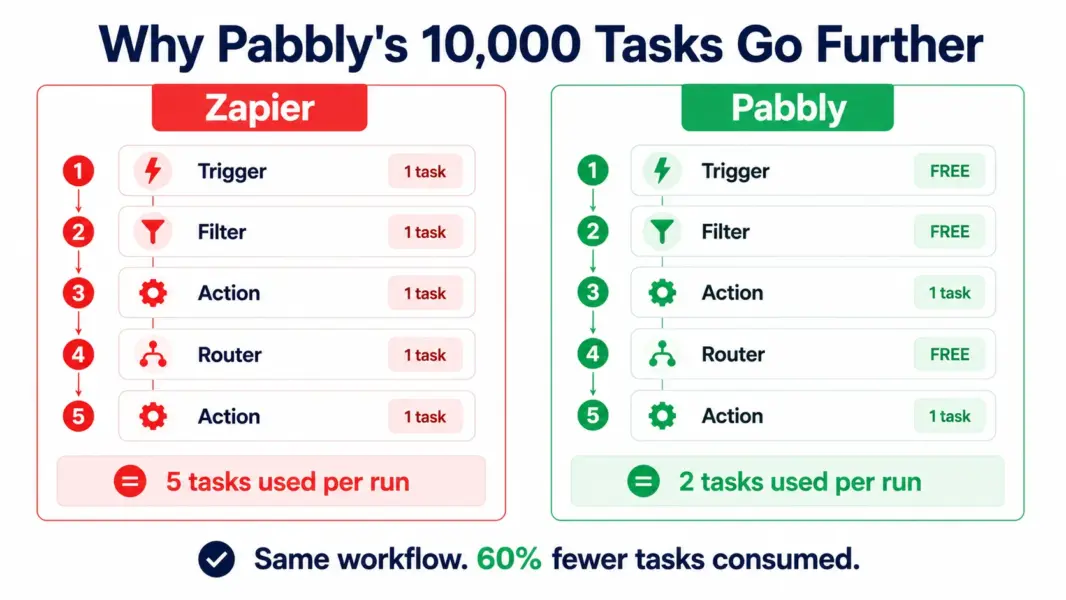
In practice, a 5-step Zapier workflow uses 5 tasks per run. The same workflow in Pabbly might use 2 or 3. That means your 10,000 Pabbly tasks cover the same ground as roughly 20,000 to 30,000 Zapier tasks. According to Pabbly’s own comparison data, this translates to roughly 91% savings at the 10,000-task level.
What Works Well After 15 Workflows
Straight-line automations run reliably. Form submission goes to Google Sheets, fires a Slack notification, adds a contact to Mailchimp. That kind of workflow just works. I’ve had multi-step automations running for months without a hiccup.
The formatter tools deserve a specific mention. Date formatting, text manipulation, number parsing. These handle the messy data cleanup that otherwise eats an hour of manual work every day. They’re free internal steps too, so they don’t touch your task count.
2,000 plus integrations cover the apps most small businesses actually use. Shopify, WooCommerce, Stripe, PayPal, HubSpot, Mailchimp, Google Sheets, Slack, Gmail, WhatsApp. Premium apps that Zapier gates behind higher tiers, like Salesforce, are included on every Pabbly plan.
Where It Frustrates You
No branching logic inside a single workflow. You can’t build if-then-else trees the way Make lets you. Need a workflow that goes left for leads over $10K and right for everyone else? You’ll need two separate workflows chained together. It works, but debugging across chained workflows when something breaks at 3 AM is not fun.
The interface needs work. Zapier and Make invested heavily in visual workflow builders that feel intuitive. Pabbly’s builder is functional but dated. Setting up a webhook for apps like Mailchimp sometimes requires manual configuration that competitors handle automatically. According to Capterra reviewers, the learning curve is steeper than Zapier’s, though most users report it gets comfortable after building 3 to 4 workflows.
Support averages a 24-hour response time. No live chat. No phone. If an automation breaks during a product launch and you need it fixed in 30 minutes, Pabbly can’t help you. The Facebook community fills some of this gap with peer support, but it’s not the same as a support agent with access to your account.
Pabbly vs Zapier vs Make: Quick Take
Zapier wins on polish, integrations (7,000 vs 2,000), and reliability for mission-critical workflows. You pay 5 to 10 times more for that polish.
Make wins on visual complexity. Branching logic, parallel paths, and nested conditionals are native. The learning curve is steeper but the ceiling is higher. Pricing sits between Pabbly and Zapier.
Pabbly wins on cost. Full stop. If your app stack is in their library and your workflows are linear, there’s no financial argument for paying Zapier rates. One user on Reddit put it simply: “I’ve automated 15,000 tasks on Pabbly’s lifetime plan and saved over $1,200 compared to Zapier in 18 months.”
Who Gets the Most From Pabbly Connect
Bootstrapped founders and solopreneurs connecting 5 to 15 apps across their stack. Small ecommerce stores syncing Shopify orders to email, CRM, and accounting. Freelancers automating client onboarding across Typeform, Google Sheets, and invoicing tools. Agencies managing 10 to 30 active workflows across client accounts without worrying about per-workflow fees.
Who Should Spend More on Zapier or Make
Teams running mission-critical automations where downtime costs real money. Anyone needing complex branching logic with parallel paths. Organizations requiring SLA-backed support and enterprise compliance beyond SOC 2. Teams with 200 plus integrations that need Zapier’s 7,000-app library. For more on how automation tools fit into your SaaS stack, see our productivity tools guide.
Last updated: July 21, 2026
Frequently Asked Questions
Is Pabbly Connect really cheaper than Zapier?
Yes. Pabbly charges $16 per month for 10,000 tasks where Zapier charges roughly $150 for the same count. Pabbly also doesn’t count triggers and filters as tasks, so your 10,000 tasks cover 2-3x more actual workflow runs. Lifetime deals from $249 one-time eliminate monthly costs entirely.
Does Pabbly Connect have a free plan?
Yes. The free plan includes 100 tasks per month and 5 workflows with access to all 2,000 plus integrations. It’s enough to test whether Pabbly fits your workflow before committing to a paid plan or lifetime deal. There’s no separate free trial because the free plan serves that purpose.
Is the Pabbly lifetime deal legit?
Yes. Pabbly has offered lifetime deals since 2018 and continues to honor them. The company (Magnet Brains) has been operating for 17 plus years. Users on Capterra and Reddit consistently confirm their lifetime licenses still work with all updates included. Pricing starts at $249 for 3,000 tasks per month.
Can Pabbly handle complex automations?
Linear multi-step automations work well. Complex branching logic with nested if-then-else conditions requires workarounds using chained workflows, which adds management overhead. If you need Make-level visual logic with parallel branches, Pabbly will frustrate you. For straightforward trigger-filter-action flows it’s solid.
How is Pabbly Connect support?
Support is email-only with an average 24-hour response time. No live chat or phone support. The Facebook community provides peer support. Multiple reviewers on G2 and Capterra flag slow support as the biggest downside. If you need immediate help during business-critical moments, this is a real limitation.
What apps does Pabbly Connect integrate with?
Over 2,000 apps including Shopify, WooCommerce, Gmail, Google Sheets, Slack, HubSpot, Mailchimp, Stripe, PayPal, Salesforce, and WhatsApp. Premium apps like Salesforce are included on all plans, not gated behind higher tiers. If your app isn’t listed, the API module lets you connect any app with a REST API.
Related Guides
Pabbly Connect does 90% of what Zapier does at roughly 20% of the cost. That math is the entire pitch and it holds up. A bootstrapped founder running 30 active workflows connecting Shopify to email to CRM will save $1,200 or more per year compared to Zapier, and the lifetime deal option pushes that even further. You pay for the savings with a clunkier interface, slower support, and no branching logic for complex automations. If your workflows follow a straight line (trigger, filter, action, done) Pabbly handles them reliably. If you need decision trees, parallel branches, or enterprise-grade support with SLAs, spend more on Zapier or Make.
