
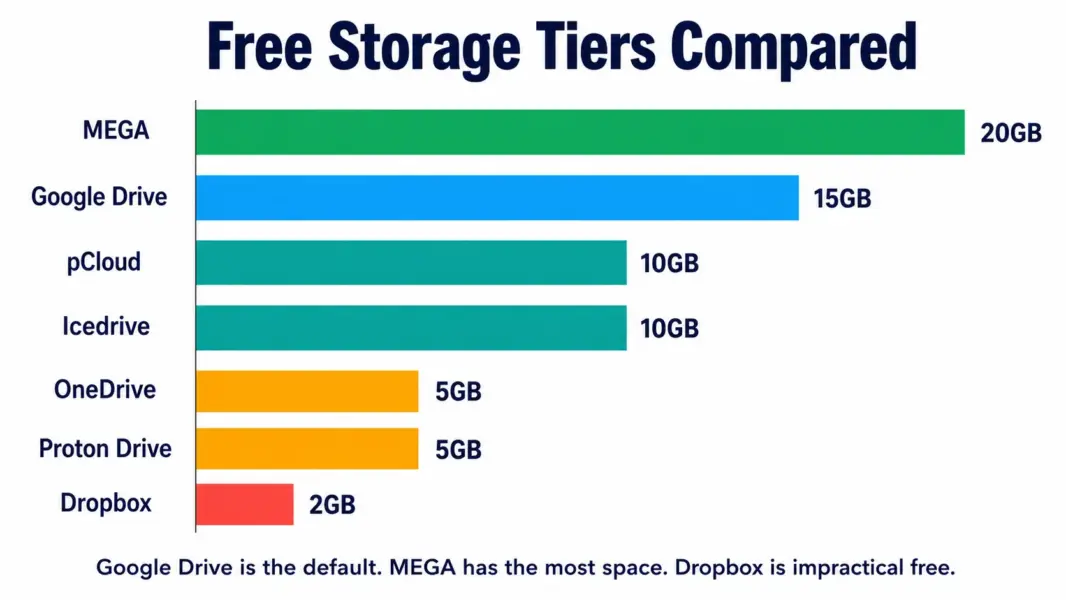
Before you compare free gigabytes, ask yourself one question: which apps do you already use every day? If you live in Gmail and Google Docs, Google Drive is the obvious answer because everything connects. If you run Windows with Microsoft Office, OneDrive is already on your computer. The best free cloud storage is not the one with the most space — it is the one that fits the tools you already work with. This guide matches 7 services to the ecosystems and priorities that actually matter.
Google Drive: 15GB Free, Best for Most People
Google Drive offers 15GB free, the largest permanent free tier from any mainstream cloud storage provider. It integrates directly with Gmail, Google Docs, Sheets, Slides, and Google Photos. Over 3 billion people use Google Drive. If you have a Gmail account, you already have Google Drive storage.
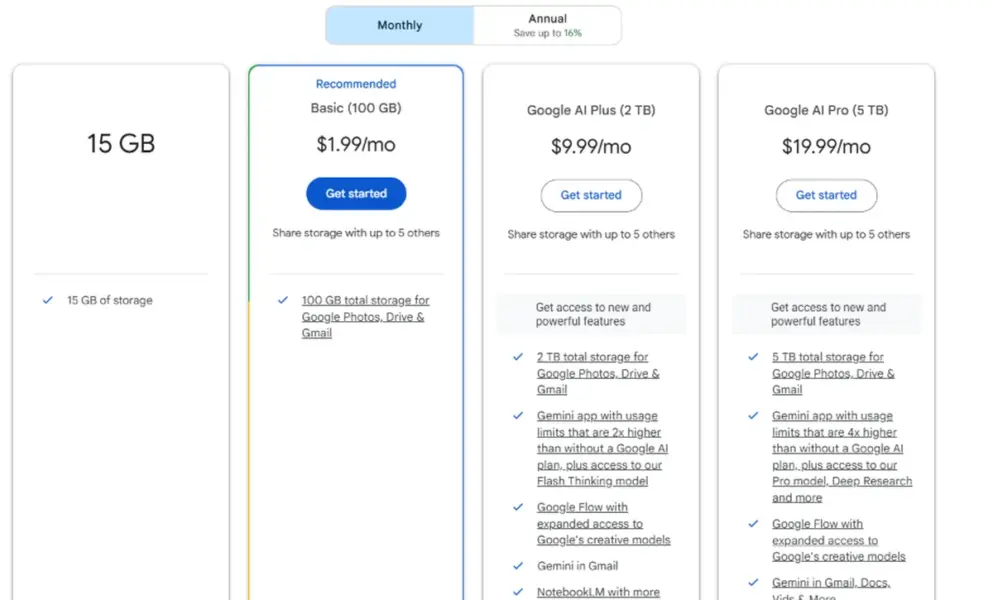
The catch most guides underplay: the 15GB is shared across Google Drive, Gmail, and Google Photos. A full Gmail inbox and backed-up phone photos can quietly consume most of that space. Check your actual available storage at one.google.com/storage before assuming you have 15GB free. According to Toolradar, this shared pool is the most common surprise for Google Drive free users who back up photos from their phone and wonder where the storage went.
If Google Drive fills up, Google One starts at $1.99 per month for 100GB, which is the best value paid upgrade in cloud storage.
MEGA: 20GB Permanent Free, Biggest Allocation
MEGA offers 20GB of permanent free storage, the largest permanent free tier available from any provider. End-to-end encryption is included by default, meaning MEGA cannot read your files. The platform supports desktop, mobile, and web access with file versioning and secure link sharing.
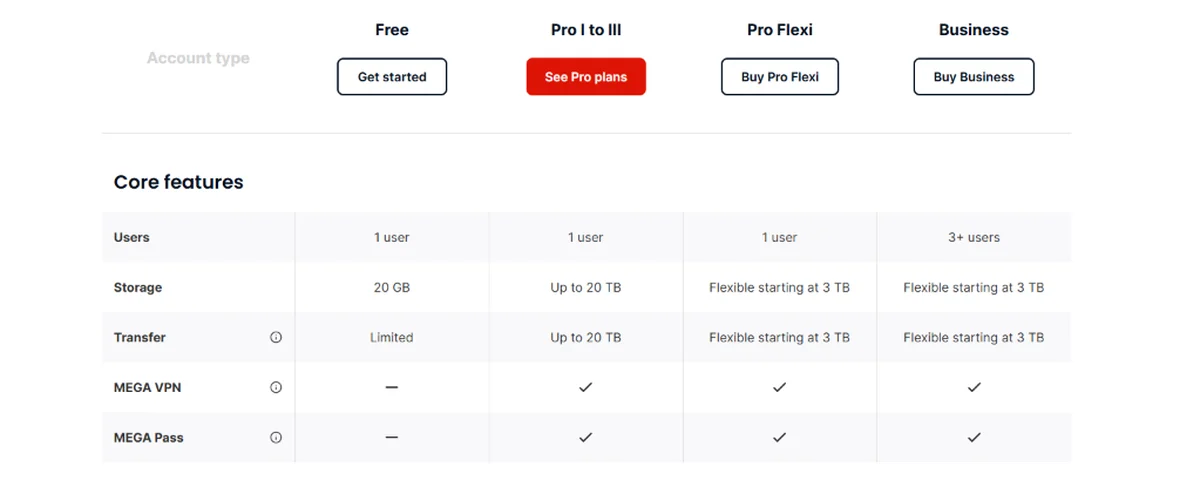
The important distinction: MEGA shows “50GB free” at signup, but 30GB of that is a 30-day promotional bonus that expires. The permanent allocation is 20GB. Monthly download bandwidth is also capped on free accounts, which can be restrictive if you share large files frequently. For personal file storage with privacy, MEGA delivers the most free space with encryption included. For collaboration and document editing, Google Drive is significantly stronger.
OneDrive: 5GB Free, Pre-Installed on Windows
OneDrive gives 5GB free and comes pre-installed on Windows 10 and 11. It integrates deeply with File Explorer, Word, Excel, and PowerPoint. For anyone already using Microsoft Office, OneDrive is the most seamless cloud storage option because files save to the cloud automatically from the apps you already use.
The free 5GB is modest compared to Google Drive’s 15GB or MEGA’s 20GB. The real value case for OneDrive is the Microsoft 365 subscription at $6.99 per month, which includes 1TB of cloud storage plus the full Office suite. For Microsoft 365 subscribers, OneDrive is already paid for and functionally unlimited. As a standalone free service, 5GB is below average in 2026.
Proton Drive: 5GB Free, End-to-End Encrypted
Proton Drive gives 5GB free with end-to-end encryption, meaning Proton cannot access your files. Based in Switzerland under strict privacy laws, Proton integrates with Proton Mail, Proton VPN, and Proton Pass. For users whose primary concern is privacy rather than storage volume or collaboration features, Proton Drive is the strongest free option.
The tradeoff is fewer collaboration features than Google Drive or OneDrive. You cannot co-edit documents in real time through Proton Drive. The service is file storage and sharing, not a productivity suite. For privacy-first personal file storage, Proton is the right choice. For team collaboration, Google Drive or OneDrive serve better.
pCloud and Icedrive: 10GB Free, Affordable Upgrades
pCloud offers 10GB free with a clean interface and the option to buy lifetime storage plans (a one-time purchase instead of monthly subscription). Icedrive also offers 10GB free with one of the most polished desktop and mobile interfaces in cloud storage. Both serve as practical middle-ground options between Google Drive’s 15GB and OneDrive’s 5GB.
pCloud’s lifetime plans (starting around $199 for 500GB, one-time purchase) are uniquely cost-effective for users who want cloud storage without ongoing subscription costs. Over 5 years, a lifetime plan costs significantly less than Google One or OneDrive subscriptions. For budget-conscious long-term storage, pCloud’s lifetime model is the most cost-effective option available.
Dropbox: 2GB Free, Not Practical in 2026
Dropbox Basic includes 2GB free. That number has not changed in years and is the smallest permanent free tier in this comparison. Dropbox’s strength is sync reliability: block-level sync uploads only changed portions of files, making it the fastest sync engine available. But that strength only matters on paid plans. According to Toolradar, Dropbox Basic is useful for testing the desktop client but is not a practical primary free storage option. Dropbox’s value is in paid plans ($11.99 per month for 2TB), not the free tier.
How to Choose: Match Your Ecosystem
If you use Gmail and Google Docs: Google Drive. 15GB free, integrated with everything you already use. If you use Windows and Microsoft Office: OneDrive. Pre-installed, integrated with Office, and included with Microsoft 365 subscriptions. If privacy and encryption matter most: Proton Drive. 5GB free, end-to-end encrypted, Swiss privacy laws. If you want the most free space: MEGA. 20GB permanent, encrypted by default. If you want lifetime pricing instead of subscriptions: pCloud. 10GB free, lifetime plans from $199. If you need the best sync engine for large files: Dropbox paid plans (the free 2GB is too limited).
Need more than free?
Google One starts at $1.99/mo for 100GB. pCloud offers lifetime plans from $199.
Last updated: July 25, 2026
Frequently Asked Questions
What is the best free cloud storage in 2026?
Google Drive offers 15GB free and is the best choice for most people due to its integration with Gmail, Docs, and Android. MEGA offers 20GB free with encryption for users prioritizing privacy and maximum free space. The right choice depends on your ecosystem, not which number is biggest.
How much free cloud storage does Google Drive give?
Google Drive offers 15GB free, but this is shared across Google Drive, Gmail, and Google Photos. A full Gmail inbox or photo backup can consume most of that space. Check your actual available storage at one.google.com/storage. Google One upgrades start at $1.99 per month for 100GB.
Is MEGA really 50GB free?
No. MEGA shows 50GB at signup but 30GB is a 30-day promotional bonus that expires. The permanent free allocation is 20GB, which is still the largest permanent free tier from any provider. MEGA includes end-to-end encryption on all plans including free.
Which free cloud storage is best for privacy?
Proton Drive is the best free cloud storage for privacy. It offers 5GB free with end-to-end encryption, is based in Switzerland under strict privacy laws, and integrates with Proton Mail and VPN. MEGA also includes encryption by default with 20GB free. Google Drive, OneDrive, and Dropbox do not offer end-to-end encryption on free plans.
Is Dropbox free tier enough in 2026?
No. Dropbox’s 2GB free tier is too small for practical use. A handful of photos or a few documents exhaust it. Dropbox’s value is in paid plans ($11.99 per month for 2TB). For free cloud storage, Google Drive (15GB) or MEGA (20GB) are significantly more practical.
Can I use multiple free cloud storage services?
Yes. Using Google Drive (15GB) plus MEGA (20GB) plus OneDrive (5GB) gives you 40GB of free cloud storage across three services. Tools like Koofr can manage multiple cloud accounts from one interface. The tradeoff is managing files across multiple platforms, which adds organizational overhead.
Related Guides
