
A visitor lands on your pricing page, gets confused about which plan covers their use case, and finds no way to ask. They don’t email. They don’t call. They close the tab and check a competitor. That sale is gone and you never knew it existed.
That’s the gap live chat closes. Not “engagement,” not “customer delight,” just answering the one question standing between someone and a purchase while they’re still on the page. But choosing the best live chat software comes down to a question most comparison posts skip entirely: who is actually answering that chat? A human on your team during business hours? An AI trained on your help docs at 2am? Nobody at all after Friday?
Your answer changes which tool makes sense and which one wastes money. This guide compares six live chat tools on features, real G2 and Capterra ratings, honest limitations, and full pricing, so you can match software to how your support genuinely operates rather than to a feature checklist.
How We Evaluated These Live Chat Software Tools
Every tool here was assessed against the same five criteria, weighted for how small and mid-size teams actually buy.
Total cost including add-ons. Headline pricing on live chat tools is frequently misleading because AI, automation, and branding removal are billed separately. We calculated realistic monthly cost for a working setup, not the cheapest possible plan.
Verified user ratings. We used aggregate G2 and Capterra scores alongside recurring themes in recent reviews, prioritising complaints that appeared repeatedly over isolated one-star outliers.
Time to first chat. How long from signup to a working widget on a live site, since a tool nobody finishes installing delivers zero value.
AI capability and honesty about it. Whether the AI genuinely resolves conversations or simply deflects them into a queue, and what that capability actually costs.
Escalation path. What happens when chat can’t resolve something. Tools that strand conversations without a ticket, an owner, or a follow-up mechanism create more problems than they solve.
Pricing was verified against official vendor pages in July 2026. Figures move frequently in this category, so confirm current rates before purchase.
Live Chat Software Comparison: Pricing and Best Fit
| Tool | Starting Price | G2 Rating | Best For |
|---|---|---|---|
| tawk.to | Free forever (unlimited agents) | 4.6 / 5 | Bootstrapped teams needing chat today |
| Tidio | Free (50 convos) then $29/mo | 4.6 / 5 | Shopify and WordPress stores |
| Freshdesk | Free (2 agents) then $15/agent | 4.4 / 5 | Chat plus full ticketing |
| Intercom | $29/seat + $0.99 per AI resolution | 4.5 / 5 | SaaS products with in-app support |
| Crisp | Flat rate, no per-agent fee | 4.5 / 5 | Teams of 5-10 avoiding seat pricing |
| Zendesk | $55/agent (Suite Team) | 4.3 / 5 | 10+ agents needing omnichannel |
What Live Chat Software Actually Does for a Business
Live chat software places a messaging widget on your website so visitors can start a conversation without leaving the page. Modern platforms extend well past that basic function, and understanding the pieces helps you avoid paying for capability you’ll never switch on.
Real-time human conversation remains the core. An agent sees an incoming message, views which page the visitor is on, and responds while intent is still high.
Chatbots and AI agents handle the questions that repeat endlessly. Shipping times, return policies, pricing tiers, order status. Tidio reports its Lyro agent resolving up to 64% of incoming questions, and Intercom reports Fin resolving 42 to 50%. That deflection is what makes chat viable outside business hours without hiring overnight staff.
Proactive triggers open a conversation based on behaviour rather than waiting to be asked. A visitor sitting on the pricing page for 90 seconds, or a cart with items and no checkout progress, are the two triggers with the clearest commercial return.
A shared inbox pulls chat together with email, Instagram, Messenger, and WhatsApp so one person handles every channel without switching tabs.
Visitor context shows what someone browsed, what they bought before, and which plan they’re on, so agents stop asking questions the software already knows.
What to Look For When Choosing Live Chat Software
Six factors separate a tool that gets used from one that quietly gets uninstalled after a month.
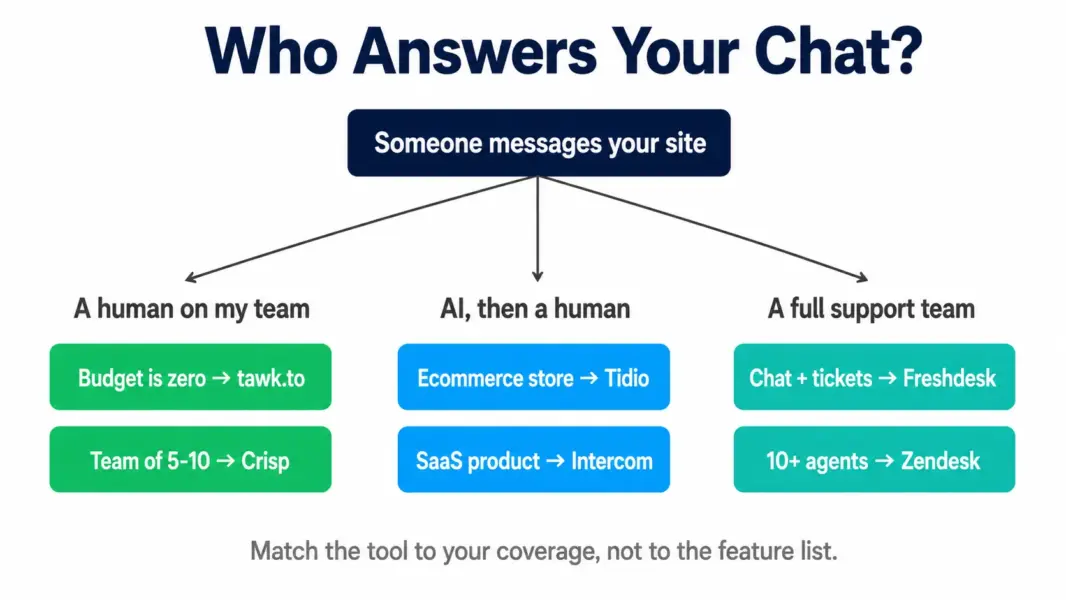
Coverage model. Decide who answers before you shortlist anything. Humans only during business hours points toward tawk.to or Crisp. AI answering overnight points toward Tidio or Intercom. This single decision eliminates most of the market.
Platform integration. An ecommerce store needs the widget to read order data so the bot can answer “where is my package” without a human. Verify native Shopify, WooCommerce, or WordPress support rather than assuming a generic integration covers it.
How AI is billed. This is where budgets break. Intercom charges per resolved conversation. Tidio sells AI as a separate add-on. Freshdesk bundles agent-assist AI into the plan. A high-traffic month costs wildly different amounts depending on which model you’re on.
Escalation and ticketing. If a chat needs follow-up tomorrow, where does it live? Standalone widgets lose these. Platforms with ticketing convert the conversation into a tracked item with an owner and a deadline.
Mobile reliability. If your coverage depends on someone watching a phone, notification reliability is a core feature rather than a nice-to-have. This is the single most common complaint against free tools.
Reporting depth. Response time, resolution rate, and CSAT are the baseline. If you need agent-level performance data or channel attribution, verify it exists before committing, because most SMB-tier chat tools report shallowly.
tawk.to: Best Free Live Chat Software With No Catch
tawk.to is the only tool in this comparison that’s genuinely free at scale. Unlimited agents, unlimited chats, unlimited websites, no trial countdown, and no feature wall engineered to force an upgrade. The business model is simply different: tawk.to sells optional hired chat agents at roughly $1 per hour and charges to remove its branding, rather than gating the software itself.
Standout Features
Genuinely unlimited seats. Add your entire team without a per-agent charge. For a 10-person company where anyone might answer chat, this alone saves what a paid tool would cost annually.
Real-time visitor monitoring. See who is on your site right now, which page they’re viewing, how they arrived, and how long they’ve been reading, then start a conversation manually based on that behaviour.
Multi-site shared inbox. Run chat across several websites from one dashboard, which suits agencies and anyone managing multiple brands.
Built-in ticketing and knowledge base. Basic but present, so conversations needing follow-up don’t vanish into the void.
Pricing
Free forever with unlimited agents and conversations. Branding removal costs roughly $19 per month. Hired chat agents start around $1 per hour. AI assist is available as a paid add-on.
What Reviewers Say
tawk.to scores 9.1 out of 10 for ease of use on G2, ahead of most paid competitors, with an aggregate rating near 4.6. Reviewers consistently report widget installation taking minutes. The complaint that repeats across platforms concerns mobile push notifications arriving late or inconsistently, which matters if your coverage depends on someone watching a phone. Reviewers also note the mobile app UI feels dated, and that tawk.to isn’t in the same class as Intercom or Zendesk beyond core chat.
Pros and Cons
Pros: genuinely free at any team size, fastest install in the category, real-time visitor tracking, multi-site support, 45-plus languages.
Cons: no meaningful AI resolution, shallow analytics, branding removal costs extra, mobile notification reliability issues, limited widget customisation on the free tier.
Who It’s For
Choose tawk.to if humans on your team will answer chat, you need a widget live this afternoon, and budget is genuinely zero. Skip it if you need AI handling questions overnight or reporting that goes beyond conversation counts.
Tidio: Best Live Chat for Shopify and WordPress Stores
Tidio installs on Shopify or WordPress in roughly five minutes through a one-click integration, and that speed is why small stores choose it. The real differentiator is Lyro, Tidio’s AI agent, which trains on your FAQ and support content and resolves a large share of routine questions without a human touching them.
Standout Features
Lyro AI agent. Point it at your help centre or upload Q&A pairs and it answers in natural language, escalating to a human with full context when it can’t resolve. Tidio reports resolution rates up to 64%.
Order lookup inside chat. Connected to Shopify or WooCommerce, the bot answers “where is my order” using live store data, which is the single highest-volume ecommerce support question.
Flows visual chatbot builder. Drag-and-drop automation for lead capture, discount delivery, and cart recovery, buildable by marketing staff without developer help.
Unified multichannel inbox. Website chat, Messenger, Instagram, WhatsApp, and email land in one view.
Pricing
Free plan covers 50 conversations monthly. Starter runs $29 per month. Lyro AI is a separate add-on starting around $39 per month, and Flows is separately priced again. A store running chat plus AI plus automation typically lands near $97 per month, roughly triple the advertised entry price.
What Reviewers Say
Tidio holds approximately 4.6 on G2. Reviewers consistently praise setup speed and the fact that non-technical staff can build working chatbot flows. Two criticisms repeat: support quality is described as hit-or-miss, and reporting is shallow relative to what growing teams need. Several reviewers also flag automatic tier upgrades triggering when conversation limits approach, producing unexpected bills.
Pros and Cons
Pros: five-minute ecommerce install, strong AI resolution rate, order data inside chat, non-technical flow builder, genuinely useful free tier for testing.
Cons: add-on pricing roughly triples real cost, shallow reporting, inconsistent support, automatic upgrades at usage thresholds.
Who It’s For
Choose Tidio if you run an ecommerce store and want AI answering order and shipping questions around the clock. Skip it if predictable monthly billing matters more than AI capability. Our Tidio review breaks down the full add-on math.
Freshdesk: Best Live Chat With Real Ticketing Behind It
Standalone chat widgets create a structural problem as volume grows. A conversation that needs follow-up next Tuesday has nowhere to live. Freshdesk solves this by treating chat as one channel inside a full help desk, so any conversation converts into a tracked ticket with an owner and an SLA attached.
Standout Features
Omnichannel agent workspace. Chat, email, social, and WhatsApp in a single interface, so one agent handles everything without switching tools.
SLA policies with escalation. Set response and resolution targets, and route breaches upward automatically before a customer complains.
Freddy AI agent-assist. Ticket summarisation, reply suggestions, and tone adjustment, included in paid plan pricing rather than sold as a separate line item.
1,000-plus marketplace apps. Extends into CRM, time tracking, screen sharing, and ecommerce platforms.
Pricing
Free plan covers email ticketing for 2 agents but excludes live chat. Growth is $15 per agent monthly, Pro $49, Enterprise $79, all billed annually. Phone support requires the separate Freshcaller product.
What Reviewers Say
Freshdesk sits around 4.4 on G2. Reviewers highlight ease of use and automation that meaningfully reduces manual ticket handling, with several noting new agents become productive within a day. The consistent criticism is that reporting depth and enterprise-grade customisation trail Zendesk, and that some advanced capability sits behind higher tiers than expected.
Pros and Cons
Pros: chat becomes a trackable ticket, AI assist included at no extra charge, strong automation, gradual pricing without cliffs, large app marketplace.
Cons: live chat requires a paid plan, reporting trails Zendesk, phone needs a separate product, deep customisation limited below Pro.
Who It’s For
Choose Freshdesk if chat is one of several channels and conversations need to become tracked work. Skip it if you only need a widget and nothing behind it. See our Freshdesk review and the Zendesk vs Freshdesk comparison.
Intercom: Best Live Chat Software for SaaS Products
Intercom’s Messenger lives inside your application rather than on a marketing page. A user hits a confusing settings screen and asks about it without leaving the product, while Intercom already knows their plan, usage history, and account age.
Standout Features
In-app Messenger. Support delivered at the moment of confusion, inside the product, with full account context attached to every conversation.
Fin AI agent. Trained on your help centre and past conversations, Fin resolves 42 to 50% of conversations autonomously according to Intercom’s published data, and hands off cleanly when it can’t.
Behaviour-triggered outbound messages. Message users based on what they did or failed to do in-product, which drives onboarding completion and reduces churn.
Copilot for agents. Surfaces relevant help content and drafts replies mid-conversation so human agents resolve faster.
Pricing
Essential starts at $29 per seat monthly. Advanced, the plan most teams actually need, is $85 per seat. Fin AI adds $0.99 per resolved conversation on top. Copilot is a further per-agent add-on.
What Reviewers Say
Intercom and Fin both sit near 4.5 on G2. Reviewers rate Fin’s setup speed and resolution quality highly, and the in-app experience is widely regarded as the category benchmark. The dominant complaint across every review platform is pricing unpredictability, since seat costs and per-resolution AI charges compound. Several reviewers describe budget overruns during traffic spikes.
Pros and Cons
Pros: best-in-class in-app messaging, strongest autonomous AI resolution, deep product usage context, excellent outbound triggering.
Cons: most expensive option here, variable AI billing makes forecasting hard, overkill for simple website chat, add-ons stack quickly.
Who It’s For
Choose Intercom if you sell software, support happens inside the product, and AI deflection at scale justifies a variable bill. Skip it if you need predictable costs or you’re running a brochure site. Our Intercom review models the full stack.
Crisp: Best Live Chat Without Per-Agent Pricing
Crisp charges per workspace rather than per seat. For a support team of five to ten people, that billing model alone can halve what Zendesk or Intercom would cost for identical coverage.
Standout Features
Flat workspace pricing. Add agents without adding cost, which removes the usual pressure to limit who can answer chat.
Co-browsing. Agents view a visitor’s screen live, which resolves “I can’t find the button” conversations in seconds instead of paragraphs.
MagicReply and chatbot builder. AI-suggested responses trained on past conversations, plus scenario-based automation.
CRM-style contact profiles. Conversation history and customer data stored alongside chat rather than in a separate system.
Pricing
Free plan available for basic chat. Paid tiers use flat monthly workspace pricing rather than per-agent billing, with limits on included seats per tier.
What Reviewers Say
Crisp holds roughly 4.5 on G2 and is frequently described as the value pick for teams tired of seat-based billing. Reviewers praise co-browsing and the clean interface. The recurring criticism is a smaller native integration library than the major platforms, meaning more workflows depend on Zapier or webhooks.
Pros and Cons
Pros: no per-agent fees, co-browsing, clean modern interface, strong value for mid-size teams.
Cons: fewer native integrations, smaller ecosystem and community, less enterprise-grade reporting.
Who It’s For
Choose Crisp if you have five or more people answering chat and per-seat pricing is the blocker. Skip it if your stack depends on niche native integrations.
Zendesk: Best Enterprise Live Chat and Omnichannel Suite
Zendesk doesn’t sell live chat separately. Chat arrives as one channel inside the Zendesk Suite alongside email, voice, SMS, and social, which is precisely what a 20-agent operation needs and precisely what a three-person store does not.
Standout Features
Skills-based routing. Conversations reach the agent with the right language, product knowledge, or tier authority rather than whoever is free.
Deepest reporting in the category. Pre-built dashboards plus a custom report builder covering agent performance, channel volume, and resolution trends.
1,800-plus integrations. The largest marketplace here, which matters when your stack includes enterprise tools smaller platforms never built connectors for.
Workforce management add-ons. Forecasting and scheduling for teams large enough that staffing becomes its own problem.
Pricing
Support Team starts at $19 per agent for email-only ticketing. Suite Team at $55 per agent adds live chat and omnichannel. Suite Professional is $115. Copilot AI is a $50 per agent add-on, and automated AI resolutions bill separately beyond plan allowances.
What Reviewers Say
Zendesk sits around 4.3 on G2. Reviewers credit reliability, routing sophistication, and reporting depth. Criticism centres on cost relative to smaller teams’ needs and on configuration complexity requiring dedicated admin time.
Pros and Cons
Pros: enterprise routing, best reporting, largest integration library, proven reliability at scale.
Cons: expensive at every tier, AI assist costs $50 per agent extra, setup complexity, chat unavailable without the Suite.
Who It’s For
Choose Zendesk if you run 10-plus agents across multiple channels and need routing and analytics smaller tools can’t match. Skip it if you have fewer than five agents, where Freshdesk delivers comparable capability at roughly a third of the cost.
Free vs Paid Live Chat: When to Actually Upgrade
Free live chat software handles more than most businesses expect. tawk.to runs unlimited agents at zero cost, and for a team answering chat manually during business hours, that’s a complete solution rather than a compromise.
Four signals indicate it’s time to pay. First, conversations arriving outside staffed hours consistently go unanswered, which means you need AI resolution rather than more seats. Second, the same five questions consume most agent time, which automation solves cheaply. Third, chats requiring follow-up start getting lost, which means you need ticketing behind the widget. Fourth, you can’t answer basic questions about response time or resolution rate, which means you need real reporting.
If none of those apply, staying free is the correct decision rather than a temporary one.
How to Choose the Right Live Chat Software
Work backwards from coverage. Humans answering during business hours on zero budget points to tawk.to, and that decision takes five minutes. AI answering order questions overnight on a Shopify store points to Tidio. Chat as one channel in a support operation that also runs email points to Freshdesk. Support inside a software product points to Intercom. Seat pricing blocking a mid-size team points to Crisp. Past 10 agents across four channels points to Zendesk.
Model total spend before committing, because AI add-ons and per-resolution fees distort headline pricing far more than seat counts do. Our help desk cost calculator compares annual totals including AI charges, and the best help desk for small business guide covers ticketing-first alternatives.
Live Chat Best Practices That Affect Your Results
The software matters less than how you run it. Four practices separate chat that converts from chat that annoys.
Set a response target and staff to it. Chat sets an expectation of immediacy. A widget that takes eleven minutes to answer performs worse than no widget, because it converts a neutral visitor into a frustrated one. If you can’t cover it, use AI or set clear offline hours.
Trigger proactively, but narrowly. Popping a chat window on every visitor after three seconds trains people to dismiss it reflexively. Trigger on genuine intent signals: extended time on pricing, a populated cart with no checkout movement, or a second visit to the same product page.
Design the AI handoff carefully. The worst chat experience is a bot looping through irrelevant articles with no visible escape. Always expose a route to a human, and pass the full conversation across so nobody repeats themselves.
Review transcripts monthly. Chat logs are the cheapest customer research available. Recurring questions signal missing content on your site, and the pages generating the most confusion are usually the ones costing you conversions.
Last updated: July 29, 2026
Frequently Asked Questions
What is the best free live chat software in 2026?
tawk.to is the best free live chat software, offering unlimited agents, unlimited chats, and unlimited websites at no cost with no time limit. Tidio’s free plan includes 50 conversations monthly with basic AI. Freshdesk’s free plan covers email ticketing for 2 agents but does not include live chat.
How much does live chat software cost?
tawk.to is free forever. Tidio starts at $29 per month plus separate add-ons for AI and automation. Freshdesk starts at $15 per agent monthly. Intercom starts at $29 per seat plus $0.99 per AI resolution. Zendesk Suite Team starts at $55 per agent. Crisp uses flat workspace pricing instead of per-agent fees.
Which live chat software is best for ecommerce?
Tidio is the strongest live chat for ecommerce thanks to one-click Shopify and WordPress installs, order lookup inside the chat window, and Lyro AI resolving up to 64% of routine questions. For Shopify stores needing a full helpdesk rather than chat alone, Gorgias is a strong alternative.
Do I really need live chat on my website?
If visitors regularly leave without asking questions they clearly had, yes. Ecommerce stores commonly report conversion lifts of 3 to 5% after adding chat, and service businesses see reduced email volume. Start with tawk.to at $0 to measure the impact on your own traffic before paying for anything.
Is AI live chat better than human agents?
AI handles repetitive questions well, with Tidio’s Lyro reporting up to 64% resolution and Intercom’s Fin reporting 42 to 50%. Complex, emotional, or high-value conversations still need humans. The strongest setups use AI for tier-one deflection and escalate everything else to a person with the full conversation attached.
What is the difference between live chat and a chatbot?
Live chat connects a visitor to a human agent in real time. A chatbot answers automatically using rules or AI trained on your content. Most tools here offer both, with the bot greeting and qualifying first, then handing off to a human when it can’t resolve the request.
How fast should you respond to live chat messages?
Under a minute is the working standard, since chat creates an expectation of immediacy that email doesn’t. If you can’t staff that consistently, use an AI agent for first response or display clear offline hours with an email capture, because a slow chat reply damages the experience more than no chat at all.
Does live chat software slow down your website?
Modern chat widgets load asynchronously and typically add 50 to 200KB, with minimal impact on perceived load speed. Test with PageSpeed Insights after installation. If you measure a meaningful drop, most tools offer settings to delay widget loading until after page content renders.
Can live chat software integrate with a CRM?
Most platforms integrate with major CRMs natively or through Zapier. Intercom, Zendesk, Freshdesk, and HubSpot Live Chat offer direct connectors. tawk.to, Tidio, and Crisp rely more on webhooks or third-party automation. Confirm your specific CRM is supported before committing.
Related Help Desk Guides
- Tidio Review 2026
- Freshdesk Review 2026
- Intercom Review 2026
- Zoho Desk Review 2026
- Zendesk vs Freshdesk 2026
- Best Help Desk for Small Business
- Help Desk Cost Calculator
